Plugable USB 3 Universal Docking Station Dual HDMI
Key Features
1.
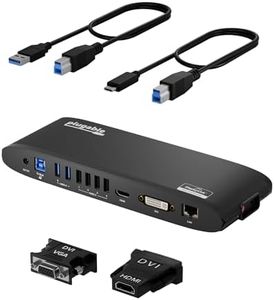
Flexible Expandability: Connects via a single USB 3.0 or USB-C cable, providing dual video outputs, Gigabit Ethernet, audio jacks, and multiple USB ports.
2.
Dual HD Monitors: Supports dual HDMI displays up to 1920x1200 @ 60Hz, with the second output also supporting DVI or VGA through included adapters.
3.
Broad Compatibility: Compatible with Windows, macOS, and ChromeOS, with plug and play driver installation for Windows and manual installation for macOS.

Chosen by 1108 this week
Factors to Consider
Compatibility across multiple operating systems including Windows 7-11, macOS 10.14+, and ChromeOS 100.x+, but requires manual driver installation on macOS and does not support HDCP streaming protection.
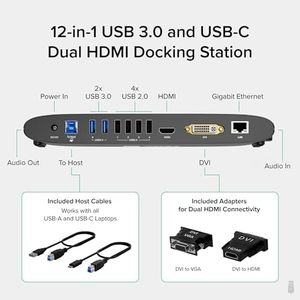
Dual video output capability providing support for two monitors up to 1920x1200 resolution at 60Hz, with flexible options for HDMI, DVI, or VGA via included adapters.
Connectivity variety with a total of 12 ports including Gigabit Ethernet, audio jacks, and six USB ports, all accessible through a single USB 3.0 or USB-C connection.
Power management aspect where this dock has its own power supply and does not charge connected laptops, preserving laptop battery health.
Use case suitability focused on productivity tasks and multi-screen web or office software setups, but not recommended for gaming or HDCP streaming.
Priced competitively for a docking station that offers wide compatibility, multiple ports, and dual monitor support, making it a cost-effective choice for mixed-device work environments.
Delivers dual 1920x1200 HD outputs, Gigabit Ethernet, audio inputs, and six USB ports via a single USB 3.0 or USB-C connection, supporting diverse connectivity needs with reliability.
Users benefit from enhanced productivity through multi-screen setups and easy device management; the dock’s design improves desk organization and serves well for home offices or IT deployment situations.
FAQ
Will this docking station work with my MacBook M1 or M2?
Yes, it supports MacBooks with M1 or M2 chips and can output to dual monitors even if your Mac only supports a single external display, but macOS users need to manually install drivers.
Does the dock charge my laptop while connected?
No, the dock includes its own power adapter and does not provide charging to laptops, which helps avoid draining your laptop battery during use.
Can I use this dock for gaming or streaming Netflix in HD?
This dock is not recommended for gaming and does not support HDCP, which means it won’t work properly with streaming services like Netflix or Hulu for protected content.
How easy is it to set up this docking station?
Setup is straightforward for Windows and ChromeOS with auto driver installation, but macOS users will need to perform a manual driver installation; once set up, it efficiently supports dual displays and multiple peripheral connections.
What kind of warranty and support does this product have?
The docking station comes with a 2-year limited parts and labor warranty and includes Seattle-based email support for troubleshooting and assistance.
The Bottom Line
The Plugable USB 3.0 Universal Docking Station stands out with its flexible connectivity options, broad OS compatibility, and reliable dual monitor support tailored for productivity environments. It is an excellent choice for users needing to expand their workstation seamlessly across Windows, macOS, and ChromeOS devices. Ready to boost your workspace efficiency? This dock delivers essential features with trusted support to keep you connected.