Plugable Dual DisplayPort HDMI Docking Station UD6950Z
Key Features
1.
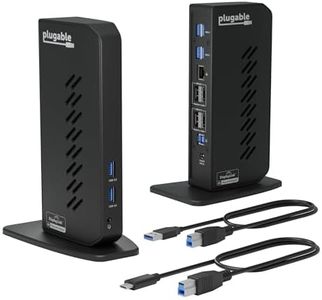
Flexible Expandability: Offers dual video outputs, Gigabit Ethernet, audio jack, and six USB 3.0 ports with USB 3.0 and USB-C cables for versatile connectivity options.
2.
Dual 4K Display Support: Features dual HDMI and DisplayPort ports to connect two 4K monitors at 3840x2160 resolution with 60Hz refresh rate, also supports 1080p.
3.
Broad Compatibility: Compatible with Windows 11, 10, 8.x, 7, ChromeOS 100+, and macOS 10.14+, with simple driver installation for easy setup.

Chosen by 1255 this week
Factors to Consider
Connectivity versatility includes dual HDMI and DisplayPort outputs plus six USB 3.0 ports, but it does not support host charging.
Supports dual 4K monitors at 3840x2160 resolution with 60Hz refresh rate, excellent for multitasking but lacks HDCP compliance for streaming protected content.
Compatible across multiple operating systems including Windows, macOS (with driver), and ChromeOS, though Linux users will face compatibility challenges.
Optimized specifically for productivity apps and general computer use; not suitable for gaming or HD video playback services like Netflix or Hulu.
Warranty support offers a 2-year limited parts and labor coverage with Seattle-based email customer service for reliable assistance.
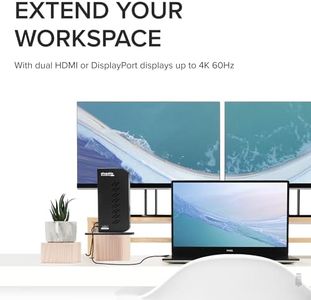
At a price point of around $130, this docking station delivers extensive connectivity and high-resolution dual display capabilities geared toward professionals, making it a worthwhile investment for productivity.
It supports dual 4K monitors at smooth 60Hz refresh rates, multiple USB 3.0 peripherals, and Gigabit Ethernet, providing a comprehensive desktop expansion tailored to office and multitasking needs.
Users benefit from a streamlined setup after driver installation, clean cable management with versatile port options, and consistent reliability backed by a 2-year warranty, enhancing the overall workspace.
FAQ
Does this docking station charge my laptop while connected?
No, the Plugable UD-6950Z docking station does not provide power delivery to charge the host computer; a separate power source for your laptop is necessary.
Which operating systems are supported by this dock?
It supports Windows 7 and above, macOS 10.14 or newer (driver required), and ChromeOS 100+, but it is not compatible with Linux systems without additional manual driver configuration.
Can I use this dock for gaming and streaming protected content like Netflix?
This dock is designed for office productivity and general web use; it does not support gaming or playback of HDCP-protected content such as Netflix or Hulu.
What resolutions can I achieve with dual monitors?
You can connect two monitors at up to 4K UHD resolution (3840x2160) at 60Hz via HDMI or DisplayPort, or use 1080p if preferred, enabling sharp visuals for enhanced multitasking.
Is setup complicated for macOS users?
macOS users need to install the DisplayLink driver manually, but once installed, the docking station offers plug-and-play functionality similar to Windows and ChromeOS.
The Bottom Line
For users seeking a robust, dual 4K monitor docking solution suitable for office and productivity tasks, the Plugable UD-6950Z offers versatile connectivity, broad OS compatibility, and professional-grade performance—making it a smart upgrade to any workspace.