We Use CookiesWe use cookies to enhance the security, performance, functionality and for analytical and promotional activities. By continuing to browse this site you are agreeing to our privacy policy

10 Best 3D Printers For Beginners 2026 in the United States
How do we rank products for you?

Our technology thoroughly searches through the online shopping world, reviewing hundreds of sites. We then process and analyze this information, updating in real-time to bring you the latest top-rated products. This way, you always get the best and most current options available.

headphones-stars

Our Top Picks

#1

Winner

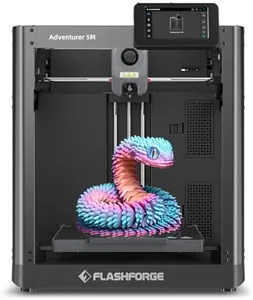
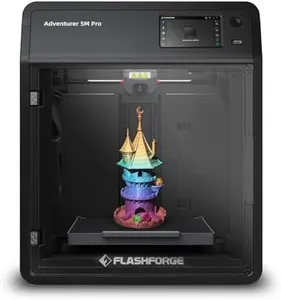
FLASHFORGE Adventurer 5M 3D Printer with Fully Auto Leveling, Max 600mm/s High Speed Printing, 280°C Direct Extruder with 3S Detachable Nozzle, CoreXY All Metal Structure, Print Size 220x220x220mm

Rating
10.0
Chosen by1,363
Print Resolution
Print Speed
Filament Compatibility

Most important from
3289 reviews

Print Resolution
The printer is incredibly fast and easy to use with a direct drive extruder delivering excellent detail.
Print Speed
The printer is incredibly fast and easy to use with a direct drive extruder delivering excellent detail.
Filament Compatibility
The included filament sample can cause issues if not handled properly, potentially damaging the machine.
Ease of Use
Setting up the unit was straightforward, although the software setup on a PC was a bit challenging.

The FLASHFORGE Adventurer 5M 3D Printer is a promising option for beginners looking to dive into 3D printing. Its standout features include a decent build volume of 220x220x220mm, which is ample for most beginner projects. The printer boasts a high-speed printing capability of up to 600mm/s, significantly reducing waiting times, especially useful for rapid prototyping. The print resolution and precision are commendable, driven by its Core XY structure and dual-fan nozzles, ensuring consistent quality.

It supports various filament types like PLA, ABS, PETG, and TPU, making it versatile for different types of projects. For materials such as PC and ASA, an enclosed enclosure is required, which might be an additional consideration for some users. One of its biggest strengths is its user-friendly features like fully automatic leveling and one-click printing, which can save beginners a lot of hassle and time. The quick nozzle change and warm-up times further enhance the ease of use. Additionally, the dual-sided PEI platform aids in the easy removal of prints, reducing the risk of damage.

Real-time monitoring through a mobile app adds a layer of convenience, allowing users to manage and adjust print settings remotely. However, there are some drawbacks. At 23.8 pounds, it is relatively heavy, which may limit portability. While it offers a lot of advanced features, the initial setup and learning curve may still be challenging for absolute beginners. The community and support for FLASHFORGE products are generally robust, but the experience can vary. For those seeking a balance between advanced features and ease of use, the Adventurer 5M is a solid choice, but be prepared for some trial and error as you familiarize yourself with its capabilities.

Rating
10.0
Chosen by1,363
Print Resolution
Print Speed
Filament Compatibility

Most important from
3289 reviews

Print Resolution
The printer is incredibly fast and easy to use with a direct drive extruder delivering excellent detail.
Print Speed
The printer is incredibly fast and easy to use with a direct drive extruder delivering excellent detail.
Filament Compatibility
The included filament sample can cause issues if not handled properly, potentially damaging the machine.
Ease of Use
Setting up the unit was straightforward, although the software setup on a PC was a bit challenging.
#2

Original Prusa CORE One 3D Printer Kit, Removable Print Sheets, Beginner-Friendly 3D Printer DYI Kit, Fun to Assemble, Automatic Calibration, Filament Sample Included, Print Size 9.8 x 8.6 x 10.6 in

Rating
8.8
Filament Compatibility
Ease of Use

Most important from
22 reviews

Filament Compatibility
Print results with PLA and PETG have been outstanding in early use.
Ease of Use
Building the printer is a rewarding experience that requires patience and attention to detail.

The Original Prusa CORE One is a solid choice for beginners ready to dive into 3D printing with a bit of hands-on assembly. Its build volume of 250 x 220 x 270 mm (roughly 9.8 x 8.6 x 10.6 inches) offers plenty of space for most beginner projects without feeling too overwhelming. The printer’s CoreXY design supports faster print speeds while maintaining good quality, and the enclosed chamber with active temperature control helps when printing with a wide range of filaments, including PLA, PETG, ASA, PC, and Nylon. This versatility is great if you want to experiment beyond basic materials.

Automatic calibration and one-click printing make the user experience smoother, which is helpful for those new to 3D printers. The all-steel frame ensures the machine is sturdy and durable, contributing to consistent print results over time. Since this is a DIY kit, you’ll need some patience and willingness to assemble it yourself, which might be challenging for absolute beginners expecting plug-and-play convenience. The printer is on the heavier side at 54 pounds, so it’s less portable but more stable during printing.

Prusa’s strong community and lifetime technical support are valuable resources, especially for newcomers who might need help troubleshooting. Prusa machines are known for good quality prints, making it a dependable pick to grow your skills. If you want an easy startup without assembly, the option to buy a fully built CORE One is available, though at a higher price.

Rating
8.8
Filament Compatibility
Ease of Use

Most important from
22 reviews

Filament Compatibility
Print results with PLA and PETG have been outstanding in early use.
Ease of Use
Building the printer is a rewarding experience that requires patience and attention to detail.
#3

Creality K2 Pro (A) 3D Printer, Support Multicolor Printing Needs CFS, 600mm/s Max High-Speed, Dual AI Camera, Fully Assembled Auto Leveling, 300x300x300mm Large Print Volume, for Pros & Hobbyists

Rating
8.8
Build Volume
Print Speed
Filament Compatibility

Most important from
129 reviews

Build Volume
The large 300x300x300 mm build volume enables printing sizable models and multiple parts in one go, expanding creative possibilities.
Print Speed
Incredible print speed combined with excellent print quality makes this printer stand out in its price range.
Filament Compatibility
Supports a wide variety of filaments including PA (nylon), ASA, ABS, PETG, and even carbon fiber blends with the right nozzle, broadening material options beyond basic PLA.
Ease of Use
Auto-leveling and dual AI cameras simplify setup and help catch print errors, making it user-friendly despite its advanced features.
Community and Support
Customer support is responsive and helpful, particularly when exploring printing with specialized materials like carbon fiber nylon.

The Creality K2 Pro is a strong candidate for beginners who want a 3D printer that can grow with them into more advanced projects. It offers a large build volume of 300x300x300 mm, which is generous for printing sizable models or multiple smaller pieces in one go. The printer supports multicolor printing with up to 16 colors via the optional Creality Filament System, enhancing creativity but requiring extra equipment that beginners may need time to get used to. Print speeds can reach up to 600 mm/s, which is very fast compared to typical beginner models, yet it maintains quiet operation and good precision thanks to advanced motors and balanced components. The hardened steel nozzle and heated chamber allow it to handle a variety of filaments, including some professional-grade materials like ABS and carbon fiber blends, offering flexibility beyond basic PLA.

Auto-leveling and dual AI cameras simplify setup and error detection, making it more user-friendly, though the advanced features might feel overwhelming at first. It also benefits from Creality’s software ecosystem and community support, which helps beginners find resources and assistance. The printer is quite large and heavy (about 70 pounds), which may require a dedicated space. Also, while the multi-color system is innovative, it adds cost and complexity. In summary, the K2 Pro is ideal for beginners who want an expandable machine with room to explore multicolor printing and advanced materials, but casual users seeking a simple plug-and-play experience might find it a bit much initially.

Rating
8.8
Build Volume
Print Speed
Filament Compatibility

Most important from
129 reviews

Build Volume
The large 300x300x300 mm build volume enables printing sizable models and multiple parts in one go, expanding creative possibilities.
Print Speed
Incredible print speed combined with excellent print quality makes this printer stand out in its price range.
Filament Compatibility
Supports a wide variety of filaments including PA (nylon), ASA, ABS, PETG, and even carbon fiber blends with the right nozzle, broadening material options beyond basic PLA.
Ease of Use
Auto-leveling and dual AI cameras simplify setup and help catch print errors, making it user-friendly despite its advanced features.
Community and Support
Customer support is responsive and helpful, particularly when exploring printing with specialized materials like carbon fiber nylon.

Buying Guide for the Best 3D Printers For Beginners

Choosing a 3D printer as a beginner can be an exciting yet overwhelming experience. The key is to understand the essential specifications and how they align with your needs. By focusing on the right features, you can find a 3D printer that is easy to use, reliable, and capable of producing the types of objects you want to create. Here are the key specifications to consider when selecting a 3D printer for beginners.
Build VolumeBuild volume refers to the maximum size of the object that the 3D printer can produce. It is measured in three dimensions: width, depth, and height. This spec is important because it determines the size of the projects you can undertake. For beginners, a moderate build volume is often sufficient, as it allows for a variety of small to medium-sized prints without being too cumbersome. If you plan to create larger objects, look for a printer with a larger build volume, but keep in mind that larger printers can be more complex to operate.
Print ResolutionPrint resolution indicates the level of detail that the 3D printer can achieve, measured in microns. A lower micron value means higher resolution and finer details. For beginners, a resolution of around 100 microns is typically adequate, providing a good balance between detail and ease of use. Higher resolutions (lower micron values) can produce more detailed prints but may require more advanced knowledge and longer print times. Consider what types of objects you want to print and how much detail is necessary for your projects.
Print SpeedPrint speed measures how quickly the 3D printer can produce an object, usually in millimeters per second (mm/s). Faster print speeds can save time, but they may also compromise print quality. For beginners, a moderate print speed is often best, as it provides a good balance between speed and quality. If you are new to 3D printing, starting with a slower speed can help you learn the process and achieve better results. As you gain experience, you can experiment with faster speeds.
Filament CompatibilityFilament compatibility refers to the types of materials that the 3D printer can use to create objects. Common filaments include PLA, ABS, and PETG, each with its own properties and uses. PLA is a popular choice for beginners due to its ease of use and low printing temperature. ABS is more durable but requires higher temperatures and better ventilation. PETG offers a balance between PLA and ABS, being both strong and easy to print. Consider what materials you want to work with and ensure the printer supports them.
Ease of UseEase of use encompasses features that make the 3D printer user-friendly, such as a simple setup process, intuitive controls, and reliable performance. For beginners, it's important to choose a printer that is easy to assemble and operate, with clear instructions and good customer support. Look for features like automatic bed leveling, touchscreen interfaces, and pre-configured settings that can simplify the printing process. A user-friendly printer can make your introduction to 3D printing more enjoyable and less frustrating.
Community and SupportCommunity and support refer to the availability of resources, such as online forums, tutorials, and customer service, that can help you troubleshoot issues and learn more about 3D printing. A strong community can provide valuable advice, share tips, and offer solutions to common problems. For beginners, having access to a supportive community and reliable customer service can make a significant difference in your 3D printing experience. Look for printers with active user groups and good manufacturer support.

FAQ

Most Popular Categories Right Now