We Use CookiesWe use cookies to enhance the security, performance, functionality and for analytical and promotional activities. By continuing to browse this site you are agreeing to our privacy policy

10 Best Digital Notebooks 2026 in the United States
How do we rank products for you?

Our technology thoroughly searches through the online shopping world, reviewing hundreds of sites. We then process and analyze this information, updating in real-time to bring you the latest top-rated products. This way, you always get the best and most current options available.

headphones-stars

Our Top Picks

#1

Winner

reMarkable Starter Bundle – reMarkable 2 is The Original Paper Tablet | Includes Black and White 10.3” Writing Tablet, Marker Plus Pen with Built-in Eraser

Rating
10.0
Chosen by1,492
Screen Size
Writing Experience
Battery Life

Most important from
1280 reviews

Screen Size
Despite the monochrome screen, the reading and writing experience remains highly effective for long-form note-taking and document review.
Writing Experience
The device excels at delivering a distraction-free and intuitive note-taking experience, making it easy to write, erase, and organize notes seamlessly.
Battery Life
The long battery life, lasting up to two weeks, supports heavy daily use without the need for frequent recharging.
Cloud Sync and File Export
Cloud syncing and backup provide peace of mind by ensuring all notes and documents are safely stored and accessible across devices.
Build Quality and Portability
The minimalist, ultra-thin design makes the device highly portable and convenient to carry around for work, personal, and creative uses.
Handwriting Recognition and Search
While handwriting-to-text conversion isn’t perfect for all handwriting styles, the core writing and organizational features remain outstanding.

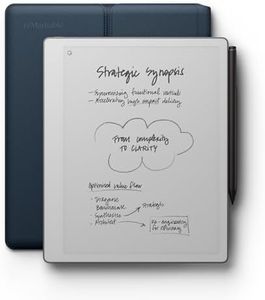
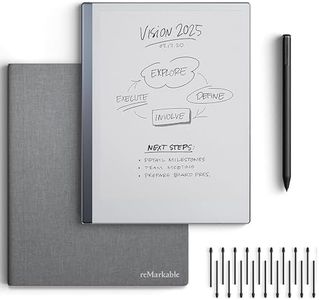
The reMarkable 2 digital notebook stands out for its 10.3-inch black-and-white screen that mimics the feel of paper better than most tablets, making writing and sketching feel natural and comfortable. Its ultra-thin design at only 4.7 mm and light weight make it very portable. The battery life is impressive, lasting up to two weeks on a single charge, supporting extended use without frequent recharging. It focuses on distraction-free note-taking by avoiding apps and notifications, which helps maintain concentration.

Cloud sync and file export are well-covered through the reMarkable Connect subscription, offering unlimited cloud storage and easy access across devices, with support for importing and exporting PDFs, Word, and PowerPoint files. The ability to convert handwritten notes to typed text adds convenience for organizing and sharing work. The device supports 2048 levels of pressure sensitivity for precise writing and drawing.

Build quality is solid with a minimalist, sleek design, though the monochrome E Ink screen means it’s not suited for color images or multimedia. Handwriting recognition and search features require an active subscription. Some users may find the Linux-based operating system limiting compared to traditional tablets, as it lacks app diversity. This device is best suited for those who prioritize a focused, paper-like writing and reading experience, excellent battery life, and seamless document management, while it may be less ideal for users seeking color, multimedia, or a wide app selection.

Rating
10.0
Chosen by1,492
Screen Size
Writing Experience
Battery Life

Most important from
1280 reviews

Screen Size
Despite the monochrome screen, the reading and writing experience remains highly effective for long-form note-taking and document review.
Writing Experience
The device excels at delivering a distraction-free and intuitive note-taking experience, making it easy to write, erase, and organize notes seamlessly.
Battery Life
The long battery life, lasting up to two weeks, supports heavy daily use without the need for frequent recharging.
Cloud Sync and File Export
Cloud syncing and backup provide peace of mind by ensuring all notes and documents are safely stored and accessible across devices.
Build Quality and Portability
The minimalist, ultra-thin design makes the device highly portable and convenient to carry around for work, personal, and creative uses.
Handwriting Recognition and Search
While handwriting-to-text conversion isn’t perfect for all handwriting styles, the core writing and organizational features remain outstanding.
#2

Amazon Kindle Scribe (32GB) - Your notes, documents and books, all in one place. With built-in AI notebook summarization. Includes Premium Pen - Tungsten

Rating
9.7
Screen Size
Writing Experience
Battery Life

Most important from
3446 reviews

Screen Size
The screen resolution is the best of any Kindle seen, delivering a clear and comfortable reading experience with customizable fonts and lighting.
Writing Experience
Writing on the device feels smooth and natural, with multiple pen and eraser options that make note-taking a pleasure.
Battery Life
Battery life impresses, lasting weeks even with active reading and writing, reducing the need for frequent recharging.
Cloud Sync and File Export
Document import and annotation are straightforward, supporting a variety of formats and syncing notes seamlessly across devices.
Supported File Formats
Document import and annotation are straightforward, supporting a variety of formats and syncing notes seamlessly across devices.
Build Quality and Portability
The device feels solid and high quality, with a lightweight design that remains portable despite its slightly larger size.
Handwriting Recognition and Search
AI handwriting refinement transforms sloppy notes into neat, organized entries, though it can be a bit slow and clunky with multi-page documents.

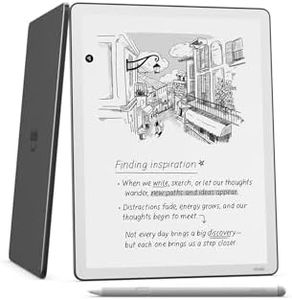
The Amazon Kindle Scribe is a well-designed digital notebook with a large 10.2-inch Paperwhite screen that offers clear, glare-free viewing ideal for reading and writing in various lighting conditions. Its writing experience stands out thanks to the included Premium Pen, which feels natural on the screen and doesn’t require charging, making note-taking smooth and comfortable. Battery life is impressive for a device of this type — it can last up to 12 weeks for reading and about 3 weeks for writing on a single charge, so you won’t need to recharge often.

The Scribe supports a wide range of file formats including PDFs, DOCX, and EPUB (through conversion), which makes importing and marking up documents simple. Amazon’s cloud syncing ensures your notes and documents stay updated across devices. A standout feature is the built-in AI tools that can convert handwriting to text and summarize notes, which is helpful if you want to organize or review your thoughts quickly. The device also allows easy annotation of books and documents, with flexible margin space to add notes.

In terms of build quality, the Kindle Scribe is lightweight and portable, weighing just over 15 ounces, making it comfortable to carry around. However, it’s slightly larger than some other digital notebooks, which might not suit users wanting a very compact device. While it offers good handwriting recognition and search functions, these may not be as advanced as specialized note-taking tablets with third-party apps. The Kindle Scribe is well suited for readers and writers who want a distraction-free, all-in-one device for reading, note-taking, and document markup, especially if you appreciate Amazon's ecosystem. Users seeking heavy multimedia features or very advanced handwriting capabilities might want to consider other options.

Rating
9.7
Screen Size
Writing Experience
Battery Life

Most important from
3446 reviews

Screen Size
The screen resolution is the best of any Kindle seen, delivering a clear and comfortable reading experience with customizable fonts and lighting.
Writing Experience
Writing on the device feels smooth and natural, with multiple pen and eraser options that make note-taking a pleasure.
Battery Life
Battery life impresses, lasting weeks even with active reading and writing, reducing the need for frequent recharging.
Cloud Sync and File Export
Document import and annotation are straightforward, supporting a variety of formats and syncing notes seamlessly across devices.
Supported File Formats
Document import and annotation are straightforward, supporting a variety of formats and syncing notes seamlessly across devices.
Build Quality and Portability
The device feels solid and high quality, with a lightweight design that remains portable despite its slightly larger size.
Handwriting Recognition and Search
AI handwriting refinement transforms sloppy notes into neat, organized entries, though it can be a bit slow and clunky with multi-page documents.
#3

XPPen 3 in 1 Color Digital Notebook 10.95'' Paper Note Taking Tablet with 16384 Pressure Levels Battey-Free X3 Pro Pencil 2 Magnetic Folio 6+128GB Magic Note Pad for Writing/Reading/Meeting/Study

Rating
7.9
Screen Size
Writing Experience
Cloud Sync and File Export

Most important from
264 reviews

Screen Size
The matte, anti-glare screen delivers a paper-like reading and writing experience that significantly reduces eye strain, even for users sensitive to flicker.
Writing Experience
The stylus is outstanding for its price range, offering a natural, precise writing and drawing experience with high pressure sensitivity and convenient magnetic attachment.
Cloud Sync and File Export
Despite being heavier than simpler note-taking devices, the extra weight is justified by its versatility as a full Android tablet capable of running apps, playing media, and supporting cloud syncing.
Build Quality and Portability
Thicker bezels and a sturdy metal side enhance grip and pen attachment, making it feel comfortable and durable in hand without the fragile thinness of premium tablets.

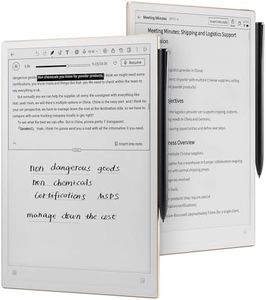
The XPPen Magic Note Pad is a compact 10.95-inch digital notebook that offers a paper-like writing and reading experience thanks to its AG nano-etched X-Paper display with TCL NXTpaper 3.0 technology. This screen reduces glare and ambient light interference, making it gentle on the eyes, which is enhanced by TÜV low blue light certification. It features a smooth 90Hz refresh rate and full HD resolution (1920x1200) that ensures crisp visuals without lag, useful for note-taking and reading.

The included X3 Pro Pencil 2 excels in writing sensitivity with 16,384 pressure levels, allowing for natural, varied strokes that closely mimic pen on paper. The magnetic attachment and customizable shortcut key add convenience when working on the go. Writing experience is further supported by the native XPPen Notes app, which supports handwriting-to-text conversion, PDF import/editing, sound recording, and cloud syncing with OneDrive or Google Drive, helping keep notes organized and accessible.

With 128GB storage and Android 14 OS, this device is versatile, allowing installation of Android apps for study, office work, or entertainment. The 8000mAh battery provides solid usage time with fast 20W charging. Portability is a strong point—lightweight at just 495g and slim at 7mm, making it easy to carry. The added 13MP front camera, dual speakers, and microphones make it a handy tool for remote meetings beyond note-taking. This digital notebook is suitable for students, professionals, or anyone seeking a versatile, eye-friendly device for handwritten notes, reading, and light multimedia use, especially if cloud syncing and Android app compatibility are priorities.

Rating
7.9
Screen Size
Writing Experience
Cloud Sync and File Export

Most important from
264 reviews

Screen Size
The matte, anti-glare screen delivers a paper-like reading and writing experience that significantly reduces eye strain, even for users sensitive to flicker.
Writing Experience
The stylus is outstanding for its price range, offering a natural, precise writing and drawing experience with high pressure sensitivity and convenient magnetic attachment.
Cloud Sync and File Export
Despite being heavier than simpler note-taking devices, the extra weight is justified by its versatility as a full Android tablet capable of running apps, playing media, and supporting cloud syncing.
Build Quality and Portability
Thicker bezels and a sturdy metal side enhance grip and pen attachment, making it feel comfortable and durable in hand without the fragile thinness of premium tablets.

Buying Guide for the Best Digital Notebooks

Choosing the right digital notebook can make organizing your notes, sketches, and tasks easier, whether you’re a student, a professional, or just someone who loves to keep things tidy. Before you buy, think about how you plan to use it: Are you mainly writing text, sketching, marking documents, or mixing everything? Digital notebooks come with different features that suit different needs, so understanding these will help you find the best match for your workflow and preferences.
Screen SizeScreen size refers to the physical dimensions of the display on the digital notebook. It's important because it determines how much space you have to write, draw, or view your content. Smaller screens (around 7–8 inches) are more portable and easier to carry, making them good for quick notes or on-the-go use. Medium-sized screens (around 10 inches) offer a balance between portability and a comfortable writing area, suitable for regular note-taking or light sketching. Larger screens (12 inches or more) provide more canvas for drawing, complex note-taking, or reading documents, but they are less portable. Your choice should depend on where and how you plan to use the device the most.
Writing ExperienceThe writing experience is about how closely the digital notebook feels like writing on paper. This depends on factors like screen texture, responsiveness, and the type of stylus it uses. Some notebooks have screens with a matte finish or special layers to mimic paper, while others feel smoother and more like glass. A responsive stylus and accurate input are crucial for comfortable and natural note-taking or drawing. If you write for long stretches or do precise sketches, look for devices praised for their handwriting or drawing feel – but if you're just jotting quick notes, you might not be as sensitive to these differences.
Battery LifeBattery life refers to how long the device can operate before needing a recharge. It’s important because it affects how often you need to charge the notebook, especially if you use it throughout the day or while traveling. Digital notebooks with simple, e-paper screens often last for days or even weeks, while those with more advanced color screens or extra features may need daily charging. If you plan to take a lot of notes on the go, choose a notebook known for longer battery life; if you’ll mostly use it near a charger, shorter battery life may be less of a concern.
Cloud Sync and File ExportCloud sync and file export determine how easily you can back up, share, or access your notes from other devices. Some digital notebooks connect with popular cloud services (like Google Drive or Dropbox), making your notes available anywhere. Others offer their own cloud platforms, or let you export notes in formats like PDF or image files. If you want your notes automatically saved to the cloud or commonly share your documents, look for devices with strong syncing and exporting options. If you prefer to keep everything offline, you might focus less on this feature.
Supported File FormatsSupported file formats are the types of files you can view, edit, or create on your digital notebook. Common examples include PDFs, ebooks, images, or note files. Some models let you annotate PDFs or import/export a variety of document types, while others may be more limited. If you often work with specific formats (like annotating research papers or reading ebooks), pay attention to what the device supports. For simple handwritten notes, wider format support might not be as important.
Build Quality and PortabilityBuild quality includes the material and design of the notebook, affecting its durability and how it feels in your hand. Portability refers to its weight and thickness, which impact how easy it is to carry around. Thin, lightweight notebooks are great for commuters and students who move between classes, while a slightly heavier build may offer increased durability. Think about your daily routine: If you carry your device everywhere, prioritize low weight and slim design; if it mostly stays at your desk, a sturdier device might be a better fit.
Handwriting Recognition and SearchHandwriting recognition lets your digital notes be converted into searchable, typed text. This is especially useful if you need to find old notes quickly or want to copy your handwritten work into emails or documents. Some notebooks include powerful search tools that can find your handwritten words, while others are more basic. If staying organized and quickly accessing specific notes is a priority for you, look for strong handwriting recognition and search features; if you only need simple handwritten capture, this may be less important.

FAQ

Most Popular Categories Right Now