We Use CookiesWe use cookies to enhance the security, performance, functionality and for analytical and promotional activities. By continuing to browse this site you are agreeing to our privacy policy

10 Best Ergonomic Wireless Mice 2026 in the United States
How do we rank products for you?

Our technology thoroughly searches through the online shopping world, reviewing hundreds of sites. We then process and analyze this information, updating in real-time to bring you the latest top-rated products. This way, you always get the best and most current options available.

headphones-stars

Our Top Picks

#1

Winner

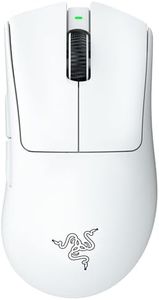
Razer DeathAdder V3 Pro Wireless Gaming Mouse: 64g Lightweight Ergonomic - 30K DPI Optical Sensor - Gen-3 Optical Switches - 8 Programmable Controls - Up to 90 Hr Battery - White

Rating
10.0
Chosen by1,159
Ergonomic Design
Wireless Technology
Battery Life

Most important from
2099 reviews

Ergonomic Design
This mouse offers an outstanding balance of lightweight design and ergonomic comfort, making it feel even lighter than its actual weight during use.
Wireless Technology
The wireless connection is strong and reliable, especially when using the provided USB dongle positioned close to the mouse to minimize signal loss.
Battery Life
Battery life is impressive, lasting a long time on a single charge, with the added benefit of fast charging and the ability to use the mouse while plugged in.
DPI (Dots Per Inch)
The mouse includes a conveniently placed DPI button on the bottom, allowing quick cycling through preset sensitivities without accidental presses.

The Razer DeathAdder V3 Pro is a lightweight wireless mouse designed with ergonomics in mind, making it comfortable for long gaming or work sessions. Weighing just 64 grams, it offers a great balance of speed and control favored by pro gamers. Its ergonomic form is thoughtfully shaped to fit your hand naturally, reducing strain over time. The mouse uses an advanced Focus Pro 30K optical sensor, which provides very precise tracking even on tough surfaces like glass, and a high DPI of up to 30,000 means you can move the cursor very quickly or fine-tune it for accuracy.

With eight programmable buttons, you can customize it to fit your workflow or gaming style easily. Wireless connection is fast and reliable thanks to Razer's Hyperspeed technology, helping avoid lag during use. Battery life is impressive, lasting up to 90 hours on a single charge, and it charges conveniently via USB-C.

This mouse is primarily designed for PC users (Windows and macOS) and might feel a bit pricey for casual users. Also, while its shape suits many, those with very small hands might want to try it first to ensure comfort. It represents a strong choice if you want a high-performance, ergonomic wireless mouse with customizable features and excellent battery life.

Rating
10.0
Chosen by1,159
Ergonomic Design
Wireless Technology
Battery Life

Most important from
2099 reviews

Ergonomic Design
This mouse offers an outstanding balance of lightweight design and ergonomic comfort, making it feel even lighter than its actual weight during use.
Wireless Technology
The wireless connection is strong and reliable, especially when using the provided USB dongle positioned close to the mouse to minimize signal loss.
Battery Life
Battery life is impressive, lasting a long time on a single charge, with the added benefit of fast charging and the ability to use the mouse while plugged in.
DPI (Dots Per Inch)
The mouse includes a conveniently placed DPI button on the bottom, allowing quick cycling through preset sensitivities without accidental presses.
#2

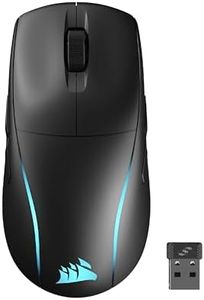
Corsair Scimitar Elite Wireless SE MMO PC Gaming Mouse – 33,000 DPI, 16 Programmable Buttons, Key Slider, Elgato Virtual Stream Deck, 1,000Hz Polling, Up to 150-Hour Battery – Gunmetal

Rating
9.7
Ergonomic Design
Wireless Technology
Battery Life

Most important from
377 reviews

Ergonomic Design
The adjustable sliding side buttons hit the sweet spot for thumb comfort, enabling fatigue-free clicking during long sessions.
Wireless Technology
Wireless performance is solid, offering low latency and the convenience of multiple connection options including Bluetooth and USB charging.
Battery Life
Battery life impresses with up to 150 hours, minimizing interruptions during extended gaming or streaming sessions.
DPI (Dots Per Inch)
The high DPI sensor provides exceptional precision, ideal for complex gaming tasks requiring fine accuracy and quick reactions.
Programmable Buttons
Customizing macros and lighting is straightforward with the responsive iCUE software, which also stores profiles directly on the mouse for flexibility.
Size and Weight
The mouse fits larger hands well with a wide, ergonomic design and glides smoothly with a decent weight that balances control and comfort.

The Corsair Scimitar Elite Wireless SE is tailored for MMO gamers who want a high-performance ergonomic mouse with wireless freedom. Its 33,000 DPI optical sensor offers exceptional precision, suitable for tasks requiring fine accuracy like aiming or quick map scanning. The mouse stands out for its 16 programmable buttons, allowing users to assign many commands right at their fingertips, which is ideal for complex gaming or productivity setups. Integration with Elgato Stream Deck software adds extra versatility, making it a great choice for streamers or multitaskers who want to customize buttons beyond gaming.

Wireless connectivity is solid, with low-latency SLIPSTREAM technology and multiple connection options including Bluetooth and USB charging, ensuring minimal lag and the convenience of charging while playing. Battery life is impressive, offering up to 150 hours, which means fewer interruptions during long gaming sessions. The design focuses on a comfortable grip with a moderate weight of 4 ounces and compact size, but while it’s ergonomic, it’s primarily shaped for MMO-style use, so it might feel less natural for users with very small hands or those who prefer simpler mice. The mouse also includes LED lights for aesthetics, but this may slightly impact battery during prolonged use.

A minor drawback is that the mouse is more specialized than a general ergonomic mouse, so casual users might find its many buttons overwhelming or unnecessary. It is a premium wireless gaming mouse that combines comfort, precision, and extensive customization, making it best suited for serious gamers and streamers who can fully take advantage of its features.

Rating
9.7
Ergonomic Design
Wireless Technology
Battery Life

Most important from
377 reviews

Ergonomic Design
The adjustable sliding side buttons hit the sweet spot for thumb comfort, enabling fatigue-free clicking during long sessions.
Wireless Technology
Wireless performance is solid, offering low latency and the convenience of multiple connection options including Bluetooth and USB charging.
Battery Life
Battery life impresses with up to 150 hours, minimizing interruptions during extended gaming or streaming sessions.
DPI (Dots Per Inch)
The high DPI sensor provides exceptional precision, ideal for complex gaming tasks requiring fine accuracy and quick reactions.
Programmable Buttons
Customizing macros and lighting is straightforward with the responsive iCUE software, which also stores profiles directly on the mouse for flexibility.
Size and Weight
The mouse fits larger hands well with a wide, ergonomic design and glides smoothly with a decent weight that balances control and comfort.
#3

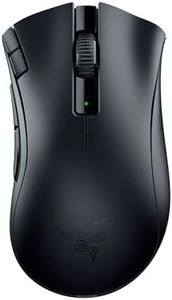
Razer DeathAdder V2 X HyperSpeed: Award-Winning Ergonomic Design - Ultra-Fast Wireless - 235hr Battery Life - 7 Programmable Buttons - Gen 2 Mechanical Switches - 5G 14K DPI Optical Sensor

Rating
8.5
Ergonomic Design
Wireless Technology
Battery Life

Most important from
1072 reviews

Ergonomic Design
The mouse’s ergonomic shape fits naturally in the hand, providing excellent comfort especially for those with smaller palms and long fingers.
Wireless Technology
Advanced wireless technology delivers a fast and stable connection with impressively long battery life, lasting many hours without needing recharge.
Battery Life
Advanced wireless technology delivers a fast and stable connection with impressively long battery life, lasting many hours without needing recharge.
DPI (Dots Per Inch)
The DPI and profile buttons are thoughtfully designed to avoid accidental presses while allowing quick adjustments when needed.
Programmable Buttons
The two extra thumb buttons are perfectly positioned for easy access and customizable controls, though the total number of programmable buttons is limited.
Size and Weight
Compared to previous versions, this model feels slightly smaller, which benefits users with smaller hands without sacrificing performance.

The Razer DeathAdder V2 X HyperSpeed is a wireless mouse designed with comfort and performance in mind, making it a strong choice for users who value ergonomics and long battery life. Its award-winning shape is well-loved in the gaming community for fitting the hand naturally and reducing strain during extended use. Using advanced Razer HyperSpeed wireless technology, it offers a fast and reliable connection with very low delay, suitable for both casual use and gaming. The battery life is impressive, lasting up to 235 hours on the 2.4GHz wireless mode and even longer on Bluetooth, so you won’t need to recharge often.

The 14,000 DPI optical sensor ensures precise tracking, which is great if you want accurate cursor movement whether gaming or working. With 7 programmable buttons, you can customize controls to fit your workflow or gaming style easily. The mouse is lightweight at around 3.68 ounces and has thoughtfully balanced weight for comfortable handling. However, it might be a bit large or shaped specifically for right-handed users, which might not suit everyone’s grip or preferences. Also, while the mouse provides many advanced features, some might find it more focused on gaming than general office tasks.

If you want a high-performing, ergonomic wireless mouse with excellent battery life and customization options, the DeathAdder V2 X HyperSpeed represents a solid pick, especially for gamers and those who spend long hours at the computer.

Rating
8.5
Ergonomic Design
Wireless Technology
Battery Life

Most important from
1072 reviews

Ergonomic Design
The mouse’s ergonomic shape fits naturally in the hand, providing excellent comfort especially for those with smaller palms and long fingers.
Wireless Technology
Advanced wireless technology delivers a fast and stable connection with impressively long battery life, lasting many hours without needing recharge.
Battery Life
Advanced wireless technology delivers a fast and stable connection with impressively long battery life, lasting many hours without needing recharge.
DPI (Dots Per Inch)
The DPI and profile buttons are thoughtfully designed to avoid accidental presses while allowing quick adjustments when needed.
Programmable Buttons
The two extra thumb buttons are perfectly positioned for easy access and customizable controls, though the total number of programmable buttons is limited.
Size and Weight
Compared to previous versions, this model feels slightly smaller, which benefits users with smaller hands without sacrificing performance.

Buying Guide for the Best Ergonomic Wireless Mice

Choosing the right ergonomic wireless mouse can significantly improve your comfort and productivity, especially if you spend long hours at the computer. An ergonomic mouse is designed to reduce strain on your hand, wrist, and arm, helping to prevent repetitive strain injuries. When selecting an ergonomic wireless mouse, it's important to consider several key specifications to ensure you get the best fit for your needs.
Ergonomic DesignErgonomic design refers to how well the mouse fits the natural shape of your hand and supports a comfortable posture. This is crucial because a well-designed ergonomic mouse can reduce strain and discomfort during extended use. Ergonomic mice come in various shapes and sizes, including vertical mice, trackball mice, and contoured mice. To pick the right one, consider how you hold your mouse (palm grip, claw grip, or fingertip grip) and choose a design that feels natural and comfortable in your hand.
Wireless TechnologyWireless technology determines how the mouse connects to your computer. The two main types are Bluetooth and RF (radio frequency) with a USB receiver. Bluetooth mice are convenient because they don't require a USB port, making them ideal for laptops with limited ports. RF mice typically offer a more stable connection and lower latency, which can be important for gaming or precise tasks. Choose based on your device compatibility and whether you prefer the convenience of Bluetooth or the reliability of RF.
Battery LifeBattery life indicates how long the mouse can operate before needing a recharge or battery replacement. This is important for convenience and uninterrupted use. Battery life can range from a few weeks to several months, depending on the mouse and usage. If you prefer not to worry about frequent recharging, look for a mouse with a longer battery life. Some mice also offer rechargeable batteries, which can be more cost-effective and environmentally friendly in the long run.
DPI (Dots Per Inch)DPI measures the sensitivity of the mouse, or how much the cursor moves on the screen in response to your movements. Higher DPI means the cursor moves faster, which can be useful for high-resolution monitors or gaming. Lower DPI offers more precise control, which is beneficial for tasks like graphic design. Many ergonomic mice allow you to adjust the DPI settings, so you can customize the sensitivity to your preference. Consider your primary use case to determine the ideal DPI range for you.
Programmable ButtonsProgrammable buttons are additional buttons on the mouse that can be customized to perform specific functions or shortcuts. This feature is important for increasing productivity and efficiency, especially in tasks that require repetitive actions. The number of programmable buttons can vary, with some mice offering just a few and others providing many. Think about the types of tasks you perform regularly and whether having extra buttons would be beneficial for you.
Size and WeightThe size and weight of the mouse affect how comfortable it is to use, especially for extended periods. A mouse that is too large or too small can cause discomfort and strain. Similarly, a mouse that is too heavy can be tiring to use, while one that is too light may feel insubstantial. To find the right size and weight, consider the size of your hand and how you prefer to hold the mouse. Trying out different options in person can help you determine the most comfortable fit.

FAQ

Most Popular Categories Right Now