We Use CookiesWe use cookies to enhance the security, performance, functionality and for analytical and promotional activities. By continuing to browse this site you are agreeing to our privacy policy

10 Best Home Cloud Drives 2026 in the United States

How do we rank products for you?

Our technology thoroughly searches through the online shopping world, reviewing hundreds of sites. We then process and analyze this information, updating in real-time to bring you the latest top-rated products. This way, you always get the best and most current options available.

headphones-stars

Our Top Picks

#1

Winner

WD 20TB My Cloud Pro Series PR2100 Network Attached Storage - NAS - WDBBCL0200JBK-NESN

Rating
10.0
Chosen by1,214
Storage Capacity
Data Transfer Speed
User Interface and Software

Most important from
20 reviews

Storage Capacity
Highly recommended for anyone needing to store large amounts of data in a redundant manner for safety against data loss.
Data Transfer Speed
Transfer speed through Ethernet is good, with speeds nearing 100 Mbps for many transfers.
User Interface and Software
The unit installs easily, with an intuitive web-based admin interface for managing the drive.
Compatibility
Streams 1080p flawlessly, making it an excellent choice for Plex users.

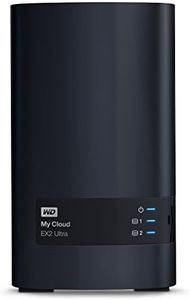
The WD 20TB My Cloud Pro Series PR2100 is a robust network-attached storage (NAS) device that caters well to users needing extensive storage capacity. With its 20TB space, it is suitable for home users with large media libraries or small businesses requiring centralized data storage. The device is powered by an Intel Pentium N3710 Quad-Core processor and 4GB DDR3L memory, which supports smooth performance, especially for tasks like media streaming through Plex, thanks to its built-in video transcoding feature.

In terms of security, the PR2100 offers comprehensive protection with password security and AES 256-bit volume encryption, making it a reliable choice for safeguarding sensitive data. The My Cloud OS 3 provides a user-friendly interface for managing the device and organizing files, contributing to an efficient workflow.

Connectivity is somewhat limited, offering only a single USB 2.0 port, which may restrict the ability to connect additional devices or transfer data at higher speeds generally expected with USB 3.0 or newer standards. However, its compatibility with both PC and Mac platforms offers flexibility for different users. Physical size and weight are considerable, as it weighs 7.72 pounds, which might be less portable compared to other options on the market. While it's not the most compact, its design in black is sleek and professional, fitting well into most office or home environments.

Rating
10.0
Chosen by1,214
Storage Capacity
Data Transfer Speed
User Interface and Software

Most important from
20 reviews

Storage Capacity
Highly recommended for anyone needing to store large amounts of data in a redundant manner for safety against data loss.
Data Transfer Speed
Transfer speed through Ethernet is good, with speeds nearing 100 Mbps for many transfers.
User Interface and Software
The unit installs easily, with an intuitive web-based admin interface for managing the drive.
Compatibility
Streams 1080p flawlessly, making it an excellent choice for Plex users.
#2

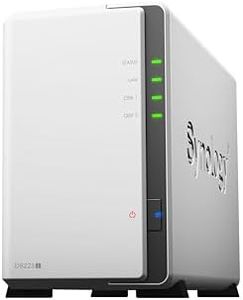
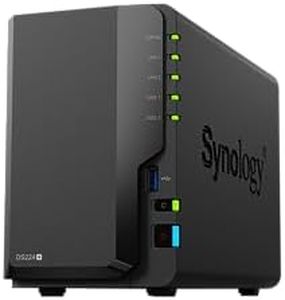
Synology 2-Bay DiskStation DS224+ (Diskless)

Rating
7.9
Security Features
User Interface and Software
Data Transfer Speed

Most important from
4752 reviews

Security Features
Synology stands out with robust, feature-rich software that feels like a digital fortress, making data security and backup effortless.
User Interface and Software
Setting up backups, including USB backups, is straightforward and well-documented, making disaster recovery plans easy to implement.
Data Transfer Speed
Performance improvements are noticeable, with faster file transfers and backup jobs compared to older NAS units.

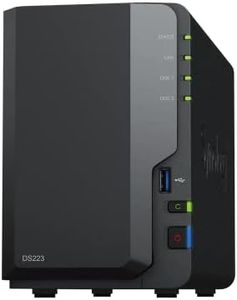
The Synology 2-Bay DiskStation DS224+ is a compact and sturdy home cloud drive designed to centralize your data storage. Since it’s diskless, you can choose your own hard drives, giving flexibility on storage capacity depending on your needs. It supports 5400 RPM solid-state drives, which offer a good balance between speed and quiet operation, making file access and data transfers reasonably fast for typical home use.

The device supports multi-platform access, so you can easily share and sync files across different devices like PCs, smartphones, and tablets. Synology’s well-regarded software provides a user-friendly interface that simplifies tasks like backup, restoration, and syncing without needing advanced technical skills. Connectivity options are solid for home networks, but if you need ultra-high-speed transfers, the device might feel average compared to higher-end models. Security features are built-in to protect your data, though advanced users might want to explore additional layers depending on their needs. Compatibility is broad, working well with various operating systems and common network setups.

Its size and metal build make it durable yet unobtrusive for home environments. The 2 GB RAM supports smooth multitasking for typical household data management. The DS224+ is best suited for users looking for a reliable and flexible home cloud storage solution with good software support and moderate speed. It is ideal if you want to build your own storage capacity and prioritize ease of use with dependable data protection.

Rating
7.9
Security Features
User Interface and Software
Data Transfer Speed

Most important from
4752 reviews

Security Features
Synology stands out with robust, feature-rich software that feels like a digital fortress, making data security and backup effortless.
User Interface and Software
Setting up backups, including USB backups, is straightforward and well-documented, making disaster recovery plans easy to implement.
Data Transfer Speed
Performance improvements are noticeable, with faster file transfers and backup jobs compared to older NAS units.
#3

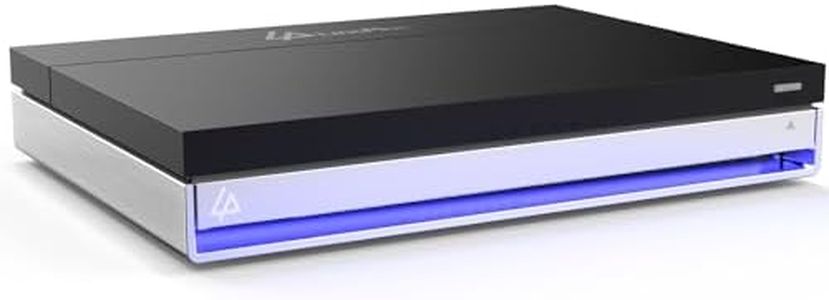
LincStation N1 6-Bay NAS Storage - Intel Celeron N5105 Quad-Core | 16GB RAM | 128G eMMC | 2x2.5 HDD + 4xM.2 NVMe Slots | 2.5GbE | 2-Year Warranty | 4K HDMI | Network Attached Storage (Diskless)

Rating
7.6
Storage Capacity
User Interface and Software

Most important from
56 reviews

Storage Capacity
This compact 6-bay NAS handles media storage and computer backups efficiently, making it a reliable local backup solution.
User Interface and Software
Be sure to verify that the box is sealed upon delivery to avoid issues with previously activated software trials.

The LincStation N1 is a compact and powerful home NAS system designed to store and protect your digital files efficiently. It supports a flexible 6-bay storage setup, allowing you to combine two 2.5" SATA hard drives with four M.2 NVMe SSDs. This gives you plenty of options for balancing capacity and speed, especially since NVMe SSDs offer very fast data transfer rates.

The included Intel Celeron quad-core processor and 16GB of RAM make it capable of smooth 4K media streaming and running multiple apps simultaneously. Connectivity is strong with a 2.5GbE network port for faster file transfers than standard Gigabit Ethernet, plus USB-C and USB 3.2 ports for connecting external devices. It also includes an HDMI port for direct 4K video output, which is a nice touch for media use. Security-wise, the use of Unraid software helps protect your data by allowing automatic backups and file recovery even if a drive fails, giving peace of mind.

The system comes with a 2-year warranty and 24/7 US-based support, which is reassuring. The device is compatible with desktops, laptops, and servers, making it versatile for home or small office use. The product is diskless, so you need to buy your own drives separately, which adds to the initial cost. The Unraid software may have a learning curve if you prefer plug-and-play solutions. This NAS is ideal if you want a customizable and fast home cloud storage solution and are comfortable with some setup and configuration. If you prefer something simpler or ready to use right away, this might require more effort to get going.

Rating
7.6
Storage Capacity
User Interface and Software

Most important from
56 reviews

Storage Capacity
This compact 6-bay NAS handles media storage and computer backups efficiently, making it a reliable local backup solution.
User Interface and Software
Be sure to verify that the box is sealed upon delivery to avoid issues with previously activated software trials.

Buying Guide for the Best Home Cloud Drives

Choosing the right home cloud drive can be a game-changer for managing your digital life. A home cloud drive allows you to store, access, and share your files from anywhere, providing a personal and secure cloud storage solution. To make the best choice, you need to consider several key specifications that will determine how well the drive meets your needs. Understanding these specs will help you navigate the options and select the perfect home cloud drive for you.
Storage CapacityStorage capacity refers to the amount of data that the cloud drive can hold. This is crucial because it determines how much content you can store, including documents, photos, videos, and backups. Storage capacities typically range from a few hundred gigabytes (GB) to several terabytes (TB). If you have a large media library or need to back up multiple devices, opt for a higher capacity (2TB or more). For basic document storage and occasional backups, a smaller capacity (500GB to 1TB) may suffice. Assess your current and future storage needs to choose the right capacity.
Data Transfer SpeedData transfer speed indicates how quickly you can upload and download files to and from the cloud drive. This is important for efficiency, especially if you frequently transfer large files. Data transfer speeds are often measured in megabytes per second (MB/s). Higher speeds (100 MB/s or more) are ideal for users who need to move large files quickly, such as video editors or photographers. For general use, moderate speeds (50-100 MB/s) are usually adequate. Consider your typical file sizes and how often you transfer data to determine the necessary speed.
Connectivity OptionsConnectivity options refer to the ways you can connect to the cloud drive, such as through Wi-Fi, Ethernet, or USB. This is important for ensuring compatibility with your devices and network setup. Wi-Fi connectivity offers the convenience of wireless access, while Ethernet provides a stable and fast wired connection. USB ports can be useful for direct connections to computers or other devices. If you need flexibility and ease of access, look for a drive with multiple connectivity options. Evaluate your home network and device compatibility to choose the best connectivity features.
Security FeaturesSecurity features protect your data from unauthorized access and potential breaches. This is crucial for maintaining the privacy and integrity of your files. Common security features include encryption, password protection, and two-factor authentication. Encryption ensures that your data is unreadable to anyone without the decryption key, while password protection and two-factor authentication add extra layers of security. If you store sensitive information, prioritize drives with robust security features. Consider the level of security you need based on the sensitivity of your data.
User Interface and SoftwareThe user interface and software determine how easy it is to set up, manage, and access your cloud drive. This is important for a smooth and user-friendly experience. A good interface should be intuitive and easy to navigate, with clear instructions and helpful features. Some drives come with companion apps or software that offer additional functionalities like automatic backups, file synchronization, and remote access. If you prefer a hassle-free experience, look for drives with well-designed interfaces and comprehensive software support. Think about your comfort level with technology and how much assistance you might need.
CompatibilityCompatibility refers to how well the cloud drive works with your existing devices and operating systems. This is important to ensure seamless integration and functionality. Most cloud drives are compatible with major operating systems like Windows, macOS, iOS, and Android. However, it's essential to check for any specific requirements or limitations. If you use multiple devices or platforms, choose a drive that supports all of them. Consider your current devices and any future upgrades to ensure long-term compatibility.

FAQ

Most Popular Categories Right Now