We Use CookiesWe use cookies to enhance the security, performance, functionality and for analytical and promotional activities. By continuing to browse this site you are agreeing to our privacy policy

10 Best iPhone USB Flash Drives 2026 in the United States
How do we rank products for you?

Our technology thoroughly searches through the online shopping world, reviewing hundreds of sites. We then process and analyze this information, updating in real-time to bring you the latest top-rated products. This way, you always get the best and most current options available.

headphones-stars

Our Top Picks

#1

Winner

Genuine Apple MFi Certified iPhone USB Flash Drive 512GB - Real Capacity - No Fake Storage, Genuine Lightning, encrypted Auto Backup Photo Stick for iPhone iPad Photos/Videos - Avoid Fake MFi Clones!

Rating
10.0
Chosen by1,106
Transfer Speed
Build Quality and Durability
Compatibility and Software

Most important from
15162 reviews

Transfer Speed
Backing up an iPhone is quick and easy, making it far more convenient than using iTunes.
Build Quality and Durability
This thumb drive is very simple to use and worked perfectly the first time, unlike other thumb drives that have been problematic.
Compatibility and Software
Simply download the software, plug it in, and you're ready to go, with instant access when plugged into a computer.
Design and Portability
This compact USB drive plugs easily into a phone or iPad and works well with many optional features.

The JSL JDTDC MFi Certified 512GB Photo Stick is a highly useful device for iPhone and iPad users who are constantly battling limited storage space. With a substantial 512GB capacity, it offers ample room to store photos, videos, and other files, effectively freeing up space on your device. This makes it particularly beneficial for photographers and media enthusiasts who require additional storage while on the go.

The device supports high-speed data transfer through its USB 3.0 port, with read speeds up to 80MB/s and write speeds up to 40MB/s, ensuring quick and efficient file transfers. The lightning port, however, provides slower speeds, which could be a minor drawback for users accustomed to faster data handling. Compatibility is a strong point, as it works with a wide range of iPhone and iPad models that have lightning connectors, but it is not compatible with devices that use USB-C ports unless an adapter is purchased separately.

The build quality is solid, and its compact design makes it highly portable, easily fitting into pockets or bags without adding bulk. The requirement to download the 'JD Drive' app for operation may be seen as an inconvenience by some users, but the app itself is user-friendly and facilitates easy backups of photos, videos, and contacts. In summary, the JSL JDTDC 512GB Photo Stick is an excellent tool for managing large amounts of data on iOS devices, though its reliance on an additional app and lack of native USB-C support are points to consider.

Rating
10.0
Chosen by1,106
Transfer Speed
Build Quality and Durability
Compatibility and Software

Most important from
15162 reviews

Transfer Speed
Backing up an iPhone is quick and easy, making it far more convenient than using iTunes.
Build Quality and Durability
This thumb drive is very simple to use and worked perfectly the first time, unlike other thumb drives that have been problematic.
Compatibility and Software
Simply download the software, plug it in, and you're ready to go, with instant access when plugged into a computer.
Design and Portability
This compact USB drive plugs easily into a phone or iPad and works well with many optional features.
#2

SanDisk iXpand Flash Drive Go for Your iPhone - 256 GB - USB 3.0 Type A, Lightning - 1 Year Warranty

Rating
9.4
Storage Capacity
Transfer Speed
Compatibility and Software

Most important from
36 reviews

Storage Capacity
The device delivers exactly as advertised, providing reliable storage expansion.
Transfer Speed
The transfer speed is disappointing, with backups taking an excessively long time or failing to complete.
Compatibility and Software
Connecting the iPhone directly to a PC via Lightning cable can be a simpler alternative for transferring photos and videos without needing a special flash drive.

The SanDisk iXpand Flash Drive Go offers an easy way to expand your iPhone storage or quickly transfer files between your iPhone and a computer. With 256 GB of storage, it provides ample space for photos, videos, and documents. The drive features two connectors: a Lightning plug for iPhones and a USB 3.0 Type A for standard computers, enabling convenient file transfers without the need for extra adapters. USB 3.0 ensures faster transfer speeds, although actual speeds depend on your device. The design is lightweight and compact, making it very portable and easy to carry. Build quality is decent—sturdy enough for everyday use but not designed for heavy-duty conditions.

Compatibility is strong with iPhones that have Lightning connectors, and SanDisk includes an app to help manage files, simplifying backup and transfer tasks. One limitation is that the drive only supports Lightning connectors, so it won't work with newer iPhones using USB-C without an adapter. Additionally, while the app is useful, the software interface may seem basic to some users. For iPhone users with a Lightning port seeking extra storage or a straightforward method to back up and transfer media, the iXpand Flash Drive Go provides reliable performance with good capacity and ease of use.

Rating
9.4
Storage Capacity
Transfer Speed
Compatibility and Software

Most important from
36 reviews

Storage Capacity
The device delivers exactly as advertised, providing reliable storage expansion.
Transfer Speed
The transfer speed is disappointing, with backups taking an excessively long time or failing to complete.
Compatibility and Software
Connecting the iPhone directly to a PC via Lightning cable can be a simpler alternative for transferring photos and videos without needing a special flash drive.
#3

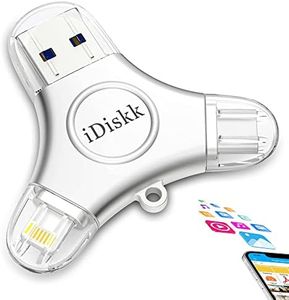
App*le Certified iDiskk 1TB iPhone 17 and 16 Photo flashdrive for iPhone Photo Stick USB -C iPad Pro Android Samsung for iPhone 15/14/14 PRO/13/13 PRO/12 pro/12/11, Thumb Drive for iPhone Photos

Rating
9.1
Storage Capacity
Compatibility and Software

Most important from
335 reviews

Storage Capacity
Offers a massive 1TB capacity, perfect for offloading thousands of movies and large media files to free up device space.
Compatibility and Software
Seamlessly transfers and backs up photos and videos without cluttering your iPhone or iPad storage.

The iDiskk 1TB iPhone Photo Flash Drive is a versatile storage solution designed especially for iPhone users but also compatible with Android, Windows, and Mac devices thanks to its three connectors: Lightning, USB-C, and USB 3.0. This makes it a solid choice for anyone who wants to easily transfer photos and videos across different gadgets without relying on cables or cloud storage. With a large 1TB capacity, it offers plenty of space to back up your media, helping free up space on your phone quickly through a one-click backup feature.

In terms of speed, it delivers decent performance with read speeds up to 100 MB/s and write speeds around 60 MB/s, which is sufficient for everyday photo and video transfers though not the fastest available. Its metal build feels sturdy and durable, adding confidence for frequent carrying and use. The included app supports direct playback of many video and audio formats right from the drive, which is handy for travel or entertainment without loading files onto your device.

Security is a plus here, with Touch ID and passcode encryption options to protect sensitive files. The drive is Apple MFi certified, reassuring compatibility and reliability on iPhones and iPads, including the latest iPhone 15 series. The device’s package size and weight are slightly bulkier compared to simpler flash drives, which may affect portability for some users. Also, although it supports many devices, setting up and navigating the companion app might require a little learning curve for those less comfortable with new tech. The write speed is modest, so transferring very large files or lots of data at once could take some time. This iDiskk drive suits iPhone users seeking a large, durable external storage option with multi-device flexibility and security features, especially useful for backing up photos and videos without hassle. Those prioritizing fast transfers or ultra-compact design may find better options, but this product strikes a good balance of features for its price and use case.

Rating
9.1
Storage Capacity
Compatibility and Software

Most important from
335 reviews

Storage Capacity
Offers a massive 1TB capacity, perfect for offloading thousands of movies and large media files to free up device space.
Compatibility and Software
Seamlessly transfers and backs up photos and videos without cluttering your iPhone or iPad storage.

Buying Guide for the Best iPhone USB Flash Drives

When choosing an iPhone USB flash drive, it's important to consider several key specifications to ensure you get the best fit for your needs. These drives can be incredibly useful for expanding your storage, backing up important files, and transferring data between devices. Understanding the key specs will help you make an informed decision and get the most out of your purchase.
Storage CapacityStorage capacity refers to the amount of data the flash drive can hold. This is important because it determines how much content you can store on the drive. Capacities typically range from 16GB to 256GB or more. If you only need to transfer a few files or store some photos, a smaller capacity like 16GB or 32GB might be sufficient. For larger files, such as videos or extensive photo libraries, consider a higher capacity like 128GB or 256GB. Think about your current and future storage needs to choose the right capacity.
Connector TypeThe connector type is crucial because it determines compatibility with your devices. iPhone USB flash drives usually come with a Lightning connector for iPhones and iPads, and a USB or USB-C connector for computers. Some drives feature dual connectors, making them versatile for use with multiple devices. Ensure the drive you choose has the appropriate connectors for your devices. If you frequently transfer data between your iPhone and a computer, a dual connector drive can be very convenient.
Transfer SpeedTransfer speed indicates how quickly data can be read from or written to the flash drive. This is important for efficiency, especially when dealing with large files. Transfer speeds are usually measured in megabytes per second (MB/s). Drives with higher transfer speeds (e.g., 100 MB/s or more) are ideal for quickly moving large files, while lower speeds (e.g., 20-50 MB/s) might be sufficient for smaller, less frequent transfers. Consider how often and how much data you will be transferring to determine the appropriate speed.
Build Quality and DurabilityBuild quality and durability refer to how well the flash drive is constructed and how it can withstand everyday use. This is important to ensure the longevity of the drive and the safety of your data. Look for drives made with sturdy materials, such as metal or high-quality plastic, and features like water resistance or shockproofing. If you plan to carry the drive with you frequently, a more durable build is essential to protect it from damage.
Compatibility and SoftwareCompatibility and software support are important to ensure the flash drive works seamlessly with your devices. Some drives come with companion apps that offer additional features like automatic backups, file encryption, and media playback. Check if the drive is compatible with your iPhone's iOS version and if it offers any useful software features. If you need specific functionalities, such as automatic photo backups or secure file storage, look for drives that provide these through their apps.
Design and PortabilityDesign and portability refer to the physical size and shape of the flash drive, as well as how easy it is to carry around. This is important for convenience and ease of use. Compact and lightweight designs are ideal for portability, especially if you plan to carry the drive in your pocket or bag. Some drives also come with keychain loops or protective caps to enhance portability and protect the connectors. Consider how and where you will use the drive to choose a design that fits your lifestyle.

FAQ

Most Popular Categories Right Now