We Use CookiesWe use cookies to enhance the security, performance, functionality and for analytical and promotional activities. By continuing to browse this site you are agreeing to our privacy policy

10 Best Mac USB-C Hubs 2026 in the United States
How do we rank products for you?

Our technology thoroughly searches through the online shopping world, reviewing hundreds of sites. We then process and analyze this information, updating in real-time to bring you the latest top-rated products. This way, you always get the best and most current options available.

headphones-stars

Our Top Picks

#1

Winner

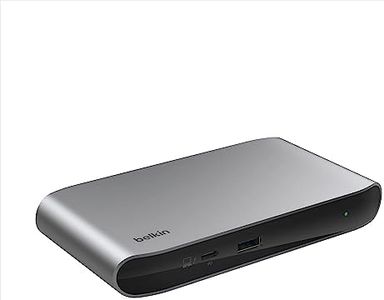
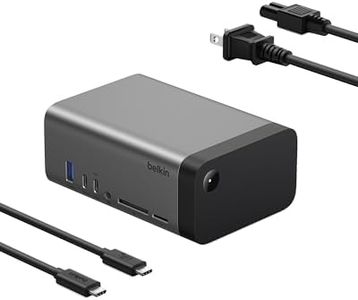
Belkin Connect Thunderbolt 4 Docking Station, 5-in-1 USB-C Multiport Core Hub w/ 96W Power Delivery for Mac, Windows, Single 8K or Dual 4K Display, Thunderbolt 4 Cable & Power Supply Included

Rating
10.0
Chosen by1,245
Number of Ports
Type of Ports
Power Delivery (PD)

Most important from
648 reviews

Number of Ports
Reliable for the six months I've had it to date. I don't know what I'd do without these additional USB-C ports.
Type of Ports
The straightforward architecture focused on USB-C ports simplifies my cable connection.
Power Delivery (PD)
The hub did not perform as expected, delivering only 60W, which is insufficient for charging a MacBook Pro 16 inch.
Data Transfer Speed
Some issues with the ethernet adapter and external SSD drive not working consistently on the dock.
Build Quality and Design
This hub is exactly what I needed. It's small but not too small, has all the necessary ports, and is easy to set up.

The Belkin Connect Thunderbolt 4 Docking Station is a versatile 5-in-1 hub designed for users needing extensive connectivity options for their Mac or other USB-C enabled devices. It features 3 downstream and 1 upstream Thunderbolt 4 USB-C ports, plus one USB-A port, offering significant flexibility. The hub excels in data transfer speed, supporting rates up to 40 Gbps, which is notably faster than USB 3.0. This makes it suitable for users requiring high-speed data transfers, such as video editors or photographers.

Additionally, it supports dual 4K displays at 60Hz or a single 8K display at 30Hz, which caters to those utilizing high-resolution monitors for productivity or entertainment purposes. The 96W power delivery ensures that your devices remain charged while using other ports, which is a substantial advantage for those who need continuous power without sacrificing connectivity. The 150W power supply ensures reliable charging and performance across connected devices.

Compatibility is broad, encompassing Thunderbolt 4, Thunderbolt 3, USB4, and USB-C enabled devices, making it a practical choice for various tech setups. The hub’s build quality is also commendable, made with 72% post-consumer recycled content, and includes a 3-year warranty for added reliability and peace of mind. The device's weight, at nearly 2 pounds, might be a consideration for users looking for a more portable solution. Despite these points, the Belkin hub remains a robust choice for users needing a high-speed, multifunctional, and eco-friendly docking station.

Rating
10.0
Chosen by1,245
Number of Ports
Type of Ports
Power Delivery (PD)

Most important from
648 reviews

Number of Ports
Reliable for the six months I've had it to date. I don't know what I'd do without these additional USB-C ports.
Type of Ports
The straightforward architecture focused on USB-C ports simplifies my cable connection.
Power Delivery (PD)
The hub did not perform as expected, delivering only 60W, which is insufficient for charging a MacBook Pro 16 inch.
Data Transfer Speed
Some issues with the ethernet adapter and external SSD drive not working consistently on the dock.
Build Quality and Design
This hub is exactly what I needed. It's small but not too small, has all the necessary ports, and is easy to set up.
#2

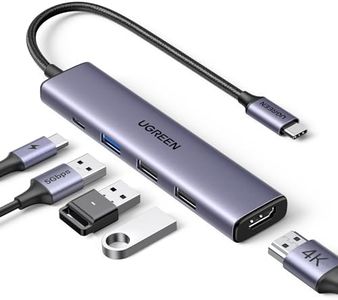
UGREEN USB C Hub 5 in 1 Multiport Adapter Revodok 105 4K HDMI, 100W Power Delivery, 3 USB-A Data Ports, USB C Dongle for MacBook Pro/Air, iPad Pro, iMac, iPhone 16 Pro/Pro Max, XPS, Thinkpad

Rating
9.1
Number of Ports
Type of Ports
Power Delivery (PD)

Most important from
27570 reviews

Number of Ports
Three USB-A ports allow simultaneous connection of mouse, keyboard, and external drives with fast data transfer.
Type of Ports
Three USB-A ports allow simultaneous connection of mouse, keyboard, and external drives with fast data transfer.
Power Delivery (PD)
Power delivery supports up to 100W, keeping devices charged without slowdowns.
Data Transfer Speed
Three USB-A ports allow simultaneous connection of mouse, keyboard, and external drives with fast data transfer.
Build Quality and Design
Build quality feels high-end and durable, suitable for students, professionals, and travelers.

The UGREEN Revodok 105 is a compact and versatile 5-in-1 USB-C hub designed with MacBook and other USB-C devices in mind. It offers a good mix of ports: one 4K HDMI for clear external display at up to 30Hz, a USB-C port supporting up to 95W power delivery to keep your laptop charged, plus three USB-A ports for connecting mice, keyboards, or storage devices.

The single USB 3.0 port delivers fast data transfer speeds up to 5 Gbps, while the other two USB 2.0 ports handle slower peripherals well. Its sleek grey design is lightweight and portable, making it convenient for travel or daily use. Compatibility is broad, working smoothly with MacBooks, iPads, Windows laptops, and even smartphones.

The HDMI output is limited to 30Hz, which might not satisfy users wanting smoother video, and the power delivery reserves some wattage for device operation, so charging might be slightly less than advertised. Also, the USB 2.0 ports are best for low-speed devices, not for fast data transfers or charging. This hub represents a reliable all-in-one adapter option for typical office or casual use, especially with Apple devices, but those needing higher refresh rates or more USB-C ports might look elsewhere.

Rating
9.1
Number of Ports
Type of Ports
Power Delivery (PD)

Most important from
27570 reviews

Number of Ports
Three USB-A ports allow simultaneous connection of mouse, keyboard, and external drives with fast data transfer.
Type of Ports
Three USB-A ports allow simultaneous connection of mouse, keyboard, and external drives with fast data transfer.
Power Delivery (PD)
Power delivery supports up to 100W, keeping devices charged without slowdowns.
Data Transfer Speed
Three USB-A ports allow simultaneous connection of mouse, keyboard, and external drives with fast data transfer.
Build Quality and Design
Build quality feels high-end and durable, suitable for students, professionals, and travelers.
#3

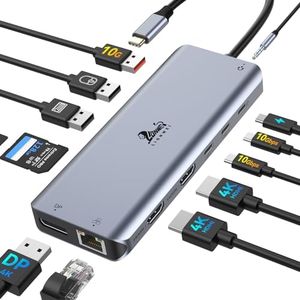
LIONWEI Laptop Docking Station 13 in 1 - Dual HDMI+DisplayPort+10Gbps, 6 USB C/A, 100W PD, Ethernet, SD/TF, Audio, USB C Hub for MacBook/Dell/HP/Surface

Rating
8.8
Type of Ports
Power Delivery (PD)
Data Transfer Speed

Most important from
13143 reviews

Type of Ports
Dual HDMI and DisplayPort options make multi-monitor setups a breeze, and the 100W charging keeps devices powered all day.
Power Delivery (PD)
Dual HDMI and DisplayPort options make multi-monitor setups a breeze, and the 100W charging keeps devices powered all day.
Data Transfer Speed
Performance is excellent, with fast data transfer speeds and reliable connectivity across various ports.
Build Quality and Design
The build quality is solid and compact, making the docking station feel sturdy and reliable.
Compatibility
This docking station works perfectly with both MacBook Pro and Dell laptops, offering seamless plug-and-play setup.

The LIONWEI Laptop Docking Station is a versatile 13-in-1 USB-C hub, offering a wide range of connectivity options. It stands out with its dual 4K HDMI ports, a DisplayPort, and a 100W Power Delivery (PD) charging port, making it suitable for users who need to connect multiple monitors and quickly charge their devices. The hub includes 6 USB ports (3 USB 3.1 and 2 USB 2.0), ensuring fast data transfer speeds of up to 10Gbps, which is ideal for transferring large files. Additionally, the SD/TF card reader and Ethernet port provide further flexibility for different connectivity needs.

One notable feature is its compatibility with both Windows and MacBook devices, although Mac users should note that they can only extend to one external monitor at 4K@60Hz. The docking station’s lightweight and portable design make it convenient for on-the-go use, and it also promises heat resistance and reliability. However, it consumes 13W of power to operate, slightly reducing the available power for charging your laptop.

Potential buyers should be aware that the extensive range of ports could make it bulky compared to simpler hubs. For those needing comprehensive connectivity options and robust performance in a docking station, the LIONWEI 13-in-1 is a strong contender.

Rating
8.8
Type of Ports
Power Delivery (PD)
Data Transfer Speed

Most important from
13143 reviews

Type of Ports
Dual HDMI and DisplayPort options make multi-monitor setups a breeze, and the 100W charging keeps devices powered all day.
Power Delivery (PD)
Dual HDMI and DisplayPort options make multi-monitor setups a breeze, and the 100W charging keeps devices powered all day.
Data Transfer Speed
Performance is excellent, with fast data transfer speeds and reliable connectivity across various ports.
Build Quality and Design
The build quality is solid and compact, making the docking station feel sturdy and reliable.
Compatibility
This docking station works perfectly with both MacBook Pro and Dell laptops, offering seamless plug-and-play setup.

Buying Guide for the Best Mac USB-C Hubs

When choosing a USB-C hub for your Mac, it's important to consider your specific needs and how you plan to use the hub. USB-C hubs can expand the functionality of your Mac by providing additional ports for connecting various devices. To make the best choice, you should understand the key specifications and how they relate to your usage requirements.
Number of PortsThe number of ports on a USB-C hub determines how many devices you can connect simultaneously. This is important because it affects your ability to use multiple peripherals at once, such as external hard drives, monitors, keyboards, and mice. Hubs can range from having just a few ports to over a dozen. If you only need to connect a couple of devices, a hub with fewer ports will suffice. However, if you have many peripherals, opt for a hub with more ports to avoid constantly swapping devices.
Type of PortsUSB-C hubs can come with various types of ports, including USB-A, HDMI, Ethernet, SD card slots, and more. The type of ports you need depends on the devices you plan to connect. For example, if you need to connect a monitor, look for a hub with an HDMI port. If you need to transfer files from a camera, an SD card slot is essential. Consider the devices you use regularly and choose a hub that includes the necessary ports to support them.
Power Delivery (PD)Power Delivery (PD) is a feature that allows the hub to charge your Mac while connected. This is important if you want to keep your Mac charged without using a separate charger. PD hubs can vary in their power output, typically ranging from 30W to 100W. If you have a MacBook Pro, which requires more power, choose a hub with higher wattage PD to ensure efficient charging. For lighter devices like MacBook Air, lower wattage PD may be sufficient.
Data Transfer SpeedData transfer speed determines how quickly data can be transferred between your Mac and connected devices. This is crucial for tasks like transferring large files or using external storage. USB-C hubs can support different speeds, such as USB 3.0 (up to 5Gbps) or USB 3.1/3.2 (up to 10Gbps). If you frequently transfer large files or use high-speed storage devices, opt for a hub with higher data transfer speeds to save time and improve efficiency.
Build Quality and DesignThe build quality and design of a USB-C hub can affect its durability and ease of use. A well-built hub made from high-quality materials will last longer and withstand daily wear and tear. Additionally, consider the hub's size and design; a compact and lightweight hub is easier to carry around, while a hub with a longer cable can provide more flexibility in positioning. Choose a hub that matches your lifestyle and usage habits for the best experience.
CompatibilityCompatibility ensures that the USB-C hub works seamlessly with your Mac and other devices. Some hubs may have specific requirements or limitations, so it's important to check if the hub is compatible with your Mac model and operating system. Additionally, consider compatibility with other devices you plan to connect, such as monitors, external drives, and peripherals. Ensuring compatibility will prevent connectivity issues and ensure smooth operation.

FAQ

Most Popular Categories Right Now