We Use CookiesWe use cookies to enhance the security, performance, functionality and for analytical and promotional activities. By continuing to browse this site you are agreeing to our privacy policy

10 Best Mice For Left Handers 2026 in the United States
How do we rank products for you?

Our technology thoroughly searches through the online shopping world, reviewing hundreds of sites. We then process and analyze this information, updating in real-time to bring you the latest top-rated products. This way, you always get the best and most current options available.

headphones-stars

Our Top Picks

#1

Winner

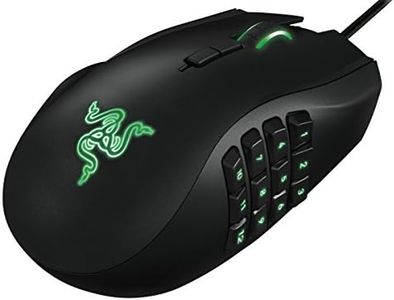
Razer RZ01-01050100-R3M1 Naga Left-Handed - Ergonomic MMO Gaming Mouse with 12 Programmable Thumb Buttons - 8,200 Adjustible DPI

Rating
10.0
Chosen by1,289
Ergonomics
Button Configuration
DPI (Dots Per Inch)

Most important from
352 reviews

Ergonomics
The mouse feels very comfortable in hand and smooth to use, greatly improving my gaming experience.
Button Configuration
The 12 buttons on the side have made it easier for me and significantly enhanced my gameplay.
DPI (Dots Per Inch)
Great mouse for lefties; worth the price for high precision and maximum efficiency.
Additional Features
Razer's high quality and great Synapse software offer extensive customizability, making it a phenomenal mouse for left-handed gamers.

The Razer RZ01-01050100-R3M1 Naga Left-Handed is designed specifically for left-handed gamers, particularly those who enjoy MMO (Massively Multiplayer Online) games. One of its standout features is the ergonomic design which aims to provide maximum comfort during prolonged gaming sessions. The mouse's size, with dimensions of 4.87 x 2.94 x 1.69 inches and a weight of 4.8 ounces, is crafted to fit snugly in the user's hand, making it comfortable for extended use.

The 12 programmable thumb buttons are a significant advantage for MMO gamers, allowing for a high degree of customization and efficient gameplay. The 8200 DPI 4G laser sensor ensures precise and responsive movements, which is beneficial for both gaming and general computer use. The mouse also boasts a 32-bit ARM processor for fast computation, enhancing its performance capabilities. Connectivity is via a wired USB connection, which ensures a stable and uninterrupted gaming experience.

The additional feature of a scroll wheel that moves left, right, up, down, and in, further enhances the mouse's versatility. Some drawbacks include its reliance on a wired connection, which might limit mobility for some users, and the potentially overwhelming configuration process for those not accustomed to highly customizable gaming mice. Additionally, while the mouse is specialized for left-handed users, right-handed gamers won't benefit from its features. The mouse is also a bit more dated, having been first available in 2013, which might affect its appeal compared to more recent models.

Rating
10.0
Chosen by1,289
Ergonomics
Button Configuration
DPI (Dots Per Inch)

Most important from
352 reviews

Ergonomics
The mouse feels very comfortable in hand and smooth to use, greatly improving my gaming experience.
Button Configuration
The 12 buttons on the side have made it easier for me and significantly enhanced my gameplay.
DPI (Dots Per Inch)
Great mouse for lefties; worth the price for high precision and maximum efficiency.
Additional Features
Razer's high quality and great Synapse software offer extensive customizability, making it a phenomenal mouse for left-handed gamers.
#2

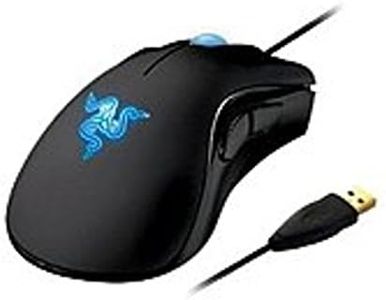
Razer DeathAdder Essential - Left-Handed Esports Ergonomic Gaming Mouse - 3,500 Adjustible DPI

Rating
9.7
Ergonomics
DPI (Dots Per Inch)
Connectivity

Most important from
629 reviews

Ergonomics
The ergonomic design is genuinely comfortable and tailored specifically for left-handed users, avoiding awkward ambidextrous compromises.
DPI (Dots Per Inch)
This mouse delivers sharp accuracy and fast response times, making it reliable for gaming and everyday use.
Connectivity
The wired connection ensures a consistent 1ms response, perfect for quick reactions during gameplay.
Button Configuration
The five-button layout is simple yet functional, covering essential needs without overwhelming complexity.
Additional Features
The software allows useful customization like DPI adjustment and turning off the lighting, though it requires installation and can be a bit unintuitive for left-handed button remapping.
Size
The size and shape fit well for medium to large hands, supporting a palm grip comfortably during long sessions.

The Razer DeathAdder Essential Left-Handed gaming mouse is a solid choice for left-handed gamers who want a mouse designed specifically for their hand shape. Its ergonomic design is crafted to reduce wrist and hand tension, which is great for long gaming sessions. With a DPI of 3,500, it offers noticeably better precision than a standard mouse, making it suitable for gamers who need accuracy.

The 5-button setup is straightforward and should cover most gaming and everyday needs without confusion. Being a wired USB mouse, it ensures a fast 1ms response time, which helps with quick reactions during gameplay, though it does mean you’ll have to deal with a cord. The size and shape fit well for those who prefer a comfortable, right-sized mouse rather than something bulky or too small.

While it lacks wireless options or customizable buttons, the simplicity keeps it reliable and easy to use. If you are a left-handed gamer wanting an ergonomic, affordable mouse with good precision and fast response, this model fits well. However, if you're looking for more advanced features like adjustable weights or wireless freedom, you might want to explore other options.

Rating
9.7
Ergonomics
DPI (Dots Per Inch)
Connectivity

Most important from
629 reviews

Ergonomics
The ergonomic design is genuinely comfortable and tailored specifically for left-handed users, avoiding awkward ambidextrous compromises.
DPI (Dots Per Inch)
This mouse delivers sharp accuracy and fast response times, making it reliable for gaming and everyday use.
Connectivity
The wired connection ensures a consistent 1ms response, perfect for quick reactions during gameplay.
Button Configuration
The five-button layout is simple yet functional, covering essential needs without overwhelming complexity.
Additional Features
The software allows useful customization like DPI adjustment and turning off the lighting, though it requires installation and can be a bit unintuitive for left-handed button remapping.
Size
The size and shape fit well for medium to large hands, supporting a palm grip comfortably during long sessions.
#3

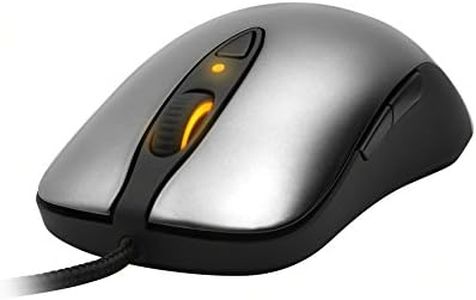
SteelSeries Sensei Laser Gaming Mouse - Grey

Rating
9.7
Ergonomics
Size
Additional Features

Most important from
898 reviews

Ergonomics
The ambidextrous design offers excellent ergonomics, making it comfortable for left-handed users without accidental side button clicks.
Size
The mouse balance and weight feel just right, allowing natural pivoting for quick side flicks without being too sharp or dull.
Additional Features
The on-mouse LCD lets you switch profiles without needing software, eliminating driver crashes and resource issues common with other brands.
Button Configuration
The mouse features 8 programmable buttons with crisp, springy Omron switches, though side buttons are a bit small and can be tricky to reach for some grips.
DPI (Dots Per Inch)
Adjustable CPI settings work well, but increments happen in steps of 90, with software interpolating values for finer control.
Connectivity
The cloth-wrapped cord is durable and high quality, with a gold-plated USB connector ensuring reliable connectivity.

The SteelSeries Sensei Laser Gaming Mouse is designed with an ambidextrous shape, making it a good option for left-handed gamers who often struggle to find comfortable mice. Its symmetrical design means it doesn’t favor right-hand use, which is a strong point for left-handed users. The mouse features 8 programmable buttons, allowing customization that suits different gaming styles. It also supports SteelSeries’ ExactSens and ExactAim technologies, which help improve pointer accuracy and control—important for precise gaming movements. The DPI (dots per inch) setting is adjustable, giving users the ability to fine-tune sensitivity based on their preferences.

Connectivity is via USB with a gold-plated connector, ensuring a reliable and fast connection without needing batteries, which is handy for long gaming sessions. The mouse includes additional features like an on-mouse LCD display with user-defined bitmaps and three-zone lighting, adding a nice visual touch and some customization flair. However, the mouse weighs nearly a pound, which could feel a bit heavy compared to other gaming mice, potentially affecting quick flick movements. Also, while the ambidextrous design is a plus for left-handers, the button layout may not be fully optimized for left-hand use as some buttons might be harder to reach or less intuitive on that side.

The plug-and-play feature means you won’t need extra drivers, which is simple for users who want to avoid complicated setup. This mouse provides solid performance and customization options geared towards left-handed gamers, with excellent precision features, though its weight and button arrangement might not suit everyone perfectly.

Rating
9.7
Ergonomics
Size
Additional Features

Most important from
898 reviews

Ergonomics
The ambidextrous design offers excellent ergonomics, making it comfortable for left-handed users without accidental side button clicks.
Size
The mouse balance and weight feel just right, allowing natural pivoting for quick side flicks without being too sharp or dull.
Additional Features
The on-mouse LCD lets you switch profiles without needing software, eliminating driver crashes and resource issues common with other brands.
Button Configuration
The mouse features 8 programmable buttons with crisp, springy Omron switches, though side buttons are a bit small and can be tricky to reach for some grips.
DPI (Dots Per Inch)
Adjustable CPI settings work well, but increments happen in steps of 90, with software interpolating values for finer control.
Connectivity
The cloth-wrapped cord is durable and high quality, with a gold-plated USB connector ensuring reliable connectivity.

Buying Guide for the Best Mice For Left Handers

Choosing the right mouse for left-handers can significantly improve comfort and productivity. Left-handed mice are designed to fit the natural hand position of left-handed users, reducing strain and enhancing control. When selecting a mouse, consider the shape, size, button configuration, and additional features that match your specific needs and preferences. Understanding the key specifications will help you make an informed decision and find the best fit for your hand and usage style.
ErgonomicsErgonomics refers to how well the mouse fits the natural shape and movement of your hand. This is crucial for preventing strain and discomfort during extended use. Left-handed mice are specifically designed to accommodate the left hand, with contours and button placements that align with left-handed use. When choosing a mouse, consider whether you prefer a symmetrical design (which can be used by both hands) or a dedicated left-handed design. Try to find a mouse that feels comfortable in your hand and supports your wrist and fingers naturally.
SizeThe size of the mouse affects how comfortably it fits in your hand. Mice come in various sizes, from compact travel mice to larger, full-sized models. A mouse that is too small may cause your hand to cramp, while one that is too large may be difficult to control. To find the right size, consider the size of your hand and how you grip the mouse. If you have smaller hands or prefer a fingertip grip, a smaller mouse may be more suitable. For larger hands or a palm grip, a bigger mouse might be more comfortable.
Button ConfigurationButton configuration refers to the number and placement of buttons on the mouse. This is important for both functionality and comfort. Left-handed mice often have buttons mirrored from right-handed models, making them easier to use for left-handed users. Consider how many buttons you need based on your typical usage. Basic models have the standard left and right buttons and a scroll wheel, while more advanced models may include additional programmable buttons for shortcuts and gaming. Choose a configuration that matches your needs, whether for simple navigation or complex tasks.
DPI (Dots Per Inch)DPI measures the sensitivity of the mouse, indicating how much the cursor moves on the screen in response to your movements. Higher DPI settings allow for faster cursor movement, which can be useful for gaming or high-resolution displays, while lower DPI settings offer more precise control, ideal for tasks like graphic design. Many mice offer adjustable DPI settings, allowing you to switch between different levels based on your activity. Consider your primary use for the mouse and choose a DPI range that suits your needs. For general use, a DPI range of 800-1600 is usually sufficient.
ConnectivityConnectivity options include wired and wireless mice. Wired mice connect directly to your computer via a USB cable, providing a stable connection and eliminating the need for batteries. Wireless mice offer more freedom of movement and a cleaner workspace, connecting via Bluetooth or a USB receiver. When choosing between wired and wireless, consider your workspace setup and how much mobility you need. If you prefer a clutter-free desk and don't mind recharging or replacing batteries, a wireless mouse might be the best choice. For uninterrupted use and no battery concerns, a wired mouse is ideal.
Additional FeaturesAdditional features can enhance the functionality and convenience of your mouse. These may include customizable buttons, adjustable weights, RGB lighting, and ergonomic enhancements like thumb rests. Think about what extra features would benefit your usage. For example, customizable buttons can improve productivity by allowing you to set shortcuts for frequently used functions. Adjustable weights can help you find the perfect balance for your hand. RGB lighting is more of an aesthetic feature but can add a personal touch to your setup. Choose features that align with your preferences and enhance your overall experience.

FAQ

Most Popular Categories Right Now