We Use CookiesWe use cookies to enhance the security, performance, functionality and for analytical and promotional activities. By continuing to browse this site you are agreeing to our privacy policy

10 Best Note Taking Tablets 2026 in the United States
How do we rank products for you?

Our technology thoroughly searches through the online shopping world, reviewing hundreds of sites. We then process and analyze this information, updating in real-time to bring you the latest top-rated products. This way, you always get the best and most current options available.

headphones-stars

Our Top Picks

#1

Winner

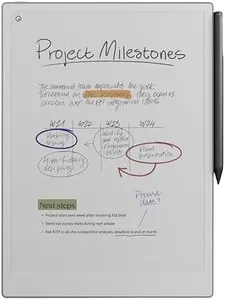
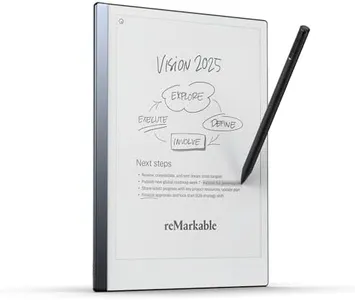
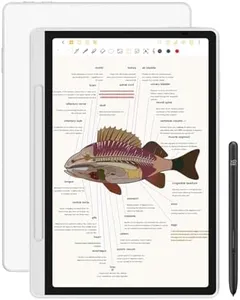
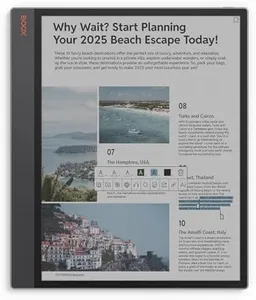
reMarkable Paper Pro Bundle – Includes 11.8” reMarkable Paper Tablet, and Marker Plus Pen with Eraser

Rating
10.0
Chosen by1,200
Display Size
Stylus Support and Latency
Operating System and App Ecosystem

Most important from
914 reviews

Display Size
The larger 11.8-inch screen provides ample space for creativity and productivity without sacrificing portability.
Stylus Support and Latency
The writing experience is incredibly natural, closely mimicking pen on paper, making note-taking and sketching deeply satisfying.
Operating System and App Ecosystem
The distraction-free design eliminates notifications and apps, allowing pure focus during use.
Battery Life
Battery life lasts for days, supporting extended sessions without frequent charging.
Screen Type (LCD, OLED, E-Ink)
The addition of color, although muted due to e-ink technology, significantly enhances notes and sketches compared to monochrome displays.
Portability and Build Quality
The tablet is sleek, lightweight, and feels robust despite its slim design, making it highly portable and durable.

The reMarkable Paper Pro Bundle is a sleek and portable note-taking tablet featuring an 11.8-inch color display designed to mimic the feel of real paper, making writing and sketching feel natural. It comes with the Marker Plus pen, which includes an eraser and offers low latency and precise control, allowing users to write comfortably for extended sessions. The screen is low-glare and adjustable for reading in various lighting conditions, including outdoors and at night, reducing eye strain compared to typical tablets or phones.

Running on Linux, its app ecosystem focuses on core note-taking features such as organizing notes, annotating PDFs, and converting handwriting to text. The battery life is impressive, lasting up to two weeks on a single charge, which is convenient for heavy users. The tablet supports USB-C for charging and data transfer. Its lightweight and ultra-slim design make it highly portable, ideal for students, professionals, or anyone who prefers a distraction-free digital notebook for writing and reading.

While it may not replace more versatile tablets with extensive apps, the reMarkable Paper Pro Bundle excels as a specialized device dedicated to providing an exceptional paper-like experience.

Rating
10.0
Chosen by1,200
Display Size
Stylus Support and Latency
Operating System and App Ecosystem

Most important from
914 reviews

Display Size
The larger 11.8-inch screen provides ample space for creativity and productivity without sacrificing portability.
Stylus Support and Latency
The writing experience is incredibly natural, closely mimicking pen on paper, making note-taking and sketching deeply satisfying.
Operating System and App Ecosystem
The distraction-free design eliminates notifications and apps, allowing pure focus during use.
Battery Life
Battery life lasts for days, supporting extended sessions without frequent charging.
Screen Type (LCD, OLED, E-Ink)
The addition of color, although muted due to e-ink technology, significantly enhances notes and sketches compared to monochrome displays.
Portability and Build Quality
The tablet is sleek, lightweight, and feels robust despite its slim design, making it highly portable and durable.
#2

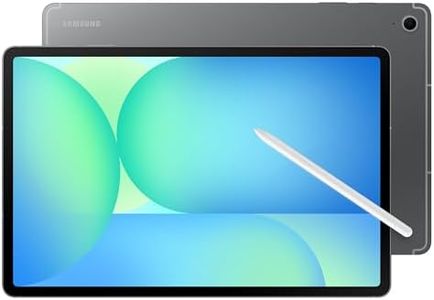
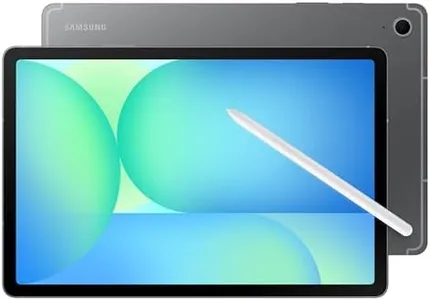
SAMSUNG Galaxy Tab S10 FE+ 13.1” 256GB WiFi Android Tablet, Large Display, Long Battery Life, Exynos 1580 Processor, IP68, Water-Resistant, 90 Hz Refresh, S Pen for Note-Taking, US Version, Gray

Rating
10.0
Display Size
Stylus Support and Latency
Operating System and App Ecosystem

Most important from
1287 reviews

Display Size
Its design feels premium and lightweight, balancing a large 13.1-inch display with portability suitable for extended use.
Stylus Support and Latency
The S Pen delivers exceptional accuracy and natural writing feel, complemented by flawless palm rejection that enhances the note-taking experience.
Operating System and App Ecosystem
Android's flexibility allows access to a wide range of apps, though some users notice pre-installed bloatware and prefer Google AI over Samsung's Bixby.
Battery Life
Battery life impresses with up to several days of use on a single charge, and fast charging keeps it ready for busy school or work days.
Screen Type (LCD, OLED, E-Ink)
The tablet offers a perfectly responsive and quick experience with a clear, sharp screen that beautifully captures handwriting, making it ideal for note-taking.
Storage Capacity
Expandable storage through microSD up to a terabyte supports users needing ample space for files and media.

The Samsung Galaxy Tab S10 FE+ is a solid choice for those who want a large, versatile tablet for note-taking and more. Its 13.1-inch display is quite roomy and sharp, making it great for viewing documents and sketching. The screen uses an LCD panel with a 90 Hz refresh rate, so it’s smooth when you’re writing or scrolling. The included S Pen is a standout feature, offering low latency and a natural writing feel, which helps your notes look neat, especially with the built-in Handwriting Assist and Math Solver tools that tidy up handwriting and solve equations.

Running on Android, it gives you access to a wide range of note-taking and productivity apps, though Android might feel less streamlined compared to some other tablet systems designed specifically for note-taking. Battery life is impressive, offering up to 21 hours, so you won’t need to recharge often during a busy day, and when you do, fast charging gets you going quickly. Storage is generous with 256GB built-in, and you can add much more via microSD if needed. The tablet is also water-resistant with an IP68 rating, which adds some peace of mind against spills or splashes—a bonus for on-the-go use.

At nearly 1.5 pounds and with dimensions reflecting its large screen, it’s less portable than smaller tablets, so it might feel bulky if you want something ultra-light. Connectivity is decent with WiFi support, but lack of cellular options could limit flexibility if you need to work completely away from WiFi. This tablet suits users who prioritize a large screen and excellent stylus experience for note-taking, combined with strong battery life and durability, but it may be less appealing if you want a lightweight, super-portable device or offline connectivity.

Rating
10.0
Display Size
Stylus Support and Latency
Operating System and App Ecosystem

Most important from
1287 reviews

Display Size
Its design feels premium and lightweight, balancing a large 13.1-inch display with portability suitable for extended use.
Stylus Support and Latency
The S Pen delivers exceptional accuracy and natural writing feel, complemented by flawless palm rejection that enhances the note-taking experience.
Operating System and App Ecosystem
Android's flexibility allows access to a wide range of apps, though some users notice pre-installed bloatware and prefer Google AI over Samsung's Bixby.
Battery Life
Battery life impresses with up to several days of use on a single charge, and fast charging keeps it ready for busy school or work days.
Screen Type (LCD, OLED, E-Ink)
The tablet offers a perfectly responsive and quick experience with a clear, sharp screen that beautifully captures handwriting, making it ideal for note-taking.
Storage Capacity
Expandable storage through microSD up to a terabyte supports users needing ample space for files and media.
#3

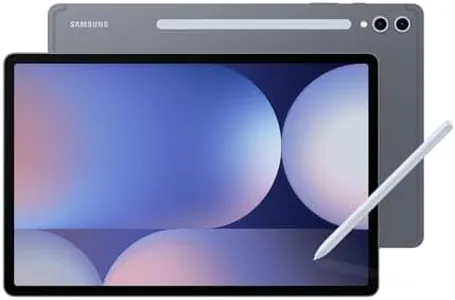
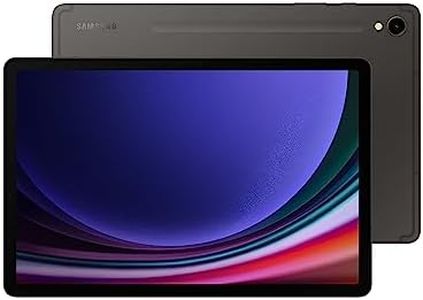
Samsung Galaxy Tab S10+ Plus 12.4” 512GB Android Tablet, Galaxy AI Tools, Circle to Search, AMOLED 2X Display, Long Battery Life, Durable Design, S Pen for Note-Taking, US Version, Moonstone Gray

Rating
9.7
Display Size
Stylus Support and Latency
Battery Life

Most important from
1287 reviews

Display Size
The AMOLED 2X display delivers exceptionally sharp, vibrant visuals with fluid responsiveness, making it ideal for drawing, watching videos, or note-taking.
Stylus Support and Latency
The S Pen offers accurate and responsive stylus interaction, enhancing the natural feel of writing and sketching.
Battery Life
Battery life impresses with long-lasting performance, supporting extended use without frequent recharging.
Screen Type (LCD, OLED, E-Ink)
The AMOLED 2X display delivers exceptionally sharp, vibrant visuals with fluid responsiveness, making it ideal for drawing, watching videos, or note-taking.
Storage Capacity
Storage flexibility is limited; while expandable via SD card, internal memory cannot be expanded, effectively capping usable space.
Portability and Build Quality
This tablet strikes a perfect balance between power and style, featuring a sleek, premium build and a contemporary Moonstone Gray finish.

The Samsung Galaxy Tab S10+ is a strong choice for a note-taking tablet thanks to its large 12.4-inch AMOLED 2X display, which offers bright, sharp visuals and smooth stylus interaction with the included S Pen. This makes writing or sketching feel natural and responsive, important for a good note-taking experience. Running Android 14, it supports a wide variety of apps, including Samsung’s Galaxy AI tools that help organize and summarize your notes automatically—handy features for students or professionals.

Storage is generous at 512 GB, enabling you to save extensive notes, documents, and media without worry. Its battery life is long-lasting, suitable for extended use throughout the day. The tablet is fairly lightweight at 1.25 pounds and has a slim profile, making it portable enough to carry around comfortably. Connectivity includes standard Wi-Fi (802.11ac), allowing for smooth cloud syncing and internet access.

The processor is a MediaTek 3.2 GHz model, which is decent but not the fastest, so very heavy multitasking or demanding apps might feel a bit slower compared to top-tier tablets. The AMOLED screen, while vibrant, may be less comfortable for reading long text compared to e-reader style displays with E-Ink. Stylus latency is low but may not match the ultra-low latency found on some specialized note-taking devices. The Galaxy Tab S10+ offers a powerful and flexible Android tablet experience with excellent note-taking capabilities, especially if you want a bright, colorful screen and AI-powered tools, though it may not be optimal if your priority is an ultra-lightweight design or the longest possible battery and reading comfort.

Rating
9.7
Display Size
Stylus Support and Latency
Battery Life

Most important from
1287 reviews

Display Size
The AMOLED 2X display delivers exceptionally sharp, vibrant visuals with fluid responsiveness, making it ideal for drawing, watching videos, or note-taking.
Stylus Support and Latency
The S Pen offers accurate and responsive stylus interaction, enhancing the natural feel of writing and sketching.
Battery Life
Battery life impresses with long-lasting performance, supporting extended use without frequent recharging.
Screen Type (LCD, OLED, E-Ink)
The AMOLED 2X display delivers exceptionally sharp, vibrant visuals with fluid responsiveness, making it ideal for drawing, watching videos, or note-taking.
Storage Capacity
Storage flexibility is limited; while expandable via SD card, internal memory cannot be expanded, effectively capping usable space.
Portability and Build Quality
This tablet strikes a perfect balance between power and style, featuring a sleek, premium build and a contemporary Moonstone Gray finish.

Buying Guide for the Best Note Taking Tablets

Choosing a note-taking tablet can make a big difference in how comfortable and productive you are with your digital notes, whether you're a student, a professional, or someone who just loves jotting things down. The best way to find a great fit is to understand which features matter most for your style of note-taking, how much portability you need, and whether you'll use the tablet for other purposes like sketching or reading. Focusing on the following core specifications will help you match a tablet to your actual needs, making your note-taking experience smooth and enjoyable.
Display SizeThe display size refers to how large the screen is and is usually measured diagonally in inches. A larger screen gives you more room to write and can feel closer to writing on real paper, which is useful for people who write a lot, take detailed notes, or annotate PDFs. On the other hand, a compact screen makes the tablet easier to carry and use with one hand, which is helpful for quick notes during meetings or classes. If you need spacious pages and often refer to multiple documents side by side, a bigger display (around 10 inches or more) is best. For casual or ultra-portable note-taking, a smaller screen (7–9 inches) might be enough.
Stylus Support and LatencyStylus support describes how well a tablet works with a pen-like tool for handwriting. Latency means the delay between your pen movement and when the line appears on the screen. Lower latency (less delay) feels more natural and makes digital writing comfortable. Pressure sensitivity allows for varied line thickness when drawing or writing, important for artists but also nice for natural handwriting. Some tablets come with a stylus that has palm rejection and tilt sensitivity, which prevents accidental marks from your hand and gives better control. If you're going to write a lot or want your notes to feel like pen-and-paper, look for a tablet with low-latency stylus support and reliable palm rejection.
Operating System and App EcosystemThe operating system (OS) controls which note-taking apps you can use, how easily you can organize or export notes, and if you can sync with other devices. Common OS options include dedicated e-note systems, or broad platforms like iOS, Android, and Windows. With a bigger app ecosystem, you get more flexibility—if you want powerful apps, cloud syncing, voice-to-text, or integration with services like calendars or to-do lists, go for an OS with well-known app stores. If you prefer simplicity and minimal distraction, dedicated note tablets with fewer apps can be ideal. Consider how much you value features, flexibility, and syncing with other tools when you decide.
Battery LifeBattery life means how long the tablet lasts on one charge when you're using it for taking notes. Some tablets, especially those with e-ink screens, can last for several days or even weeks, while those with brighter, high-resolution displays may need daily charging. If you take notes throughout long days, travel frequently, or don't want to worry about plugging in all the time, aim for longer battery life. For people who mainly use the tablet when they're near a charger, battery life might be less critical.
Screen Type (LCD, OLED, E-Ink)Screen type affects how comfortable the display is for your eyes and how realistic it feels when writing. LCD and OLED screens are bright, colorful, and fast, making them good for multitasking and working in dim light, but they can cause eye fatigue after long sessions. E-ink screens mimic real paper, are easy to read in sunlight, and are very battery-efficient, but don't show color or videos well and may have slower response times. Choose LCD or OLED if you want a multipurpose device, or e-ink if your priority is comfortable, long sessions of focused note-taking.
Storage CapacityStorage capacity is how many notes, documents, and apps you can keep on your tablet at one time. Note files and PDFs are small, so even lower storage options might be plenty for most users. However, if you'll store lots of lectures, textbooks, or audio notes, or use apps with larger file sizes, consider more storage. Some tablets allow expandable storage with memory cards for extra space if you need it in the future.
Portability and Build QualityPortability is about the tablet's weight, thickness, and how easy it is to carry around. Build quality refers to how sturdy and comfortable the device is in your hands. If you're constantly on the go, commuting, or use the tablet in different places, a lighter and slim device is easier to handle. For home or desk use, size and weight may matter less, and sturdier materials may last longer over time.
Connectivity OptionsConnectivity refers to how the tablet can connect to other devices or the internet. Wi-Fi is essential for syncing notes to the cloud or sharing with others, and Bluetooth lets you pair accessories like keyboards or headphones. Some tablets offer cellular (SIM) options for internet access anywhere, and USB ports can be helpful for transferring files. If you rely on cloud backups, sharing, or use accessories, check these options. If you'll use your tablet mostly offline, basic Wi-Fi may be enough.

FAQ

Most Popular Categories Right Now