We Use CookiesWe use cookies to enhance the security, performance, functionality and for analytical and promotional activities. By continuing to browse this site you are agreeing to our privacy policy

10 Best Printers For Dormitories 2026 in the United States


How do we rank products for you?

Our technology thoroughly searches through the online shopping world, reviewing hundreds of sites. We then process and analyze this information, updating in real-time to bring you the latest top-rated products. This way, you always get the best and most current options available.

headphones-stars

Our Top Picks

#1

Winner

Epson EcoTank ET-2800 Wireless Color All-in-One Cartridge-Free Supertank with Scan and Copy, The Ideal Basic Home Printer - White

Rating
10.0
Chosen by1,408
Print Quality
Connectivity Options
Size and Portability

Most important from
19729 reviews

Print Quality
Printed photos have excellent quality with bright and vivid colors.
Connectivity Options
Entering the WiFi password is tedious due to the small display and cumbersome input method.
Size and Portability
This printer is smaller and more lightweight than expected, taking up less desk space.
Cost of Consumables
The printer saves a ton of money on ink, making it a very cost-effective choice.
Additional Features
Filling the ink tank is surprisingly satisfying and the ink lasts significantly longer than traditional cartridges.

The Epson EcoTank ET-2800 is a wireless all-in-one printer that aims to be a practical choice for dormitory use. One of its standout features is the cartridge-free printing system. The high-capacity ink tanks significantly reduce the frequency and cost of ink replacement, making it a budget-friendly option for college students. With up to 2 years of ink included, this printer can handle up to 4,500 black and 7,500 color pages, reducing the risk of running out of ink during critical moments like exam periods. It also contributes to environmental sustainability by minimizing cartridge waste.

The print quality is commendable, thanks to Epson’s Micro Piezo Heat-Free Technology, which ensures sharp text and vibrant color photos on various paper types. The built-in scanner and copier add to its versatility, making it more than just a printer. However, print speeds are relatively slow, with 10 pages per minute for black and 5 pages per minute for color, which might be a drawback for those needing high-speed printing. The absence of automatic duplex printing is another downside, as users will have to manually flip pages for double-sided printing.

The printer's compact size and lightweight build (8.8 pounds) make it suitable for small dorm rooms, while its wired and wireless connectivity options provide flexibility in setup. Despite its strengths, the printer’s reliance on manual duplexing and relatively slow print speed may not meet the needs of those who require faster and more automated printing solutions. Nevertheless, its cost-saving ink system, high print quality, and additional scanning and copying functions make it a well-rounded option for students.

Rating
10.0
Chosen by1,408
Print Quality
Connectivity Options
Size and Portability

Most important from
19729 reviews

Print Quality
Printed photos have excellent quality with bright and vivid colors.
Connectivity Options
Entering the WiFi password is tedious due to the small display and cumbersome input method.
Size and Portability
This printer is smaller and more lightweight than expected, taking up less desk space.
Cost of Consumables
The printer saves a ton of money on ink, making it a very cost-effective choice.
Additional Features
Filling the ink tank is surprisingly satisfying and the ink lasts significantly longer than traditional cartridges.
#2

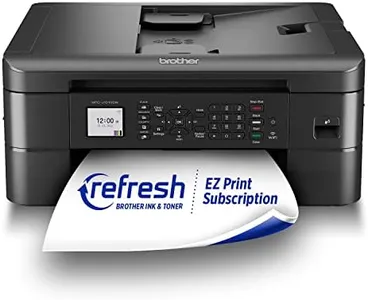
Brother DCP-L2640DW Wireless Compact Monochrome Multi-Function Laser Printer with Copy and Scan, Duplex, Mobile, Black & White | Includes Refresh Subscription Trial(1), Works with Alexa

Rating
8.5
Print Speed
Print Quality
Connectivity Options

Most important from
3130 reviews

Print Speed
Prints very fast and produces much crisper text compared to inkjet printers.
Print Quality
Excellent print quality and the toner lasts a long time, making it a cost-effective option.
Connectivity Options
The wired connection is a significant advantage, ensuring consistent performance without network issues.
Additional Features
The auto document feeder and duplex printing feature add substantial convenience for everyday tasks.

The Brother DCP-L2640DW is a laser printer that combines printing, scanning, and copying functions, making it a versatile choice for dormitories. Its compact size (15.7"D x 16.1"W x 12.5"H) makes it suitable for small spaces, although it weighs 25 pounds, which may be a bit heavy for frequent moving. It offers high print speeds of up to 36 pages per minute, which is excellent for quick document printing. The print quality is monochrome, so it’s best suited for text documents rather than color images.

The printer supports duplex printing, saving paper by printing on both sides automatically. Connectivity options are robust, including Wi-Fi, USB, and Ethernet, ensuring easy connection to various devices. Additionally, the Brother Mobile Connect App allows for printing and scanning from mobile devices, adding convenience. The cost of consumables should be considered; it uses Brother Genuine TN830 or TN830XL toner, and while the Refresh EZ Print Subscription Service can provide savings and prevent running out of toner, the subscription might be an additional ongoing cost.

Special features like the 50-page auto document feeder and energy-saving qualifications add value. However, for those needing color printing or a lighter, more portable option, this may not be the best fit.

Rating
8.5
Print Speed
Print Quality
Connectivity Options

Most important from
3130 reviews

Print Speed
Prints very fast and produces much crisper text compared to inkjet printers.
Print Quality
Excellent print quality and the toner lasts a long time, making it a cost-effective option.
Connectivity Options
The wired connection is a significant advantage, ensuring consistent performance without network issues.
Additional Features
The auto document feeder and duplex printing feature add substantial convenience for everyday tasks.
#3

Canon imageCLASS MF753Cdw - Wireless Duplex Color Laser Printer, All-in-One with Scanner, Copier, Fax, Auto Document Feeder, Mobile Ready, 3 Year Limited Warranty, 35 PPM, White

Rating
8.2
Printer Type
Print Speed
Print Quality

Most important from
589 reviews

Printer Type
This printer is a powerful workhorse, delivering professional-level features rarely seen in dorm-friendly models.
Print Speed
The print and scan speeds are notably fast, handling double-sided tasks smoothly and efficiently.
Print Quality
Prints come out brilliantly sharp with excellent color reproduction, rivaling much more expensive commercial printers.
Connectivity Options
Advanced functions like scanning directly to email and seamless mobile printing elevate its versatility beyond basic printing.
Size and Portability
Its size and weight make it better suited for dorm rooms with enough desk space rather than cramped setups.
Cost of Consumables
Toner cartridges are expensive, reflecting the typical cost of laser consumables.
Additional Features
Customizing settings through the web-based admin interface allows deep control but demands careful attention and restarts for changes to take effect.

The Canon imageCLASS MF753Cdw is a solid choice for dormitory use where multiple functions and wireless convenience matter. It’s a color laser printer that prints quickly—up to 35 pages per minute in both black and color—so it can handle daily school assignments without long waits. The print quality is good for text and basic graphics, with a maximum color resolution of 1200 x 1200 dpi, which means your documents will look sharp and professional.

It supports automatic two-sided printing and scanning, saving paper and time. Connectivity is versatile: you can print via USB, Ethernet, or wireless, and it works well with mobile devices and Chromebooks, making it easy to print directly from your phone or laptop. The printer is a bit heavy at nearly 49 pounds and is on the larger side, so it’s better suited for a dorm room with some desk space rather than tiny setups. It offers a decent paper capacity with a 250-sheet main tray and 50-sheet multipurpose tray, expandable if you need more.

Toner cartridges come in standard and high capacity, which helps reduce how often you need to replace them, though laser toner costs tend to be higher than inkjet ink. The included scanner, copier, and fax add extra value, especially for students who need to digitize or copy documents quickly. With a 3-year warranty and energy-efficient certifications, this model provides reliability and peace of mind. If you want a fast, multi-use printer with solid wireless features and don’t mind the size or slightly higher consumable costs, this model fits dormitory life well.

Rating
8.2
Printer Type
Print Speed
Print Quality

Most important from
589 reviews

Printer Type
This printer is a powerful workhorse, delivering professional-level features rarely seen in dorm-friendly models.
Print Speed
The print and scan speeds are notably fast, handling double-sided tasks smoothly and efficiently.
Print Quality
Prints come out brilliantly sharp with excellent color reproduction, rivaling much more expensive commercial printers.
Connectivity Options
Advanced functions like scanning directly to email and seamless mobile printing elevate its versatility beyond basic printing.
Size and Portability
Its size and weight make it better suited for dorm rooms with enough desk space rather than cramped setups.
Cost of Consumables
Toner cartridges are expensive, reflecting the typical cost of laser consumables.
Additional Features
Customizing settings through the web-based admin interface allows deep control but demands careful attention and restarts for changes to take effect.

Buying Guide for the Best Printers For Dormitories

Choosing the right printer for a dormitory can make a big difference in your college life. A good printer can save you time, money, and the hassle of running to the library or print shop every time you need to print an assignment. When selecting a printer, consider your specific needs, such as the volume of printing, the types of documents you'll be printing, and the space available in your dorm room. Here are some key specifications to consider when choosing a printer for a dormitory.
Printer TypePrinters generally come in two main types: inkjet and laser. Inkjet printers are versatile and can handle both text and high-quality color images, making them ideal for students who need to print a variety of documents, including photos and graphics. Laser printers, on the other hand, are known for their speed and efficiency in printing large volumes of text documents. If you primarily need to print essays and reports, a laser printer might be the better choice. Consider what you'll be printing most often to decide which type suits your needs.
Print SpeedPrint speed is measured in pages per minute (PPM) and indicates how quickly a printer can produce documents. This is important if you often find yourself printing large documents or multiple copies in a hurry. For dormitory use, a print speed of 10-20 PPM is generally sufficient for most students. If you anticipate needing to print large volumes quickly, look for a printer with a higher PPM. However, if your printing needs are minimal, a lower PPM will suffice and may save you some money.
Print QualityPrint quality is measured in dots per inch (DPI) and determines how sharp and clear your printed documents will be. Higher DPI values mean better print quality, which is important for printing detailed images or professional-looking documents. For general text documents, a DPI of 600x600 is usually adequate. If you need to print high-quality photos or graphics, look for a printer with a higher DPI, such as 1200x1200 or more. Consider the types of documents you'll be printing most often to determine the necessary print quality.
Connectivity OptionsModern printers offer various connectivity options, including USB, Wi-Fi, and Bluetooth. Wi-Fi-enabled printers allow you to print wirelessly from your laptop, smartphone, or tablet, which is convenient in a dormitory setting where space is limited. Some printers also support mobile printing apps, making it even easier to print from your devices. If you prefer a more traditional setup, a USB connection might be sufficient. Consider your preferred method of connecting to the printer and choose one that offers the necessary options.
Size and PortabilityDorm rooms are often small, so the size and portability of a printer are important factors to consider. Compact and lightweight printers are ideal for dormitories as they take up less space and can be easily moved if needed. Measure the available space in your room and look for a printer that fits comfortably without crowding your desk or storage area. If you need to transport the printer frequently, consider a model that is easy to carry.
Cost of ConsumablesThe cost of consumables, such as ink or toner, can add up over time. It's important to consider the long-term costs associated with the printer you choose. Inkjet printers typically have lower upfront costs but higher ongoing costs for ink cartridges. Laser printers, while more expensive initially, often have lower per-page printing costs due to the longer-lasting toner cartridges. Research the cost and availability of replacement cartridges for the printer models you're considering to ensure they fit within your budget.
Additional FeaturesSome printers come with additional features that can be useful in a dormitory setting. These may include scanning, copying, and faxing capabilities, as well as duplex (double-sided) printing, which can save paper. Multifunction printers (MFPs) combine several functions into one device, saving space and providing added convenience. Consider which additional features are important to you and whether they justify any extra cost or space requirements.

FAQ

Most Popular Categories Right Now