We Use CookiesWe use cookies to enhance the security, performance, functionality and for analytical and promotional activities. By continuing to browse this site you are agreeing to our privacy policy

10 Best Razer Gaming Mice 2026 in the United States
How do we rank products for you?

Our technology thoroughly searches through the online shopping world, reviewing hundreds of sites. We then process and analyze this information, updating in real-time to bring you the latest top-rated products. This way, you always get the best and most current options available.

headphones-stars

Our Top Picks

#1

Winner

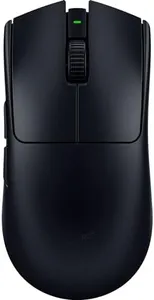
Razer Viper V3 Pro Wireless Esports Gaming Mouse: Symmetrical - 54g Lightweight - 8K Polling - 35K DPI Optical Sensor - Gen3 Switches - 8 Programmable Buttons - 95 Hr Battery - Black

Rating
10.0
Chosen by1,171
Ergonomics
Wired vs. Wireless
Sensor Type

Most important from
2005 reviews

Ergonomics
The mouse feels incredibly light and comfortable, making it perfect for long gaming sessions without causing hand fatigue.
Wired vs. Wireless
Wireless connectivity is seamless and ultra-responsive, with no noticeable lag, rivaling wired mouse performance.
Sensor Type
The advanced sensor ensures precise aiming and fast response times, elevating gameplay accuracy significantly.
Programmable Buttons
Side buttons are solid and reliable, avoiding issues experienced with previous mice and enhancing in-game control.
DPI (Dots Per Inch)
The ultra-fast scroll wheel responsiveness is ideal for fast-paced games requiring quick edits and actions.

The Razer Viper V3 Pro Wireless is a lightweight, high-performance gaming mouse designed with esports players in mind. Weighing just 54 grams, its symmetrical shape suits both left- and right-handed users and allows fast, precise movements without tiring your hand. It features an advanced Focus Pro 35K optical sensor that tracks accurately even on tricky surfaces like glass, with an impressive maximum DPI of 35,000 for highly sensitive control. The mouse supports an ultra-fast 8000 Hz polling rate, which means it communicates with your computer extremely quickly, reducing any delay during gameplay.

With 8 programmable buttons, you can customize commands to fit your play style, making complex actions easier to perform. The Gen-3 optical switches promise a long lifespan of 90 million clicks with no double-click issues, ensuring reliability and quick response times. As a wireless mouse, it uses Razer’s HyperSpeed technology, which offers stable, low-latency connections similar to wired mice, even in busy tournament settings. Battery life is another strong point, offering up to 95 hours on a single charge—great for extended gaming sessions without interruptions. The build quality is solid yet lightweight, focusing on speed and comfort rather than heavy durability.

The very lightweight design might feel less substantial for those who prefer a heavier mouse. Since it’s wireless, occasional charging is needed, which might be inconvenient for some. Also, the premium features and advanced technology come at a higher price point. This mouse is best suited for competitive gamers who want top-tier precision, speed, and wireless freedom in a lightweight package. Casual gamers might find it more advanced and costly than necessary, but for esports enthusiasts, it hits most of the right notes.

Rating
10.0
Chosen by1,171
Ergonomics
Wired vs. Wireless
Sensor Type

Most important from
2005 reviews

Ergonomics
The mouse feels incredibly light and comfortable, making it perfect for long gaming sessions without causing hand fatigue.
Wired vs. Wireless
Wireless connectivity is seamless and ultra-responsive, with no noticeable lag, rivaling wired mouse performance.
Sensor Type
The advanced sensor ensures precise aiming and fast response times, elevating gameplay accuracy significantly.
Programmable Buttons
Side buttons are solid and reliable, avoiding issues experienced with previous mice and enhancing in-game control.
DPI (Dots Per Inch)
The ultra-fast scroll wheel responsiveness is ideal for fast-paced games requiring quick edits and actions.
#2

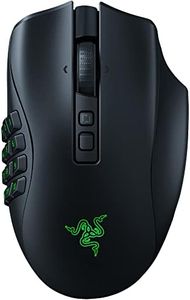
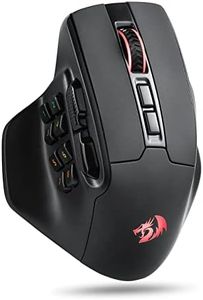
Razer Naga V2 Pro Wireless MMO Gaming Mouse: 19+1 Programmable Buttons w/Swappable Side Plates - HyperScroll Pro Wheel - Focus Pro 30K Optical Sensor - Optical Mouse Switches Gen-3-300 Hr Battery

Rating
10.0
Programmable Buttons
Sensor Type
Ergonomics

Most important from
1918 reviews

Programmable Buttons
The interchangeable side plates with 2, 6, and 12-button layouts offer incredible versatility, allowing seamless adaptation to different games and playstyles.
Sensor Type
The Focus Pro 30K optical sensor combined with third-generation optical switches delivers precise tracking and ultra-fast response times, enhancing overall gaming performance.
Ergonomics
The ergonomic design ensures comfort during extended gaming sessions, with a shape that supports the hand and reduces fatigue.
Wired vs. Wireless
Wireless connectivity is stable and reliable, featuring both 2.4GHz and Bluetooth modes, with impressive battery life lasting up to 150 hours on wireless and 300 hours on Bluetooth.
Build Quality
While heavier than some other gaming mice, the weight feels justified by the added features and build quality, though it might take some getting used to.

The Razer Naga V2 Pro is designed mainly for MMO and MMO-like gaming thanks to its impressive 19+1 programmable buttons, which you can customize by swapping between three magnetic side plates (12, 6, or 2-button layouts). This flexibility lets you tailor the mouse to different game styles or personal preferences, making it versatile beyond just MMO titles. It features the Focus Pro 30K optical sensor, offering precise and smooth tracking even on tricky surfaces like glass, and supports high DPI sensitivity for accurate control. The mouse uses Razer’s Optical Mouse Switches Gen-3, which provide fast response times (0.2ms) and a durable lifespan (up to 90 million clicks) without double-click issues, important for competitive gaming. The HyperScroll Pro wheel adds another layer of customization with adjustable resistance and steps, helping with quick weapon switching or smooth scrolling depending on what you need.

The wireless connectivity is strong, using Razer HyperSpeed technology that's faster and more stable than typical wireless mice, with a battery life lasting up to 150 hours on this mode or up to 300 hours via Bluetooth. You can recharge it via USB-C, a dedicated dock, or optional wireless charging. While the mouse aims for comfort and control, its slightly larger size and weight (7.7 ounces) may not suit users who prefer very lightweight options for fast flicks. Also, the extensive button layout might feel overwhelming if you’re not into MMOs or don’t need so many programmable keys.

RGB lighting adds a nice visual touch, though it may slightly impact battery life if used heavily. This mouse is a feature-packed tool for serious MMO or MMO-like gamers who want deep customization and wireless freedom, but casual gamers or those who prioritize ultra-lightweight design might find it less ideal.

Rating
10.0
Programmable Buttons
Sensor Type
Ergonomics

Most important from
1918 reviews

Programmable Buttons
The interchangeable side plates with 2, 6, and 12-button layouts offer incredible versatility, allowing seamless adaptation to different games and playstyles.
Sensor Type
The Focus Pro 30K optical sensor combined with third-generation optical switches delivers precise tracking and ultra-fast response times, enhancing overall gaming performance.
Ergonomics
The ergonomic design ensures comfort during extended gaming sessions, with a shape that supports the hand and reduces fatigue.
Wired vs. Wireless
Wireless connectivity is stable and reliable, featuring both 2.4GHz and Bluetooth modes, with impressive battery life lasting up to 150 hours on wireless and 300 hours on Bluetooth.
Build Quality
While heavier than some other gaming mice, the weight feels justified by the added features and build quality, though it might take some getting used to.
#3

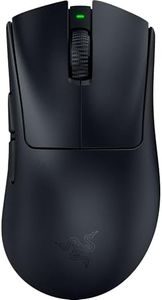
Razer DeathAdder V4 Pro Wireless Gaming Mouse: 56g Lightweight - HyperSpeed Wireless Gen-2 - Optical Scroll Wheel - Optical Switches Gen-4 - Focus Pro 45K Sensor Gen-2 - Up to 150 Hr Battery - Black

Rating
8.5
Build Quality
Ergonomics
Wired vs. Wireless

Most important from
349 reviews

Build Quality
Delivers fantastic gaming performance paired with excellent build quality, reflecting a premium feel.
Ergonomics
Lightweight design and ergonomic shape provide exceptional comfort during extended gaming sessions.
Wired vs. Wireless
Battery life can be limited at the highest polling rates, lasting around six hours, which may require more frequent charging.

The Razer DeathAdder V4 Pro Wireless is a strong choice for gamers seeking a lightweight, high-performance mouse. Weighing just 56 grams, it’s designed for fast, precise movements without causing hand fatigue, thanks to its ergonomic shape. Its Focus Pro 45K optical sensor offers a very high DPI of 45,000, allowing extremely accurate tracking on various surfaces, which is excellent for competitive gameplay. The polling rate reaches up to 8000 Hz in wireless mode, meaning the mouse reacts very quickly to your movements, minimizing lag.

This mouse uses Razer’s HyperSpeed Wireless Gen-2 technology, which improves connection stability and lowers latency compared to older models, so you get a reliable wireless experience that’s close to wired performance. It also has an impressive battery life—up to 150 hours on a standard polling rate, which is great for long gaming sessions without frequent recharging. The optical scroll wheel adds durability and precision, while the Optical Mouse Switches Gen-4 promise a crisp click feel and long lifespan, rated for over 100 million clicks.

In terms of customization, the mouse includes programmable buttons, enhancing its usefulness for a variety of game types and personal preferences. The build quality is solid, with a smooth-touch finish that feels comfortable and premium. The mouse is designed specifically for right-handed users, so left-handed gamers will need to look elsewhere. For gamers who want a top-tier wireless gaming mouse that balances speed, precision, and comfort, the DeathAdder V4 Pro Wireless offers reliable wireless performance without sacrificing accuracy or battery life.

Rating
8.5
Build Quality
Ergonomics
Wired vs. Wireless

Most important from
349 reviews

Build Quality
Delivers fantastic gaming performance paired with excellent build quality, reflecting a premium feel.
Ergonomics
Lightweight design and ergonomic shape provide exceptional comfort during extended gaming sessions.
Wired vs. Wireless
Battery life can be limited at the highest polling rates, lasting around six hours, which may require more frequent charging.

Buying Guide for the Best Razer Gaming Mice

Choosing the right gaming mouse can significantly enhance your gaming experience. The right mouse will offer comfort, precision, and the right features to match your gaming style. When selecting a gaming mouse, consider the following key specifications to ensure you get the best fit for your needs.
DPI (Dots Per Inch)DPI measures the sensitivity of the mouse. A higher DPI means the cursor moves further on the screen with less physical movement of the mouse. This is important for fast-paced games where quick reflexes are crucial. For precision tasks, a lower DPI might be preferable. Gamers who play first-person shooters (FPS) often prefer a DPI range of 400-800 for better control, while those who play real-time strategy (RTS) or massively multiplayer online (MMO) games might opt for higher DPI settings, such as 1600-3200, for faster movements.
Polling RatePolling rate is how often the mouse reports its position to the computer, measured in Hertz (Hz). A higher polling rate means more frequent updates, leading to smoother and more responsive cursor movements. This is crucial for competitive gaming where every millisecond counts. Common polling rates are 125Hz, 500Hz, and 1000Hz. For most gamers, a polling rate of 500Hz or 1000Hz is ideal, as it provides a good balance between responsiveness and performance.
ErgonomicsErgonomics refers to how comfortable the mouse is to use over extended periods. This includes the shape, size, and weight of the mouse. It's important to choose a mouse that fits your hand size and grip style (palm, claw, or fingertip grip). A well-designed ergonomic mouse can prevent strain and fatigue during long gaming sessions. Try different shapes and sizes to see what feels most comfortable for you.
Programmable ButtonsProgrammable buttons allow you to customize the mouse to perform specific actions or macros, which can be a significant advantage in gaming. This is particularly useful in MMO and MOBA games where multiple commands need to be executed quickly. The number of programmable buttons varies, with some mice offering just a few extra buttons and others providing over a dozen. Consider how many additional buttons you need based on the complexity of the games you play.
Wired vs. WirelessThe choice between wired and wireless mice depends on your preference for convenience versus performance. Wired mice generally offer a more stable connection and lower latency, which is crucial for competitive gaming. Wireless mice provide more freedom of movement and a cleaner setup but may have slight latency and require battery management. Recent advancements have minimized the performance gap, so if you prefer a clutter-free desk, a high-quality wireless mouse can be a great choice.
Sensor TypeGaming mice typically use optical or laser sensors. Optical sensors are known for their accuracy and reliability on most surfaces, while laser sensors can work on a wider range of surfaces, including glass. However, laser sensors can sometimes be too sensitive, leading to jittery movements. For most gamers, an optical sensor is the preferred choice due to its precision and consistency.
Build QualityBuild quality refers to the materials and construction of the mouse. A well-built mouse will be durable and withstand the rigors of intense gaming. Look for mice with high-quality switches, sturdy materials, and a good warranty. This ensures that your investment will last and perform well over time.
RGB LightingRGB lighting is an aesthetic feature that allows you to customize the look of your mouse with different colors and effects. While it doesn't impact performance, it can enhance your gaming setup and provide a more immersive experience. If you enjoy personalizing your gear, look for a mouse with customizable RGB lighting options.

FAQ

Most Popular Categories Right Now