We Use CookiesWe use cookies to enhance the security, performance, functionality and for analytical and promotional activities. By continuing to browse this site you are agreeing to our privacy policy

8 Best Signage Printers 2026 in the United States
How do we rank products for you?

Our technology thoroughly searches through the online shopping world, reviewing hundreds of sites. We then process and analyze this information, updating in real-time to bring you the latest top-rated products. This way, you always get the best and most current options available.

headphones-stars

Our Top Picks

#1

Winner

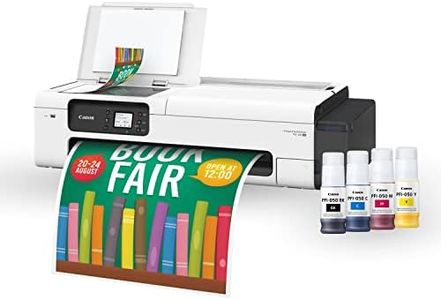
Canon imagePROGRAF TC-20M 24" Large Format Poster & Plotter Printer - Scanner Included - Enlarge Copies - Compact - Automatic Roll & Cut Sheet Paper Feeder, Ships with 280ml of Ink - USB, Wi-Fi, LAN

Rating
10.0
Chosen by1,120
Print Resolution
Print Speed
Media Compatibility

Most important from
28 reviews

Print Resolution
The Canon imagePROGRAF TC-20M produces vibrant and true-to-life colors, making posters eye-catching and attention-grabbing.
Print Speed
High-speed printing capabilities ensure meeting tight deadlines without compromising on quality.
Media Compatibility
The printer handles a wide range of media types and sizes, allowing for experimentation with different materials.

The Canon imagePROGRAF TC-20M is a versatile and compact large-format printer ideal for various signage needs, such as posters, blueprints, and promotional materials. Its 4-color ink bottle system ensures high print quality with a resolution of 2400 x 1200 dpi, producing vibrant and crisp images that are water and highlighter-resistant. This makes it suitable for both indoor and some outdoor uses where document durability is essential.

The printer supports both roll-fed and cut-sheet media, up to 24 inches wide, offering great flexibility for different print jobs and media types. The built-in flatbed scanner is a standout feature, allowing users to digitize originals and enlarge smaller documents without needing a computer. The print speeds (20 ppm for monochrome and 15 ppm for color) may not be the fastest for heavy-duty printing tasks, and the lack of duplex printing may be a limitation for some users. Connectivity options are robust, including Wi-Fi, USB, and Ethernet, ensuring easy integration into various environments.

Despite its compact design, the printer has a relatively large footprint, which might not be ideal for very small office spaces. Maintenance and durability seem manageable with Canon’s ink system and the machine’s construction. Software compatibility is broad, supporting both smartphones and PCs, which is helpful for users who need to print from different devices. The Canon imagePROGRAF TC-20M would be well-suited for small to medium-sized businesses, educational institutions, and creative professionals who need reliable and high-quality large-format prints without the necessity for constant heavy-duty printing.

Rating
10.0
Chosen by1,120
Print Resolution
Print Speed
Media Compatibility

Most important from
28 reviews

Print Resolution
The Canon imagePROGRAF TC-20M produces vibrant and true-to-life colors, making posters eye-catching and attention-grabbing.
Print Speed
High-speed printing capabilities ensure meeting tight deadlines without compromising on quality.
Media Compatibility
The printer handles a wide range of media types and sizes, allowing for experimentation with different materials.
#2

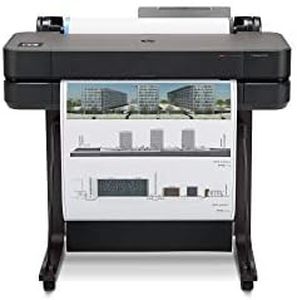
HP DesignJet T630 Large Format Wireless Plotter Color Printer - 24", with Auto Sheet Feeder, Media Bin & Stand (5HB09A),Black

Rating
9.7
Print Resolution
Print Speed
Media Compatibility

Most important from
123 reviews

Print Resolution
The printer delivers reliable, high-quality output with crisp, sharp prints ideal for architectural and technical drawings.
Print Speed
Print speed is sufficient to keep projects moving without long waits, balancing quality and efficiency well.
Media Compatibility
While it lacks duplex printing and longer roll capacity, its versatility with media types and sizes suits diverse professional printing needs.
Durability and Maintenance
Maintenance is cost-effective and user-friendly, using less ink for cleaning compared to competitors and reducing downtime.
Software Compatibility
Connectivity options and software support make printing from various devices, including smartphones, straightforward and convenient.

The HP DesignJet T630 is a solid choice for professionals like architects, engineers, and designers who need clear, sharp line drawings and large color prints up to 24 inches wide. It offers excellent print resolution (2400 x 1200 dpi) ensuring detailed and crisp output, especially good for technical drawings and maps. Print speed is decent for its class, with about 30 seconds per A1/D size page and up to 76 prints per hour, which helps keep projects moving without long waits. This model supports both roll and sheet media up to 24 inches wide, with an automatic sheet feeder and cutter that simplify switching between media types and sizes—convenient for handling diverse print jobs.

The ink system uses a combination of dye-based colors and pigment black, balancing vibrant colors with fade-resistant text, though ink cartridges might be a bit pricey compared to smaller printers. Connectivity options are strong, including Wi-Fi, Ethernet, and USB, plus the HP Smart app and HP Click software make printing from smartphones or computers easy, even remotely. The printer includes a stand, media bin, and an intuitive touch control, but at 64 pounds and with a footprint around 40" wide, it requires a dedicated space.

Maintenance is user-friendly and efficient, using much less ink for routine cleaning than competitors, which helps reduce costs and downtime. While it is not the fastest printer for very high volume color printing and lacks duplex printing, its accuracy, media versatility, and smart software make it well-suited for signage and technical prints in professional offices.

Rating
9.7
Print Resolution
Print Speed
Media Compatibility

Most important from
123 reviews

Print Resolution
The printer delivers reliable, high-quality output with crisp, sharp prints ideal for architectural and technical drawings.
Print Speed
Print speed is sufficient to keep projects moving without long waits, balancing quality and efficiency well.
Media Compatibility
While it lacks duplex printing and longer roll capacity, its versatility with media types and sizes suits diverse professional printing needs.
Durability and Maintenance
Maintenance is cost-effective and user-friendly, using less ink for cleaning compared to competitors and reducing downtime.
Software Compatibility
Connectivity options and software support make printing from various devices, including smartphones, straightforward and convenient.
#3

HP DesignJet T210 Large Format 24-inch Plotter Printer, with Modern Office Design (8AG32A)

Rating
9.7
Print Resolution
Media Compatibility
Software Compatibility

Most important from
692 reviews

Print Resolution
Setup can be tricky, but once configured, it delivers vibrant and accurate prints, especially when set to 'FINE' mode.
Media Compatibility
An excellent choice for canvas prints, though the automatic cutter needs adjustment for such materials.
Software Compatibility
Despite initial setup hurdles, using design software directly ensures seamless printing without issues.

The HP DesignJet T210 Large Format 24-inch Plotter Printer is well-suited for professionals needing precise and crisp printouts, such as architects, engineers, and construction professionals. It excels in printing technical line drawings, maps, and renders due to its high print resolution of 2400 x 1200 dpi, ensuring sharp detail and clear text.

A notable strength of this printer is its ability to handle large media sizes, accommodating up to 24-inch wide media rolls and sheets up to 13 x 19 inches. This makes it a versatile choice for various large-format projects. The media handling features include sheet feed, roll feed, and an automatic horizontal cutter, allowing users to print multi-size projects seamlessly without manual switching.

In terms of speed, the T210 offers a moderate pace, with 1.3 pages per minute for both monochrome and color prints, translating to about 59 A1/D size prints per hour. It incorporates cost-effective efficiencies by using significantly less ink for routine maintenance compared to other plotters, which can be a big plus for budget-conscious users.

Connectivity is robust with options including Wi-Fi, USB, and Ethernet, alongside support for printing from various devices using apps like HP Smart. This allows convenient and flexible operation from almost anywhere.

However, the printer's weight of 47 pounds and size at 11"D x 40"W x 17"H make it a bulky choice, requiring ample space in an office setting. While it lacks features like dual-sided printing, it compensates with a user-friendly interface and helpful software like HP Click for poster creation.

Durability and maintenance are backed by a one-year limited hardware warranty and accessible customer support. The HP DesignJet T210 is a reliable option for those needing precise large-format prints, although it may not be ideal for users seeking faster print speeds or advanced features like automatic duplexing.

Rating
9.7
Print Resolution
Media Compatibility
Software Compatibility

Most important from
692 reviews

Print Resolution
Setup can be tricky, but once configured, it delivers vibrant and accurate prints, especially when set to 'FINE' mode.
Media Compatibility
An excellent choice for canvas prints, though the automatic cutter needs adjustment for such materials.
Software Compatibility
Despite initial setup hurdles, using design software directly ensures seamless printing without issues.

Buying Guide for the Best Signage Printers

Choosing the right signage printer is crucial for businesses that need to produce high-quality signs, banners, and other large-format prints. The right printer can help you create eye-catching and durable signage that effectively communicates your message. When selecting a signage printer, it's important to consider several key specifications to ensure you get the best fit for your needs. Here are the most important specs to consider and how to navigate them.
Print ResolutionPrint resolution refers to the level of detail a printer can produce, measured in dots per inch (DPI). Higher DPI means finer detail and sharper images. For high-quality signage, a resolution of at least 1200 DPI is recommended. If your signage requires detailed graphics or text, opt for a higher resolution. For simpler designs or larger prints viewed from a distance, a lower resolution may suffice.
Print SpeedPrint speed indicates how quickly a printer can produce prints, usually measured in square feet per hour (sq ft/hr). Faster print speeds are beneficial for high-volume production environments. If you need to produce a large number of signs quickly, look for a printer with a higher print speed. For smaller operations or less frequent printing, a slower speed may be acceptable.
Media CompatibilityMedia compatibility refers to the types of materials a printer can handle, such as vinyl, fabric, paper, or canvas. This is important because different signage applications may require different materials. Ensure the printer you choose can handle the media types you plan to use. If you need versatility, look for a printer that supports a wide range of media.
Ink TypeInk type affects the durability, color quality, and environmental impact of your prints. Common ink types include solvent, eco-solvent, UV-curable, and latex. Solvent inks are durable and weather-resistant, making them ideal for outdoor signage. Eco-solvent inks are less harmful to the environment. UV-curable inks dry quickly and are suitable for a variety of materials. Latex inks are water-based and environmentally friendly. Choose the ink type based on your specific needs, such as outdoor durability or environmental considerations.
Printer SizePrinter size determines the maximum width of the media that can be printed. Larger printers can handle wider media, which is important for large-format signage. Consider the maximum print width you need for your projects. If you frequently produce large banners or signs, a wider printer is necessary. For smaller signs or posters, a narrower printer may be sufficient.
Durability and MaintenanceDurability and maintenance refer to the printer's build quality and the ease of keeping it in good working condition. A durable printer will have a longer lifespan and require fewer repairs. Regular maintenance is necessary to ensure consistent print quality. Look for printers with user-friendly maintenance features and consider the availability of support and replacement parts. If you need a reliable printer for heavy use, prioritize durability and ease of maintenance.
Software CompatibilitySoftware compatibility involves the printer's ability to work with various design and print management software. This is important for ensuring a smooth workflow and maximizing the printer's capabilities. Check if the printer is compatible with the software you use or plan to use. If you need advanced design features or specific software integration, ensure the printer supports those requirements.

FAQ

Most Popular Categories Right Now