10 Best Speakers For Computer 2026 in the United States


Related Products
Up to 8% off

Our technology thoroughly searches through the online shopping world, reviewing hundreds of sites. We then process and analyze this information, updating in real-time to bring you the latest top-rated products. This way, you always get the best and most current options available.

Our Top Picks
Winner
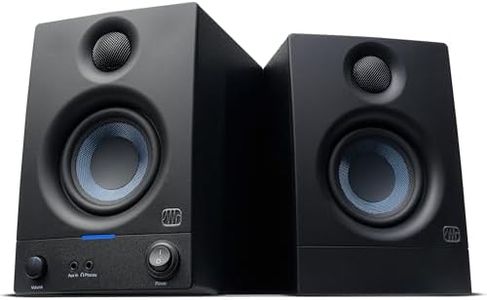
PreSonus Eris 3.5 Studio Monitors, Pair — Powered, Active Monitor Speakers for Near Field Music Production, Desktop Computer, Hi-Fi Audio
Most important from
1479 reviews
The PreSonus Eris 3.5 Studio Monitors are designed for users who need high-quality sound for near field music production or hi-fi audio listening. These compact speakers offer a commendable sound quality with their woven-composite woofers delivering tight bass and clear overall audio. With 50 Watts of Class AB dual amplification, they provide ample volume while maintaining a balanced tonal clarity suitable for desk or bookshelf placement. Connectivity options are robust, featuring balanced ¼-inch TRS inputs for professional devices, unbalanced RCA inputs for consumer electronics, and a front-panel ⅛-inch TRS stereo aux input for easy connection to smartphones.
Additional features include high- and low-frequency tuning controls for customizing audio output to match room size and speaker placement, and a front-panel headphone output for convenient private listening. The speakers also support expansion with the Eris Sub 8BT subwoofer for enhanced low-end and Bluetooth connectivity, adding versatility to the setup. A power-saving mode is included, which can be useful to save energy when the speakers are idle.
On the downside, while the Eris 3.5 offers excellent sound quality and customization options, they may be considered overkill for basic desktop computer use without the need for professional audio quality or production capabilities. Additionally, users looking for wireless options might find the need for the companion subwoofer to enable Bluetooth connectivity somewhat limiting. Nonetheless, for those who prioritize high-fidelity sound and customizable audio settings, the PreSonus Eris 3.5 Studio Monitors stand out as a strong choice.
Most important from
1479 reviews
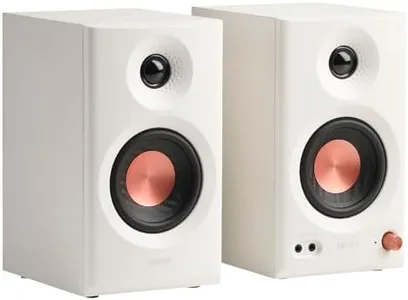
Edifier MR3 Powered Studio Monitor Speakers, Hi-Res Audio Certified Bluetooth V5.4 Active Bookshelf Loudspeakers, 2.0 Computer Speaker with Headphone Output RCA AUX Balanced TRS Input (White)
Most important from
483 reviews
The Edifier MR3 Powered Studio Monitor Speakers offer impressive sound quality thanks to their Hi-Res Audio certification, which means they deliver clear and accurate sound across a wide frequency range. With 36 watts of total power (18W per speaker), they provide enough volume for most home or small studio setups without distortion. Their 3.5-inch mid-low drivers and 1-inch tweeters make music, video editing, or gaming sound detailed and balanced. Connectivity is versatile, including Bluetooth 5.4 for wireless use and multiple wired options like RCA, AUX, and balanced TRS inputs, so you can connect various devices at once. The ability to switch between music, monitor, and custom sound modes, plus the option to fine-tune audio via the EDIFIER ConneX app, is a handy feature for tailoring sound to your preference.
Design-wise, these speakers have a sturdy MDF wood cabinet to reduce unwanted vibrations and distortion, and their size is compact enough to fit comfortably on a desk or shelf without taking up too much space. They also include a headphone output for private listening. On the downside, while the speakers deliver clear sound, their peak volume and bass depth might be limited for those wanting very powerful or bass-heavy audio. Also, setup might be a little more involved if you want to use the app's advanced controls. These speakers are ideal for users seeking high-quality, accurate sound for tasks like audio production, gaming, or everyday computer use, especially in smaller rooms or home studios.
Most important from
483 reviews
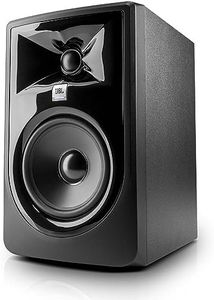
JBL Professional 305PMkII 5-Inch 2-Way Powered, Active Monitor Speaker for Near Field Music Production, Studio Monitor, Desktop Computer, Hi-Fi Audio. Sold Individually, Black
Most important from
1728 reviews
The JBL Professional 305PMkII is a 5-inch 2-way powered monitor speaker that stands out for its impressive sound quality, making it a great option for those seeking high-fidelity audio, especially in studio or near-field music production settings. With an audio output power of 82 watts, it delivers robust sound with optimized damping for superior transient response and deep bass, thanks to the updated HF and LF transducers. The new Boundary EQ feature helps maintain a neutral low-frequency response, even when the speaker is placed near walls or on a desktop, ensuring consistent audio quality.
Connectivity is limited to wired options, which may not be ideal for those looking for Bluetooth or wireless capabilities in a computer speaker. Its design, while sleek and modern, is more suited for studio environments rather than casual home use, and it's sold individually, so users looking for a stereo pair will need to purchase two units.
The speaker’s size is compact enough for desktop use, yet its 10.12-pound weight and 11.75-inch height mean it requires some space. The device’s design is not water-resistant, aligning with its indoor usage focus. Users seeking additional features such as remote control or wireless connectivity might find the lack of such options a limitation. The 305PMkII excels in providing a broad 'sweet spot,' allowing for accurate sound reproduction even off-axis, which is beneficial for mixing and audio production tasks. However, as a computer speaker for general use, it might be overkill unless top-notch audio quality is a primary requirement. This JBL speaker is best suited for audiophiles or professionals in need of precise audio monitoring rather than general computer audio needs.
Most important from
1728 reviews
Buying Guide for the Best Speakers For Computer
When choosing speakers for your computer, it's important to consider several key specifications to ensure you get the best audio experience for your needs. Whether you're using them for gaming, music, movies, or general use, understanding these specs will help you make an informed decision. Here are the key specifications to look out for and how to navigate them.FAQ
Most Popular Categories Right Now


