10 Best Thermal Transfer Label Printers 2026 in the United States

Related Products
Up to 10% off

Our technology thoroughly searches through the online shopping world, reviewing hundreds of sites. We then process and analyze this information, updating in real-time to bring you the latest top-rated products. This way, you always get the best and most current options available.

Our Top Picks
Winner
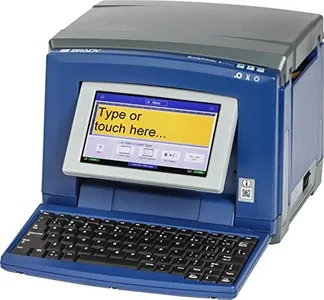
Brady S3100 Sign and Label Printer with Workstation Safety and Facility ID Software - Prints Industrial Labels and Facility Signs (S3100-W)
Most important from
8 reviews
The Brady S3100 Sign and Label Printer is designed for industrial environments, offering a robust solution for printing labels and signs with clear visibility. Its print resolution of 300 dpi ensures crisp text and images, catering well to the requirements of industrial labeling. The printer achieves a print speed of 3 inches per second in monochrome, which is suitable for moderate volume needs but might not suffice for high-demand settings.
The maximum label width of 4.25 inches provides flexibility for various labeling tasks, from small tags to broader signs. Connectivity is straightforward with USB, enabling easy integration with most computer systems, though some users might desire wireless options for added convenience. The build quality of the S3100 is solid, designed to withstand industrial wear and tear, which reflects its suitability for harsh environments.
The printer stands out with its automatic label setup, minimizing downtime by eliminating manual calibration. This feature, along with its 'walk up and print' functionality, enhances user-friendliness, making it accessible even to those unfamiliar with technical equipment. Compatibility with Brady B30 Series Continuous Labeling Tape adds versatility, allowing users to choose from various tape styles and widths for different applications. However, the printer's weight of over 8 kg and lack of color printing options may be considered drawbacks for some users. It's ideal for facilities seeking a reliable, specialized labeling tool, though those requiring high-speed or color printing might look elsewhere.
Most important from
8 reviews
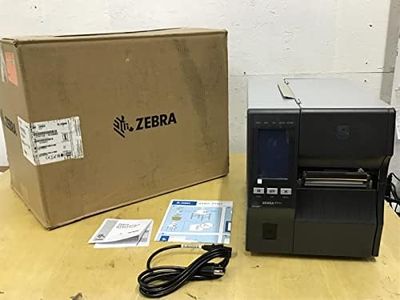
ZEBRA ZT411 Thermal Transfer Industrial Printer 203 dpi Print Width 4 Inches Features Serial, USB, Ethernet, and Bluetooth Connecting Options ZT41142-T010000Z
The Zebra ZT411 Thermal Transfer Industrial Printer is designed for demanding environments such as manufacturing, transportation, healthcare, and retail. With a print resolution of 203 dpi and a maximum print speed of 14 inches per second, this printer effectively meets the needs of businesses that require efficient and high-quality label printing. One of its strengths is its versatility in connectivity options, as it supports USB, serial, Ethernet, and Bluetooth. This makes it easy to integrate into various setups.
The ZT411 is built to last, featuring a sturdy construction with a bi-fold door that allows it to fit into tight spaces, making it ideal for industrial use. It operates with thermal transfer technology, utilizing a ribbon for long-lasting images, but it can also print without a ribbon using direct thermal media. This dual capability increases its flexibility for different labeling needs.
In terms of usability, the printer is easy to set up and manage, which can be a plus for businesses that may not have dedicated IT staff. Additionally, its Energy Star certification indicates that it is energy-efficient, potentially saving costs over its lifespan by reducing electricity usage.
However, there are some considerations. The printer is relatively heavy at 40 pounds, which might make it cumbersome to move or reposition. The print speed, while decent, might not compete with faster models available in the market, especially for those needing high-volume outputs. Its monochrome output may also limit its use for businesses requiring colorful labels.
The Zebra ZT411 is a solid choice for businesses looking for a reliable and robust thermal transfer printer that can handle various applications. Its connectivity options and ease of use stand out, but potential buyers should consider its weight and monochrome printing capabilities when making a decision.
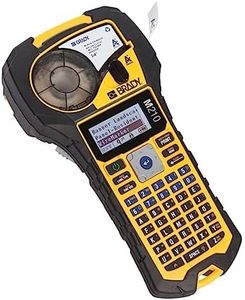
Brady M210 Portable Label Printer with Rubber Bumpers, Multi-Line Print, 6 to 40 Point Font (Replaces BMP21-PLUS Printer)
Most important from
1075 reviews
The Brady M210 Portable Label Printer is designed for users who need a rugged, on-the-go labeling solution, especially on tough job sites. Its print resolution of 203 x 203 dpi is standard for clear, readable monochrome labels but not suited for very fine detail or color prints. The print speed is quite slow at about 0.39 pages per minute, so it’s best for small batches rather than high-volume labeling. It handles narrow labels up to 0.75 inches wide, which is typical for wire, panel, and safety labels, matching the needs of industrial and safety labeling tasks. Connectivity is limited to USB, meaning you’ll need to connect it directly to a computer or compatible device; no wireless options are available.
One of its standout features is durability—it meets military-grade standards for shock and vibration resistance, including withstanding 6-foot drops, making it reliable in rough environments. The printer is easy to use with hot keys, an LCD screen, and pre-loaded design guides that speed up label creation without needing complex software. It supports multiple barcode types and tracks label material remaining, helping prevent mid-job surprises.
Ribbon and media compatibility focus on Brady's own M21 label materials, which are reliable but a bit restrictive if you want third-party options. This printer is strong in toughness, user-friendliness, and producing clear safety and industrial labels; however, it is not the fastest or most versatile in connectivity and label size.
Most important from
1075 reviews
Buying Guide for the Best Thermal Transfer Label Printers
Choosing the right thermal transfer label printer can be a bit overwhelming, but understanding the key specifications can help you make an informed decision. Thermal transfer label printers are used for printing durable labels that can withstand harsh environments. They use a ribbon to transfer ink onto the label, making them ideal for long-lasting applications. Here are some key specifications to consider when selecting a thermal transfer label printer and how to navigate them to find the best fit for your needs.FAQ
Most Popular Categories Right Now


