10 Best USB-C Webcams 2026 in the United States


Related Products
Up to 13% off

Our technology thoroughly searches through the online shopping world, reviewing hundreds of sites. We then process and analyze this information, updating in real-time to bring you the latest top-rated products. This way, you always get the best and most current options available.

Our Top Picks
Winner
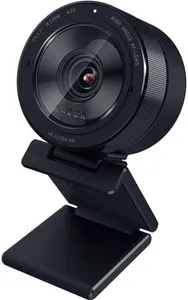
Razer Kiyo Pro Ultra 4K Webcam: Large Sensor - Auto Light Correction - Built-in Mic and Shutter - Pro Grade Content Creation, Streaming, Gaming, Video Calls - Works with OBS, Xsplit, PC, Zoom, Teams
Most important from
228 reviews
The Razer Kiyo Pro Ultra is a high-end 4K webcam designed especially for content creators, streamers, and professionals who need sharp, detailed video. Its large 1/1.2" Sony STARVIS 2 sensor and wide F/1.7 aperture let in plenty of light, which means it performs very well even in dim environments. This helps produce clear, vibrant images with true-to-life colors thanks to HDR support at 30 frames per second. The webcam offers flexible video options including uncompressed 4K at 24 FPS, 1440p at 30 FPS, and smooth 1080p at 60 FPS, covering a variety of quality and performance needs.
Autofocus is smart and face-tracking, keeping you in focus as you move, while an AI-powered exposure adjusts lighting automatically so you always look your best. The device also features a built-in microphone and a physical shutter for privacy. What sets it apart is the ability to blur the background without extra software, adding a professional touch with portrait-style depth. It supports Windows fully with software that lets you customize settings extensively, but Mac users will only get basic plug-and-play functionality without access to advanced controls. The webcam’s mounting options are standard and should work with most setups.
While it excels in video quality and low-light performance, the price might be higher than basic models, and Mac users won’t benefit from all features. For those who want a webcam that delivers pro-grade visuals and smart lighting adjustments ideal for streaming, video calls, and content creation, this model is a strong choice.
Most important from
228 reviews
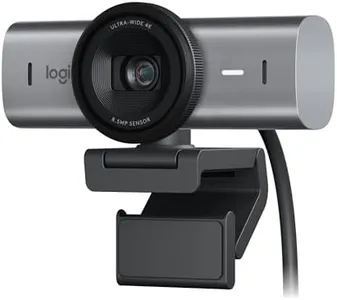
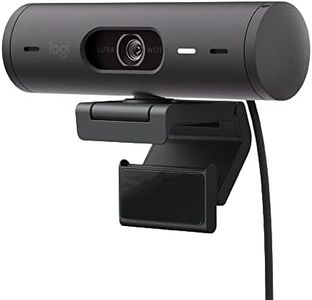
Logitech MX Brio Ultra HD 4K Collaboration, Streaming Webcam, 1080p at 60 FPS, Show Mode, Works with Microsoft Teams, Zoom, Google Meet, Nintendo Switch 2 New GameChat - Graphite
Most important from
1240 reviews
The Logitech MX Brio Ultra HD 4K Collaboration and Streaming Webcam offers impressive specs for users seeking high-quality video performance. It supports Ultra HD 4K resolution at 30fps and 1080p at 60fps, providing sharp and clear images. The AI-enhanced image quality features auto-exposure, auto white balance, noise reduction, and autofocus, which help maintain excellent visibility even in challenging light conditions. The dual noise-reducing microphones effectively minimize background noise, ensuring clear audio during calls and streaming sessions.
Additionally, the Show Mode allows users to tilt the webcam down to share notes and sketches, enhancing collaboration. Privacy is safeguarded with the built-in webcam cover that blocks the camera when not in use. Compatibility is broad, working seamlessly with Windows, macOS, Chrome OS, and Linux, and it is certified for popular platforms like Zoom, Microsoft Teams, and Google Meet. The webcam can be paired with Logitech software for enhanced control over video streaming settings via MX keyboard and mouse.
The physical dimensions and weight are standard, making it portable but not exceptionally compact. The Logitech MX Brio Ultra HD 4K Webcam is a solid choice for professionals and streamers needing high resolution and reliable performance.
Most important from
1240 reviews
Razer Kiyo V2 Streaming Webcam: 4K 30 FPS, 1080p 60 FPS - AI Powered Auto-Framing - Built-in Microphone - Ultrawide Angle Lens - Privacy Cover - Works with OBS, Xsplit, Discord, Zoom, Teams - Black
Most important from
125 reviews
The Razer Kiyo V2 is a strong choice for anyone looking for a high-quality USB-C webcam, especially streamers and content creators. It offers sharp video with up to 4K resolution at 30 frames per second and smooth 1080p video at 60 FPS, which means your streams and videos will look clear and fluid. The ultrawide angle lens lets you capture not just your face but your entire setup without distortion, which is great if you want to show off your environment. The AI-powered auto-framing is a handy feature that keeps you centered in the frame by automatically adjusting pan, tilt, and zoom as you move, so you don’t have to worry about repositioning during a stream or call.
Low-light conditions won’t be a problem thanks to its one-click image enhancement, which adjusts exposure and reduces noise, making you look crisp even in darker rooms. The built-in microphone supports common audio formats and should work well for casual calls and basic streaming, though serious podcasters might want a separate mic. The universal pivoting mount is versatile, allowing you to attach the webcam to a monitor or tripod and adjust angles easily.
It works smoothly with popular software like OBS, Discord, Zoom, and Teams, ensuring compatibility for most users. However, at around 1.1 pounds and a slightly larger size than some compact webcams, it’s a bit heavier and bulkier, which might be a consideration if desk space is tight. The built-in privacy shutter is a nice security touch, giving peace of mind when the camera is not in use. The Razer Kiyo V2 balances advanced video features with ease of use, making it well-suited for streamers and remote workers who want sharp, professional-looking video and smart framing without complex setup. Its price and size might be more than casual users need, but for those focused on quality and control, it’s a solid pick.
Most important from
125 reviews
Buying Guide for the Best USB-C Webcams
When choosing a USB-C webcam, it's important to consider several key specifications to ensure you get the best fit for your needs. A good webcam can significantly enhance your video conferencing, streaming, or content creation experience. Here are the key specs you should pay attention to and how to navigate them.FAQ
Most Popular Categories Right Now


