We Use CookiesWe use cookies to enhance the security, performance, functionality and for analytical and promotional activities. By continuing to browse this site you are agreeing to our privacy policy

10 Best Auto Scanners 2026 in the United States
How do we rank products for you?

Our technology thoroughly searches through the online shopping world, reviewing hundreds of sites. We then process and analyze this information, updating in real-time to bring you the latest top-rated products. This way, you always get the best and most current options available.

headphones-stars

Our Top Picks

#1

Winner

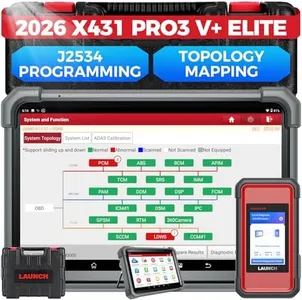
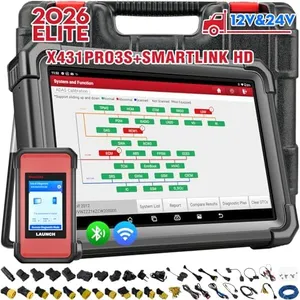
Launch X431 PRO3 V+ Elite, 2026 SmartlinkC 2.0 Bidirectional Scan Tool with J2534 Portocol, HD Trucks Scanner, 10.1 inch, Topology Map, 60+Service, Online Code, CANFD/DoIP/D-PDU, FCA, 2 Yrs Update

Rating
10.0
Chosen by1,467
Compatibility
Functionality
User Interface

Most important from
111 reviews

Compatibility
Provides valuable insights into vehicle issues by accurately identifying the root cause, enabling precise diagnostics and cost-effective repairs.
Functionality
The topology map feature instantly reveals faulty components, making complex diagnostics straightforward and saving significant repair costs.
User Interface
The 10.1-inch touchscreen remains bright and responsive even in sunlight, enhancing usability in various workshop conditions.
Connectivity
Bluetooth connectivity allows scanning and logging from up to 40 feet away, enabling flexible and efficient workflow in the garage.
Update and Support
Android-based interface with fast updates and live chat tech support makes the device user-friendly and keeps it current with vehicle technologies.

The Launch X431 PRO3 V+ Elite is a powerful and versatile auto-scanner ideal for professional mechanics and serious DIYers who need broad vehicle compatibility and advanced diagnostic functions. It supports over 200 vehicle brands, including heavy trucks and electric vehicles, thanks to its J2534 protocol and CANFD/DoIP communications. This means it can handle a wide range of modern vehicle systems, including complex ECU programming and bi-directional tests, which send commands to vehicle components for thorough diagnostics.

Its 10.1-inch Gorilla glass touchscreen is bright, responsive, and easy to navigate, running on Android 10 with solid processing power. The device offers over 60 special service functions like oil resets and brake bleeding, plus a handy topology map that visually guides you through the vehicle’s systems. This helps in understanding which parts to check without guesswork. Connectivity is strong with the SmartLink C 2.0 interface and support for multiple protocols, allowing fast and reliable data transfer. The scanner comes with 4GB RAM and 64GB storage to save vehicle data and reports, which is useful for tracking repair history or sharing information with customers.

The tool offers two years of free software updates and five years of warranty, ensuring continued support and access to the latest vehicles and features. However, the unit is somewhat heavy (13.8 pounds), which might affect portability. Also, while it’s packed with professional-level features, beginners might find its vast functions and setup a bit overwhelming initially. The Launch X431 PRO3 V+ Elite provides extensive coverage, powerful diagnostics, and helpful user aids for complex vehicle troubleshooting, making it an excellent choice for technicians seeking a reliable, all-in-one scanner.

Rating
10.0
Chosen by1,467
Compatibility
Functionality
User Interface

Most important from
111 reviews

Compatibility
Provides valuable insights into vehicle issues by accurately identifying the root cause, enabling precise diagnostics and cost-effective repairs.
Functionality
The topology map feature instantly reveals faulty components, making complex diagnostics straightforward and saving significant repair costs.
User Interface
The 10.1-inch touchscreen remains bright and responsive even in sunlight, enhancing usability in various workshop conditions.
Connectivity
Bluetooth connectivity allows scanning and logging from up to 40 feet away, enabling flexible and efficient workflow in the garage.
Update and Support
Android-based interface with fast updates and live chat tech support makes the device user-friendly and keeps it current with vehicle technologies.
#2

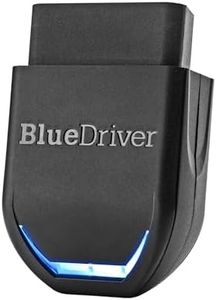
BlueDriver Pro Next Gen OBD2 Scanner – No Subscription, Bluetooth Car Code Reader for iPhone & Android – Diagnose 8000+ Issues, ABS SRS TPMS, Repair Reports, Vehicles 1996+

Rating
9.7
Functionality
User Interface
Connectivity

Most important from
62689 reviews

Functionality
Consistently reliable over years of use, it saves money by diagnosing issues before mechanic visits and helps order parts in advance to speed up repairs.
User Interface
Effortless to use—just plug into the OBDII port, launch the app, and instantly access live data, scan codes, or track maintenance with no compatibility issues.
Connectivity
Wireless Bluetooth connection eliminates cable clutter and allows quick scanning on multiple vehicles without reconfiguration.
Data Storage and Reporting
Stores diagnostic history on your phone, which can be exported or shared with repair shops for better communication.
Update and Support
No subscription fees and free updates ensure long-term value and up-to-date diagnostics

The BlueDriver Pro Next Gen OBD2 Scanner is a solid choice if you want a professional-level car diagnostic tool that works with most gas-powered vehicles from 1996 onward, including many popular car brands and some light-duty trucks. It connects wirelessly via Bluetooth to your iPhone or Android device, which means no tangled cables or complicated hardware to deal with. The app it uses is user-friendly, showing you clear trouble codes and detailed repair reports verified by real technicians, helping you understand and fix issues without guesswork.

One of its strong points is that it reads and clears more types of codes than basic readers, including ABS, airbag systems, and tire pressure sensors. Another plus is that you won’t have to pay any subscription fees—all features come with the one-time purchase, and free updates keep it current. Also, if you run into problems, there’s 24/7 tech support available through phone or in-app chat, which is reassuring. While this scanner is designed mainly for gas vehicles and select trucks, it may not support some diesel models fully, and coverage might be more limited or less detailed on very new or less common vehicles. For those seeking a straightforward, wireless scanner that offers deep diagnostics and trustworthy repair info without ongoing costs, BlueDriver Pro Next Gen is a great fit, especially for everyday drivers who want to avoid unnecessary mechanic visits and handle some repairs on their own.

Rating
9.7
Functionality
User Interface
Connectivity

Most important from
62689 reviews

Functionality
Consistently reliable over years of use, it saves money by diagnosing issues before mechanic visits and helps order parts in advance to speed up repairs.
User Interface
Effortless to use—just plug into the OBDII port, launch the app, and instantly access live data, scan codes, or track maintenance with no compatibility issues.
Connectivity
Wireless Bluetooth connection eliminates cable clutter and allows quick scanning on multiple vehicles without reconfiguration.
Data Storage and Reporting
Stores diagnostic history on your phone, which can be exported or shared with repair shops for better communication.
Update and Support
No subscription fees and free updates ensure long-term value and up-to-date diagnostics
#3

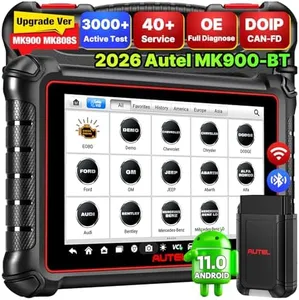
Autel Scanner MaxiCOM MK900BT, 2026 MK900-BT V2.0 Bidirectional Diagnostic Tool, 8in Up of MK900 MX900 MK808S MK808BT MX808S MK808Z, 3000+ Active Tests, 40+ Service, CAN-FD&DOIP, All System, FCA 11 OS

Rating
9.4
Compatibility
Functionality
User Interface

Most important from
751 reviews

Compatibility
Extensive vehicle coverage, including many makes and models, with accurate Auto VIN and license scanning.
Functionality
Great bi-directional scanner at a great price, loaded with 40 service functions like Oil Reset, EPB Reset, and ABS Bleed.
User Interface
Easy to navigate with great build quality and efficient speed, delivering accurate diagnostics.
Connectivity
Bluetooth module works seamlessly, maintaining a strong signal throughout the vehicle.
Update and Support
Setup and updates are straightforward, with a simple menu system and fast response times.

The Autel Scanner MaxiCOM MK900BT is a high-end diagnostic tool designed for professional use. It boasts a wide range of features, including compatibility with 150+ car brands and 10,000 vehicle models from 1996 to 2025. Its functionality is impressive, offering over 3000 active tests and 40+ maintenance services, making it suitable for extensive diagnostic tasks. The 8-inch display with a resolution of 1280x800 provides a user-friendly interface, enhancing readability and ease of use.

Connectivity options are robust, featuring CAN FD and DOIP protocols, as well as WiFi for printing and wireless diagnostics up to 33 feet away, eliminating the need for cables. This model also supports Auto VIN and license scanning, saving time on manual input, and includes features like battery testing and remote desk access for additional convenience. Updates and support are strong points, with a 1-year warranty and free software updates for the first year.

The tool is quite specialized and may be overkill for casual users or those with limited technical knowledge. The inclusion of numerous advanced functionalities and language support (21+ languages) caters to a global user base. Data storage and reporting are well-covered with Autel Cloud server backup, ensuring that repair data is never lost. While the hardware is premium with fast processing and a long-lasting battery, the price point may be high for some users given its advanced features.

Rating
9.4
Compatibility
Functionality
User Interface

Most important from
751 reviews

Compatibility
Extensive vehicle coverage, including many makes and models, with accurate Auto VIN and license scanning.
Functionality
Great bi-directional scanner at a great price, loaded with 40 service functions like Oil Reset, EPB Reset, and ABS Bleed.
User Interface
Easy to navigate with great build quality and efficient speed, delivering accurate diagnostics.
Connectivity
Bluetooth module works seamlessly, maintaining a strong signal throughout the vehicle.
Update and Support
Setup and updates are straightforward, with a simple menu system and fast response times.

Buying Guide for the Best Auto Scanners

Choosing the right auto-scanner can be a game-changer for both professional mechanics and car enthusiasts. Auto-scanners, also known as OBD2 scanners, help diagnose issues with your vehicle by reading error codes from the car's computer system. To make an informed decision, it's important to understand the key specifications and how they align with your needs. Here are the main specs to consider when selecting an auto-scanner.
CompatibilityCompatibility refers to whether the auto-scanner can work with your vehicle's make, model, and year. This is crucial because not all scanners support all vehicles. Generally, most OBD2 scanners are compatible with cars manufactured after 1996, but it's always best to check the specific compatibility list provided by the manufacturer. If you own multiple vehicles or plan to use the scanner on different cars, look for a model with broad compatibility.
FunctionalityFunctionality encompasses the range of tasks the auto-scanner can perform, such as reading and clearing error codes, displaying live data, and performing advanced diagnostics. Basic models can read and clear codes, which is sufficient for simple troubleshooting. More advanced models offer features like ABS/SRS diagnostics, emission testing, and even bi-directional control. Consider what level of detail and control you need based on your experience and the complexity of the issues you expect to encounter.
User InterfaceThe user interface includes the display and controls of the auto-scanner. A clear, easy-to-read screen and intuitive navigation can make a big difference in usability. Some scanners have basic monochrome screens, while others offer color displays with graphical data representation. Touchscreen models are also available. If you prefer a straightforward, no-frills approach, a basic interface will suffice. However, if you want detailed visual data and ease of use, opt for a model with a more advanced interface.
ConnectivityConnectivity options determine how the auto-scanner communicates with other devices. Traditional models use a wired connection to the car's OBD2 port, while modern scanners may offer Bluetooth or Wi-Fi connectivity, allowing you to use a smartphone or tablet as the display. Wireless models provide more flexibility and can be more convenient, especially if you prefer using apps for diagnostics. Choose based on your comfort with technology and whether you value the convenience of wireless operation.
Update and SupportUpdate and support refer to the manufacturer's provision of software updates and customer service. Regular updates ensure that the scanner can handle new car models and diagnostic protocols. Some manufacturers offer free lifetime updates, while others may charge a fee. Good customer support can be invaluable if you encounter issues or need assistance. If you plan to use the scanner for many years, prioritize models with reliable update policies and strong customer support.
Data Storage and ReportingData storage and reporting capabilities allow you to save diagnostic data and generate reports. This can be useful for tracking the history of vehicle issues or sharing information with a mechanic. Some scanners have internal memory, while others rely on external devices or cloud storage. If you need to keep detailed records or share data easily, look for models with robust storage and reporting features.

FAQ

Most Popular Categories Right Now