10 Best Automotive Scan Tools 2026 in the United States

Related Products
Up to 30% off
Recommended lists


Our technology thoroughly searches through the online shopping world, reviewing hundreds of sites. We then process and analyze this information, updating in real-time to bring you the latest top-rated products. This way, you always get the best and most current options available.

Our Top Picks
Winner
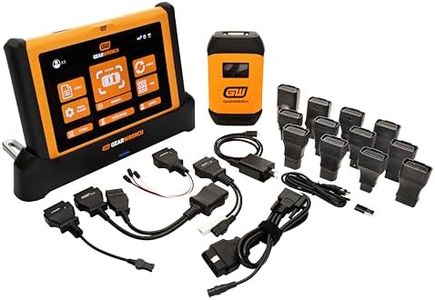
GEARWRENCH 10" Pro Command Wireless Bi-Directional Diagnostic Tablet with Rapid-Charge Dock, Includes 4 Years of Software Updates | GWSMART10
Most important from
24 reviews
The GEARWRENCH 10" Pro Command Wireless Diagnostic Tablet is a solid choice for professional mechanics or serious DIYers who need a reliable and powerful scan tool. It supports a wide range of vehicles with universal compatibility and offers over 50 reset and relearn functions, including ABS bleeding and TPMS resetting, which cover many common repair tasks. The tablet’s wireless connection reduces clutter and makes it easy to use around the shop.
It features a large, 10-inch screen running Android 10, providing a user-friendly interface with live data graphs and system mapping to help visualize vehicle issues quickly. The device’s build is rugged enough to handle tough environments and frequent use, and the battery life is designed to last through a full workday. Software updates are included for 4 years, helping keep the tool current with evolving vehicle technology, though after that, they cost $150 per year. Customer reviews are very positive, praising its speed and accuracy.
The initial cost and ongoing update fees might be high for casual users or hobbyists, and while the interface is modern, those less familiar with technology might face a learning curve. The product includes a 2-year manufacturer warranty and support from Apex Tool Group, adding peace of mind. For those who need a robust diagnostic tablet with advanced features and reliable wireless connectivity for professional or heavy use, this GEARWRENCH model is a strong contender.
Most important from
24 reviews
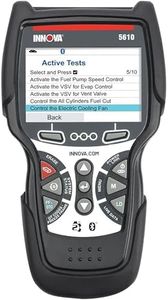
Innova 5610 OBD2 Bidirectional Scan Tool - Understand Your Vehicle, Pinpoint What's Wrong, and Complete Your Repairs with Less Headache, Updates Included, US-Based Technical Support
Most important from
3762 reviews
The Innova 5610 OBD2 Bidirectional Scan Tool is designed for both casual car owners and professional mechanics looking for reliable diagnostic capabilities. One of its primary strengths is its compatibility with a wide range of vehicles, from 1996 to 2023 models, making it accessible for many users. The bidirectional controls are also a significant advantage, allowing users to perform advanced tests and functions like fuel pump operation and electronic parking brake retraction, giving it a pro-level edge in automotive diagnostics.
The user interface stands out as easy to navigate, supporting multiple languages (English, Spanish, and French), which broadens its usability. With features like live data viewing and enhanced data streams for various systems, the Innova 5610 is suitable for anyone needing in-depth vehicle diagnostics. The inclusion of the RepairSolutions2 app enhances its functionality by providing wireless scanning and access to repair guidance, making it a helpful tool for troubleshooting.
There are a few weaknesses to consider. Some users have pointed out that while the coverage checker is useful, compatibility features may vary across different makes and models. Additionally, while the tool offers a good range of functions, it may not cover every special reset feature available in some vehicles, limiting its effectiveness for advanced users seeking very specific repairs. Lastly, the need for AA batteries could be seen as an inconvenience compared to rechargeable options.
Most important from
3762 reviews
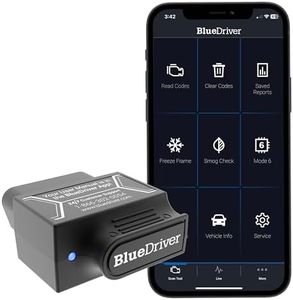
BlueDriver Bluetooth Pro OBDII Scan Tool for iPhone & Android - No Subscription Fee - OBD2 Car Scanner and Code Reader - Diagnose Check Engine, ABS, SRS, Airbag & 7000+ Issues on Vehicles 1996+
Most important from
62957 reviews
The BlueDriver Bluetooth Pro OBDII Scan Tool is a handy device for anyone looking to manage vehicle diagnostics without the need of a professional mechanic. Its compatibility with all gas-powered vehicles made from 1996 onwards makes it a versatile choice for most users. The ability to read and clear various trouble codes, including ABS and SRS, is a significant advantage, as it provides insights into issues that basic code readers typically miss.
One of the standout features is its user-friendly app available for both iOS and Android. This app not only displays diagnostic information but also provides access to a wealth of repair videos that can help users perform fixes themselves. The wireless Bluetooth connection eliminates the hassle of cords, making it more convenient to use.
While it excels in functionality and ease of use, the BlueDriver is specifically designed for gas vehicles and won't work with diesel or hybrid models. Additionally, it might be overwhelming for complete beginners, as navigating through all the features and interpreting the data can take some time to get used to. The lack of any subscription fees is refreshing, giving users full access to its features without hidden costs.
In terms of build quality, it is compact and lightweight, making it easy to store and carry. However, some users have mentioned that the physical OBDII connector could be more robust for long-term use. For those interested in automotive DIY repairs or just wanting to understand their vehicle better, the BlueDriver offers a compelling package of features, support, and functionality. Just keep in mind its limitations with certain vehicle types and be prepared to spend some time learning how to fully utilize its capabilities.
Most important from
62957 reviews
Buying Guide for the Best Automotive Scan Tools
Choosing the right automotive scan tool can be a game-changer for anyone who works on cars, whether you're a professional mechanic or a DIY enthusiast. These tools help you diagnose and troubleshoot issues with your vehicle's electronic systems, saving you time and money. To pick the best scan tool for your needs, it's important to understand the key specifications and features that differentiate them. Here's a breakdown of what to look for and how to decide which one is right for you.FAQ
Most Popular Categories Right Now


