We Use CookiesWe use cookies to enhance the security, performance, functionality and for analytical and promotional activities. By continuing to browse this site you are agreeing to our privacy policy

10 Best Dimmable Smart Switch 2026 in the United States
How do we rank products for you?

Our technology thoroughly searches through the online shopping world, reviewing hundreds of sites. We then process and analyze this information, updating in real-time to bring you the latest top-rated products. This way, you always get the best and most current options available.

headphones-stars

Our Top Picks

#1

Winner

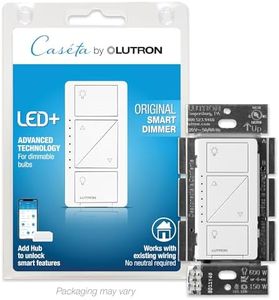
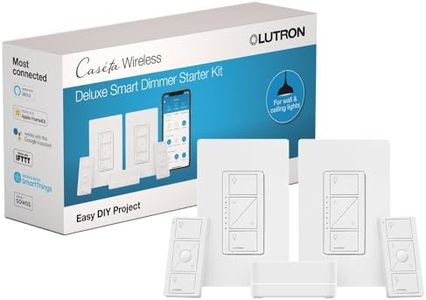
Lutron Caseta Original Smart Dimmer Switch Kit, 2 Dimmer Switches, 2 Wall Plates, 2 Pico Remotes, and Smart Hub, Works with Alexa, Apple Home, Google Home, 3 Way, 150W, No Neutral, P-BDG-PKG2W-A

Rating
10.0
Chosen by1,144
Compatibility
Dimming Range
Control Options

Most important from
2583 reviews

Compatibility
Compatibility with dimmable incandescent and many LED bulbs is strong, though verifying bulb compatibility is important as not all LEDs dim well.
Dimming Range
The dimmers provide smooth, flicker-free dimming with a wide range of brightness levels, enhancing lighting control precision.
Control Options
Integration with voice assistants like Alexa, Apple HomeKit, and Google Home is seamless, enabling convenient voice commands and remote control via the app.
Installation Requirements
Installation is straightforward and quick even for users without electrical experience, often taking under 15 minutes without requiring a neutral wire or special wall plates.
Additional Features
The system operates reliably independent of Wi-Fi, so lights continue to work during internet outages without needing resets afterward.

The Lutron Caseta Original Smart Dimmer Switch Kit is a solid choice if you're looking to add smart dimming to your home lighting without complicated wiring. It works with popular voice assistants like Alexa, Apple HomeKit, and Google Home, making it easy to control your lights by voice or through the Lutron app. One standout feature is that it doesn’t require a neutral wire, so installation is simpler and faster—often under 15 minutes—even if you don’t have much electrical experience. The kit includes two dimmer switches, two remote controls, wall plates, and a smart hub, which helps the system run reliably without depending on your Wi-Fi. This means your lighting won’t slow down your internet or get interrupted if your Wi-Fi goes down.

Each dimmer supports up to 150 watts of LED lighting or 600 watts for incandescent/halogen, which covers most home lighting needs but might be limiting if you have very high-powered fixtures. You can add up to 10 wireless Pico remotes to control lights from multiple locations without extra wiring, which is handy for multi-way setups. The dimming smoothly adjusts light levels, and the switch’s design is modern and user-friendly, with straightforward on/off and dimmer buttons.

You might find the load capacity a bit low if you have larger or multiple heavy fixtures on one switch. While the system supports many smart home platforms, it offers a reliable, easy-to-install smart dimmer that works well with many smart home systems and doesn’t rely on Wi-Fi, making it a good fit for most users who need smart lighting control without complicated installation.

Rating
10.0
Chosen by1,144
Compatibility
Dimming Range
Control Options

Most important from
2583 reviews

Compatibility
Compatibility with dimmable incandescent and many LED bulbs is strong, though verifying bulb compatibility is important as not all LEDs dim well.
Dimming Range
The dimmers provide smooth, flicker-free dimming with a wide range of brightness levels, enhancing lighting control precision.
Control Options
Integration with voice assistants like Alexa, Apple HomeKit, and Google Home is seamless, enabling convenient voice commands and remote control via the app.
Installation Requirements
Installation is straightforward and quick even for users without electrical experience, often taking under 15 minutes without requiring a neutral wire or special wall plates.
Additional Features
The system operates reliably independent of Wi-Fi, so lights continue to work during internet outages without needing resets afterward.
#2

Leviton Decora Smart Voice Dimmer Switch with Amazon Alexa Built-in, Wi-Fi 1st Gen, Neutral Wire Required, Works with My Leviton, Alexa, Google Assistant, DWVAA-1BW, White

Rating
8.2
Compatibility
Dimming Range
Control Options

Most important from
205 reviews

Compatibility
Setup with Apple HomeKit works seamlessly on the first try, allowing smooth control of dimmer intensity alongside on/off commands.
Dimming Range
The dimmer excels at low-level dimming, reaching as low as 10%, which is better than many other WiFi dimmers on the market.
Control Options
The switch’s push top for on and bottom for off, combined with dimmer adjustment on the side, makes for intuitive manual control.
Installation Requirements
Installation is straightforward and supports 3-way configurations, fitting easily into standard outlet boxes without bulkiness.
Additional Features
The locator light when the switch is off is very dim, making it ideal for bedrooms where bright indicator lights can be disruptive.

The Leviton Decora Smart Voice Dimmer Switch is a solid choice if you want a smart switch with voice control built right in, thanks to Alexa integration without needing a separate hub. It supports dimmable LED lights up to 300 watts and offers full-range dimming, so you can easily set the perfect lighting level. The switch works with Google Assistant and IFTTT too, giving you flexible control options through voice or the My Leviton app for scheduling and creating lighting scenes.

Installation requires a neutral wire, which is common but something to check in your home before buying. It supports multi-location dimming, so you can control one light from different switches if needed. One unique feature is that it can stream audio from services like Amazon Music and Pandora, which adds another layer of convenience. However, it might not be the best fit if you don’t have a neutral wire or if you want compatibility with more ecosystems beyond Alexa and Google. Also, it requires a lithium-ion battery for operation, which is included but something to be aware of.

This switch is ideal for users looking to simplify their smart lighting setup with voice commands and app control, especially if they already use Alexa or Google Assistant.

Rating
8.2
Compatibility
Dimming Range
Control Options

Most important from
205 reviews

Compatibility
Setup with Apple HomeKit works seamlessly on the first try, allowing smooth control of dimmer intensity alongside on/off commands.
Dimming Range
The dimmer excels at low-level dimming, reaching as low as 10%, which is better than many other WiFi dimmers on the market.
Control Options
The switch’s push top for on and bottom for off, combined with dimmer adjustment on the side, makes for intuitive manual control.
Installation Requirements
Installation is straightforward and supports 3-way configurations, fitting easily into standard outlet boxes without bulkiness.
Additional Features
The locator light when the switch is off is very dim, making it ideal for bedrooms where bright indicator lights can be disruptive.
#3

Kasa Smart Dimmer Switch HS220P3, Single Pole, Needs Neutral Wire, 2.4GHz Wi-Fi Light Switch Works with Alexa and Google Home, UL Certified,, No Hub Required, 3-Pack

Rating
7.9
Compatibility
Dimming Range
Control Options

Most important from
34757 reviews

Compatibility
Voice control via Alexa or Google Home, as well as control through the Kasa app, makes adjusting lights incredibly convenient.
Dimming Range
The dimming feature enhances the home ambiance, perfect for movie nights or reading.
Control Options
Voice control via Alexa or Google Home, as well as control through the Kasa app, makes adjusting lights incredibly convenient.
Installation Requirements
Installation is a breeze with the Kasa app guiding you through the process step-by-step, even for those not well-versed in electrical work.
Additional Features
The scheduling option allows lights to turn on and off at specific times, providing peace of mind when away from home.

The Kasa Smart Dimmer Switch HS220P3 is a notable choice for anyone looking to upgrade their lighting control with smart technology. It offers a range of user-friendly features that can enhance your home lighting experience. One of its main strengths is the ease of installation, thanks to the Kasa app, which walks you through the process step-by-step, making it accessible for those who aren’t well-versed in electrical work. The requirement for a neutral wire is something to keep in mind, as this could limit compatibility in some older homes.

In terms of functionality, you can adjust the dimming from 0% to 100%, and set schedules for your lights to turn on or off, which is great for creating the right ambiance or helping kids fall asleep. Voice control compatibility with Amazon Alexa and Google Assistant adds a layer of convenience, allowing you to manage your lights hands-free. Plus, you can monitor and control your lights remotely from your smartphone, which is perfect for those who want to keep an eye on their home while away.

There are a few drawbacks to consider. The requirement of a 2.4GHz Wi-Fi connection may be a limitation for some users who have switched to newer dual-band routers, and it might not connect well if your network primarily operates on 5GHz. Also, while the switch is UL certified for safety, users who are not familiar with electrical systems may still find the initial setup daunting despite the guided installation.

Rating
7.9
Compatibility
Dimming Range
Control Options

Most important from
34757 reviews

Compatibility
Voice control via Alexa or Google Home, as well as control through the Kasa app, makes adjusting lights incredibly convenient.
Dimming Range
The dimming feature enhances the home ambiance, perfect for movie nights or reading.
Control Options
Voice control via Alexa or Google Home, as well as control through the Kasa app, makes adjusting lights incredibly convenient.
Installation Requirements
Installation is a breeze with the Kasa app guiding you through the process step-by-step, even for those not well-versed in electrical work.
Additional Features
The scheduling option allows lights to turn on and off at specific times, providing peace of mind when away from home.

Buying Guide for the Best Dimmable Smart Switch

Choosing the right dimmable smart switch can greatly enhance your home lighting experience, providing you with the ability to control the brightness of your lights remotely and set the perfect ambiance for any occasion. To make an informed decision, it's important to understand the key specifications and how they align with your needs. Here are the main factors to consider when selecting a dimmable smart switch.
CompatibilityCompatibility refers to whether the smart switch can work with your existing lighting fixtures and home automation systems. This is crucial because not all smart switches are compatible with all types of bulbs (like LED, CFL, incandescent) or home automation platforms (like Alexa, Google Home, Apple HomeKit). To navigate this, first check the type of bulbs you have and ensure the switch supports them. Then, consider the smart home ecosystem you are using or plan to use, and choose a switch that integrates seamlessly with it. If you have a mix of different bulbs or platforms, look for a versatile switch that supports multiple types.
Load CapacityLoad capacity indicates the maximum wattage the switch can handle. This is important to ensure that the switch can safely control the lights without overheating or causing electrical issues. Load capacity is usually measured in watts. For small rooms with a few light fixtures, a lower load capacity (up to 300 watts) might be sufficient. For larger rooms or areas with multiple high-wattage bulbs, you might need a switch with a higher load capacity (up to 600 watts or more). Assess the total wattage of the lights you plan to control with the switch and choose accordingly.
Dimming RangeThe dimming range refers to how low and high the brightness levels can be adjusted. This is important for creating the right ambiance and ensuring that the lights can be dimmed to your preferred levels. Some switches offer a wide dimming range (e.g., 1% to 100%), while others might have a more limited range. If you need precise control over the brightness, look for a switch with a wide and smooth dimming range. For general use, a standard dimming range might suffice. Consider how you plan to use the lighting in different scenarios to determine the appropriate range.
Control OptionsControl options refer to the different ways you can operate the smart switch, such as through a mobile app, voice commands, physical buttons, or remote controls. This is important for convenience and ease of use. Some switches offer multiple control options, while others might be limited to just one or two. If you prefer hands-free operation, look for switches that support voice control through your preferred virtual assistant. If you want to control the lights from anywhere, ensure the switch has a reliable mobile app. Think about how you and your family members will interact with the switch and choose the one that offers the most convenient options.
Installation RequirementsInstallation requirements refer to the technical aspects and tools needed to install the smart switch. This is important to ensure that you can install the switch yourself or know what to expect if you need professional help. Some switches require a neutral wire, which might not be available in older homes. Others might have more straightforward installation processes. To navigate this, check your existing wiring setup and see if it matches the requirements of the switch. If you're comfortable with DIY projects, look for switches with easy installation guides. If not, consider hiring an electrician to ensure proper installation.
Additional FeaturesAdditional features refer to extra functionalities that enhance the usability and performance of the smart switch, such as scheduling, energy monitoring, or integration with other smart home devices. These features can add convenience and efficiency to your lighting control. For example, scheduling allows you to set specific times for the lights to turn on or off, which can be useful for energy savings and security. Energy monitoring helps you track electricity usage. If you have other smart home devices, look for switches that can integrate with them for a more cohesive system. Consider which additional features will benefit your lifestyle and choose accordingly.

FAQ

Most Popular Categories Right Now