We Use CookiesWe use cookies to enhance the security, performance, functionality and for analytical and promotional activities. By continuing to browse this site you are agreeing to our privacy policy

10 Best Document Receipt Scanner 2025 in the United States

How do we rank products for you?

Our technology thoroughly searches through the online shopping world, reviewing hundreds of sites. We then process and analyze this information, updating in real-time to bring you the latest top-rated products. This way, you always get the best and most current options available.

headphones-stars

Our Top Picks

#1

Winner

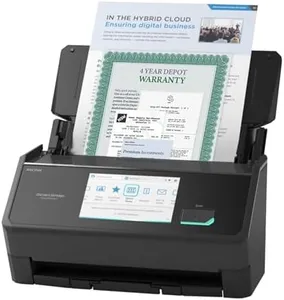
ScanSnap iX1600 Wireless or USB High-Speed Cloud Enabled Document, Photo & Receipt Scanner with Large Touchscreen and Auto Document Feeder for Mac or PC, 17 watts, Black

Rating
10.0
Chosen by1,431
Duplex Scanning
Connectivity Options
Software Compatibility

Most important from
4807 reviews

Duplex Scanning
The duplex function scans both sides of the paper simultaneously without impacting speed, saving significant time.
Connectivity Options
Setup is effortless, and the scanner works flawlessly over both USB and Wi-Fi without additional configuration.
Software Compatibility
The ScanSnap Home software offers a clean interface and integrates document management and scanner configuration seamlessly.
Size and Portability
The compact and portable design makes it easy to transfer between locations, despite being less lightweight than some models.

The ScanSnap iX1600 is a versatile and efficient scanner, ideal for managing documents, receipts, photos, and business cards for home and small business use. One of its standout features is the large color touchscreen, which makes it user-friendly and allows for quick access to up to 30 customizable scanning profiles. This is particularly useful for teams, as each user can have personalized shortcuts and destinations.

With its fast 40 pages per minute (ppm) duplex scanning, it handles double-sided documents quickly, which is a significant time-saver for busy environments. The automatic document feeder (ADF) further enhances productivity by allowing you to scan multiple pages in one go without manual intervention. Connectivity is another strong point, with both Wi-Fi and USB options available, enabling flexible placement and ease of use with various devices and cloud services.

The ScanSnap Home software included simplifies the organization and management of scanned files, making it easier to edit and use the data. However, there are some minor drawbacks. The resolution of 600 dpi, while sufficient for most document scanning needs, might not be high enough for users requiring very detailed image scans. Additionally, its weight of 7.5 pounds and dimensions make it less portable compared to some smaller, lighter models, which might be a consideration for those needing to frequently move the scanner. Despite these minor issues, the ScanSnap iX1600's robust feature set and ease of use make it a strong contender for anyone in need of a reliable document-receipt scanner.

Rating
10.0
Chosen by1,431
Duplex Scanning
Connectivity Options
Software Compatibility

Most important from
4807 reviews

Duplex Scanning
The duplex function scans both sides of the paper simultaneously without impacting speed, saving significant time.
Connectivity Options
Setup is effortless, and the scanner works flawlessly over both USB and Wi-Fi without additional configuration.
Software Compatibility
The ScanSnap Home software offers a clean interface and integrates document management and scanner configuration seamlessly.
Size and Portability
The compact and portable design makes it easy to transfer between locations, despite being less lightweight than some models.
#2

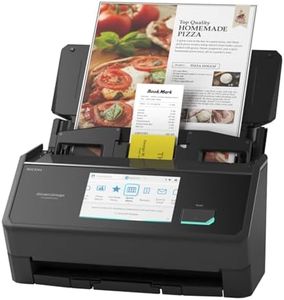
Epson RapidReceipt RR-600W Wireless Desktop Color 2-Sided Receipt & Document Scanner with ScanSmart AI PRO Receipt Management & PDF Software for PC & Mac, Touchscreen & 100-Page Auto Document Feeder

Rating
8.2
Resolution
Scanning Speed
Automatic Document Feeder (ADF)

Most important from
622 reviews

Resolution
The RR-600W's scan quality is good, although there may be occasional tilted scans due to the exit tray pages blocking the current scanning page.
Scanning Speed
Despite its compact size, the RR-600W handles dozens of pages at a time efficiently, making it a valuable investment for businesses that require frequent scanning.
Automatic Document Feeder (ADF)
The Epson RapidReceipt RR-600W is a compact yet powerful scanner, perfect for digital document archiving with its auto document feed and duplex scanning capabilities.
Duplex Scanning
The Epson RapidReceipt RR-600W is a compact yet powerful scanner, perfect for digital document archiving with its auto document feed and duplex scanning capabilities.
Connectivity Options
The scanner's WiFi functionality works seamlessly, as if it were connected directly to a PC, and the Epson Smart Panel app allows for direct scanning to a phone on the first attempt.
Size and Portability
The Epson RapidReceipt RR-600W is a compact yet powerful scanner, perfect for digital document archiving with its auto document feed and duplex scanning capabilities.

The Epson RapidReceipt RR-600W is a solid choice for those needing a document and receipt scanner, especially small business owners or anyone looking to manage their finances more efficiently. One of its standout features is the 100-page Automatic Document Feeder, which allows you to scan large batches of documents quickly—a real time-saver.

It boasts a duplex scanning capability, capturing both sides of a document simultaneously at a speed of 35 pages per minute, making it very effective for handling receipts and invoices. In terms of connectivity, this scanner offers both wireless and USB options, providing flexibility for various work environments. It’s compatible with popular financial software like QuickBooks and Excel, making data management seamless. The user-friendly touchscreen adds to the convenience, allowing for easy operation.

However, there are some drawbacks to consider. The scanning resolution of 300 dpi is decent for receipts, but it may not meet the needs of users looking for high-resolution scans for detailed documents. Additionally, while the size is relatively compact, weighing in at 8.2 pounds, it may not be the most portable option for those who frequently travel with their scanners.

Rating
8.2
Resolution
Scanning Speed
Automatic Document Feeder (ADF)

Most important from
622 reviews

Resolution
The RR-600W's scan quality is good, although there may be occasional tilted scans due to the exit tray pages blocking the current scanning page.
Scanning Speed
Despite its compact size, the RR-600W handles dozens of pages at a time efficiently, making it a valuable investment for businesses that require frequent scanning.
Automatic Document Feeder (ADF)
The Epson RapidReceipt RR-600W is a compact yet powerful scanner, perfect for digital document archiving with its auto document feed and duplex scanning capabilities.
Duplex Scanning
The Epson RapidReceipt RR-600W is a compact yet powerful scanner, perfect for digital document archiving with its auto document feed and duplex scanning capabilities.
Connectivity Options
The scanner's WiFi functionality works seamlessly, as if it were connected directly to a PC, and the Epson Smart Panel app allows for direct scanning to a phone on the first attempt.
Size and Portability
The Epson RapidReceipt RR-600W is a compact yet powerful scanner, perfect for digital document archiving with its auto document feed and duplex scanning capabilities.
#3

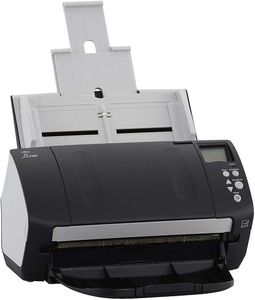
Epson Workforce ES-400 II Color Duplex Desktop Document Scanner for PC and Mac, with Auto Document Feeder (ADF) and Image Adjustment Tools, ES-400 II

Rating
7.9
Scanning Speed
Automatic Document Feeder (ADF)
Duplex Scanning

Most important from
1137 reviews

Scanning Speed
Speed and quality of scanning are impressive, handling multiple-page documents in minutes with crisp and clear results.
Automatic Document Feeder (ADF)
The feeder works reliably, unlike some other models that struggle with different paper types.
Duplex Scanning
The duplex capability, allowing it to scan both sides of a sheet simultaneously, saves time and effort, especially with multi-page documents.
Connectivity Options
The initial setup is very simple, just connect via USB and download the Epson software, which offers a variety of scanning options.

The Epson Workforce ES-400 II is a robust document scanner that stands out for its high-speed scanning capabilities and efficient document handling. With a 50-sheet Auto Document Feeder (ADF), it is well-suited for both home offices and larger office environments where batch scanning is required. The scanner supports duplex scanning, meaning it can scan both sides of a document simultaneously, which significantly speeds up the scanning process and enhances productivity.

At 300 dpi resolution, the ES-400 II provides clear and sharp scanned images, suitable for most standard office needs. However, for those requiring higher resolution for detailed images or graphics, it may fall short. Connectivity is limited to USB, which simplifies the setup but lacks the flexibility of wireless options that some users might prefer for easier sharing and use with multiple devices. The included Epson ScanSmart Software is user-friendly, offering features like automatic file naming, cloud integration, and direct email capabilities, making document management more straightforward.

Additionally, the TWAIN driver ensures compatibility with most document management software, allowing seamless integration into existing workflows. Its ability to create searchable PDFs and editable Word or Excel files through OCR is a significant advantage for maintaining digital records. On the downside, the scanner's weight of approximately 8.14 pounds and dimensions make it less portable compared to some compact models, which might be a consideration for users with limited desk space or those needing a mobile solution. The Epson Workforce ES-400 II is a strong contender for anyone needing a reliable, efficient document scanner with excellent software support, though its lack of wireless connectivity and moderate resolution are potential drawbacks.

Rating
7.9
Scanning Speed
Automatic Document Feeder (ADF)
Duplex Scanning

Most important from
1137 reviews

Scanning Speed
Speed and quality of scanning are impressive, handling multiple-page documents in minutes with crisp and clear results.
Automatic Document Feeder (ADF)
The feeder works reliably, unlike some other models that struggle with different paper types.
Duplex Scanning
The duplex capability, allowing it to scan both sides of a sheet simultaneously, saves time and effort, especially with multi-page documents.
Connectivity Options
The initial setup is very simple, just connect via USB and download the Epson software, which offers a variety of scanning options.

Buying Guide for the Best Document Receipt Scanner

Choosing the right document receipt scanner can significantly improve your efficiency in managing paperwork. Whether you need it for personal use, a small business, or a large organization, understanding the key specifications will help you make an informed decision. Here are the essential specs to consider and how to navigate them to find the best fit for your needs.
ResolutionResolution refers to the clarity and detail of the scanned image, measured in dots per inch (DPI). Higher resolution means better image quality, which is important for capturing fine details in documents. For general document scanning, 300 DPI is usually sufficient. If you need to scan detailed images or graphics, look for scanners with 600 DPI or higher. Consider your typical scanning needs to determine the appropriate resolution.
Scanning SpeedScanning speed is measured in pages per minute (PPM) and indicates how quickly the scanner can process documents. Faster scanning speeds are beneficial for high-volume scanning tasks. For occasional use, a scanner with 15-20 PPM may be adequate. For frequent or large-scale scanning, look for models with 30 PPM or more. Assess how often and how many documents you need to scan to choose the right speed.
Automatic Document Feeder (ADF)An Automatic Document Feeder (ADF) allows the scanner to handle multiple pages automatically, saving time and effort. ADF capacity varies, with some holding 20 pages and others up to 100 pages or more. If you frequently scan multi-page documents, an ADF with a higher capacity will be more efficient. For occasional single-page scans, an ADF may not be as critical.
Duplex ScanningDuplex scanning means the scanner can scan both sides of a document simultaneously. This feature is essential for double-sided documents and can significantly speed up the scanning process. If you often deal with double-sided documents, a duplex scanner is a must. For single-sided documents, this feature may not be necessary.
Connectivity OptionsConnectivity options determine how the scanner connects to your computer or network. Common options include USB, Wi-Fi, and Ethernet. USB is straightforward for direct connections, while Wi-Fi and Ethernet are useful for networked environments and multiple users. Consider your setup and whether you need the flexibility of wireless or networked scanning.
Software CompatibilitySoftware compatibility refers to the scanner's ability to work with various operating systems and document management software. Ensure the scanner is compatible with your current systems and any specific software you use for managing scanned documents. Compatibility with popular formats like PDF and OCR (Optical Character Recognition) capabilities can also be important for converting scanned images into editable text.
Size and PortabilitySize and portability are important if you need to move the scanner frequently or have limited desk space. Compact and portable scanners are ideal for on-the-go use or small workspaces, while larger models may offer more features and higher capacities. Consider where and how you will use the scanner to determine the best size for your needs.

FAQ

Most Popular Categories Right Now