We Use CookiesWe use cookies to enhance the security, performance, functionality and for analytical and promotional activities. By continuing to browse this site you are agreeing to our privacy policy

10 Best Film Scanners 2026 in the United States

How do we rank products for you?

Our technology thoroughly searches through the online shopping world, reviewing hundreds of sites. We then process and analyze this information, updating in real-time to bring you the latest top-rated products. This way, you always get the best and most current options available.

headphones-stars

Our Top Picks

#1

Winner

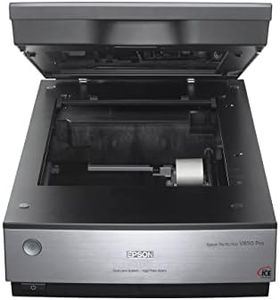
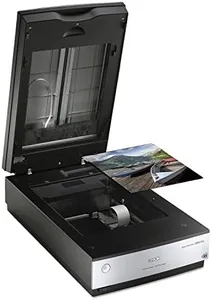
Epson Perfection V850 Pro scanner

Rating
10.0
Chosen by1,283
Resolution
Scan Speed
Film Compatibility

Most important from
490 reviews

Resolution
Despite lacking wireless capabilities, the V850's resolution and scan quality are top-notch, making it worth the investment for high-resolution digitization projects.
Scan Speed
Scanning up to 12 slides at a time significantly reduces the effort and cost compared to outsourcing to a photo lab, offering great value for preserving memories.
Film Compatibility
The scanner excels in scanning capabilities for various sizes of negatives and slides, making it a versatile tool for digitizing large collections.
Software and Features
The scanner is user-friendly and efficient for processing color slides, prints, and negatives, providing excellent results for both amateur and professional use.

The Epson Perfection V850 Pro scanner is a strong choice for photography enthusiasts and professionals looking for high-quality film scanning. Its standout feature is the impressive resolution of up to 6400 dpi, which ensures that you capture every detail and nuance in your film images. The dynamic range of 4.0 Dmax is also commendable, allowing for smooth gradations and fine shadow details, which is essential for achieving professional-grade scans. The dual lens system is particularly beneficial, letting users switch between two lenses for optimal results based on the type of film being scanned.

One of the key strengths is its versatility in film compatibility, catering to various film formats, which adds to its usability for both modern and older films. The scanner works with a broad range of operating systems, making it accessible to many users, regardless of their computer setup, which is great for those who may not have the latest technology.

The Epson V850 Pro is relatively hefty and weighs around 20.9 pounds, which may be cumbersome for users looking for portability. Additionally, while it comes with powerful scanning capabilities, the initial cost might be on the higher side compared to entry-level scanners, which could be a consideration for budget-conscious users. The scan speed is decent but might not be the fastest in the market, potentially making it less appealing for those needing quick results. In terms of connectivity, it uses USB, which is standard, but there are no wireless options, which could limit flexibility for some users.

Rating
10.0
Chosen by1,283
Resolution
Scan Speed
Film Compatibility

Most important from
490 reviews

Resolution
Despite lacking wireless capabilities, the V850's resolution and scan quality are top-notch, making it worth the investment for high-resolution digitization projects.
Scan Speed
Scanning up to 12 slides at a time significantly reduces the effort and cost compared to outsourcing to a photo lab, offering great value for preserving memories.
Film Compatibility
The scanner excels in scanning capabilities for various sizes of negatives and slides, making it a versatile tool for digitizing large collections.
Software and Features
The scanner is user-friendly and efficient for processing color slides, prints, and negatives, providing excellent results for both amateur and professional use.
#2

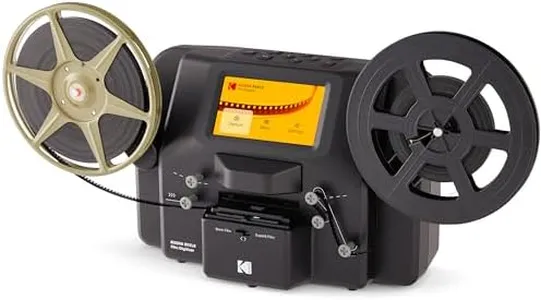
KODAK Slide N SCAN Film & Slide Scanner Digitizer with 5” LCD Screen, Quickly Convert Negatives & Slides to Digital 22MP JPEG Photos, Compatible with 135, 126 and 110 Film & Slides

Rating
10.0
Scan Speed
Film Compatibility
Connectivity

Most important from
11902 reviews

Scan Speed
The easy-load film tray speeds up the scanning process, although it can sometimes cause slight misalignments that need correction.
Film Compatibility
While the scanner handles most film types well, it can struggle with curled negatives, which may require manual adjustments.
Connectivity
You absolutely need an SD card for this scanner, but once you have it, transferring images to your computer is straightforward.

The Kodak Digital Film Scanner is a handy tool for digitizing old photo memories with a 22MP resolution, making it suitable for preserving detailed images. The scanner offers basic editing options for adjusting color and brightness, which can help improve scanned images. The 5-inch LCD screen is a standout feature, allowing you to preview and edit photos directly on the device. This makes it user-friendly, especially for those who prefer a straightforward process without needing a computer for initial edits.

The scanner is compatible with a variety of film types, including 35mm, 126, and 110 negatives and slides, which makes it versatile for different collections of old photos. It features a convenient easy-load film tray for quicker scanning, though it may still be a bit slow compared to more expensive models designed for high-speed scanning. Connectivity options include USB and HDMI, ensuring you can easily transfer scanned images to your computer or view them on a larger screen. However, the need for an SD card (not included) for storage might be an extra step for some users.

The device’s design is both practical and stylish, fitting well into home or office settings. This Kodak scanner is a solid choice for casual users or hobbyists who want to digitize their film collections with relative ease and decent quality.

Rating
10.0
Scan Speed
Film Compatibility
Connectivity

Most important from
11902 reviews

Scan Speed
The easy-load film tray speeds up the scanning process, although it can sometimes cause slight misalignments that need correction.
Film Compatibility
While the scanner handles most film types well, it can struggle with curled negatives, which may require manual adjustments.
Connectivity
You absolutely need an SD card for this scanner, but once you have it, transferring images to your computer is straightforward.
#3

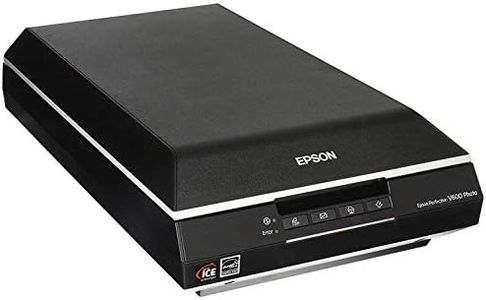
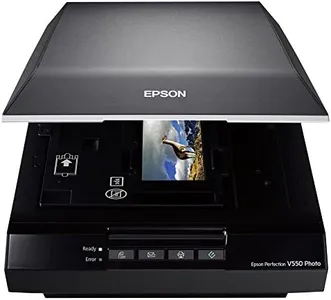
Epson Perfection V550 Color Photo, Image, Film, Negative & Document Scanner with 6400 DPI Optical Resolution

Rating
9.1
Resolution
Dynamic Range
Color Depth

Most important from
1415 reviews

Resolution
Produces excellent quality scans that can enlarge small negatives into detailed 4x6 or even 8x10 prints with rich, true-to-life colors.
Dynamic Range
The included DIGITAL ICE Light technology only removes scratches on negatives, not photos, which is a notable limitation compared to full Digital ICE available on higher-end models.
Color Depth
Digital ICE and Color Restoration features significantly reduce the need for manual photo editing by effectively removing scratches and restoring faded colors.
Scan Speed
Scan speed is reasonable for a flatbed scanner, taking about a minute per frame at 300 dpi, balancing quality and efficiency for hobbyists and semi-professionals.
Film Compatibility
The scanner supports multiple film sizes including 35mm, but some formats like 110 negatives require purchasing an additional expensive adapter for optimal scanning.
Software and Features
Full Auto Mode simplifies batch scanning by automatically cropping and saving individual frames, making it easy to scan hundreds of negatives with minimal intervention.
Connectivity
USB 2.0 connectivity is functional but somewhat outdated, though it does not significantly impact usability for most users.

The Epson Perfection V550 is a versatile film scanner that offers a high optical resolution of 6400 dpi, which means it can capture very detailed images suitable for enlargements up to 17 x 22 inches. It supports various film types including 35mm slides and negatives thanks to its built-in transparency unit, making it a solid choice for those who want to digitize different film formats. The scanner provides 48-bit color depth, allowing it to capture rich and true-to-life colors, which is important for maintaining photo quality. For those dealing with older or damaged films, the Digital ICE technology can automatically remove dust and scratches, while the Easy Photo Fix feature helps restore faded photos with a single touch.

Its ReadyScan LED technology means scans start quickly without waiting for warmup, boosting productivity. The scanner also allows multiple photos to be scanned simultaneously and automatically crops each image into separate files, saving time during batch scanning. Connectivity is straightforward with USB 2.0, commonly available on most computers. Additionally, it includes ABBYY FineReader Sprint Plus OCR software, which can convert scanned documents into editable text, adding some extra functionality.

While the scan speed is reasonable for a flatbed scanner, it is not the fastest option available, especially if you plan to scan large volumes regularly. The scanner is somewhat bulky and heavier than portable models, which may be a consideration if workspace is limited. Its USB 2.0 connection is a bit outdated compared to newer USB versions, but remains functional. This scanner suits hobbyists and semi-professional users looking for quality film and photo scans with useful restoration features, though professionals scanning very large batches might find it a bit slower.

Rating
9.1
Resolution
Dynamic Range
Color Depth

Most important from
1415 reviews

Resolution
Produces excellent quality scans that can enlarge small negatives into detailed 4x6 or even 8x10 prints with rich, true-to-life colors.
Dynamic Range
The included DIGITAL ICE Light technology only removes scratches on negatives, not photos, which is a notable limitation compared to full Digital ICE available on higher-end models.
Color Depth
Digital ICE and Color Restoration features significantly reduce the need for manual photo editing by effectively removing scratches and restoring faded colors.
Scan Speed
Scan speed is reasonable for a flatbed scanner, taking about a minute per frame at 300 dpi, balancing quality and efficiency for hobbyists and semi-professionals.
Film Compatibility
The scanner supports multiple film sizes including 35mm, but some formats like 110 negatives require purchasing an additional expensive adapter for optimal scanning.
Software and Features
Full Auto Mode simplifies batch scanning by automatically cropping and saving individual frames, making it easy to scan hundreds of negatives with minimal intervention.
Connectivity
USB 2.0 connectivity is functional but somewhat outdated, though it does not significantly impact usability for most users.

Buying Guide for the Best Film Scanners

Choosing the right film scanner can be a daunting task, especially with the variety of options available in the market. A film scanner is a device used to convert film negatives and slides into digital images. The right film scanner for you will depend on your specific needs, such as the type of film you are scanning, the quality of the digital images you require, and how often you plan to use the scanner. Understanding the key specifications and how they relate to your needs will help you make an informed decision.
ResolutionResolution is measured in dots per inch (DPI) and determines the level of detail the scanner can capture. Higher resolution means more detail and larger file sizes. For general use, a resolution of 2400 DPI is usually sufficient. For professional use or large prints, you might need a resolution of 4000 DPI or higher. Consider what you will be using the scanned images for; if you need high-quality prints or detailed enlargements, opt for a higher resolution.
Dynamic RangeDynamic range measures the scanner's ability to capture the range of tones in the film, from the darkest shadows to the brightest highlights. It is usually expressed as a number, with higher numbers indicating a greater range. A dynamic range of 3.0 is adequate for most purposes, but for professional-quality scans, look for a dynamic range of 4.0 or higher. If you are scanning film with a lot of contrast or detail in shadows and highlights, a higher dynamic range will be beneficial.
Color DepthColor depth, measured in bits, indicates how many colors the scanner can capture. Higher color depth means more accurate and vibrant colors. Most film scanners offer 24-bit color depth, which is sufficient for general use. For professional or archival purposes, a 48-bit color depth is recommended. If you need precise color reproduction, especially for professional photography or archiving, opt for a scanner with higher color depth.
Scan SpeedScan speed refers to how quickly the scanner can digitize a film frame. This is usually measured in seconds per frame. Faster scan speeds are convenient if you have a large volume of film to scan. For occasional use, scan speed may not be as critical, but for high-volume scanning, look for a scanner with faster speeds to save time. Consider how much film you need to scan and how patient you are with the scanning process.
Film CompatibilityFilm compatibility refers to the types of film the scanner can handle, such as 35mm, medium format, or large format. Ensure the scanner you choose is compatible with the film formats you plan to scan. Some scanners are versatile and can handle multiple formats, while others are specialized for specific types. Think about the types of film you have and choose a scanner that can accommodate them.
Software and FeaturesThe software that comes with the scanner can greatly affect your scanning experience. Look for software that offers features like dust and scratch removal, color correction, and batch scanning. These features can save you time and improve the quality of your scans. Consider what features are important to you and choose a scanner that includes software with those capabilities.
ConnectivityConnectivity options, such as USB, Wi-Fi, or memory card slots, determine how you can transfer scanned images to your computer or other devices. USB is the most common and reliable option, but Wi-Fi can offer more flexibility. Think about how you plan to use the scanner and choose one with connectivity options that suit your workflow.

FAQ

Most Popular Categories Right Now