We Use CookiesWe use cookies to enhance the security, performance, functionality and for analytical and promotional activities. By continuing to browse this site you are agreeing to our privacy policy

10 Best Keyboard Trays 2025 in the United States

How do we rank products for you?

Our technology thoroughly searches through the online shopping world, reviewing hundreds of sites. We then process and analyze this information, updating in real-time to bring you the latest top-rated products. This way, you always get the best and most current options available.

headphones-stars

Our Top Picks

#1

Winner

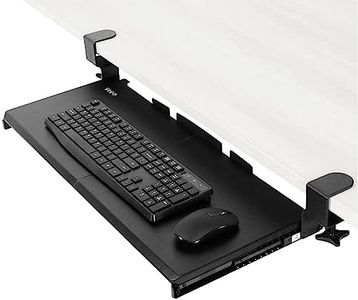
VIVO Large Keyboard Tray Under Desk Pull Out with Extra Sturdy C Clamp Mount System, 27 (33 Including Clamps) x 11 Inch Slide-Out Platform Computer Drawer for Typing, Black, MOUNT-KB05E

Rating
10.0
Chosen by1,224
Adjustability
Size and Compatibility
Material and Build Quality

Most important from
12142 reviews

Adjustability
Be mindful of desk height; the tray may not be suitable for lower desks or those with obstructions underneath.
Size and Compatibility
There's plenty of room for both a standard keyboard and mouse.
Material and Build Quality
The tray is very sturdy; vigorous typing doesn't faze it.
Ease of Installation
Assembly is straightforward and the tray feels solid once installed.
Ergonomic Features
The tray effectively frees up desk space by holding the keyboard and mouse below the desktop.
Swivel and Slide Mechanism
The tray slides in and out smoothly and stays in position unless moved with force.

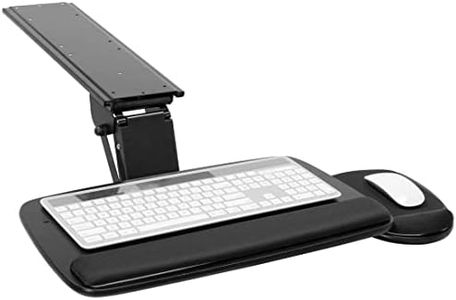
The VIVO Large Keyboard Tray Under Desk Pull Out is designed to save desk space by holding your keyboard, mouse, and other small accessories below the desktop. With a platform size of 27 inches (33 inches including clamps), it offers ample space for comfortable typing. The tray easily slides in and out, providing ergonomic typing angles to reduce wrist and shoulder strain – a great feature for those working long hours at a desk.

It extends up to 8.5 inches from the desk edge, giving it reasonable accessibility without taking up too much space when not in use. However, it’s important to note that the total length from clamp to clamp is 32.5 inches, which requires a sufficient amount of space on your desk to install properly. The sturdy C-clamp mount system ensures a secure fit without damaging your desk, although it’s limited to desks with a maximum thickness of 1.25 inches and not compatible with desks that have beveled edges.

Constructed from alloy steel, the tray promises durability and can support weights up to 11 lbs. The installation process is straightforward, with all necessary hardware and instructions included, making it user-friendly even for those less experienced with assembling office accessories. Additionally, the product comes with a 3-year limited manufacturer warranty and customer support. On the downside, its compatibility restrictions in terms of desk thickness and edge type might be a limitation for some users.

Rating
10.0
Chosen by1,224
Adjustability
Size and Compatibility
Material and Build Quality

Most important from
12142 reviews

Adjustability
Be mindful of desk height; the tray may not be suitable for lower desks or those with obstructions underneath.
Size and Compatibility
There's plenty of room for both a standard keyboard and mouse.
Material and Build Quality
The tray is very sturdy; vigorous typing doesn't faze it.
Ease of Installation
Assembly is straightforward and the tray feels solid once installed.
Ergonomic Features
The tray effectively frees up desk space by holding the keyboard and mouse below the desktop.
Swivel and Slide Mechanism
The tray slides in and out smoothly and stays in position unless moved with force.
#2

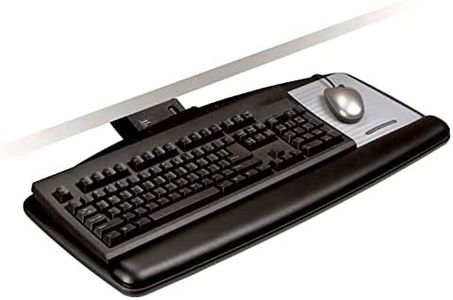
3M Keyboard Tray, Just Lift To Adjust Height And Tilt, Sturdy Tray Includes Gel Wrist Rest And Precise Mouse Pad, Swivels Side To Side And Stores Under Desk, 23" Track, Black (AKT90LE)

Rating
8.5
Adjustability
Material and Build Quality
Ease of Installation

Most important from
1779 reviews

Adjustability
Despite initial installation challenges, the tray's adjustability is top-notch, allowing for comfortable positioning over extended hours.
Material and Build Quality
The 3M Keyboard Tray is impressively heavy-duty with excellent craftsmanship, making it a solid addition to any workspace.
Ease of Installation
Installation instructions could be clearer, but once set up, the tray's functionality and ease of use are highly satisfying.
Ergonomic Features
The wrist rest is comfortable and effectively alleviates pain during long typing sessions, even with slim-profile keyboards.
Swivel and Slide Mechanism
The swivel feature is particularly useful, allowing the tray to be moved out of the way for close-up tasks or better positioning of the chair.

The 3M Keyboard Tray is designed for those who spend extended periods typing and need customizable comfort. The adjustability feature is impressive, allowing users to easily lift the platform to adjust height and tilt. This helps find a comfortable working position, which is crucial for ergonomics. The tray supports a height adjustment range of 4.5 inches above and 6 inches below the mounting surface, along with a tilt range of +10 to -15 degrees. This flexibility ensures a personalized setup for various desk heights and user preferences.

The size of the tray, at 23 inches, suits most standard keyboards and includes a gel wrist rest and a mouse pad that can be positioned on either side. These additions enhance comfort and support during long typing sessions while being easy to clean due to the leatherette covering. Another strength is its sturdy wood platform, which minimizes bounce while typing, contributing to a stable and reliable experience. The ability to swivel the platform 360 degrees and store it completely under the desk when not in use is a convenient feature, saving desk space and maintaining a tidy work area.

Users should note that this tray's dimensions and weight (10.55 pounds) might be slightly cumbersome during initial installation, despite its straightforward design. For those looking for long-term durability, the product comes with a lifetime warranty on the keyboard arm, five years on the keyboard platform, and one year on the gel wrist rests. This indicates a strong confidence in the product's build quality. The 3M Keyboard Tray is a solid pick for anyone needing an adaptable and ergonomic typing setup, though the installation might require a bit of effort.

Rating
8.5
Adjustability
Material and Build Quality
Ease of Installation

Most important from
1779 reviews

Adjustability
Despite initial installation challenges, the tray's adjustability is top-notch, allowing for comfortable positioning over extended hours.
Material and Build Quality
The 3M Keyboard Tray is impressively heavy-duty with excellent craftsmanship, making it a solid addition to any workspace.
Ease of Installation
Installation instructions could be clearer, but once set up, the tray's functionality and ease of use are highly satisfying.
Ergonomic Features
The wrist rest is comfortable and effectively alleviates pain during long typing sessions, even with slim-profile keyboards.
Swivel and Slide Mechanism
The swivel feature is particularly useful, allowing the tray to be moved out of the way for close-up tasks or better positioning of the chair.
#3

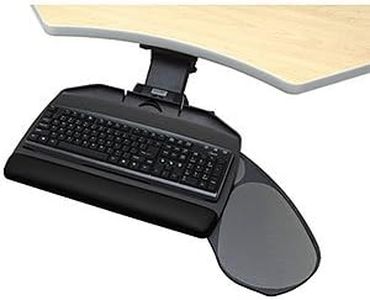
EUREKA ERGONOMIC Keyboard Tray Height Adjustable, Swivel Tilt Computer Keyboard Drawer Under Desk, 25x9.13'' Sliding Keyboard & Mouse Platform with Mouse Pad for Typing, Black

Rating
8.2
Adjustability
Size and Compatibility
Material and Build Quality

Most important from
1598 reviews

Adjustability
Its sturdy and solid mechanism offers reliable adjustability despite some small screws feeling less premium.
Size and Compatibility
The keyboard tray effectively lowers typing height for standing desks, fitting perfectly and improving shoulder comfort.
Material and Build Quality
Its sturdy and solid mechanism offers reliable adjustability despite some small screws feeling less premium.
Ease of Installation
Installation is straightforward with all necessary hardware included, making it feel like a seamless part of the desk.
Ergonomic Features
The soft wrist rest and smooth mouse pad surface provide excellent comfort and control during extended use.
Swivel and Slide Mechanism
The integrated turning handle controls both tilt and height smoothly, though its placement behind the tray can be awkward to operate.

The EUREKA ERGONOMIC Keyboard Tray is a versatile option for anyone looking to improve desk ergonomics and save workspace. It offers a wide range of adjustability, allowing you to change the height by nearly 6 inches, swivel the tray fully around, tilt it up to 43 degrees, and slide it forward or backward. This flexibility helps users find a comfortable typing angle and arm position, which can reduce fatigue during long work or gaming sessions. Sized at 25 by 9 inches, the tray fits most standard keyboards and mice, and can even hold small devices like tablets, making it a practical addition for many desk setups.

The tray is compatible with wood or MDF desks at least 0.7 inches thick, but it won't work well with glass or plastic desks, so checking your desk material is important. The build feels sturdy and stable, supporting up to about 6.6 pounds, which should be enough for your keyboard and mouse without wobbling. Installation is user-friendly, supported by a detailed manual, but keep in mind that the mounting bracket depth requires a desk with enough clearance underneath.

On the ergonomic side, it includes a soft wrist rest to keep your wrists comfortable and prevent slipping when you adjust the tilt, plus a smooth mouse pad surface for better control. One downside is the weight of the unit itself is somewhat heavy, which might make installation a bit cumbersome. While it performs well, there are other options on the market that are more popular. This keyboard tray is well suited for office or home users who want an adjustable, solid tray to improve typing posture and clear desk space, provided their desk material and size fit the requirements.

Rating
8.2
Adjustability
Size and Compatibility
Material and Build Quality

Most important from
1598 reviews

Adjustability
Its sturdy and solid mechanism offers reliable adjustability despite some small screws feeling less premium.
Size and Compatibility
The keyboard tray effectively lowers typing height for standing desks, fitting perfectly and improving shoulder comfort.
Material and Build Quality
Its sturdy and solid mechanism offers reliable adjustability despite some small screws feeling less premium.
Ease of Installation
Installation is straightforward with all necessary hardware included, making it feel like a seamless part of the desk.
Ergonomic Features
The soft wrist rest and smooth mouse pad surface provide excellent comfort and control during extended use.
Swivel and Slide Mechanism
The integrated turning handle controls both tilt and height smoothly, though its placement behind the tray can be awkward to operate.

Buying Guide for the Best Keyboard Trays

Choosing the right keyboard tray can significantly improve your comfort and productivity while working at a desk. A keyboard tray allows you to position your keyboard and mouse at an ergonomic height, reducing strain on your wrists, shoulders, and neck. When selecting a keyboard tray, consider the following key specifications to ensure you find the best fit for your needs.
AdjustabilityAdjustability refers to the ability to change the height, tilt, and sometimes the angle of the keyboard tray. This is important because it allows you to customize the tray to your ergonomic needs, ensuring that your wrists are in a neutral position and reducing the risk of repetitive strain injuries. Look for trays that offer a wide range of height and tilt adjustments. If you frequently switch between sitting and standing, consider a tray with easy and quick adjustability.
Size and CompatibilityThe size of the keyboard tray should accommodate your keyboard and mouse comfortably. It's important to ensure that the tray is wide enough to fit both devices without crowding. Additionally, check the compatibility of the tray with your desk. Some trays are designed to be mounted under the desk, while others may require specific desk types or sizes. Measure your desk space and compare it with the tray dimensions to ensure a proper fit.
Material and Build QualityThe material and build quality of the keyboard tray affect its durability and stability. High-quality materials like metal or sturdy plastic can provide a stable platform for your keyboard and mouse, reducing wobbling and ensuring longevity. Consider trays with a solid build and good reviews regarding their durability. If you plan to use the tray heavily, investing in a well-built product can save you from frequent replacements.
Ease of InstallationEase of installation refers to how simple it is to set up the keyboard tray on your desk. Some trays come with detailed instructions and all necessary hardware, making installation straightforward. Others might require more complex assembly or additional tools. If you're not handy with tools, look for trays that are known for their easy installation process. Reading user reviews can provide insights into the actual installation experience.
Ergonomic FeaturesErgonomic features include wrist rests, mouse platforms, and the ability to adjust the tray to a negative tilt. These features are important for maintaining a comfortable and healthy posture while typing. Wrist rests can provide additional support and reduce strain, while a negative tilt can help keep your wrists in a neutral position. Consider your specific ergonomic needs and look for trays that offer features to address them.
Swivel and Slide MechanismThe swivel and slide mechanism allows you to move the keyboard tray out of the way when not in use. This is important for maintaining a clean and organized workspace. A tray with a smooth and reliable swivel and slide mechanism can be easily tucked under the desk, freeing up space. If you need to frequently move the tray, ensure that the mechanism operates smoothly and doesn't require excessive force.

FAQ

Most Popular Categories Right Now