10 Best Kvm Switches 2026 in the United States

Related Products


Our technology thoroughly searches through the online shopping world, reviewing hundreds of sites. We then process and analyze this information, updating in real-time to bring you the latest top-rated products. This way, you always get the best and most current options available.

Our Top Picks
Winner
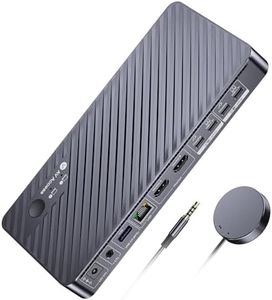
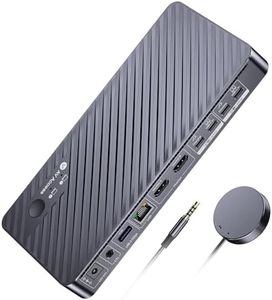
AV Access Docking Station KVM Switch 2 Monitors 2 Laptops, 4K KVM Switch Dual HDMI Monitor, 100W PD for Each PC, 1G Ethernet, EDID Emulation, Ideal for Home Office & Gaming
Most important from
115 reviews
The AV Access Docking Station KVM Switch is designed to connect two laptops to two monitors, making it a strong choice for users who need to switch between work and personal computers without hassle. It supports high-quality video up to 4K at 60Hz, plus faster refresh rates at lower resolutions, which is great for smooth gaming or crisp office visuals. With 16 ports total, including USB 3.0, USB-C, Ethernet, and audio, it offers excellent connectivity options for peripherals and network sharing. The built-in 100W USB-C charging for each laptop is a handy feature, allowing you to power your devices through the switch without extra adapters, though you need to use your original power adapter for charging.
Switching between computers is quick and can be done via a button or remote, aided by EDID emulation and automatic wake-up, so there’s minimal delay and no need to fiddle with settings. Mac users should note that extended dual monitor setups won’t work on Mac OS due to its limitations with USB-C MST, so you’ll only get mirrored screens. Also, some USB-C laptops might not support dual 4K output, so it’s worth checking your device’s video capabilities before buying.
This KVM switch is ideal for home office setups and gamers who want to streamline multiple devices with minimal clutter. Its combination of docking station features and fast switching makes it particularly useful for anyone needing efficient multitasking between two computers, though Mac users with multi-screen needs might find it less compatible.
Most important from
115 reviews
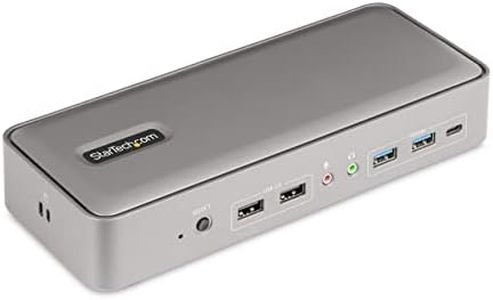
StarTech.com Dual-Laptop USB-C KVM Docking Station, Dual Monitor 4K 60Hz DisplayPort Dock, 5-Port USB Hub, GbE, 90W/45W Power Delivery to Two Laptops, Windows/Mac, 2-Host KVM Dock, TAA
Most important from
76 reviews
The StarTech.com Dual-Laptop USB-C KVM Docking Station is designed for users who need to manage two laptops at the same workspace, making it a strong choice for professionals or IT teams who frequently switch between devices. It supports dual 4K monitors at 60Hz via DisplayPort, providing sharp, smooth visuals suitable for detailed work or multitasking. With a total of 14 ports, including USB-A, USB-C, Gigabit Ethernet, and audio jacks, it offers plenty of connectivity for keyboards, mice, storage, and network connections. The front toggle button makes switching between laptops simple and fast, which is practical for a busy desk setup. It also charges both laptops simultaneously, delivering up to 90W to the active laptop and 45W to the one on standby, reducing the need for extra power adapters.
Compatibility is broad, working with Windows, macOS, ChromeOS, and Linux, and supports popular laptop brands and models, including Apple’s M-series chips. However, using this dock requires driver installation for Windows and macOS, which might be a mild inconvenience for some. The docking station offers advanced network and USB event monitoring features ideal for IT professionals, though it may be more than what a casual user requires. Its compact size ensures it fits easily on a desk without clutter.
On the downside, the price might be on the higher side compared to simpler KVM switches, given its advanced docking and charging capabilities. Additionally, audio support is limited to basic stereo and mic jacks, so it may not suit users needing advanced audio switching. This device effectively combines KVM switching with powerful docking features, making it well-suited for dual-laptop users looking to streamline their workspace and keep multiple peripherals connected and charged.
Most important from
76 reviews
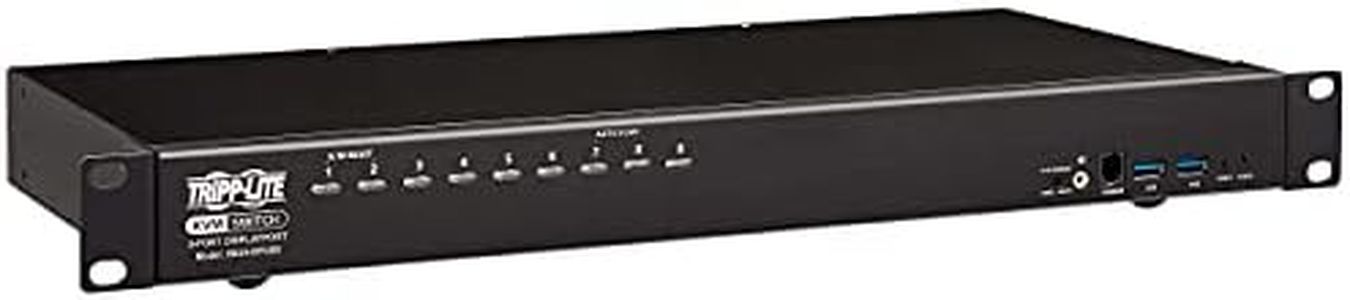
Tripp Lite DisplayPort/USB KVM Switch 8-Port Audio/Video 4K 60Hz 1URM (B024-DPU08)
The Tripp Lite DisplayPort/USB KVM Switch B024-DPU08 is a solid choice if you need to manage up to 8 computers from a single keyboard, mouse, and DisplayPort monitor. It supports high-resolution 4K video at 60Hz, which ensures sharp and smooth visuals for professional or multimedia use. The switch also includes audio support along with a built-in USB 3.1 hub, allowing you to share USB devices like printers or external drives across connected computers easily. Switching between machines can be done through pushbuttons, hotkeys, or an on-screen menu, giving you flexible control options. Compatibility is broad, working with Windows, Mac, Linux, and even Sun systems, making it versatile for mixed environments.
The device is also expandable, letting you cascade up to two levels to control up to 128 computers from one console, which is useful for larger setups. On the downside, the unit is somewhat bulky and heavy compared to smaller desktop models, which might be less convenient for tight spaces. The 1-year warranty is fairly standard but shorter than some competitors offer. Also, while the IP54 rating indicates some resistance to dust and water, it might not be suitable for harsher industrial settings.
If you prioritize solid 4K video quality and multiple port control with good peripheral sharing, this KVM switch performs well. However, if portability or extended warranty are priorities, you might want to consider other options.
Buying Guide for the Best Kvm Switches
A KVM (Keyboard, Video, Mouse) switch is a device that allows you to control multiple computers using a single keyboard, monitor, and mouse. This can be incredibly useful for managing multiple systems without the need for separate peripherals for each one. When choosing a KVM switch, it's important to consider several key specifications to ensure it meets your needs. Here are the main specs to look out for and how to choose the right one for you.FAQ
Most Popular Categories Right Now


