We Use CookiesWe use cookies to enhance the security, performance, functionality and for analytical and promotional activities. By continuing to browse this site you are agreeing to our privacy policy

10 Best Kwikset Smart Locks 2026 in the United States
How do we rank products for you?

Our technology thoroughly searches through the online shopping world, reviewing hundreds of sites. We then process and analyze this information, updating in real-time to bring you the latest top-rated products. This way, you always get the best and most current options available.

headphones-stars

Our Top Picks

#1

Winner

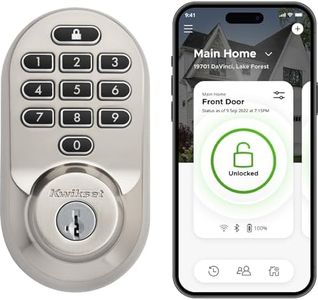
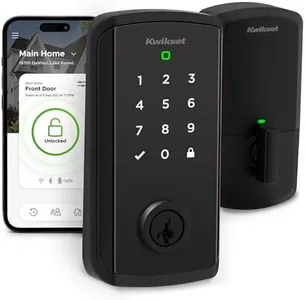
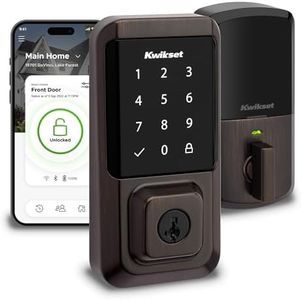
Kwikset Halo Select Smart Lock Keyless Entry Door Lock Wi-Fi and Matter Enabled Deadbolt No Hub Needed, Geofence Auto-Unlock, Grade AAA Certified, Easy Install, Matte Black Lifetime Finish Warranty

Rating
10.0
Chosen by1,440
Connectivity
Keypad vs. Keyless
Auto-Lock and Unlock

Most important from
216 reviews

Connectivity
The lock connects directly to Wi-Fi without needing a hub, enabling remote locking and unlocking through a user-friendly smartphone app.
Keypad vs. Keyless
Creating and scheduling access codes offers flexible control, perfect for family members or temporary guests like dog walkers.
Auto-Lock and Unlock
Real-time notifications about door activity and code usage enhance peace of mind, especially for monitoring kids or visitors.
Battery Life
Battery life is generally good but performs best with name-brand alkaline batteries; cheap batteries tend to drain faster.
Integration with Smart Home Systems
Support for the new Matter smart home standard future-proofs the lock, ensuring compatibility with Alexa, Google Home, Apple HomeKit, and SmartThings.
Security Features
The lock’s sturdy build and trusted Kwikset brand reputation provide confidence in its durability and security.

The Kwikset Halo Select is a solid choice for anyone looking to upgrade their door security with smart features. It connects directly via Wi-Fi with no hub needed, making remote control and monitoring easy through a smartphone app. You can unlock the door using a touchscreen keypad, the app, or automatic geofencing that senses when you're nearby—offering both convenience and keyless access.

The lock supports integration with popular smart home assistants like Amazon Alexa, Google Home, and Apple HomeKit, letting you control it by voice or link it with other smart devices. Security is taken seriously with features like real-time alerts for tampering or wrong code attempts, plus the ability to share up to 250 access codes for family or guests. It also has an auto-lock feature for extra peace of mind. The lock runs on included alkaline batteries, which are easy to replace but may require occasional attention over time. Its matte black metal design is weather resistant, fitting well on exterior doors.

Customer reviews are generally positive, although some users have noted the battery life and occasional connectivity glitches. If you want a user-friendly smart lock that works well with major smart home systems and offers flexible access options without needing extra hubs, the Kwikset Halo Select is a good pick.

Rating
10.0
Chosen by1,440
Connectivity
Keypad vs. Keyless
Auto-Lock and Unlock

Most important from
216 reviews

Connectivity
The lock connects directly to Wi-Fi without needing a hub, enabling remote locking and unlocking through a user-friendly smartphone app.
Keypad vs. Keyless
Creating and scheduling access codes offers flexible control, perfect for family members or temporary guests like dog walkers.
Auto-Lock and Unlock
Real-time notifications about door activity and code usage enhance peace of mind, especially for monitoring kids or visitors.
Battery Life
Battery life is generally good but performs best with name-brand alkaline batteries; cheap batteries tend to drain faster.
Integration with Smart Home Systems
Support for the new Matter smart home standard future-proofs the lock, ensuring compatibility with Alexa, Google Home, Apple HomeKit, and SmartThings.
Security Features
The lock’s sturdy build and trusted Kwikset brand reputation provide confidence in its durability and security.
#2

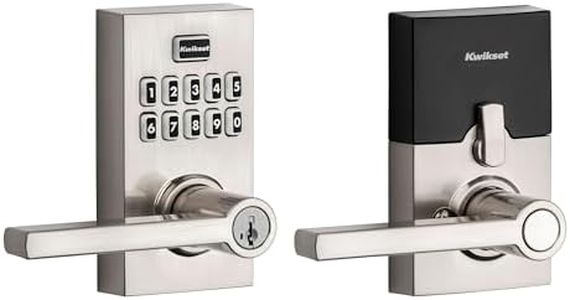
Kwikset SmartCode 955 Pembroke Light Commercial 10-Button Keypad Electronic Lever, Convenient Keyless Entry, 3-Year Battery Life and High Traffic Durability in Satin Nickel

Rating
9.7
Keypad vs. Keyless

Most important from
5553 reviews

Keypad vs. Keyless
The keypad entry is a game-changer for anyone juggling groceries or other items, making it incredibly convenient to lock and unlock the door.

The Kwikset SmartCode 955 Pembroke is a solid choice for anyone looking to enhance their home security with a smart lock. One of its standout features is the convenient keypad entry, allowing users to easily lock and unlock the door without needing keys, which is particularly useful in high-traffic situations. The lock offers customizable user codes, accommodating up to 30 different codes, which is great for families or shared spaces. Additionally, its impressive battery life of up to three years means less frequent replacements, making it low-maintenance. The lock is also built for durability, having been tested to handle 500,000 cycles, which reinforces its reliability for everyday use.

On the security front, this lock boasts Grade 2 BHMA certification, indicating it is stronger than many standard locks. The intrusion alert feature adds another layer of protection, alerting you after three incorrect code attempts, which can deter tampering. The backlit keypad and easy code management further enhance its user-friendliness, especially in low-light conditions.

There are a few considerations to keep in mind. While the smart lock performs well, it does not integrate with smart home systems, so if you're looking for a fully connected smart home experience, this might not be the best fit. Additionally, some users may prefer more advanced features like remote access or smartphone integration that are absent in this model. Lastly, installation may require some basic DIY skills, which could be a hurdle for those less comfortable with home improvement tasks.

Rating
9.7
Keypad vs. Keyless

Most important from
5553 reviews

Keypad vs. Keyless
The keypad entry is a game-changer for anyone juggling groceries or other items, making it incredibly convenient to lock and unlock the door.
#3

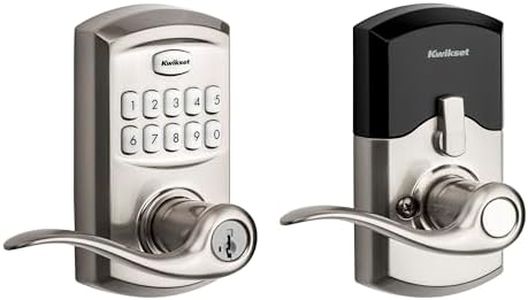
Kwikset SmartCode 917 Keypad Keyless Entry Contemporary Residential Electronic Lever Lock Deadbolt Alternative with Halifax Door Lever and SmartKey Security, Satin Nickel

Rating
9.1
Keypad vs. Keyless
Battery Life
Security Features

Most important from
1670 reviews

Keypad vs. Keyless
Its illuminated keypad and one-touch lock feature enhance ease of use in everyday scenarios.
Battery Life
The unique unlocking technology avoids mechanically pulling the latch bolt, which extends battery life and reduces alignment problems.
Security Features
The lock provides solid security features at a very affordable price point, making it a smart choice for those prioritizing reliability over advanced smart home integration.

The Kwikset SmartCode 917 is a straightforward keypad smart lock designed for residential use, offering keyless entry with up to 30 unique codes, which is great for families or guests. It features an illuminated keypad for easy use in low light and a quiet motorized deadbolt with a one-touch lock option, making daily use convenient. The lock has three locking modes including an auto-lock feature that secures your door automatically after entry or exit, which adds peace of mind if you forget to lock up. Battery life is solid, with a single 9V alkaline battery lasting up to 3 years, so you won’t need frequent replacements. Installation is simple and DIY-friendly, fitting standard door sizes without much hassle.

Security-wise, the SmartKey technology lets you re-key the lock yourself quickly, adding flexibility if you need to change keys without calling a locksmith. However, this lock does not have Wi-Fi or Bluetooth connectivity, so it won’t integrate with smart home systems or allow remote locking/unlocking via smartphone apps. If you want smart home control or alerts, you’ll need additional accessories or a different model. The lock’s design is contemporary with a durable satin nickel finish, suitable for modern homes.

This Kwikset lock is ideal for those wanting reliable, keyless entry with easy programming and solid security features, while not requiring full smart home integration.

Rating
9.1
Keypad vs. Keyless
Battery Life
Security Features

Most important from
1670 reviews

Keypad vs. Keyless
Its illuminated keypad and one-touch lock feature enhance ease of use in everyday scenarios.
Battery Life
The unique unlocking technology avoids mechanically pulling the latch bolt, which extends battery life and reduces alignment problems.
Security Features
The lock provides solid security features at a very affordable price point, making it a smart choice for those prioritizing reliability over advanced smart home integration.

Buying Guide for the Best Kwikset Smart Locks

Choosing the right Kwikset smart lock for your home can greatly enhance your security and convenience. Smart locks offer keyless entry, remote access, and integration with other smart home devices. To find the best fit for your needs, it's important to understand the key specifications and how they align with your lifestyle and security requirements.
ConnectivityConnectivity refers to how the smart lock communicates with your other devices, such as your smartphone or smart home system. Common connectivity options include Bluetooth, Wi-Fi, and Z-Wave. Bluetooth is great for short-range control and is often more secure, but it limits remote access. Wi-Fi allows for remote access and control from anywhere, but it can be more vulnerable to hacking. Z-Wave is a popular choice for smart home integration, offering a good balance of security and remote access. Choose Bluetooth if you prioritize security and don't need remote access, Wi-Fi if you want to control your lock from anywhere, and Z-Wave if you have a smart home system and want seamless integration.
Keypad vs. KeylessSome smart locks come with a keypad for entering a code, while others are completely keyless and rely on your smartphone or a key fob. A keypad can be convenient for guests or family members who don't have access to your smartphone app, and it provides a backup entry method if your phone battery dies. Keyless models offer a sleek design and eliminate the need for physical keys or codes. If you frequently have guests or want a backup entry method, a keypad model might be best. If you prefer a minimalist design and rely on your smartphone, a keyless model could be the right choice.
Auto-Lock and UnlockAuto-lock and unlock features automatically secure your door when you leave and unlock it when you approach. This can be very convenient and enhance security by ensuring your door is always locked when it should be. Some models use geofencing to detect your location, while others rely on sensors. If you often forget to lock your door or want the convenience of hands-free entry, look for a model with reliable auto-lock and unlock features. Consider how well the feature works with your daily routine and whether it integrates smoothly with your other smart home devices.
Battery LifeSmart locks are powered by batteries, and battery life can vary significantly between models. Longer battery life means less frequent battery changes, which can be more convenient. Most smart locks will alert you when the battery is low, but it's still important to consider how often you'll need to replace them. Look for models with a battery life of at least six months to a year. If you don't want the hassle of frequent battery changes, choose a model known for its long battery life and consider keeping spare batteries on hand.
Integration with Smart Home SystemsIntegration with other smart home systems allows your smart lock to work seamlessly with devices like smart lights, security cameras, and voice assistants. This can enhance your overall smart home experience and provide additional security features. Check if the smart lock is compatible with popular systems like Amazon Alexa, Google Assistant, Apple HomeKit, or Samsung SmartThings. If you already have a smart home system, choose a lock that integrates well with it. If you're planning to build a smart home, consider which ecosystem you want to use and select a compatible lock.
Security FeaturesSecurity features are crucial for a smart lock, as they protect your home from unauthorized access. Look for features like encryption, tamper alarms, and two-factor authentication. Encryption ensures that your data is secure, while tamper alarms alert you if someone tries to break in. Two-factor authentication adds an extra layer of security by requiring a second form of verification. If security is your top priority, choose a model with robust security features and check for certifications from reputable organizations like ANSI or BHMA.

FAQ

Most Popular Categories Right Now