We Use CookiesWe use cookies to enhance the security, performance, functionality and for analytical and promotional activities. By continuing to browse this site you are agreeing to our privacy policy

10 Best Modem Router Combinations 2026 in the United States
How do we rank products for you?

Our technology thoroughly searches through the online shopping world, reviewing hundreds of sites. We then process and analyze this information, updating in real-time to bring you the latest top-rated products. This way, you always get the best and most current options available.

headphones-stars

Our Top Picks

#1

Winner

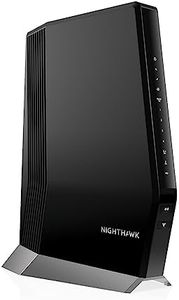
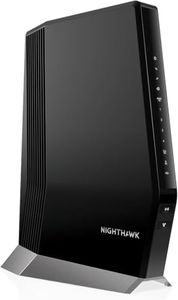
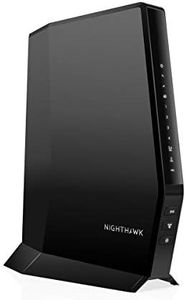
NETGEAR Nighthawk Modem Router Combo (CAX30) DOCSIS 3.1 Cable Modem and WiFi 6 Router - AX2700 2.7 Gbps - Compatible with Xfinity, Spectrum, Cox, and More - Gigabit Wireless Internet

Rating
10.0
Chosen by1,262
Internet Speed Compatibility
Range and Coverage
Security Features

Most important from
1659 reviews

Internet Speed Compatibility
Eliminating rental fees while enjoying internet speeds nearly double those provided by ISP equipment makes this device a smart long-term investment.
Range and Coverage
Excellent WiFi range covers large outdoor areas effectively, supporting smooth 4K streaming and lag-free gaming via Ethernet connections.
Security Features
Robust built-in security features help protect devices from online threats, providing peace of mind alongside high-speed connectivity.

The NETGEAR Nighthawk CAX30 is a solid option if you have a cable internet provider such as Xfinity, Spectrum, or Cox and want to combine your modem and router into one device. It supports fast internet speeds up to 2Gbps, thanks to DOCSIS 3.1 technology and WiFi 6 (802.11ax) standard, which helps deliver wireless speeds up to 2.7Gbps on two bands (2.4GHz and 5GHz). This setup is suitable for medium-sized homes, covering around 2,000 square feet and supporting up to 25 devices at once, making it good for streaming, gaming, and general browsing. It also offers four Gigabit Ethernet ports to connect wired devices like computers or gaming consoles, plus a USB 3.0 port for extra storage or media sharing.

Security is strong with built-in NETGEAR Armor protection that guards against online threats, though this feature comes with only a 30-day free trial. The device is easy to set up and manage with the Nighthawk app. However, it won’t work with DSL providers, phone-based internet services, or some major ISPs like Verizon and AT&T, so it’s important to check if your internet provider is supported.

While the coverage is sufficient for most homes, very large houses or places with many walls might need additional WiFi extenders. If you want to save on equipment rental fees and need a reliable, high-speed connection for cable internet, the CAX30 is a practical choice, but keep in mind its compatibility limits and coverage range when deciding.

Rating
10.0
Chosen by1,262
Internet Speed Compatibility
Range and Coverage
Security Features

Most important from
1659 reviews

Internet Speed Compatibility
Eliminating rental fees while enjoying internet speeds nearly double those provided by ISP equipment makes this device a smart long-term investment.
Range and Coverage
Excellent WiFi range covers large outdoor areas effectively, supporting smooth 4K streaming and lag-free gaming via Ethernet connections.
Security Features
Robust built-in security features help protect devices from online threats, providing peace of mind alongside high-speed connectivity.
#2

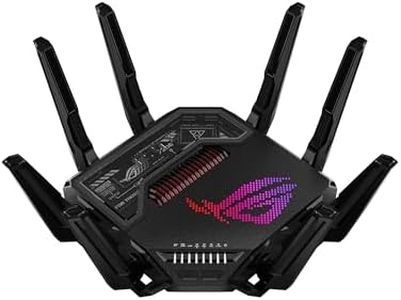
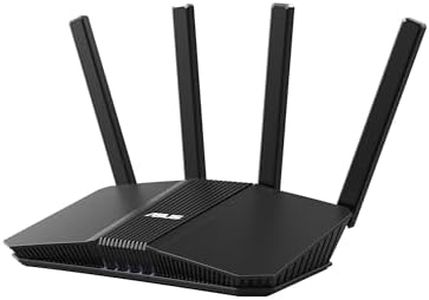
ASUS ROG Rapture GT-BE98 Pro WiFi 7 Gaming Router - Quad-Band, 30Gbps, Mesh

Rating
10.0
Internet Speed Compatibility
Wi-Fi Standards
Number of Bands

Most important from
557 reviews

Internet Speed Compatibility
The router evolved from initial firmware and hardware bugs to a mature, five-star product delivering true WiFi 7 speeds and stable connections after multiple updates.
Wi-Fi Standards
The router evolved from initial firmware and hardware bugs to a mature, five-star product delivering true WiFi 7 speeds and stable connections after multiple updates.
Number of Bands
The router handles multiple SSIDs and advanced multi-link operation, balancing traffic across bands for smooth, congestion-free connectivity.
Range and Coverage
Eight external antennas with dedicated amplifiers provide excellent coverage and signal strength even through walls, making it ideal for large homes.
Number of Ethernet Ports
Dual 10G Ethernet ports and four 2.5G ports support the latest fiber-optic speeds, perfectly suited for power users and small businesses.
Security Features
Robust security includes subscription-free AI protection, parental controls, and VPN support, though VPN setup can be complex and fragile for average users.

The ASUS ROG Rapture GT-BE98 PRO is a high-end quad-band WiFi 7 router designed especially for gamers and power users who need ultra-fast and stable internet. It supports the newest Wi-Fi 7 standard, offering blazing speeds up to 30 Gbps thanks to wider 320MHz channels and advanced signal technology. The router’s multi-link operation lets it use multiple frequency bands simultaneously to keep your connection smooth, even during heavy use. With its eight external antennas and dual 10G Ethernet ports plus four 2.5G ports, it provides excellent wired and wireless coverage, making it suitable for large homes or small businesses.

Security is robust, including WPA3, subscription-free protection, VPN support, and parental controls, keeping your network safe without extra fees. Its triple-level game acceleration boosts online gaming performance from your device to the server, which is great for serious gamers. However, this router is on the larger and heavier side, which could make placement tricky for some, and the complexity of features might be more than casual users need. It’s compatible with mesh setups (AiMesh), but it’s not a modem itself, so you’ll still need a separate modem device.

This router is a fitting choice if you want cutting-edge speed and advanced gaming support combined with strong security in a single box. For those seeking a simpler device or just basic internet needs, it could be more than necessary.

Rating
10.0
Internet Speed Compatibility
Wi-Fi Standards
Number of Bands

Most important from
557 reviews

Internet Speed Compatibility
The router evolved from initial firmware and hardware bugs to a mature, five-star product delivering true WiFi 7 speeds and stable connections after multiple updates.
Wi-Fi Standards
The router evolved from initial firmware and hardware bugs to a mature, five-star product delivering true WiFi 7 speeds and stable connections after multiple updates.
Number of Bands
The router handles multiple SSIDs and advanced multi-link operation, balancing traffic across bands for smooth, congestion-free connectivity.
Range and Coverage
Eight external antennas with dedicated amplifiers provide excellent coverage and signal strength even through walls, making it ideal for large homes.
Number of Ethernet Ports
Dual 10G Ethernet ports and four 2.5G ports support the latest fiber-optic speeds, perfectly suited for power users and small businesses.
Security Features
Robust security includes subscription-free AI protection, parental controls, and VPN support, though VPN setup can be complex and fragile for average users.
#3

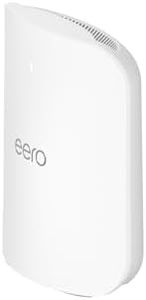
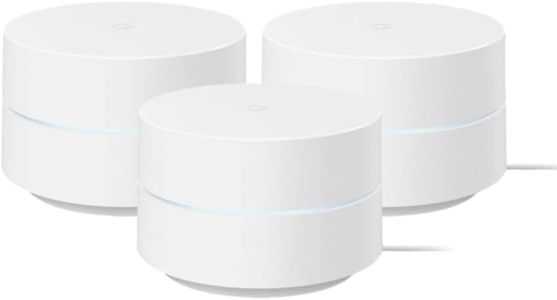
Amazon eero Max 7 mesh wifi router (newest model) - Supports internet plans up to 10 Gbps, Coverage up to 2,500 sq. ft., Connect 250+ devices, 1-pack

The Amazon eero Max 7 is a top-tier mesh Wi-Fi router designed for users who want very fast internet and reliable coverage throughout a medium-sized home (up to about 2,500 sq. ft.). It supports Wi-Fi 7, the latest wireless standard, which means it can deliver much higher speeds and handle many devices at once—up to 250+. This router is well-suited for heavy internet use such as gaming, streaming, and smart home setups thanks to its tri-band system and advanced features like multi-gigabit wired ports (two 10 Gbps Ethernet ports and two 2.5 Gbps ports). These ports allow for high-speed wired connections, which is great if you want stable connections for gaming consoles or desktop PCs.

The eero Max 7’s mesh technology helps keep your connection strong by automatically choosing the best paths for your data, reducing interruptions. It also doubles as a smart home hub, supporting popular smart home protocols like Thread, Zigbee, and Matter, making it easier to connect and control compatible devices. Security-wise, it offers strong protection using up-to-date WPA3 encryption and an optional subscription service for extra digital security, which can help safeguard your family's information. Setup is straightforward using the eero app, which guides you step-by-step.

One limitation is that the coverage might not be enough for very large homes or properties with challenging layouts, so additional units may be needed for bigger spaces. While the router supports many ISP types, it is not a modem-router combo itself—you’ll still need a separate modem unless your ISP provides one. Also, the advanced tech and high speeds may be overkill for users with slower internet plans or fewer devices. This makes the eero Max 7 an excellent choice for users looking for cutting-edge Wi-Fi technology, fast speeds, and smart home integration in a relatively compact package, especially in homes with multiple connected devices and demanding internet use.

Buying Guide for the Best Modem Router Combinations

Choosing the right modem-router combination is essential for ensuring a reliable and fast internet connection in your home or office. A modem-router combo combines the functions of a modem, which connects to your internet service provider (ISP), and a router, which distributes the internet connection to your devices. This can simplify your setup and reduce the number of devices you need. When selecting a modem-router combo, consider the following key specifications to ensure it meets your needs and provides the best performance for your internet usage.
Internet Speed CompatibilityThis spec indicates the maximum internet speed that the modem-router combo can handle. It's important because if your device can't support the speed provided by your ISP, you won't get the full benefit of your internet plan. Internet speed compatibility is usually measured in megabits per second (Mbps). For basic browsing and streaming, a device supporting up to 100 Mbps may suffice. For gaming, 4K streaming, or multiple users, look for a device that supports 300 Mbps or higher. Match the speed compatibility with your internet plan to ensure optimal performance.
Wi-Fi StandardsWi-Fi standards determine the speed and range of your wireless network. The most common standards are 802.11n (Wi-Fi 4), 802.11ac (Wi-Fi 5), and 802.11ax (Wi-Fi 6). Wi-Fi 4 is suitable for basic internet use, Wi-Fi 5 offers better performance for streaming and gaming, and Wi-Fi 6 provides the fastest speeds and best performance for multiple devices. Choose a modem-router combo with a Wi-Fi standard that matches your usage needs. For future-proofing and the best performance, Wi-Fi 6 is recommended.
Number of BandsModem-router combos can operate on single-band (2.4 GHz), dual-band (2.4 GHz and 5 GHz), or tri-band (one 2.4 GHz and two 5 GHz) frequencies. The number of bands affects the device's ability to handle multiple devices and reduce interference. Single-band is sufficient for light internet use, dual-band is better for moderate use with multiple devices, and tri-band is ideal for heavy use, such as gaming and 4K streaming, in a busy household. Consider the number of devices and the type of internet activities in your home when choosing the number of bands.
Range and CoverageRange and coverage refer to the area within which the modem-router combo can provide a strong Wi-Fi signal. This is important to ensure that all areas of your home or office have a reliable connection. The range is influenced by the power of the device and the presence of external antennas. For small apartments, a standard range may be sufficient. For larger homes or offices, look for a device with a longer range or consider additional features like mesh networking to extend coverage. Assess the size and layout of your space to determine the necessary range.
Number of Ethernet PortsEthernet ports allow you to connect wired devices directly to the modem-router combo for a more stable and faster connection. This is important for devices that require a reliable connection, such as gaming consoles, desktop computers, or smart TVs. Modem-router combos typically come with 2 to 4 Ethernet ports. If you have multiple devices that need a wired connection, choose a device with more ports. Consider the number of wired devices you have and ensure the modem-router combo can accommodate them.
Security FeaturesSecurity features protect your network from unauthorized access and cyber threats. Common security features include WPA3 encryption, firewalls, and guest network capabilities. WPA3 is the latest and most secure Wi-Fi encryption standard. Firewalls help block malicious traffic, and guest networks allow visitors to connect without accessing your main network. Choose a modem-router combo with robust security features to keep your network and data safe. Consider the sensitivity of the data you handle and the importance of network security in your environment.
ISP CompatibilityNot all modem-router combos are compatible with every ISP. This spec is crucial because using an incompatible device can result in connectivity issues or the inability to connect to the internet. Check with your ISP for a list of compatible devices or look for a modem-router combo that explicitly states compatibility with your ISP. Ensure the device you choose is approved by your ISP to avoid any potential issues.

FAQ

Most Popular Categories Right Now