We Use CookiesWe use cookies to enhance the security, performance, functionality and for analytical and promotional activities. By continuing to browse this site you are agreeing to our privacy policy

10 Best Office Laptops 2026 in the United States
How do we rank products for you?

Our technology thoroughly searches through the online shopping world, reviewing hundreds of sites. We then process and analyze this information, updating in real-time to bring you the latest top-rated products. This way, you always get the best and most current options available.

headphones-stars

Our Top Picks

#1

Winner

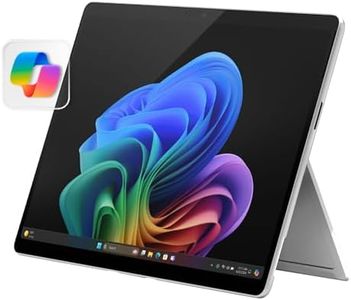
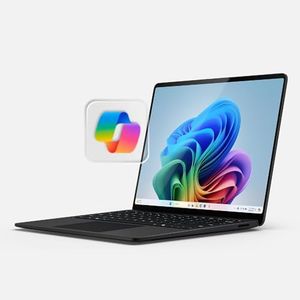
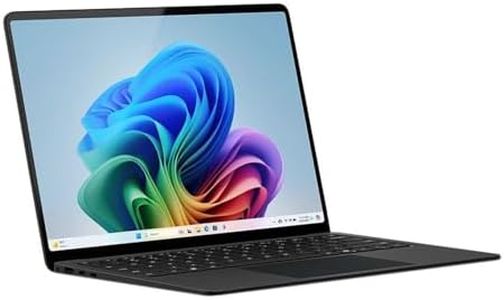
Microsoft Surface Laptop (2024), Windows 11 Copilot+ PC, 15" Touchscreen Display, Snapdragon X Elite (12 core), 32GB RAM, 1TB SSD Storage, Black

Rating
10.0
Chosen by1,396
Processor (CPU)
Display
Weight and Portability

Most important from
279 reviews

Processor (CPU)
This laptop is a true powerhouse with a premium feel that rivals or even surpasses a MacBook, offering exceptional speed for productivity tasks and a battery life that can last for days when not used continuously.
Display
The 15-inch screen strikes a perfect balance between size and portability, fitting comfortably in a backpack while remaining light and easy to carry.
Weight and Portability
The 15-inch screen strikes a perfect balance between size and portability, fitting comfortably in a backpack while remaining light and easy to carry.
Keyboard and Touchpad
The keyboard and touchpad deliver a smooth, responsive experience with excellent palm detection, making long typing sessions comfortable and precise.

The Microsoft Surface Laptop (2024) is a strong choice for office users who want a powerful and versatile machine. It has a 12-core Snapdragon X Elite processor paired with 32GB of RAM, which means it can handle demanding multitasking and AI-powered tasks smoothly. The 1TB SSD offers plenty of fast storage for documents and work files. Its 15-inch touchscreen with a sharp resolution (2496x1664) provides clear visuals and is responsive to touch, which can be useful for creative or interactive work.

Battery life is impressive, with up to 20 hours claimed, allowing you to work all day without needing to recharge. Weighing about 3.7 pounds, it remains fairly portable for a 15-inch laptop, and its thin, durable aluminum design adds a premium feel. Connectivity options are decent but note it uses integrated graphics, which is fine for office tasks but not suited for heavy gaming or graphics work.

The keyboard and touchpad are expected to be comfortable and responsive, supporting long typing sessions. One point to keep in mind is that the laptop runs Windows 11 Home with AI-powered features through Copilot+, which is great for productivity but might require some getting used to. Also, wireless connectivity is basic (802.11bgn), which could limit faster Wi-Fi speeds compared to newer standards. If you need a stylish, high-performance office laptop that supports new AI tools and long battery life, this Surface Laptop fits well, especially for users valuing touchscreen and lightweight design.

Rating
10.0
Chosen by1,396
Processor (CPU)
Display
Weight and Portability

Most important from
279 reviews

Processor (CPU)
This laptop is a true powerhouse with a premium feel that rivals or even surpasses a MacBook, offering exceptional speed for productivity tasks and a battery life that can last for days when not used continuously.
Display
The 15-inch screen strikes a perfect balance between size and portability, fitting comfortably in a backpack while remaining light and easy to carry.
Weight and Portability
The 15-inch screen strikes a perfect balance between size and portability, fitting comfortably in a backpack while remaining light and easy to carry.
Keyboard and Touchpad
The keyboard and touchpad deliver a smooth, responsive experience with excellent palm detection, making long typing sessions comfortable and precise.
#2

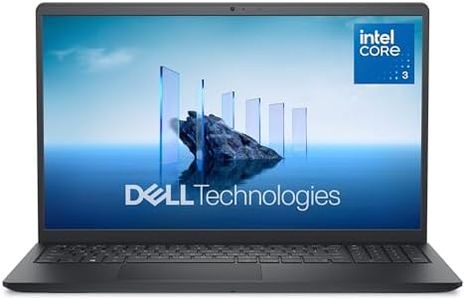
Dell 15 Laptop DC15250-15.6-inch FHD 120Hz Display, Intel Core 3 Processor 100U, 8GB DDR4 RAM, 512GB SSD, Intel UHD Graphics, Windows 11 Home, Onsite Service - Carbon Black

Rating
9.7
Processor (CPU)
Display
Connectivity

Most important from
452 reviews

Processor (CPU)
The laptop delivers fast performance with ample storage, handling everyday tasks smoothly and fitting perfectly within a budget-friendly price point.
Display
Its screen size strikes a comfortable balance, making it ideal for extended use without causing strain.
Connectivity
While basic connectivity is sufficient, some users may find the need for additional USB ports.

The Dell 15 DC15250 is a solid option for office work thanks to its 12th Gen Intel Core i3 processor and 8GB of DDR4 RAM, which handle typical tasks like web browsing, document editing, and video calls smoothly. Its 512GB SSD offers plenty of fast storage for files and programs, making startup and file access quick. The 15.6-inch Full HD display with a 120Hz refresh rate provides clear visuals and reduces eye strain with its anti-glare coating and Dell ComfortView software, which helps protect your eyes during long work sessions.

Battery life is decent with energy-efficient features and Express Charge support, allowing you to work unplugged for hours and recharge quickly when needed. The laptop weighs about 4.2 pounds, which is somewhat average—not the lightest for portability but still manageable if you carry it occasionally. Connectivity is strong with Wi-Fi 6 and Bluetooth 5.3 for fast wireless internet and peripheral connections. It includes several USB ports, an HDMI output for external monitors, and a memory card slot, covering most office accessory needs. The keyboard includes a numeric keypad and ergonomic design with lifted hinges to help typing comfort during extended use.

On the downside, the Intel Core i3 and integrated Intel UHD graphics are good for basic tasks but may struggle with demanding software or multitasking heavy workloads. The laptop lacks a touchscreen and biometric security features like a fingerprint reader, which might be missed by some users. This Dell 15 laptop fits well for students, home office users, or professionals who need a reliable, straightforward machine for daily computing without advanced performance demands.

Rating
9.7
Processor (CPU)
Display
Connectivity

Most important from
452 reviews

Processor (CPU)
The laptop delivers fast performance with ample storage, handling everyday tasks smoothly and fitting perfectly within a budget-friendly price point.
Display
Its screen size strikes a comfortable balance, making it ideal for extended use without causing strain.
Connectivity
While basic connectivity is sufficient, some users may find the need for additional USB ports.
#3

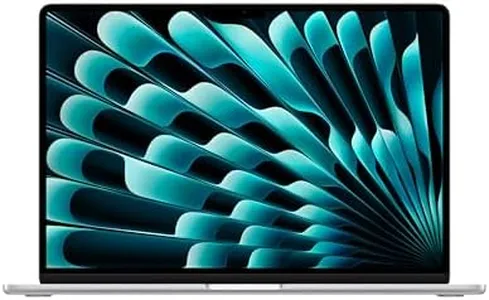
Apple 2025 MacBook Air 15-inch Laptop with M4 chip: Built for Apple Intelligence, 15.3" Liquid Retina Display, 16GB Unified Memory, 256GB SSD Storage, 12MP Center Stage Camera, Touch ID, Silver

Rating
8.8
Processor (CPU)
RAM (Memory)
Storage

Most important from
2665 reviews

Processor (CPU)
The M4 chip delivers blazing-fast performance that handles multitasking, editing, and coding with ease.
RAM (Memory)
Upgrading RAM and SSD can future-proof the device, but these upgrades come at a high price.
Storage
Upgrading RAM and SSD can future-proof the device, but these upgrades come at a high price.
Display
The 15.3-inch Liquid Retina display is bright, sharp, and vibrant, making it perfect for work and entertainment.
Battery Life
Battery life easily lasts a full day of heavy use, allowing for extended unplugged work sessions.
Weight and Portability
Despite its large 15-inch display, the laptop remains incredibly thin, lightweight, and highly portable.

The Apple 2025 MacBook Air 15-inch with the M4 chip is a strong contender for office use, especially if you value speed and portability. The M4 chip with its 10-core CPU and 10-core GPU delivers smooth multitasking and handles demanding apps effortlessly, making it great for tasks like video calls, document editing, and even some light creative work. With 16GB of unified memory, it provides plenty of space for running multiple apps simultaneously without slowdowns. However, the 256GB SSD might feel a bit tight if you store many large files, so external storage or cloud solutions could be necessary.

The 15.3-inch Liquid Retina display offers sharp, vibrant visuals with true-to-life colors and high brightness, which is excellent for long hours of work and video conferences. Its backlit Magic Keyboard and precise Force Touch trackpad make typing and navigation comfortable, adding to productivity. The inclusion of Touch ID adds convenience and security. Battery life is impressive, promising up to 18 hours under typical use, which means you can work unplugged for a full workday or more. Weighing just about 3.3 pounds, it’s easy to carry around, fitting well for those who move between meetings or work remotely.

Connectivity includes two Thunderbolt 4 ports, MagSafe charging, headphone jack, Wi-Fi 6E, and Bluetooth 5.3, providing fast data transfer and versatile peripheral support. It also supports up to two external displays if you need more screen space. The base storage size might require additional investment if you handle large files regularly. As is typical with Apple laptops, the price is likely on the higher side compared to Windows alternatives offering similar specs. This MacBook Air suits professionals who prioritize a lightweight machine with excellent performance, great screen quality, and long battery life. It's especially appealing if you already use Apple devices and want seamless integration. If storage needs are minimal and budget allows, this laptop is a reliable and stylish office companion.

Rating
8.8
Processor (CPU)
RAM (Memory)
Storage

Most important from
2665 reviews

Processor (CPU)
The M4 chip delivers blazing-fast performance that handles multitasking, editing, and coding with ease.
RAM (Memory)
Upgrading RAM and SSD can future-proof the device, but these upgrades come at a high price.
Storage
Upgrading RAM and SSD can future-proof the device, but these upgrades come at a high price.
Display
The 15.3-inch Liquid Retina display is bright, sharp, and vibrant, making it perfect for work and entertainment.
Battery Life
Battery life easily lasts a full day of heavy use, allowing for extended unplugged work sessions.
Weight and Portability
Despite its large 15-inch display, the laptop remains incredibly thin, lightweight, and highly portable.

Buying Guide for the Best Office Laptops

Choosing the right office laptop can significantly impact your productivity and work efficiency. When selecting a laptop for office use, it's important to consider several key specifications that will ensure the device meets your needs. These specifications will help you determine the laptop's performance, usability, and overall suitability for your work tasks. Here are the key specs to consider and how to navigate them.
Processor (CPU)The processor, or CPU, is the brain of your laptop and determines how quickly it can process information. For office tasks such as word processing, spreadsheets, and web browsing, a mid-range processor like an Intel Core i5 or AMD Ryzen 5 is usually sufficient. If you need to run more demanding applications or multitask heavily, consider a higher-end processor like an Intel Core i7 or AMD Ryzen 7. For basic tasks, an Intel Core i3 or AMD Ryzen 3 may be adequate.
RAM (Memory)RAM, or Random Access Memory, affects how many applications you can run simultaneously and how smoothly they operate. For most office work, 8GB of RAM is generally sufficient. If you frequently work with large files, run multiple applications at once, or use memory-intensive software, 16GB of RAM may be a better choice. For very basic tasks, 4GB of RAM might be enough, but it could limit your ability to multitask.
StorageStorage determines how much data you can save on your laptop. There are two main types: HDD (Hard Disk Drive) and SSD (Solid State Drive). SSDs are faster and more reliable but tend to be more expensive. For office use, a 256GB SSD is a good starting point, providing a balance between speed and storage capacity. If you need to store a lot of large files, consider a 512GB or 1TB SSD. HDDs are cheaper and offer more storage space, but they are slower and less durable.
DisplayThe display size and resolution affect your viewing experience. A 13-14 inch screen is portable and sufficient for most office tasks. If you need more screen real estate for multitasking or detailed work, a 15-16 inch screen might be better. Full HD (1920x1080) resolution is standard and provides clear and sharp images. Higher resolutions like 4K are available but may be unnecessary for typical office work and can drain battery life faster.
Battery LifeBattery life is crucial if you need to work on the go or away from a power outlet. Look for a laptop that offers at least 8 hours of battery life to ensure it lasts through a typical workday. If you travel frequently or work in different locations, longer battery life (10-12 hours or more) can be very beneficial. Keep in mind that battery life can vary based on usage and settings.
Weight and PortabilityThe weight and portability of a laptop are important if you need to carry it around frequently. Lighter laptops (under 3 pounds) are easier to transport and more comfortable to use on the go. Heavier laptops (over 4 pounds) may offer more features or larger screens but can be cumbersome to carry. Consider how often you will need to move your laptop and choose a weight that suits your lifestyle.
ConnectivityConnectivity options determine how you can connect your laptop to other devices and networks. Ensure the laptop has enough USB ports (preferably USB 3.0 or higher) for your peripherals, an HDMI port for external displays, and a headphone jack. If you need to connect to wired networks, look for an Ethernet port. Additionally, consider laptops with Wi-Fi 6 for faster and more reliable wireless connections.
Keyboard and TouchpadA comfortable keyboard and responsive touchpad are essential for efficient typing and navigation. Look for a laptop with a well-spaced, backlit keyboard if you often work in low-light conditions. The touchpad should be smooth and accurate, with multi-touch gesture support. If possible, try out the keyboard and touchpad in person to ensure they meet your comfort and usability standards.

FAQ

Most Popular Categories Right Now