We Use CookiesWe use cookies to enhance the security, performance, functionality and for analytical and promotional activities. By continuing to browse this site you are agreeing to our privacy policy

10 Best PC controllers 2026 in the United States

How do we rank products for you?

Our technology thoroughly searches through the online shopping world, reviewing hundreds of sites. We then process and analyze this information, updating in real-time to bring you the latest top-rated products. This way, you always get the best and most current options available.

headphones-stars

Our Top Picks

#1

Winner

PlayStation DualSense™ Wireless Controller – Galactic Purple - For PS5, PC, MAC & Mobile

Rating
10.0
Chosen by1,339
Ergonomics
Compatibility
Build Quality

Most important from
814 reviews

Ergonomics
Offers a comfortable grip that supports extended gaming sessions without strain.
Compatibility
Delivers flawless performance with seamless functionality across devices.
Build Quality
Build quality feels premium and reliable, enhancing overall satisfaction.

The PlayStation DualSense Wireless Controller in Galactic Purple offers a comfortable and ergonomic design that fits well in most hands, making gaming sessions easier on your fingers. Its button layout is familiar to PlayStation users, featuring responsive buttons and analog sticks that work smoothly for a wide range of games. One standout feature is the advanced haptic feedback and adaptive triggers, which provide a more immersive experience by simulating real-life sensations during gameplay — something not all PC controllers offer.

Connectivity options are flexible, with USB Type-C wired connection or Bluetooth wireless support, allowing easy pairing with Windows PCs, Macs, and mobile devices like Android and iOS phones. This versatility makes it a strong choice if you want one controller for multiple platforms. The built-in microphone and headset jack add convenience for online chatting, with a mute button for quick voice control.

The controller supports a broad range of devices, though unlocking full features such as adaptive triggers and haptics on some PC games might require additional configuration or compatible software. Its build quality is solid, featuring sturdy materials that feel durable without being heavy (about 15 ounces). Battery life is a minor consideration, as the rechargeable lithium-ion battery may need more frequent charging during extended sessions compared to other controllers with longer-lasting batteries. Users accustomed to Xbox or other PC-centric controllers might need some time to adjust to the button layout and feel. This controller is ideal for gamers seeking a premium, immersive experience and who plan to use it across multiple devices, including PS5 and PC. Those who prioritize advanced feedback features and versatile wireless connection will find it a great option, while casual or budget-focused PC gamers may prefer simpler, more cost-effective controllers.

Rating
10.0
Chosen by1,339
Ergonomics
Compatibility
Build Quality

Most important from
814 reviews

Ergonomics
Offers a comfortable grip that supports extended gaming sessions without strain.
Compatibility
Delivers flawless performance with seamless functionality across devices.
Build Quality
Build quality feels premium and reliable, enhancing overall satisfaction.
#2

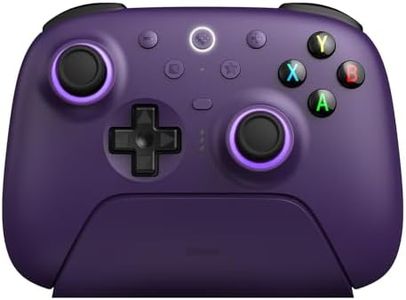
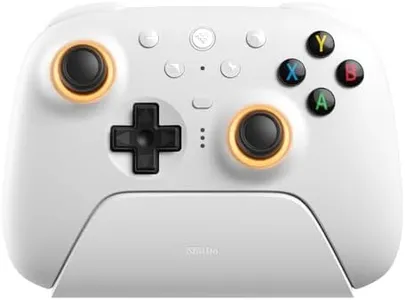
ManbaOne Interactive Screen Wireless Gaming Controller for PC/Switch/Switch 2/iOS/Android,Hall Effect Stick & Trigger,RGB Lighting,Remappable Buttons,1800mAh with Charging Dock (White)

Rating
8.5
Ergonomics
Button Layout
Connectivity

Most important from
2708 reviews

Ergonomics
Lightweight yet solidly built, the controller minimizes hand fatigue compared to bulkier alternatives like the Xbox One controller.
Button Layout
The mechanical click of the ABXY buttons and micro switch feedback provide a satisfying and responsive tactile experience.
Connectivity
Bluetooth on PC is less stable, so the dedicated wireless dongle is recommended for the best connection and minimal lag.
Compatibility
The controller supports multiple platforms including PC, Switch, iOS, and Android, but lacks compatibility with Xbox and PlayStation, which limits console options.
Build Quality
Hall Effect sticks and triggers deliver smooth, drift-free input, making it ideal for precision gaming in shooters and racing titles.
Additional Features
The built-in interactive screen allows seamless customization of buttons, vibration, lighting, and joystick settings without needing extra software.

The ManbaOne Wireless Gaming Controller offers a fresh take on PC and Switch controllers with its built-in 2-inch interactive screen, allowing easy customization of buttons, vibrations, lighting, and joystick settings without extra software. Its layout includes remappable buttons and four back keys for macros, adding flexibility for gamers who enjoy fine-tuning controls for different games. The controller uses Hall Effect sticks and triggers, which resist drift and provide smooth, accurate input—ideal for shooters and racing games.

Connectivity options include a dedicated wireless adapter, USB cable, and Bluetooth, though Bluetooth is less stable on PC. It supports multiple platforms like PC, Switch, iOS, and Android, but currently does not work with Xbox or PS5, which limits options if you use those consoles. Its ergonomic design is enhanced by interchangeable joysticks to suit different grip preferences, and the build quality feels solid, with micro switch buttons that offer satisfying feedback. The included 1800mAh battery and smart charging dock make it easy to keep powered up without fuss.

RGB lighting adds a nice personal touch, and the controller’s compatibility with both wired and wireless setups makes it versatile. Bluetooth mode on PC is not recommended for stability, so using the wireless adapter is best. This controller represents a strong choice for gamers looking for advanced customization and solid performance on PC and Switch, especially those who appreciate innovative features like the interactive screen and Hall Effect triggers.

Rating
8.5
Ergonomics
Button Layout
Connectivity

Most important from
2708 reviews

Ergonomics
Lightweight yet solidly built, the controller minimizes hand fatigue compared to bulkier alternatives like the Xbox One controller.
Button Layout
The mechanical click of the ABXY buttons and micro switch feedback provide a satisfying and responsive tactile experience.
Connectivity
Bluetooth on PC is less stable, so the dedicated wireless dongle is recommended for the best connection and minimal lag.
Compatibility
The controller supports multiple platforms including PC, Switch, iOS, and Android, but lacks compatibility with Xbox and PlayStation, which limits console options.
Build Quality
Hall Effect sticks and triggers deliver smooth, drift-free input, making it ideal for precision gaming in shooters and racing titles.
Additional Features
The built-in interactive screen allows seamless customization of buttons, vibration, lighting, and joystick settings without needing extra software.
#3

Xbox Elite Series 2 Core Wireless Gaming Controller – Black – Xbox Series X|S, Xbox One, Windows PC, Android, and iOS

Rating
8.2
Ergonomics
Button Layout
Connectivity

Most important from
46295 reviews

Ergonomics
Despite being slightly smaller and lighter than version 1, the controller maintains a satisfying weightiness and ergonomic feel.
Button Layout
Users find the satellite D-pad easier to navigate compared to traditional designs, enhancing gameplay precision.
Connectivity
The braided USB-C cable is noted for its stability and high quality, offering a reliable wired connection.
Build Quality
The controller is praised for its high-quality metal construction, particularly in the thumbstick shafts and paddles, which prevent issues like drift and breakage.
Additional Features
Adjustable hair triggers provide flexibility for gamers who prefer different levels of responsiveness in their gameplay.

The Xbox Elite Series 2 Core Wireless Gaming Controller is designed with high-end ergonomics, offering a comfortable grip even during long gaming sessions. The button layout is customizable with interchangeable thumbstick toppers, D-pads, and paddles, allowing gamers to tailor the controller to their preferred style. This flexibility is a significant plus for those who like to have precise control over their gaming experience. Connectivity is versatile, supporting Xbox Wireless, Bluetooth, and USB-C, making it easy to use across Xbox Series X|S, Xbox One, Windows, Android, and iOS devices. This broad compatibility is great for gamers who use multiple platforms.

Build quality is robust, with refined components that promise durability and up to 40 hours of rechargeable battery life, which is excellent for extended play. Additional features like the ability to save up to 3 custom profiles and utilize the Xbox Accessories app for button mapping and voice commands add a layer of personalization that advanced gamers will appreciate. However, the controller is relatively heavy at 1 pound, which might be a drawback for some users. Additionally, it comes with a higher price tag, which might not be suitable for casual gamers or those on a budget.

Despite these minor drawbacks, the Xbox Elite Series 2 Core Wireless Gaming Controller stands out as a premium choice for serious gamers looking for customization, comfort, and compatibility across multiple devices.

Rating
8.2
Ergonomics
Button Layout
Connectivity

Most important from
46295 reviews

Ergonomics
Despite being slightly smaller and lighter than version 1, the controller maintains a satisfying weightiness and ergonomic feel.
Button Layout
Users find the satellite D-pad easier to navigate compared to traditional designs, enhancing gameplay precision.
Connectivity
The braided USB-C cable is noted for its stability and high quality, offering a reliable wired connection.
Build Quality
The controller is praised for its high-quality metal construction, particularly in the thumbstick shafts and paddles, which prevent issues like drift and breakage.
Additional Features
Adjustable hair triggers provide flexibility for gamers who prefer different levels of responsiveness in their gameplay.

Buying Guide for the Best PC controllers

Choosing the right PC controller can significantly enhance your gaming experience. A good controller should feel comfortable in your hands, be responsive, and have the features you need for the types of games you play. Here are some key specifications to consider when selecting a PC controller.
ErgonomicsErgonomics refers to how comfortable and natural the controller feels in your hands. This is important because a well-designed controller can reduce fatigue and improve your gameplay. Controllers come in various shapes and sizes, so it's essential to find one that fits your hand size and grip style. If you have larger hands, look for controllers with a bulkier design. For smaller hands, a more compact controller might be better.
Button LayoutThe button layout includes the arrangement and number of buttons on the controller. This is crucial because it affects how easily you can access and press the buttons during gameplay. Controllers typically have a standard layout with a D-pad, analog sticks, face buttons, shoulder buttons, and triggers. Some controllers offer additional buttons or customizable layouts. If you play games that require complex inputs, consider a controller with extra buttons or programmable options.
ConnectivityConnectivity refers to how the controller connects to your PC. This can be wired or wireless. Wired controllers offer a stable connection and no battery concerns, but they limit your movement. Wireless controllers provide more freedom but require batteries or charging. If you prefer a clutter-free setup and don't mind charging, a wireless controller might be ideal. For uninterrupted gameplay, a wired controller is a better choice.
CompatibilityCompatibility ensures that the controller works with your PC and the games you want to play. Most controllers are compatible with Windows PCs, but some may require additional drivers or software. Check if the controller supports plug-and-play functionality for easy setup. If you play games on multiple platforms, look for a controller that is compatible with other devices like consoles or mobile phones.
Build QualityBuild quality refers to the durability and materials used in the controller. A well-built controller can withstand long hours of gaming and occasional drops. Look for controllers made from high-quality plastic and with sturdy buttons and analog sticks. If you are a heavy gamer, investing in a controller with robust build quality can save you from frequent replacements.
Additional FeaturesAdditional features include extras like vibration feedback, motion sensors, and customizable buttons. These features can enhance your gaming experience by providing more immersive gameplay and personalized control. Vibration feedback can make games feel more realistic, while motion sensors can add a new dimension to gameplay. Customizable buttons allow you to tailor the controller to your preferences. Consider which features are important for the types of games you play.

FAQ

Most Popular Categories Right Now