We Use CookiesWe use cookies to enhance the security, performance, functionality and for analytical and promotional activities. By continuing to browse this site you are agreeing to our privacy policy

10 Best Photo Printers With Mobile 2026 in the United States
How do we rank products for you?

Our technology thoroughly searches through the online shopping world, reviewing hundreds of sites. We then process and analyze this information, updating in real-time to bring you the latest top-rated products. This way, you always get the best and most current options available.

headphones-stars

Our Top Picks

#1

Winner

Epson EcoTank Photo ET-8550 Wireless Wide-format Color All-in-One Supertank Printer with Scanner Copier, Ethernet and 4.3-inch Colorfull Touchscreen

Rating
10.0
Chosen by1,186
Print Quality (Resolution)
Mobile Printing Compatibility
Print Speed

Most important from
2143 reviews

Print Quality (Resolution)
Gloss prints on Epson ultra premium paper are simply the finest gloss prints I've ever seen.
Mobile Printing Compatibility
Wireless print function is really great, allowing easy printing from phones and tablets.
Print Speed
The printer creates incredible photos very fast, earning a blessing from a professional photographer.
Ink Type and Cost
Ink tanks are huge and transparent, and the ink lasts a long time without being expensive.
Paper Handling and Size Options
Prints on various materials like sticker paper, cardstock, and holographic paper with great accuracy.

The Epson EcoTank Photo ET-8550 is a versatile and high-quality photo printer ideal for those who need to print vibrant, lab-quality photos from the comfort of their home or office. One of its standout features is the cartridge-free printing system using six-color Claria ET Premium inks, which significantly reduces the cost per print and waste associated with traditional cartridges. The printer supports a wide range of media sizes up to 13 x 19 inches, making it suitable for various creative projects, including borderless photos and specialty media like CD/DVDs. The print speed is decent, with the ability to print a 4 x 6 photo in as fast as 15 seconds, though it may be slower when printing larger, more detailed images.

It features a 4.3-inch color touchscreen for easy navigation and supports mobile printing via the Epson Smart Panel app for both iOS and Android devices, ensuring convenient operation directly from your smartphone. Connectivity options are robust, including wireless, Ethernet, and USB interfaces, although some users may find the initial setup process a bit complex. The printer's size and weight (24.5 pounds) make it less portable, but it's perfect for a fixed home office or studio space. Additionally, the two-year limited warranty with registration offers peace of mind. A minor drawback is the relatively high power consumption (150 watts), which may concern energy-conscious users.

This printer is well-suited for photo enthusiasts and small business owners who prioritize high print quality, cost efficiency, and mobile compatibility.

Rating
10.0
Chosen by1,186
Print Quality (Resolution)
Mobile Printing Compatibility
Print Speed

Most important from
2143 reviews

Print Quality (Resolution)
Gloss prints on Epson ultra premium paper are simply the finest gloss prints I've ever seen.
Mobile Printing Compatibility
Wireless print function is really great, allowing easy printing from phones and tablets.
Print Speed
The printer creates incredible photos very fast, earning a blessing from a professional photographer.
Ink Type and Cost
Ink tanks are huge and transparent, and the ink lasts a long time without being expensive.
Paper Handling and Size Options
Prints on various materials like sticker paper, cardstock, and holographic paper with great accuracy.
#2

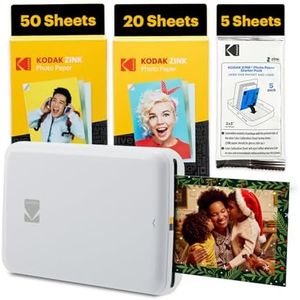
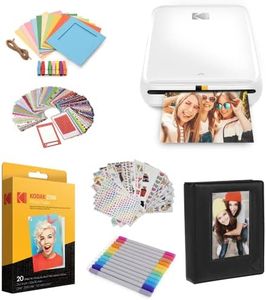
KODAK Dock Plus 4PASS Instant Photo Printer, 4x6” Portable Picture Printer, Bluetooth & Dock 2-in-1 Home and Gift Printer for iPhone & Android, 50 Sheets Bundle

Rating
8.8
Print Quality (Resolution)
Mobile Printing Compatibility
Paper Handling and Size Options

Most important from
19613 reviews

Print Quality (Resolution)
Produces really nice and clear quality pictures.
Mobile Printing Compatibility
The app makes printing a breeze, perfect for making memories tangible.
Paper Handling and Size Options
Perforated lines on the paper eliminate the need for scissors, ensuring neat edges.

The Kodak Dock Plus 4PASS Instant Photo Printer is designed with mobile printing in mind, making it easy to print high-quality photos directly from your smartphone or tablet. It offers excellent print quality, thanks to its 4PASS dye-sublimation technology, which produces vibrant, fingerprint-proof, and water-resistant photos that can last over 100 years. The printer supports both border and borderless photo options, allowing for versatile photo printing needs.

With its wireless and Bluetooth connectivity, it ensures compatibility with both iOS and Android devices, adding to its convenience. The augmented reality features and decorative options available through the Kodak Photo Printer app further enhance the printing experience, making it fun and interactive. However, the printer's speed is quite slow at 1 page per minute (ppm) for both color and monochrome prints, which may not be ideal for users needing faster print outputs.

Additionally, the printer is limited to 4x6 inch photo paper, which could be restrictive for some users. The initial and ongoing ink and paper bundle costs are reasonably low, positioning it as a cost-effective option for home photo printing. Despite its portability, the device is on the heavier side, weighing around 2 kilograms (4.4 pounds), which might be a consideration for users looking for a more lightweight and compact printer. The Kodak Dock Plus is a solid choice for users looking for high-quality, affordable photo printing with mobile compatibility, though its slow print speed and size limitations should be taken into account.

Rating
8.8
Print Quality (Resolution)
Mobile Printing Compatibility
Paper Handling and Size Options

Most important from
19613 reviews

Print Quality (Resolution)
Produces really nice and clear quality pictures.
Mobile Printing Compatibility
The app makes printing a breeze, perfect for making memories tangible.
Paper Handling and Size Options
Perforated lines on the paper eliminate the need for scissors, ensuring neat edges.
#3

Liene Photo Printer, 2x3 Mini Instant Portable Color Mono Picture Printer w/ 50 Zink Adhesive Paper, Bluetooth 5.0, Compatible w/iOS & Android, Small Photo Maker for iPhone, Smartphones, Pink

Rating
8.2
Print Quality (Resolution)
Ink Type and Cost
Size and Portability

Most important from
1497 reviews

Print Quality (Resolution)
Photos deliver surprisingly good quality with vibrant colors, making them perfect for journals, scrapbooks, and instant party prints.
Ink Type and Cost
The inkless printing technology is a game changer, eliminating the need for cartridges and reducing ongoing costs.
Size and Portability
Its compact, lightweight design fits comfortably in the original box along with extra paper packs and charging cord, making it highly portable without needing a separate case.
Mobile Printing Compatibility
Bluetooth connectivity is generally reliable after initial pairing, enabling straightforward wireless printing from phones.
Paper Handling and Size Options
The small 2x3 inch photo size is ideal for journals and crafts but limits larger-format printing needs.

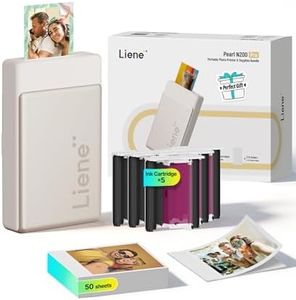
The Liene Photo Printer is a compact and lightweight device that fits well for anyone wanting an easy way to print small 2x3 inch photos directly from their iPhone or Android phone. Its standout feature is the Zink (zero ink) technology, which means it doesn’t use traditional ink cartridges—this makes operating costs lower and printing more environmentally friendly. The included adhesive photo paper is waterproof, tear-resistant, and lets you stick photos to surfaces or scrapbooks, adding fun versatility.

Print quality is decent with a resolution of 300 dpi, delivering colorful and mono prints that are vivid but not professional-grade. The printer supports both color and black-and-white photos, including a vintage film-like option. However, print speed is quite slow at about one photo per minute, so it’s not ideal if you need to print many pictures quickly. Connectivity via Bluetooth 5.0 is straightforward and reliable, and the printer pairs easily through the dedicated Liene app. The app also includes a handy cleaning feature to improve print quality when white spots or lines appear. Paper handling is simple with a single tray holding up to 10 sheets, and you receive 50 sheets with the printer.

The small size and rechargeable battery make it very portable, perfect for on-the-go use or casual photo printing. On the downside, the print size is limited to 2x3 inches, which is quite small compared to standard photo prints. The printer can only print through its proprietary app, which might limit flexibility. Also, at one page per minute, the speed is slow compared to larger photo printers. This device is better suited for casual users, scrapbookers, or those seeking fun, instant photo prints rather than high-volume or large-format printing.

Rating
8.2
Print Quality (Resolution)
Ink Type and Cost
Size and Portability

Most important from
1497 reviews

Print Quality (Resolution)
Photos deliver surprisingly good quality with vibrant colors, making them perfect for journals, scrapbooks, and instant party prints.
Ink Type and Cost
The inkless printing technology is a game changer, eliminating the need for cartridges and reducing ongoing costs.
Size and Portability
Its compact, lightweight design fits comfortably in the original box along with extra paper packs and charging cord, making it highly portable without needing a separate case.
Mobile Printing Compatibility
Bluetooth connectivity is generally reliable after initial pairing, enabling straightforward wireless printing from phones.
Paper Handling and Size Options
The small 2x3 inch photo size is ideal for journals and crafts but limits larger-format printing needs.

Buying Guide for the Best Photo Printers With Mobile

Choosing the right photo printer with mobile capabilities can greatly enhance your ability to print high-quality photos directly from your smartphone or tablet. To make an informed decision, it's important to understand the key specifications and how they align with your needs. Here are some essential specs to consider when selecting a photo printer with mobile capabilities.
Print Quality (Resolution)Print quality, often measured in dots per inch (DPI), determines the level of detail and clarity in your printed photos. Higher DPI values mean better print quality. For casual photo printing, a resolution of 300-600 DPI is usually sufficient. However, if you want professional-grade prints with fine details, look for printers with 1200 DPI or higher. Consider your need for high-quality prints versus everyday snapshots to choose the right resolution.
Mobile Printing CompatibilityMobile printing compatibility refers to the printer's ability to connect and print directly from your mobile device. This can be achieved through various methods such as Wi-Fi, Bluetooth, or dedicated mobile apps. Ensure the printer supports the operating system of your device (iOS or Android). If you frequently print from your phone, look for printers with seamless mobile integration and user-friendly apps to make the process smooth and convenient.
Print SpeedPrint speed indicates how quickly a printer can produce a photo. It is usually measured in pages per minute (PPM) or seconds per photo. Faster print speeds are beneficial if you need to print multiple photos in a short time. For occasional printing, a slower speed might be acceptable. Consider how often and how many photos you plan to print to determine the importance of print speed for your needs.
Ink Type and CostPhoto printers use different types of ink, such as dye-based or pigment-based. Dye-based inks generally produce more vibrant colors, while pigment-based inks offer better longevity and resistance to fading. Additionally, consider the cost of replacement ink cartridges, as this can add up over time. If you print frequently, look for printers with affordable and high-yield ink options to keep ongoing costs manageable.
Paper Handling and Size OptionsPaper handling refers to the types and sizes of paper a printer can accommodate. Some printers are limited to standard photo sizes like 4x6 inches, while others can handle larger formats such as 8x10 inches or even A3. If you want versatility in your prints, choose a printer that supports multiple paper sizes and types. Think about the variety of photo projects you plan to undertake to select a printer with the appropriate paper handling capabilities.
Connectivity OptionsIn addition to mobile printing, consider other connectivity options like USB, Ethernet, or memory card slots. These can provide alternative ways to print photos directly from cameras or computers. If you prefer flexibility in how you connect and print, look for printers with multiple connectivity options. Assess your typical workflow and the devices you use to determine which connectivity features are most important for you.
Size and PortabilityThe size and portability of a photo printer can be important, especially if you have limited space or need to transport the printer frequently. Compact and lightweight models are ideal for small spaces or on-the-go printing. However, larger printers may offer more features and better print quality. Consider where and how you will use the printer to decide on the right balance between size and functionality.

FAQ

Most Popular Categories Right Now