We Use CookiesWe use cookies to enhance the security, performance, functionality and for analytical and promotional activities. By continuing to browse this site you are agreeing to our privacy policy

10 Best Photos Scanners 2026 in the United States
How do we rank products for you?

Our technology thoroughly searches through the online shopping world, reviewing hundreds of sites. We then process and analyze this information, updating in real-time to bring you the latest top-rated products. This way, you always get the best and most current options available.

headphones-stars

Our Top Picks

#1

Winner

Epson FastFoto FF-680W Wireless High-Speed Duplex Photo and Document Scanner and System with USB Connect and Mobile Scanning

Rating
10.0
Chosen by1,238
Resolution
Scan Speed
Connectivity

Most important from
3333 reviews

Resolution
The scanner works flawlessly with various photo sizes and formats, enhancing the quality of the scans automatically.
Scan Speed
This photo scanner is incredibly fast, handling multiple photos at once and scanning each photo in about a second.
Connectivity
The connectivity options, including USB and wireless, make it easy to integrate into various workspaces.
Additional Features
The automatic photo restoration feature is effective without being too intrusive, significantly enhancing old photos.

The Epson FastFoto FF-680W is positioned as a top-tier photo scanner that excels in speed and versatility, making it an excellent choice for anyone looking to digitize a large collection of photos quickly. One of its standout features is its ability to scan up to 36 photos at once at a speed of one photo per second, all while maintaining a decent resolution of 300 dpi. This feature alone can save users a significant amount of time compared to traditional scanning methods. Additionally, it supports various photo formats, including Polaroids and postcards, which adds to its flexibility.

The scanner also offers impressive capabilities in enhancing old photos through its Perfect Picture Imaging System, which includes auto enhancement and color restoration, allowing users to breathe new life into their cherished memories. The single-step technology is particularly useful, as it captures images and handwritten notes simultaneously, making it an attractive option for preserving not just photos but also personal stories.

Connectivity is another strong point, with options for both USB and wireless connections, allowing for easy setup and integration into different workspaces. The ability to instantly share scans through Dropbox and Google Drive is a huge plus for those who want to back up their photos or share them with family and friends quickly. There are a few drawbacks to consider, such as the limited resolution of 300 dpi for quick scans, which may not be sufficient for users looking for the highest quality scans. Additionally, at 8.2 pounds, it may not be the most portable option for users who need to move it frequently. The software, while functional with features like OCR, may not be as intuitive for less tech-savvy users, potentially requiring a learning curve.

Rating
10.0
Chosen by1,238
Resolution
Scan Speed
Connectivity

Most important from
3333 reviews

Resolution
The scanner works flawlessly with various photo sizes and formats, enhancing the quality of the scans automatically.
Scan Speed
This photo scanner is incredibly fast, handling multiple photos at once and scanning each photo in about a second.
Connectivity
The connectivity options, including USB and wireless, make it easy to integrate into various workspaces.
Additional Features
The automatic photo restoration feature is effective without being too intrusive, significantly enhancing old photos.
#2

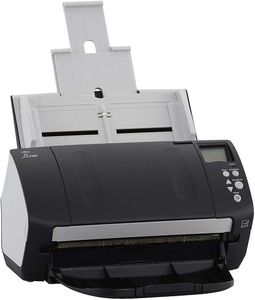
Fujitsu FI-7160 - Document Scanner - Duplex - 8.5 inx14 in - 600 DPIx600 DPI - UP to 60 PPM (Mono)/UP to 60 PPM (Color) - ADF (80 Sheets) - UP to 4000 SCANS PER Day - USB 3.0 (Renewed)

Rating
9.4
Resolution
Color Depth
Scan Speed

Most important from
61 reviews

Resolution
Image quality is sharp and clear at 600 DPI, ensuring detailed and readable scans.
Color Depth
Color reproduction is accurate thanks to the 48-bit color depth, beneficial for photo scanning.
Scan Speed
The scanner delivers impressive speed, making it ideal for fast-paced office environments.
Connectivity
USB 3.0 connectivity provides quick and reliable data transfers to your computer.
Media Handling
The 80-sheet feeder enables large batch scanning without frequent interruptions.

The Fujitsu FI-7160 is a solid choice if you need a fast and reliable document scanner, especially in a busy office setting. It scans both sides of a document at once and handles up to 60 pages per minute in color or black and white, which is great for saving time. The 80-sheet Automatic Document Feeder means you can scan large batches without constantly stopping to reload paper. It offers a sharp 600 DPI resolution, so text and details come out clear, although this might be less noticeable if you’re scanning photos rather than documents. The color depth of 48 bits helps capture accurate colors, which is a plus if you do some photo scanning.

Connectivity is straightforward with USB 3.0, ensuring speedy transfers to your computer, but there's no wireless option if you prefer that flexibility. The scanner is desk-friendly in size, but heavier than portable models, so it’s best suited for a fixed workspace rather than on-the-go use. This model is designed for frequent daily use, supporting up to 4,000 scans per day, which is more than enough for most office needs.

It focuses mainly on standard paper and receipts rather than delicate photo media, so it might not be ideal if your primary goal is high-end photo scanning. The software that comes with it is aimed at document management rather than advanced photo editing. The scanner excels in high-volume, efficient document scanning but provides limited features specifically tailored for photo scanning or portability.

Rating
9.4
Resolution
Color Depth
Scan Speed

Most important from
61 reviews

Resolution
Image quality is sharp and clear at 600 DPI, ensuring detailed and readable scans.
Color Depth
Color reproduction is accurate thanks to the 48-bit color depth, beneficial for photo scanning.
Scan Speed
The scanner delivers impressive speed, making it ideal for fast-paced office environments.
Connectivity
USB 3.0 connectivity provides quick and reliable data transfers to your computer.
Media Handling
The 80-sheet feeder enables large batch scanning without frequent interruptions.
#3

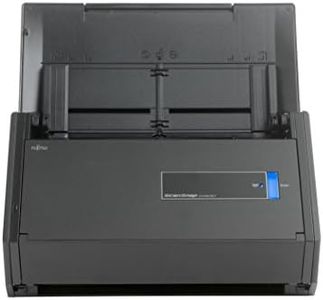
FUJITSU IX500 Scansnap Document Scanner (PA03656-B305-R) - (Renewed),Black

Rating
9.1
Scan Speed
Software

Most important from
221 reviews

Scan Speed
Rebuilt units perform flawlessly with fast scanning speeds and no paper jams, maintaining the brand's long-standing reliability.
Software
Effortless double-sided scanning simplifies digitizing documents like utility bills, making everyday use seamless and efficient.

The Fujitsu ScanSnap IX500 is a solid choice for anyone needing a reliable document scanner that can handle photos and papers efficiently. It offers a scan resolution of 300 dpi with a 24-bit color depth, which is decent for clear color scans but might not satisfy those looking for ultra-high photo quality. Its fast scanning speed of up to 25 double-sided pages per minute makes it a good fit for users with moderate to heavy scanning needs, especially for documents and photos. The 50-page automatic document feeder is handy for processing batches without constant attention.

Connectivity options are flexible, allowing you to scan via USB or wirelessly to Mac, PC, iOS, and Android devices, which adds convenience if you want to scan directly to your phone or cloud without a computer. The scanner comes with a variety of useful software tools that help organize and convert scanned files, making it easier to manage your digital documents and photos. While the size is somewhat bulky compared to ultra-portable scanners, at around 5.6 pounds it is still manageable for home or office use but not ideal for frequent travel.

A limitation to consider is the 90-day warranty, which might be a concern for long-term reliability. This scanner is well suited for users looking for a dependable desktop scanner with good speed and software support, particularly for efficiently digitizing photos and documents, but it is not recommended for professional-grade photo archiving.

Rating
9.1
Scan Speed
Software

Most important from
221 reviews

Scan Speed
Rebuilt units perform flawlessly with fast scanning speeds and no paper jams, maintaining the brand's long-standing reliability.
Software
Effortless double-sided scanning simplifies digitizing documents like utility bills, making everyday use seamless and efficient.

Buying Guide for the Best Photos Scanners

When choosing a photo scanner, it's important to consider your specific needs and how you plan to use the scanner. Whether you're digitizing old family photos, scanning professional prints, or archiving documents, the right scanner can make a big difference in the quality and efficiency of your work. Here are some key specifications to consider when selecting a photo scanner.
ResolutionResolution is measured in dots per inch (DPI) and indicates the level of detail the scanner can capture. Higher DPI means more detail and better quality scans. For general photo scanning, a resolution of 300-600 DPI is usually sufficient. For professional or archival purposes, you might want a scanner with 1200 DPI or higher. Consider what you will be using the scans for: if you need high-quality prints or detailed enlargements, opt for a higher DPI.
Color DepthColor depth, measured in bits, determines how many colors the scanner can capture. Higher color depth means more accurate and vibrant colors. Most photo scanners offer 24-bit color depth, which is adequate for most uses. For professional or high-quality photo scanning, look for scanners with 48-bit color depth. If you need true-to-life color reproduction, especially for professional work, a higher color depth is essential.
Scan SpeedScan speed is how quickly the scanner can process an image, usually measured in seconds per page. Faster scan speeds can save time, especially if you have a large number of photos to scan. For occasional use, scan speed may not be as critical, but for large projects or professional use, a faster scanner can be very beneficial. Consider how much scanning you will be doing and how important speed is to your workflow.
ConnectivityConnectivity options include USB, Wi-Fi, and sometimes Bluetooth. USB is the most common and reliable, but Wi-Fi can offer more flexibility, allowing you to scan directly to your computer or cloud storage without cables. If you plan to use the scanner with multiple devices or need the convenience of wireless scanning, look for models with Wi-Fi connectivity. Think about your setup and how you prefer to transfer your scanned images.
SoftwareThe software that comes with the scanner can greatly affect your experience. Good software can make it easier to edit, organize, and share your scans. Look for scanners that come with user-friendly software that meets your needs, whether it's basic editing tools or advanced features like OCR (optical character recognition) for text documents. Consider what kind of post-scan processing you will need and choose a scanner with software that supports those tasks.
Size and PortabilityThe size and portability of the scanner can be important depending on your workspace and how you plan to use it. Flatbed scanners are larger but can handle a variety of media, while portable scanners are smaller and easier to store but may have limitations. If you need to scan large or thick items, a flatbed scanner is a better choice. For on-the-go scanning or limited space, a portable scanner might be more suitable. Think about where and how you will be using the scanner.
Media HandlingDifferent scanners can handle different types of media, such as photos, slides, negatives, and documents. Some scanners come with special attachments or features for scanning film or slides. If you need to scan a variety of media types, look for a versatile scanner that can handle all your needs. Consider the types of items you will be scanning and choose a scanner that can accommodate them.

FAQ

Most Popular Categories Right Now