We Use CookiesWe use cookies to enhance the security, performance, functionality and for analytical and promotional activities. By continuing to browse this site you are agreeing to our privacy policy

10 Best Retro Game Console Emulator 2026 in the United States
How do we rank products for you?

Our technology thoroughly searches through the online shopping world, reviewing hundreds of sites. We then process and analyze this information, updating in real-time to bring you the latest top-rated products. This way, you always get the best and most current options available.

headphones-stars

Our Top Picks

#1

Winner

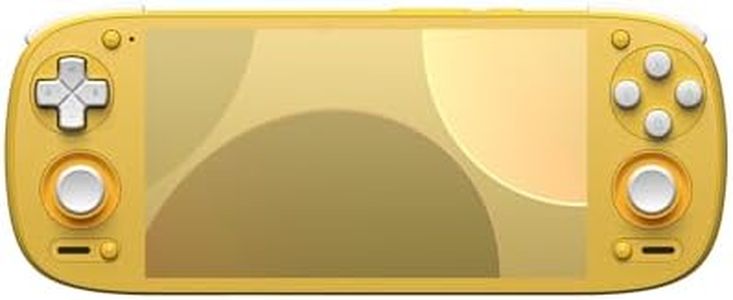
Retroid Pocket 5 Retro Handheld Game Console, 8+128G, 5.5-inch Touchscreen 1080p Portable Android Gaming Handheld with Adreno 650 GPU & WiFi 6/BT5.1, Snapdragon 865 Processor, Android 13 (Yellow)

Rating
10.0
Chosen by1,458
Performance
Compatibility
Customization Options

Most important from
366 reviews

Performance
Performance is strong enough to handle games up to PS2, GameCube, and even some Switch titles smoothly, as well as Xbox Remote Play and Steam games via Moonlight.
Compatibility
Setup requires some patience, especially with emulators, but once configured, the device runs a wide variety of games seamlessly.
Customization Options
Adding accessories like a grip or extended handles significantly improves comfort for longer play sessions.

The Retroid Pocket 5 is a powerful handheld console designed for retro game enthusiasts who want flexibility and strong performance. Its Snapdragon 865 processor and Adreno 650 GPU provide smooth and responsive gameplay, handling a wide range of retro and indie games without lag. The 5.5-inch 1080p touchscreen offers clear and vibrant visuals, making it easy to navigate menus and enjoy games on the go. Running Android 13, it supports thousands of games through emulators and app stores, giving you plenty of options to customize your library.

The device is lightweight and ergonomic, suitable for long gaming sessions, and its 5000mAh battery promises hours of playtime. Storage can be expanded with a microSD card, which is handy since no games come preloaded—you’ll need to source your own titles. The Retroid community is active, which helps with finding advice and troubleshooting, though users should stay aware of legal considerations around game ROMs to avoid copyright issues.

This console fits well for anyone comfortable setting up emulators and downloading games, offering excellent performance and flexibility, but it might require more effort from beginners to get started.

Rating
10.0
Chosen by1,458
Performance
Compatibility
Customization Options

Most important from
366 reviews

Performance
Performance is strong enough to handle games up to PS2, GameCube, and even some Switch titles smoothly, as well as Xbox Remote Play and Steam games via Moonlight.
Compatibility
Setup requires some patience, especially with emulators, but once configured, the device runs a wide variety of games seamlessly.
Customization Options
Adding accessories like a grip or extended handles significantly improves comfort for longer play sessions.
#2

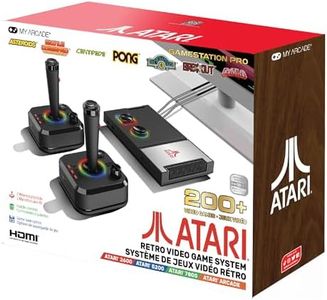
My Arcade Atari Game Station Pro: Retro Video Game Console with 200+ Games, Wireless Joysticks, RGB LED Lights

Rating
9.7
Compatibility
Customization Options
Performance

Most important from
1201 reviews

Compatibility
Setup is incredibly straightforward—just plug in USB and HDMI, insert batteries, and start playing within minutes.
Customization Options
Adding new games is easy via the micro SD card slot, allowing thousands of additional titles and even custom operating systems for enhanced browsing.
Performance
Using the controllers wired eliminates any potential wireless latency, providing a near-imperceptible input delay even when used wirelessly.
Community and Support
Firmware updates are available and easy to install, improving game layout and fixing bugs for a better user experience.

The My Arcade Atari Game Station Pro is a plug-and-play retro console that brings the classic Atari experience directly to your TV. It features over 200 officially licensed Atari games, including favorites like Asteroids and Centipede, all accessible without needing additional setup. The system comes with two wireless joysticks inspired by the originals, including paddle controls for games like Breakout. This gives players a familiar and comfortable way to enjoy multiplayer sessions. Performance is smooth for these classic titles, and the console connects easily via HDMI and USB power, making setup simple. The dynamic RGB LED lights add a nice nostalgic touch but don't affect gameplay.

In terms of customization, options are limited—there’s no way to add new games or modify the system beyond firmware updates available on My Arcade’s website. The user guide supports multiple languages, which is helpful for a wide audience. While the community around this device isn’t as extensive as PC-based emulators, My Arcade’s official licensing means you’re playing games legally, without copyright concerns.

A few minor downsides include the need for AA batteries in the wireless controllers and the absence of some popular titles like Pac-Man and Galaga. Also, the user interface is basic, designed for straightforward use rather than deep customization or advanced emulator features. For anyone seeking an easy-to-use, authentic Atari gaming experience with a physical console and wireless controllers, this product fits well. However, if you want flexibility to add games or more powerful emulator options, you might want to explore PC or more advanced systems.

Rating
9.7
Compatibility
Customization Options
Performance

Most important from
1201 reviews

Compatibility
Setup is incredibly straightforward—just plug in USB and HDMI, insert batteries, and start playing within minutes.
Customization Options
Adding new games is easy via the micro SD card slot, allowing thousands of additional titles and even custom operating systems for enhanced browsing.
Performance
Using the controllers wired eliminates any potential wireless latency, providing a near-imperceptible input delay even when used wirelessly.
Community and Support
Firmware updates are available and easy to install, improving game layout and fixing bugs for a better user experience.
#3

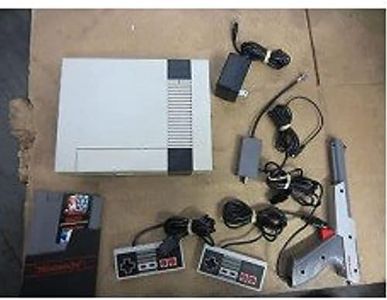
Hyperkin RetroN 2 HD Gaming Console for NES/Super NES/Super Famicom (Gray)

Rating
8.8
Compatibility
User Interface
Performance

Most important from
447 reviews

Compatibility
The console works flawlessly with NES and SNES games, including Super Famicom imports.
User Interface
The controllers feel great and are a joy to use for both NES and SNES games.
Performance
Despite minor color inaccuracies, the console delivers excellent performance and versatility.

The Hyperkin RetroN 2 HD Gaming Console offers a solid retro gaming experience, especially for fans of NES, Super NES, and Super Famicom cartridges. One of its major strengths is high compatibility with both NTSC and PAL cartridges, making it versatile for different regions. The HD support with 720p resolution and switchable 16:9/4:3 aspect ratio enhances the visual experience, but it's limited to HD cable only, which could be restrictive for some users.

Performance-wise, the Hyperkin-engineered 'perfect pin' technology ensures a reliable connection with cartridges, potentially reducing issues with game loading and playing. However, some users have reported occasional lag in gameplay which might affect the experience for fast-paced games. The included 'Cadet' and 'Scout' controllers offer a nostalgic feel but may not match the build quality and responsiveness of original controllers.

Customization options are somewhat limited, mainly revolving around video and audio settings. Legal considerations are important, especially concerning the emulation of games; however, using original cartridges should mitigate legal issues. On the downside, the product's reliance on a USB wall AC adapter with specific output requirements might be inconvenient for some users. The Hyperkin RetroN 2 HD Gaming Console is a good choice for retro gaming enthusiasts seeking a blend of modern and classic gaming experiences, albeit with some minor trade-offs in performance and user interface.

Rating
8.8
Compatibility
User Interface
Performance

Most important from
447 reviews

Compatibility
The console works flawlessly with NES and SNES games, including Super Famicom imports.
User Interface
The controllers feel great and are a joy to use for both NES and SNES games.
Performance
Despite minor color inaccuracies, the console delivers excellent performance and versatility.

Buying Guide for the Best Retro Game Console Emulator

Choosing a retro game console emulator can be a fun and rewarding experience, especially if you have a love for classic games. The right emulator will allow you to relive your favorite gaming moments from the past on modern hardware. To make the best choice, it's important to understand the key specifications and features that differentiate one emulator from another. This guide will help you navigate through these specs and find the best fit for your needs.
CompatibilityCompatibility refers to the range of retro gaming systems that the emulator can support. This is important because it determines which games you can play. Some emulators are designed to support a wide variety of systems, from early arcade games to more recent consoles, while others may focus on a specific system or era. If you have a particular set of games or a favorite console in mind, make sure the emulator you choose supports those. For a broader gaming experience, look for emulators with extensive compatibility.
User InterfaceThe user interface (UI) is how you interact with the emulator. A good UI is intuitive and easy to navigate, making it simple to load games, adjust settings, and manage your game library. Some emulators offer a more modern, polished interface, while others might be more basic. If you're new to emulators, you might prefer one with a straightforward, user-friendly interface. More experienced users might appreciate advanced features and customization options.
PerformancePerformance refers to how well the emulator runs games, including aspects like speed, graphics, and sound quality. This is crucial for an enjoyable gaming experience. Emulators with high performance can run games smoothly without lag or glitches. Performance can vary based on the hardware you're using, so consider your device's capabilities. If you have a powerful computer or console, you can opt for emulators with higher performance requirements. For older or less powerful devices, look for emulators known for their efficiency and low resource usage.
Customization OptionsCustomization options allow you to tailor the emulator to your preferences. This can include controller mapping, graphic filters, save states, and more. These features are important for enhancing your gaming experience and making it more comfortable. If you like to tweak settings and optimize your gameplay, look for emulators with extensive customization options. If you prefer a more plug-and-play experience, simpler emulators with fewer options might be more suitable.
Community and SupportCommunity and support refer to the availability of help and resources from other users and developers. A strong community can provide valuable tips, troubleshooting advice, and updates. This is important for resolving issues and getting the most out of your emulator. Emulators with active communities and good support are often more reliable and continuously improved. If you're new to emulators or anticipate needing help, choose one with a robust support system.
Legal ConsiderationsLegal considerations involve the legality of using and distributing emulators and game ROMs. It's important to understand that while emulators themselves are generally legal, downloading and using ROMs of games you do not own is often illegal. Always ensure you are complying with local laws and only use ROMs for games you legally own. Some emulators may offer legal game libraries or partnerships with game developers, which can be a safer and more ethical choice.

FAQ

Most Popular Categories Right Now