We Use CookiesWe use cookies to enhance the security, performance, functionality and for analytical and promotional activities. By continuing to browse this site you are agreeing to our privacy policy

10 Best Soldering Stations 2026 in the United States
How do we rank products for you?

Our technology thoroughly searches through the online shopping world, reviewing hundreds of sites. We then process and analyze this information, updating in real-time to bring you the latest top-rated products. This way, you always get the best and most current options available.

headphones-stars

Our Top Picks

#1

Winner

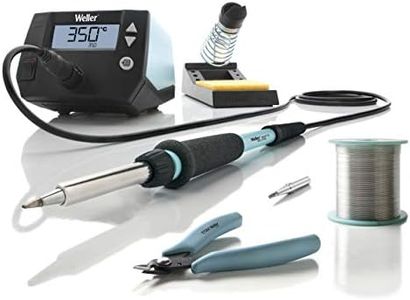
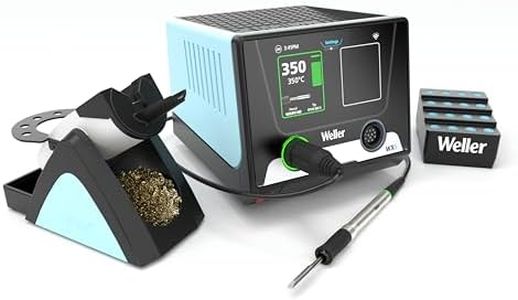
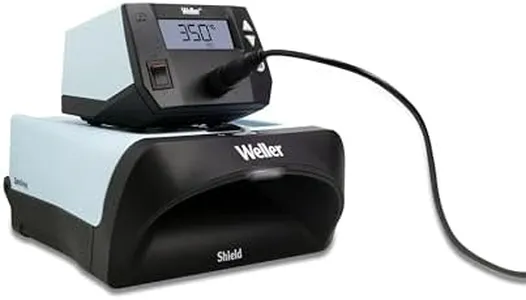
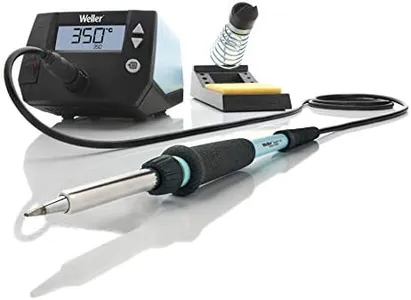
Weller Soldering Station With ZeroSmog Shield Mobile Filtration Unit | WE1010NAS

Rating
10.0
Chosen by1,431
Temperature Control
Ergonomics
Safety Features

Most important from
4922 reviews

Temperature Control
Delivers precise temperature control with quick heat-up and fast recovery, making soldering efficient and consistent.
Ergonomics
The flexible, lightweight wand cord feels almost weightless, allowing for effortless maneuverability without restriction.
Safety Features
Automatic cooldown and simultaneous display of set and actual temperatures add convenience and safety.
Tip Compatibility
Replacement tips are affordable and easy to find, unlike some competitors with expensive or scarce parts.
Additional Features
Offers excellent value by combining professional-grade features with a reasonable price point.

The Weller WE1010NAS soldering station is a strong choice for professionals who need reliable, precise soldering work. It delivers 70 watts of power, which means it heats up quickly and recovers temperature fast, helping you work efficiently without long waits. The digital LCD screen makes it easy to set and monitor the temperature, and the temperature stability is solid, within about 10 degrees Fahrenheit, so you get consistent heat control. Changing tips is simple and tool-free, which is convenient for switching tasks and maintaining precision. The station also includes a low-maintenance mobile filtration unit with a replaceable filter to help reduce soldering fumes, which is a nice safety and comfort feature for longer sessions. Additionally, the built-in work light improves visibility, making detailed work easier.

The unit is fairly heavy at over 11 pounds, which could make it less portable if you need to move it around often. The size is somewhat bulky compared to simpler soldering irons, so it’s best suited for a dedicated workspace. While the price and features align well for professional use, hobbyists or occasional users might find it more advanced than necessary.

This Weller model represents a powerful, stable, and user-friendly soldering station with useful safety and ergonomic features, especially valuable for those doing frequent or detailed soldering.

Rating
10.0
Chosen by1,431
Temperature Control
Ergonomics
Safety Features

Most important from
4922 reviews

Temperature Control
Delivers precise temperature control with quick heat-up and fast recovery, making soldering efficient and consistent.
Ergonomics
The flexible, lightweight wand cord feels almost weightless, allowing for effortless maneuverability without restriction.
Safety Features
Automatic cooldown and simultaneous display of set and actual temperatures add convenience and safety.
Tip Compatibility
Replacement tips are affordable and easy to find, unlike some competitors with expensive or scarce parts.
Additional Features
Offers excellent value by combining professional-grade features with a reasonable price point.
#2

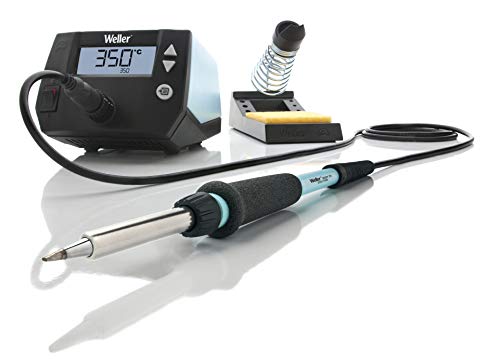
Weller Soldering Education Kit | 8 piece kit | WE1010EDU

Rating
9.4
Temperature Control
Power Output
Tip Compatibility

Most important from
4922 reviews

Temperature Control
The soldering station delivers precise temperature control with rapid heat-up and excellent stability, making it ideal for delicate electronic soldering.
Power Output
The unit’s power output closely matches the claimed 70 watts, ensuring quick recovery after tip cleaning or soldering heavy components.
Tip Compatibility
Original Weller tips are essential for maintaining accurate temperature control and optimal performance.
Ergonomics
The ergonomic iron features a lightweight, flexible cord that enhances comfort and freedom of movement during extended use.
Additional Features
The station’s automatic cooldown and dual-display of set and actual temperatures provide convenient, user-friendly operation.

The Weller Soldering Education Kit is a solid choice for users learning soldering or needing a reliable, general-purpose setup. Its 70W iron offers strong power output, which heats quickly and maintains temperature well thanks to digital temperature control with a ±6°C stability. The temperature lock feature is particularly useful for keeping the heat steady, protecting both tips and electronic parts during work.

Ergonomically, the kit includes a comfortable iron and a safety rest, making it easier and safer to handle for longer sessions. It comes with two genuine Weller ET tips that fit well with the included iron, though if you want a wider variety of tips, you might need to buy them separately. The kit also includes helpful extras like a spool of lead-free solder and a handy shear cutter to trim wires neatly, which is great for education or light professional use.

One potential downside is the 230V power rating, which means it’s best suited for regions with compatible voltage. Also, its size and weight are a bit larger and heavier than some compact models, which could affect portability. This kit is designed to meet the needs of learners and hobbyists who want dependable temperature control, good power, and useful accessories all in one package.

Rating
9.4
Temperature Control
Power Output
Tip Compatibility

Most important from
4922 reviews

Temperature Control
The soldering station delivers precise temperature control with rapid heat-up and excellent stability, making it ideal for delicate electronic soldering.
Power Output
The unit’s power output closely matches the claimed 70 watts, ensuring quick recovery after tip cleaning or soldering heavy components.
Tip Compatibility
Original Weller tips are essential for maintaining accurate temperature control and optimal performance.
Ergonomics
The ergonomic iron features a lightweight, flexible cord that enhances comfort and freedom of movement during extended use.
Additional Features
The station’s automatic cooldown and dual-display of set and actual temperatures provide convenient, user-friendly operation.
#3

FNIRSI DWS-200 200W Precision Digital Soldering Station Kit, with 3 F210 & 6 F245 Soldering Iron Tips and 2 Helping Hands, Temp Value & Curve Mode, 3 Temperature Storage, Full-Color Display

Rating
8.2
Temperature Control
Power Output
Tip Compatibility

Most important from
173 reviews

Temperature Control
Preset temperature settings and a clear, easy-to-read screen make operation straightforward and efficient.
Power Output
Delivers exceptional power and heats up almost instantly, outperforming many irons in its class.
Tip Compatibility
The ability to swap tips while hot and the inclusion of multiple standard-sized tips add great versatility.
Ergonomics
Two different soldering iron handles provide ergonomic options for varying tasks and comfort.
Safety Features
Auto sleep mode helps conserve energy and prolong tip life by activating when the iron is idle.
Additional Features
Comes with helpful accessories like a copper brush for tip cleaning, eliminating the need for extra cleaning tools.

The FNIRSI DWS-200 is a powerful soldering station designed to handle a variety of soldering tasks, featuring a strong 200W output that heats up very quickly—within just 1 second—making it efficient for both small precision jobs and more demanding work. It offers adjustable temperature control ranging from 212°F to 842°F, and its clear 2.8-inch full-color LCD screen displays temperature settings in multiple modes, including a curve mode that allows tailoring heat profiles for different tasks. The station can save three preset temperatures for quick access, which is convenient for users who often switch between jobs.

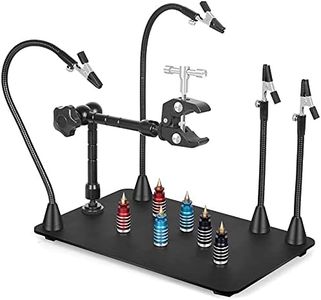
One notable advantage is the included variety of tips—three F210 tips for fine, detailed soldering and six F245 tips for higher power jobs. This versatility makes the station suitable for both beginners and more experienced users working on anything from small electronic components to larger assemblies. Additionally, it comes with two adjustable helping hands, which are useful for holding components steady during work. Ergonomics are enhanced by two different soldering iron handles (F210 and F245), letting users choose the best fit for comfort and task requirements. Safety and convenience features include an auto sleep mode that activates when the iron is resting in its stand, helping to extend tip life and conserve energy.

The station weighs about 3.7 pounds and is somewhat bulky, with a package size close to 10x9 inches, which means it may occupy a significant amount of bench space. Some users might find the interface a bit complex initially despite its useful presets and display modes. It runs on AC power only and does not include batteries or portable power options. This makes it best suited for hobbyists and professionals who want reliable performance across various soldering needs and have sufficient bench space, but do not require a portable setup.

Rating
8.2
Temperature Control
Power Output
Tip Compatibility

Most important from
173 reviews

Temperature Control
Preset temperature settings and a clear, easy-to-read screen make operation straightforward and efficient.
Power Output
Delivers exceptional power and heats up almost instantly, outperforming many irons in its class.
Tip Compatibility
The ability to swap tips while hot and the inclusion of multiple standard-sized tips add great versatility.
Ergonomics
Two different soldering iron handles provide ergonomic options for varying tasks and comfort.
Safety Features
Auto sleep mode helps conserve energy and prolong tip life by activating when the iron is idle.
Additional Features
Comes with helpful accessories like a copper brush for tip cleaning, eliminating the need for extra cleaning tools.

Buying Guide for the Best Soldering Stations

Choosing the right soldering station is crucial for anyone involved in electronics work, whether you're a hobbyist or a professional. A good soldering station can make your work easier, more efficient, and produce better results. When selecting a soldering station, it's important to consider several key specifications to ensure you get the best fit for your needs.
Temperature ControlTemperature control is the ability to adjust the heat of the soldering iron. This is important because different soldering tasks require different temperatures. For example, delicate electronics need lower temperatures to avoid damage, while larger components may need higher temperatures to ensure proper soldering. Soldering stations with precise temperature control allow you to set the exact temperature you need, which can improve the quality of your work and prevent damage to components. Look for stations with digital displays for more accurate control.
Power OutputPower output, measured in watts, determines how quickly the soldering iron can heat up and how well it can maintain its temperature during use. Higher wattage means faster heating and better performance for heavy-duty tasks. For light, occasional work, a soldering station with 20-40 watts may be sufficient. For more frequent or demanding tasks, consider a station with 50-80 watts or more. Choose a power output that matches the intensity and frequency of your soldering projects.
Tip CompatibilityThe soldering iron tip is the part that comes into direct contact with the components and solder. Different tips are designed for different tasks, such as fine tips for precision work or chisel tips for larger areas. It's important to choose a soldering station that offers a variety of compatible tips and makes it easy to change them. This flexibility allows you to handle a wider range of projects. Consider the types of projects you'll be working on and ensure the station supports the necessary tips.
ErgonomicsErgonomics refers to how comfortable and easy the soldering station is to use. This includes the design of the soldering iron handle, the weight of the iron, and the overall layout of the station. A comfortable, well-balanced iron can reduce hand fatigue and improve precision, especially during long soldering sessions. Look for stations with ergonomic handles and consider the weight and balance of the iron. If possible, try holding the iron to see how it feels in your hand.
Safety FeaturesSafety features are important to prevent accidents and protect both the user and the equipment. Common safety features include automatic shut-off, which turns off the iron after a period of inactivity, and ESD (electrostatic discharge) protection, which prevents static electricity from damaging sensitive components. Some stations also have heat-resistant stands and holders for the iron. Consider the safety features that are important for your work environment and choose a station that includes them.
Additional FeaturesAdditional features can enhance the functionality and convenience of a soldering station. These may include digital displays for temperature readouts, programmable settings for different tasks, and built-in fume extractors to remove harmful fumes. While not essential, these features can make your soldering experience more efficient and enjoyable. Think about which additional features would be beneficial for your specific needs and look for stations that offer them.

FAQ

Most Popular Categories Right Now