We Use CookiesWe use cookies to enhance the security, performance, functionality and for analytical and promotional activities. By continuing to browse this site you are agreeing to our privacy policy

10 Best Stream Deck 2025 in the United States

How do we rank products for you?

Our technology thoroughly searches through the online shopping world, reviewing hundreds of sites. We then process and analyze this information, updating in real-time to bring you the latest top-rated products. This way, you always get the best and most current options available.

headphones-stars

Our Top Picks

#1

Winner

Elgato Stream Deck + XLR - Audio Mixer & Controller, Rear XLR-to-USB Mic Interface, Compatible with any Mic for Podcasting, Streaming, Content Creators, dials and LCD keys, PC/Mac

Rating
10.0
Chosen by1,308
Customizability
Integration with Streaming Software
Build Quality

Most important from
3952 reviews

Customizability
The integrated knobs add valuable tactile control, making the device more versatile and satisfying to use.
Integration with Streaming Software
Software integration is seamless and reliable, supporting a broad range of streaming and audio control applications.
Build Quality
Sturdy, premium build quality that feels durable and well-made, suitable for both streaming and filmmaking setups.
Size and Portability
Combines the convenience of an XLR mic interface with a compact stream deck, enhancing streaming functionality in one device.

The Elgato Stream Deck + XLR combines a customizable stream deck with an integrated audio mixer designed especially for podcasters and streamers who use professional XLR microphones. It features 8 LCD buttons, a touch strip, and dials, offering tactile control and clear visual feedback for managing audio, video, lighting, and other streaming functions all in one place. The build is compact and weighs under a pound, making it fairly portable while still feeling sturdy and premium.

One of its standout strengths is the built-in XLR dock, allowing you to plug in any XLR microphone directly with up to 75 dB gain and 48V phantom power for condenser mics. This lets you achieve studio-quality sound without needing extra equipment, which is a great convenience. Its USB-C connection ensures reliable power and data transfer. Customization is a strong point thanks to the Stream Deck app and access to a wide range of plugins and integrations, including popular streaming software like OBS, Twitch, and YouTube, plus other tools like Spotify and Philips Hue lighting controls. This makes it easy to set up personalized commands and workflows.

The number of physical buttons is relatively modest compared to some other stream decks, which might feel limiting for users who need more dedicated controls. Also, while it is portable, the additional size and weight from the XLR audio dock mean it’s bulkier than basic stream decks, so it may not be the best fit if you need something ultra-compact for travel. This product is ideal for content creators who want seamless audio integration with their stream deck controls and value high sound quality and software flexibility. If your focus is purely on button-heavy command setups or ultra-portability, you might find other stream decks better suited. But for combining audio and stream control in one neat device, it offers a powerful and user-friendly experience.

Rating
10.0
Chosen by1,308
Customizability
Integration with Streaming Software
Build Quality

Most important from
3952 reviews

Customizability
The integrated knobs add valuable tactile control, making the device more versatile and satisfying to use.
Integration with Streaming Software
Software integration is seamless and reliable, supporting a broad range of streaming and audio control applications.
Build Quality
Sturdy, premium build quality that feels durable and well-made, suitable for both streaming and filmmaking setups.
Size and Portability
Combines the convenience of an XLR mic interface with a compact stream deck, enhancing streaming functionality in one device.
#2

Elgato Stream Deck Scissor Keys—Workflow Controller with Customizable Macro Keys for OBS, Twitch, Discord, Teams, Photoshop, and More—Windows 10, MacOS 13 or Later

Rating
8.8
Number of Buttons
Customizability
Integration with Streaming Software

Most important from
11341 reviews

Number of Buttons
Having multiple 15-button units can be advantageous, allowing one to be app-specific while the other holds constant functions for streamlined workflow.
Customizability
Customizing buttons is intuitive, letting you assign labels, icons, hotkeys, and even display real-time Twitch viewer counts or system stats right on the keys.
Integration with Streaming Software
The Stream Deck software offers a rich ecosystem of free add-ons and plugins, enabling seamless control over apps like OBS, Discord, Spotify, and more, with folder structures to keep functions neatly organized.
Build Quality
The scissor-switch keys provide a tactile, satisfying press that balances quiet operation with responsive feedback, similar to the feel of premium keyboards.
Size and Portability
Its compact design is portable yet substantial enough to sit comfortably on a desk, with thoughtful additions like a camera mount on the bottom enhancing versatility.

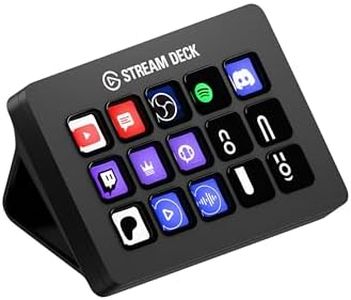
The Elgato Stream Deck Scissor Keys is a compact and well-built workflow controller designed for streamers and content creators who want quick, customizable control over their streaming software and other apps. With its 15 tactile, responsive buttons featuring clear, LED-lit icons, it offers fast access to commands like switching scenes, muting audio, or launching programs without fumbling through menus. The keys can display real-time system stats such as CPU or network performance, which is a handy feature for monitoring your stream’s health at a glance. Its USB-C connection ensures reliable performance, and the small size (about 4.65 x 3.31 inches) makes it reasonably portable without compromising usability.

The build quality feels solid, with a satisfying key press due to the scissor-switch design, giving a good balance between clicky feedback and quiet operation. It integrates smoothly with popular streaming platforms like OBS, Twitch, Discord, and even creative tools like Photoshop, expanding its usefulness beyond just gaming streams. However, with only 15 buttons, users who need more macro keys might find it limiting, and while the device is portable, it’s not pocket-sized and requires a flat surface to use comfortably.

Additionally, it is PC-focused, so Mac users should confirm compatibility with their specific setup. If you’re looking for a reliable stream deck that’s easy to customize and offers solid integration with popular software, this model is a strong choice, especially for gamers and creative streamers who need a responsive, versatile controller without a bulky footprint.

Rating
8.8
Number of Buttons
Customizability
Integration with Streaming Software

Most important from
11341 reviews

Number of Buttons
Having multiple 15-button units can be advantageous, allowing one to be app-specific while the other holds constant functions for streamlined workflow.
Customizability
Customizing buttons is intuitive, letting you assign labels, icons, hotkeys, and even display real-time Twitch viewer counts or system stats right on the keys.
Integration with Streaming Software
The Stream Deck software offers a rich ecosystem of free add-ons and plugins, enabling seamless control over apps like OBS, Discord, Spotify, and more, with folder structures to keep functions neatly organized.
Build Quality
The scissor-switch keys provide a tactile, satisfying press that balances quiet operation with responsive feedback, similar to the feel of premium keyboards.
Size and Portability
Its compact design is portable yet substantial enough to sit comfortably on a desk, with thoughtful additions like a camera mount on the bottom enhancing versatility.
#3

Elgato Stream Deck + White - Studio Controller with LCD Keys, Dials, and Touch Strip for Post Production in Adobe Premiere Pro, Photoshop, DaVinci Resolve, Final Cut Pro - Workflow Automation

Rating
8.8
Customizability
Integration with Streaming Software
Build Quality

Most important from
3952 reviews

Customizability
The combination of customizable buttons and knobs delivers unexpected utility that greatly enhances workflow efficiency.
Integration with Streaming Software
Its seamless integration with popular creative software and streaming platforms turns it into a powerful productivity hub.
Build Quality
The device feels premium and solid, with a satisfying weight and a compact design that declutters the desk.

The Elgato Stream Deck + is designed as a creative tool that fits well for video editors, designers, and music producers who want to speed up their workflow. It offers 8 customizable LCD buttons plus 4 dials, making it easy to launch shortcuts or adjust settings like volume and timeline scrub. The addition of a touch strip further helps smooth navigation across tools and workspace pages.

This setup is especially well integrated with popular Adobe apps like Premiere Pro, Photoshop, and After Effects, which is ideal if you use those programs regularly. The build feels solid and studio-ready, with a compact size that won't take up much desk space, though at just over 1 pound it's more suited for stationary use than portability on the go. Connectivity is flexible with USB-C and USB-A options.

On the downside, 8 buttons might feel limiting if you want many shortcuts at once, and this model is focused on editing and production rather than general streaming tasks. For someone mainly aiming to automate stream controls or gaming overlays, a different Stream Deck might be a better fit. However, if your focus is post-production or creative workflow automation, this device offers a stylish, efficient way to customize your workspace and save time.

Rating
8.8
Customizability
Integration with Streaming Software
Build Quality

Most important from
3952 reviews

Customizability
The combination of customizable buttons and knobs delivers unexpected utility that greatly enhances workflow efficiency.
Integration with Streaming Software
Its seamless integration with popular creative software and streaming platforms turns it into a powerful productivity hub.
Build Quality
The device feels premium and solid, with a satisfying weight and a compact design that declutters the desk.

Buying Guide for the Best Stream Deck

Choosing the right stream deck can significantly enhance your streaming experience by providing you with easy access to various functions and shortcuts. A stream deck is a customizable control pad that allows you to manage your stream, switch scenes, launch media, and much more with the press of a button. When selecting a stream deck, consider your specific needs and how you plan to use it. Here are some key specifications to consider:
Number of ButtonsThe number of buttons on a stream deck determines how many functions you can access directly. More buttons mean more shortcuts and commands at your fingertips. Stream decks typically come with varying numbers of buttons, such as 6, 15, or 32. If you are a beginner or have a simple setup, a smaller stream deck with fewer buttons might suffice. However, if you have a complex setup with many functions, a larger stream deck with more buttons will be beneficial.
CustomizabilityCustomizability refers to how easily you can personalize the buttons and functions on your stream deck. This includes changing the icons, assigning different commands, and creating multi-action sequences. High customizability allows you to tailor the stream deck to your specific needs and workflow. Look for stream decks that offer easy-to-use software for customization. If you frequently change your setup or need specific functions, prioritize a stream deck with high customizability.
Integration with Streaming SoftwareIntegration with streaming software is crucial for seamless operation. A stream deck should be compatible with popular streaming software like OBS Studio, Streamlabs, and XSplit. Good integration ensures that you can control your stream directly from the deck without any issues. Check the compatibility of the stream deck with the software you use. If you use multiple streaming platforms, ensure the stream deck supports all of them.
Build QualityBuild quality refers to the durability and feel of the stream deck. A well-built stream deck will last longer and provide a better user experience. Look for stream decks made from high-quality materials with responsive buttons. If you stream frequently or travel with your equipment, a sturdy and reliable stream deck is essential.
Size and PortabilityThe size and portability of a stream deck can affect where and how you use it. Smaller stream decks are more portable and can fit into tight spaces, making them ideal for streamers who travel or have limited desk space. Larger stream decks offer more buttons but take up more room. Consider your workspace and whether you need a portable option when choosing the size of your stream deck.

FAQ

Most Popular Categories Right Now