We Use CookiesWe use cookies to enhance the security, performance, functionality and for analytical and promotional activities. By continuing to browse this site you are agreeing to our privacy policy

10 Best Streaming Mixer 2026 in the United States
How do we rank products for you?

Our technology thoroughly searches through the online shopping world, reviewing hundreds of sites. We then process and analyze this information, updating in real-time to bring you the latest top-rated products. This way, you always get the best and most current options available.

headphones-stars

Our Top Picks

#1

Winner

Elgato Stream Deck + XLR - Audio Mixer & Controller, Rear XLR-to-USB Mic Interface, Compatible with any Mic for Podcasting, Streaming, Content Creators, dials and LCD keys, PC/Mac

Rating
10.0
Chosen by1,196
User Interface

Most important from
4233 reviews

User Interface
Setup is super easy, eliminating common challenges of getting a good mic setup while enhancing functionality with a mini stream deck.

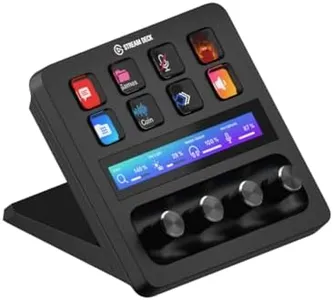
The Elgato Stream Deck + XLR is designed as a compact, user-friendly audio mixer and controller tailored for podcasters, streamers, and content creators. It offers 8 channels, which is a decent number for managing multiple audio sources comfortably but not as extensive as larger mixers. Its USB-C connectivity ensures easy plug-and-play with PCs and Macs, making setup straightforward without complicated wiring. One strong feature is the built-in 48V phantom power, allowing you to use high-quality condenser microphones directly, which is great for crystal-clear sound. The 75 dB gain also helps boost dynamic mics nicely.

This device stands out with its tactile controls, such as LCD keys, dials, and a touch strip, providing immediate visual feedback and a hands-on feel that many users appreciate during live streaming or recording. The integration with Elgato’s software ecosystem, including Wave Link and various plugins for popular platforms like OBS, Twitch, and Spotify, adds convenience by centralizing control and letting you customize your mix easily.

A limitation to consider is the absence of advanced built-in audio effects, meaning additional software might be needed for more complex sound shaping. Also, while it’s compact and reasonably lightweight (under 1 pound), it may not suit those looking for a fully portable mixer for on-the-go use, since it requires USB power and a connected computer. The single USB 2.0 port on the unit is useful but limited if you want to connect multiple peripherals. If you want a simple, integrated solution that combines a physical mixer with customizable controls and excellent microphone support, this product fits well. However, users needing extensive audio processing or a more traditional mixer layout might find it somewhat limiting.

Rating
10.0
Chosen by1,196
User Interface

Most important from
4233 reviews

User Interface
Setup is super easy, eliminating common challenges of getting a good mic setup while enhancing functionality with a mini stream deck.
#2

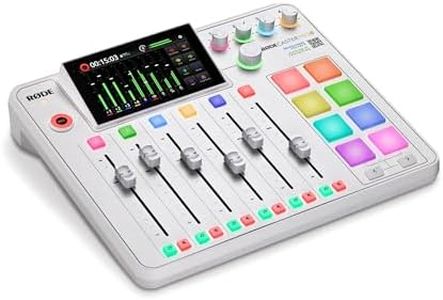
RØDE RØDECaster Pro II All-in-One Production Solution for Podcasting, Streaming, Music Production and Content Creation (White)

Rating
8.8
Connectivity Options
Built-in Effects
Size and Portability
Connectivity Options
The compact all-in-one unit combines customizable sound pads, voice effects, and seamless integration with USB and Bluetooth for a streamlined creative experience.
Built-in Effects
The compact all-in-one unit combines customizable sound pads, voice effects, and seamless integration with USB and Bluetooth for a streamlined creative experience.
Size and Portability
The compact all-in-one unit combines customizable sound pads, voice effects, and seamless integration with USB and Bluetooth for a streamlined creative experience.
User Interface
Its user-friendly interface makes it accessible for beginners while still offering powerful features that satisfy experienced audio engineers.

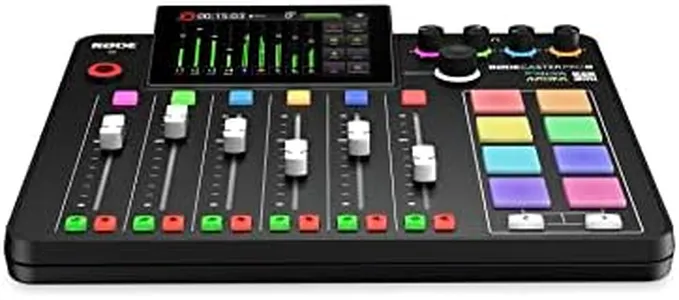
The RØDE RØDECaster Pro II is a versatile streaming mixer designed for podcasters, streamers, and content creators who want professional-quality audio without fuss. It offers nine channels, including four combo inputs with high-quality, low-noise preamps that deliver clear sound, plus USB and Bluetooth connections to easily link computers and mobile devices. Its eight customizable smart pads allow quick access to sound effects, voice effects, and MIDI commands, which is great for live shows or podcasts that benefit from on-the-fly creativity. The built-in audio processing tools like compression, noise gating, and EQ help polish your voice and reduce background noise, making your recordings sound more professional. The device also includes phantom power for condenser microphones, adding flexibility for different mic types.

With a compact size and weighing just over 4 pounds, it’s portable enough for mobile recording setups. The user interface is designed to be straightforward, so even beginners can navigate it without much hassle. While it covers most needs, some users might find it a bit pricey compared to simpler mixers, and the learning curve for all the features can be steep if you want to use everything to its full potential. Also, multi-track recording is supported, though storage options rely on microSD cards or external drives, which might not suit everyone. This makes the RØDECaster Pro II a powerful, all-in-one mixer that suits creators looking for a compact, feature-rich device with professional sound quality and flexible connectivity.

Rating
8.8
Connectivity Options
Built-in Effects
Size and Portability
Connectivity Options
The compact all-in-one unit combines customizable sound pads, voice effects, and seamless integration with USB and Bluetooth for a streamlined creative experience.
Built-in Effects
The compact all-in-one unit combines customizable sound pads, voice effects, and seamless integration with USB and Bluetooth for a streamlined creative experience.
Size and Portability
The compact all-in-one unit combines customizable sound pads, voice effects, and seamless integration with USB and Bluetooth for a streamlined creative experience.
User Interface
Its user-friendly interface makes it accessible for beginners while still offering powerful features that satisfy experienced audio engineers.
#3

RØDE RØDECaster Duo Compact All-in-One Audio Production Solution for Podcasting, Streaming, Music Production and Content Creation (White)

Rating
8.8
Connectivity Options
Built-in Effects
User Interface
Connectivity Options
The RØDECaster Pro II is a powerhouse that elevates your audio production with professional-grade features and versatile connectivity, making it a worthy investment for podcasters and content creators.
Built-in Effects
The device includes an impressive suite of audio processing tools like reverb, delay, pitch shifter, and APHEX processing, making it adaptable to any audio scenario.
User Interface
The intuitive interface and ease of use make it suitable for both professional and non-professional users seeking quick solutions for voice-over recordings and podcasts.

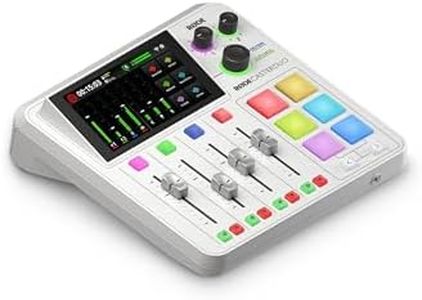
The RØDE RØDECaster Duo is a compelling choice for anyone involved in podcasting, streaming, or content creation, thanks to its all-in-one audio production capabilities. It includes two high-quality Neutrik combo jacks, suitable for microphones and instruments, that feature ultra-low-noise and high-gain Revolution Preamps, ensuring clear audio output. With four broadcast-quality faders, it allows for smooth volume control, while the high-resolution touchscreen with haptic feedback offers an intuitive user interface.

In terms of effects, the RØDECaster Duo shines with its studio-grade effects and APHEX processing, including popular options like the Aural Exciter and Big Bottom effects, making it versatile for various audio needs. Connectivity is another strength, boasting dual USB-C interfaces, Bluetooth, Wi-Fi, and Ethernet, providing numerous ways to connect devices. This includes an integrated 2.4GHz wireless receiver for seamless use with RØDE’s wireless microphones.

While its range of connectivity options is a plus, the reliance on corded electric power may limit its portability compared to battery-powered alternatives. Additionally, its size might be a bit bulky for those looking for a truly compact solution. The product is well-reviewed, reflecting its quality and reliability, ranking high among audio interfaces.

For users who need a reliable streaming mixer with excellent connectivity and built-in effects, this product is a solid choice. However, if you prioritize extreme portability or need to operate without direct power sources, you might need to consider other options.

Rating
8.8
Connectivity Options
Built-in Effects
User Interface
Connectivity Options
The RØDECaster Pro II is a powerhouse that elevates your audio production with professional-grade features and versatile connectivity, making it a worthy investment for podcasters and content creators.
Built-in Effects
The device includes an impressive suite of audio processing tools like reverb, delay, pitch shifter, and APHEX processing, making it adaptable to any audio scenario.
User Interface
The intuitive interface and ease of use make it suitable for both professional and non-professional users seeking quick solutions for voice-over recordings and podcasts.

Buying Guide for the Best Streaming Mixer

Choosing the right streaming mixer can significantly enhance the quality of your live streams, whether you're a gamer, musician, or content creator. A streaming mixer allows you to control and mix multiple audio sources, ensuring that your audience gets the best possible sound experience. To find the best fit for you, it's important to understand the key specifications and how they align with your specific needs.
Number of ChannelsThe number of channels on a streaming mixer refers to how many separate audio sources it can handle at once. This is important because it determines how many different inputs (like microphones, instruments, or other audio devices) you can mix simultaneously. If you're a solo streamer, a mixer with 2-4 channels might be sufficient. However, if you plan to have multiple guests or use several audio sources, you might need a mixer with 8 or more channels. Consider your current and future needs when deciding on the number of channels.
Connectivity OptionsConnectivity options refer to the types of inputs and outputs available on the mixer. This includes XLR, TRS, RCA, USB, and Bluetooth connections. These are important because they determine what kind of devices you can connect to your mixer. For example, XLR inputs are typically used for professional microphones, while USB connections are useful for direct integration with a computer. Evaluate the types of equipment you plan to use and ensure the mixer has the appropriate connections to support them.
Built-in EffectsBuilt-in effects are audio processing features like reverb, delay, and equalization that can be applied directly on the mixer. These are important for enhancing the sound quality and adding creative elements to your stream. If you want to add professional-sounding effects without needing additional software or hardware, look for a mixer with a variety of built-in effects. If you prefer to keep your audio clean and simple, or if you plan to use external effects processors, this feature might be less critical.
Phantom PowerPhantom power is a feature that supplies power to condenser microphones, which require an external power source to operate. This is important if you plan to use high-quality condenser mics for your streams, as they typically offer better sound quality than dynamic mics. If you don't plan to use condenser microphones, phantom power might not be necessary. However, having this feature can provide flexibility for future upgrades.
Size and PortabilityThe size and portability of a streaming mixer can affect how easily you can integrate it into your setup and transport it if needed. This is important for streamers who have limited space or who travel frequently. Smaller, more portable mixers are great for compact setups and on-the-go streaming, while larger mixers might offer more features and channels but require more space. Consider your workspace and how often you might need to move your mixer when making your choice.
User InterfaceThe user interface of a streaming mixer includes the layout of controls, ease of use, and any digital displays. This is important because a well-designed interface can make it easier to adjust settings quickly and efficiently during a live stream. If you're new to using mixers, look for one with a simple, intuitive interface. More experienced users might prefer a mixer with more advanced controls and customization options. Think about your comfort level with audio equipment and how much time you're willing to spend learning to use the mixer.

FAQ

Most Popular Categories Right Now