We Use CookiesWe use cookies to enhance the security, performance, functionality and for analytical and promotional activities. By continuing to browse this site you are agreeing to our privacy policy

10 Best Travel Routers 2026 in the United States
How do we rank products for you?

Our technology thoroughly searches through the online shopping world, reviewing hundreds of sites. We then process and analyze this information, updating in real-time to bring you the latest top-rated products. This way, you always get the best and most current options available.

headphones-stars

Our Top Picks

#1

Winner

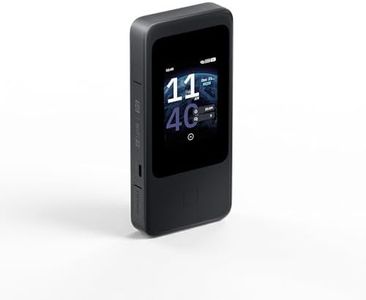
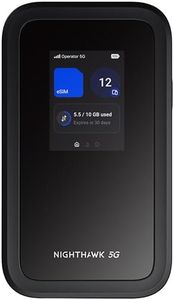
NETGEAR Nighthawk 5G Mobile Hotspot M7 | eSIM or SIM | Portable WiFi 7 Router for Travel in 140+ Countries | 32 Devices | Unlocked 5G/4G LTE | 3.6Gbps Speed | AT&T, T-Mobile, Verizon (MH7150)

Rating
10.0
Chosen by1,384
Wi-Fi Standards
Security Features
Battery Life

Most important from
5071 reviews

Wi-Fi Standards
The device delivers faster and more reliable internet than using a phone alone, supporting multiple devices simultaneously with ease.
Security Features
Privacy concerns arise due to mandatory persistent browser cookies required for the device to function, which may compromise user anonymity and interfere with VPN or Tor usage.
Battery Life
Battery life is excellent, lasting through a full day of travel, making it ideal for staying connected without frequent charging.
Ethernet Ports
The absence of built-in Ethernet ports means users must rely on additional adapters for wired connections, which may be inconvenient for some.
Setup and User Interface
Setup is straightforward through the app, and the eSIM feature offers flexible and cost-effective international data plans.

The NETGEAR Nighthawk 5G Mobile Hotspot M7 is a strong choice for travelers needing fast and reliable internet on the go. It supports the latest WiFi 7 standard, offering very high speeds up to 3.6 Gbps, which is excellent for streaming, video calls, and connecting multiple devices—up to 32 at once. Its portability is good for travel, with a built-in battery lasting up to 10 hours, so you can stay connected through a full day away from power outlets.

The device is unlocked and supports major US carriers like AT&T, T-Mobile, and Verizon, plus works in over 140 countries thanks to its eSIM capability, which makes switching data plans abroad simple and contract-free. Security-wise, it offers modern protections such as WPA3 encryption, firewall, and automatic updates, helping keep your connection safe during travel. Setup is user-friendly through the NETGEAR mobile app, allowing easy network management and data monitoring.

One downside is the lack of built-in Ethernet ports; while you can connect via USB-C or use an Ethernet adapter (sold separately), this might be less convenient for users wanting wired connections without extra accessories. Also, while 10 hours of battery life is solid, heavy usage with many devices or 5G may drain it quicker, so carrying a charger might be necessary. This device is well-suited for travelers who prioritize speed, wide carrier compatibility, security, and the ability to connect many devices simultaneously, though those needing wired ports without extra gear might find it less ideal.

Rating
10.0
Chosen by1,384
Wi-Fi Standards
Security Features
Battery Life

Most important from
5071 reviews

Wi-Fi Standards
The device delivers faster and more reliable internet than using a phone alone, supporting multiple devices simultaneously with ease.
Security Features
Privacy concerns arise due to mandatory persistent browser cookies required for the device to function, which may compromise user anonymity and interfere with VPN or Tor usage.
Battery Life
Battery life is excellent, lasting through a full day of travel, making it ideal for staying connected without frequent charging.
Ethernet Ports
The absence of built-in Ethernet ports means users must rely on additional adapters for wired connections, which may be inconvenient for some.
Setup and User Interface
Setup is straightforward through the app, and the eSIM feature offers flexible and cost-effective international data plans.
#2

GL.iNet MUDI 7 (GL-E5800) Wi-Fi 7 5G Travel Router with eSIM & Dual SIM, 2.8" Touchscreen, Tri-Band up to 5.76 Gbps, 2.5G Ethernet, 700Mbps VPN, 13.5h Battery — Mobile Hotspot for Travel, Livestream

Rating
8.8
Security Features
Setup and User Interface
Battery Life

Most important from
8 reviews

Security Features
This router offers robust privacy and security, supporting Wireguard and OpenVPN without forcing proprietary protocols that break VPN functionality.
Setup and User Interface
Setup is almost foolproof, with secure default passwords and immediate connection upon inserting a SIM card, making it accessible even for non-technical users.
Battery Life
Battery life of nearly 13 hours is impressive, and the device can run continuously when plugged in with fast charging.
Portability
It is a reliable companion for RVs, camping, and remote work, especially within the US where 5G band compatibility is assured.

The GL.iNet MUDI 7 is a high-end travel router designed to keep multiple devices connected with fast, stable internet wherever you go. It supports the latest Wi-Fi 7 standard on three frequency bands, allowing up to 64 devices to stream, game, or video chat smoothly. Its 5G cellular connection with built-in eSIM and dual SIM slots means you can easily switch between global carriers without swapping physical SIM cards—a big plus for frequent travelers. The router also offers solid security with up-to-date WPA3 encryption and a pre-installed VPN supporting many popular services, helping protect your data on public Wi-Fi.

Portability-wise, it has a built-in battery lasting around 13.5 hours, which is quite generous for a travel router, and it charges quickly via USB-C. The compact size and included travel pouch make it easy to carry. For wired connections, it includes a fast 2.5 Gbps Ethernet port and a high-speed USB-C port that can be used for external storage or tethering, which is handy for professionals handling large files on the go.

The 2.8-inch touchscreen is a user-friendly feature, letting you switch SIMs, monitor usage, or toggle VPN without needing a complicated app, making it accessible for users who want quick control without deep technical knowledge. Additionally, it supports multi-WAN failover, meaning it can automatically switch between different internet sources to avoid downtime—great for critical work environments. While the router packs advanced features, its price and complexity might be more than a casual traveler needs. Also, real-world VPN speeds will vary and may be lower than the stated maximums. The router’s size, though portable, is slightly larger than some simpler travel routers. Lastly, it relies on OpenWrt for its operating system, which is powerful but might require some learning for advanced setup. This device is best suited for business travelers, remote workers, or content creators who need fast, reliable internet across multiple devices with flexible carrier options and strong security, rather than for those wanting just basic travel Wi-Fi on short trips.

Rating
8.8
Security Features
Setup and User Interface
Battery Life

Most important from
8 reviews

Security Features
This router offers robust privacy and security, supporting Wireguard and OpenVPN without forcing proprietary protocols that break VPN functionality.
Setup and User Interface
Setup is almost foolproof, with secure default passwords and immediate connection upon inserting a SIM card, making it accessible even for non-technical users.
Battery Life
Battery life of nearly 13 hours is impressive, and the device can run continuously when plugged in with fast charging.
Portability
It is a reliable companion for RVs, camping, and remote work, especially within the US where 5G band compatibility is assured.
#3

TP-Link Roam 7 BE3600 Wi-Fi 7 Portable Travel Router | Dual-Band, 2.5G Port, USB 3.0 | Multi-Modes in One | OpenVPN, WireGuard® | Public WiFi Sharing for Hotel/Cruise/RV/Plane | No 6 GHz | TL-WR3602BE

Rating
7.9
Portability
Wi-Fi Standards
Setup and User Interface

Most important from
217 reviews

Portability
The compact and sleek design fits well in any setting, making it a great travel companion or home upgrade.
Wi-Fi Standards
The router delivers incredibly fast Wi-Fi 7 speeds, making 4K streaming seamless and significantly improving download times.
Setup and User Interface
Setup is surprisingly simple and quick, easily managed through the mobile app, even for those who aren't tech-savvy.

The TP-Link BE3600 Wi-Fi 7 Portable Travel Router is a solid choice for travelers who want fast and reliable internet access on the go. It supports the latest Wi-Fi 7 standard on dual bands (2.4 GHz and 5 GHz), offering impressive speeds up to nearly 3 Gbps on 5 GHz. This allows smooth streaming, gaming, and connecting up to 90 devices, which is great if you often share networks with family or colleagues. Its multi-mode capability makes it flexible: you can use it as a router with Ethernet or USB tethering, extend existing Wi-Fi, or connect wired devices wirelessly. For wired connections, it includes a fast 2.5 Gbps WAN port and a 1 Gbps LAN port, plus a USB 3.0 port for versatile device support.

Security-wise, it’s strong, supporting OpenVPN and WireGuard VPNs to keep your data private when using public Wi-Fi, plus additional protocols for broader compatibility. The router’s compact, lightweight design fits easily in a bag, and it’s powered via USB-C, so you can use a power bank—handy when traveling without easy access to outlets. The setup is user-friendly, with a one-step captive portal authentication and management through a mobile app, making it approachable even if you're not tech-savvy.

It does not support the 6 GHz Wi-Fi band, which some newer devices use for less crowded connections, and it lacks OpenWRT support, limiting advanced customization. Also, battery life depends on your external power source since it doesn’t have an internal battery. This router is a versatile and secure travel companion ideal for those needing fast, multiple-device connectivity and easy setup, while users looking for the absolute latest Wi-Fi bands or built-in battery might want to consider alternatives.

Rating
7.9
Portability
Wi-Fi Standards
Setup and User Interface

Most important from
217 reviews

Portability
The compact and sleek design fits well in any setting, making it a great travel companion or home upgrade.
Wi-Fi Standards
The router delivers incredibly fast Wi-Fi 7 speeds, making 4K streaming seamless and significantly improving download times.
Setup and User Interface
Setup is surprisingly simple and quick, easily managed through the mobile app, even for those who aren't tech-savvy.

Buying Guide for the Best Travel Routers

When choosing a travel router, it's important to consider your specific needs and how you plan to use the device. Travel routers can provide a secure and reliable internet connection while you're on the go, whether you're in a hotel, at a café, or on a business trip. Understanding the key specifications will help you make an informed decision and ensure you get the best fit for your requirements.
PortabilityPortability refers to the size and weight of the travel router. This is important because a travel router should be easy to carry around without adding much bulk to your luggage. Travel routers come in various sizes, from pocket-sized to slightly larger models. If you need a router that you can easily slip into your pocket or a small bag, look for a compact and lightweight model. If you don't mind a bit more bulk for additional features, a slightly larger model might be suitable.
Wi-Fi StandardsWi-Fi standards determine the speed and range of the wireless connection. The most common standards are 802.11n (Wi-Fi 4), 802.11ac (Wi-Fi 5), and 802.11ax (Wi-Fi 6). Wi-Fi 4 is sufficient for basic browsing and email, Wi-Fi 5 offers faster speeds and better performance for streaming and multiple devices, and Wi-Fi 6 provides the latest technology with even faster speeds and improved efficiency. Choose a standard based on your internet usage: Wi-Fi 4 for basic needs, Wi-Fi 5 for moderate use, and Wi-Fi 6 for high-demand activities.
Security FeaturesSecurity features protect your data and privacy while using public or shared networks. Important security features include WPA3 encryption, VPN support, and firewall capabilities. WPA3 is the latest Wi-Fi security protocol, offering enhanced protection compared to older WPA2. VPN support allows you to create a secure connection to another network over the internet, which is useful for accessing sensitive information. Firewalls help block unauthorized access to your network. If security is a top priority, look for a travel router with robust security features.
Battery LifeBattery life is crucial if you need to use the travel router in places where power outlets are not readily available. Some travel routers come with built-in batteries, while others require an external power source. Battery life can range from a few hours to an entire day of usage. If you need a router for long periods without access to power, choose one with a longer battery life. For shorter usage periods or if you have access to power, a router with a shorter battery life may suffice.
Ethernet PortsEthernet ports allow you to connect wired devices to the travel router. This can be important if you need a stable and fast connection for certain devices, such as a laptop or a gaming console. Some travel routers come with one or more Ethernet ports, while others may not have any. If you anticipate needing a wired connection, look for a travel router with at least one Ethernet port. If you only plan to use wireless connections, this feature may not be as important.
USB PortsUSB ports on a travel router can be used for various purposes, such as sharing files from a USB drive, charging devices, or connecting a 4G/5G modem for internet access. The number and type of USB ports (e.g., USB 2.0, USB 3.0) can vary between models. If you need to share files or use a mobile modem, look for a travel router with the appropriate USB ports. If these features are not necessary for you, this specification may be less critical.
Setup and User InterfaceThe setup process and user interface determine how easy it is to configure and manage the travel router. A user-friendly interface and straightforward setup process can save you time and frustration, especially if you're not tech-savvy. Look for travel routers with simple setup procedures, clear instructions, and intuitive interfaces. If you prefer more control and customization options, consider a router with advanced settings and features.

FAQ

Most Popular Categories Right Now