We Use CookiesWe use cookies to enhance the security, performance, functionality and for analytical and promotional activities. By continuing to browse this site you are agreeing to our privacy policy

10 Best Wifi Photo Frames 2025 in the United States

How do we rank products for you?

Our technology thoroughly searches through the online shopping world, reviewing hundreds of sites. We then process and analyze this information, updating in real-time to bring you the latest top-rated products. This way, you always get the best and most current options available.

headphones-stars

Our Top Picks

#1

Winner

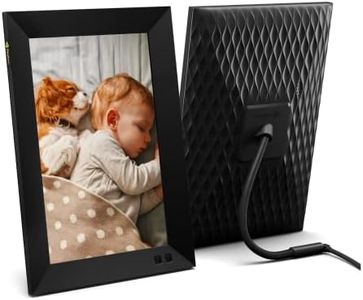
Nixplay Smart Digital Picture Frame I 10.1 inch I WiFi I Black I Shared Family Playlists I Mobile App, Email I Preload Content for a Gifted Frame

Rating
10.0
Chosen by1,457
Resolution
WiFi Connectivity
Additional Features

Most important from
21205 reviews

Resolution
The frame's picture clarity is impressive, with accurate colors and a user-friendly touch screen.
WiFi Connectivity
The connection and setup are basic and straightforward, making it easy to get started.
Additional Features
Watching the frame cycle through pictures can be more engaging than watching TV.

The Nixplay Smart Digital Picture Frame features a 10.1-inch screen with a resolution of 1280x800, which provides clear and bright images suitable for most casual users. Its unlimited cloud photo storage is a significant advantage, ensuring you never run out of space for your cherished memories. The 5GB video storage is decent but might be limiting for those who wish to store longer videos.

WiFi connectivity allows for easy sharing and receiving of photos and videos through the Nixplay app, email, or even social media imports from platforms like Google Photos, Facebook, and Instagram. This makes it very user-friendly, especially for family use where multiple people can contribute to photo playlists through the niX-FamilyCircles feature. The niX-SenseMe sensor adds convenience by automatically waking or sleeping the frame based on room presence, conserving energy and adding a smart touch. The frame's ability to be positioned in either portrait or landscape orientation adds versatility.

The user interface, accessible via a mobile app, desktop web app, and direct email, is easy to navigate, accommodating users who are not very tech-savvy. Additionally, the frame's integration with Amazon Alexa offers hands-free operation, enhancing its ease of use. However, the resolution, while adequate, may not satisfy users looking for ultra-high-definition displays. The frame's price could also be a consideration for budget-conscious buyers. The Nixplay Smart Digital Picture Frame is an excellent choice for families and individuals looking for an easy-to-use, feature-rich digital frame to display and share their photos and videos.

Rating
10.0
Chosen by1,457
Resolution
WiFi Connectivity
Additional Features

Most important from
21205 reviews

Resolution
The frame's picture clarity is impressive, with accurate colors and a user-friendly touch screen.
WiFi Connectivity
The connection and setup are basic and straightforward, making it easy to get started.
Additional Features
Watching the frame cycle through pictures can be more engaging than watching TV.
#2

Nixplay WiFi 10.1" Touch Screen Digital Picture Frame I Easy Set Up I Share Photos and Videos Instantly via Email or App

Rating
9.1
User Interface

Most important from
1724 reviews

User Interface
The setup is a breeze with a user-friendly app, ensuring easy photo upload and management.

The Nixplay WiFi 10.1" Touch Screen Digital Picture Frame offers a user-friendly experience with its straightforward setup process. The 10.1-inch display is ample for showcasing photos, but the resolution is only 720p, which might not provide the sharpest image quality for those accustomed to higher resolutions in modern devices. The frame allows easy sharing and uploading of photos and videos via the Nixplay app, supporting multiple users and devices, making it great for family use. A standout feature is its compatibility with various platforms like Apple Photos, Facebook, and Instagram, although full features for Google Photos require a subscription.

Additional features include AI-driven smart-centering for better image display and automatic rotation to adjust between landscape and portrait modes. Nixplay frames also offer the unique NixCast to share photos onto your smart TV and NixEvents for collaborative photo sharing at events, though some features might require paid subscriptions. Privacy is a strong point, with secure cloud storage compliant with CCPA and GDPR.

The frame's design is sleek and fits various decor styles, but the reliance on cloud and app connectivity means it may not be ideal for those preferring offline or simple plug-and-play frames. The Nixplay is relatively lightweight at 1.26 pounds, making it easy to move around, and its dimensions ensure it doesn't take up much space. However, potential buyers should be aware of the lithium battery requirement and the ongoing subscription costs for some premium features. This digital frame is well-suited for tech-friendly families wanting to share memories easily and in real time, but might not appeal to those seeking ultra-high-definition displays or fully offline functionality.

Rating
9.1
User Interface

Most important from
1724 reviews

User Interface
The setup is a breeze with a user-friendly app, ensuring easy photo upload and management.
#3

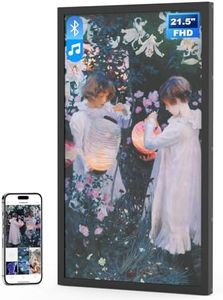
Arktronic 21.5 Inch FHD Extra Large Digital Picture Frame with Bluetooth Speaker, 64G WiFi Electronic Photo Frame, Light Sensor, Instantly Share Photo/Video via Apps & Email Gift for Mom

Rating
8.8
Display Size
Resolution
Storage Capacity

Most important from
52 reviews

Display Size
The 21.5-inch full HD screen delivers sharp images with vivid colors and wide viewing angles, making every photo stand out beautifully.
Resolution
The anti-glare matte screen performs exceptionally well even in bright sunlight, allowing clear visibility without reflections.
Storage Capacity
With 64GB of built-in storage, the frame can hold an enormous number of pictures, eliminating worries about running out of space.
WiFi Connectivity
WiFi connectivity and the dedicated app enable easy and instant sharing of photos and videos from smartphones or email.
User Interface
The included remote control is user-friendly and appreciated, especially by those less comfortable with technology.
Additional Features
Customizable slideshow intervals and sleep mode schedules offer good flexibility to tailor the viewing experience.

The Arktronic 21.5 Inch Digital Picture Frame is a great choice if you want a large, clear display for your photos and videos. Its 21.5-inch screen offers full HD resolution (1920x1080) with an IPS panel, meaning you get sharp images with good color and wide viewing angles. It supports many photo and video formats, so you can easily showcase different types of media. With 64GB of built-in storage, it can hold a huge number of pictures—up to around 160,000—which means you won’t need to worry about running out of space anytime soon. You can also add a microSD card or USB drive for even more storage, which is handy if you have loads of photos to share.

The frame connects to WiFi, allowing you to send photos and videos from your phone or through email using a dedicated app, making sharing with family and friends simple and instant. For ease of use, it comes with a remote control, which many users, especially those less comfortable with new tech, will appreciate. Extra features like adjustable brightness, slideshow options, captions for photos, and background music add to the enjoyment and personalization. Its sleek black frame fits well in various settings, from your living room to an office or even commercial spaces.

One consideration is that the frame is somewhat heavy at over 8 pounds and nearly an inch thick, so it’s less portable compared to smaller models. While the app-based sharing is convenient, setting it up may require some patience. This model offers a large, versatile digital photo frame that’s easy to operate, delivers strong image quality, and provides plenty of storage to meet various needs.

Rating
8.8
Display Size
Resolution
Storage Capacity

Most important from
52 reviews

Display Size
The 21.5-inch full HD screen delivers sharp images with vivid colors and wide viewing angles, making every photo stand out beautifully.
Resolution
The anti-glare matte screen performs exceptionally well even in bright sunlight, allowing clear visibility without reflections.
Storage Capacity
With 64GB of built-in storage, the frame can hold an enormous number of pictures, eliminating worries about running out of space.
WiFi Connectivity
WiFi connectivity and the dedicated app enable easy and instant sharing of photos and videos from smartphones or email.
User Interface
The included remote control is user-friendly and appreciated, especially by those less comfortable with technology.
Additional Features
Customizable slideshow intervals and sleep mode schedules offer good flexibility to tailor the viewing experience.

Buying Guide for the Best Wifi Photo Frames

WiFi photo frames are a great way to display your favorite photos without the need for physical prints. They allow you to upload and change photos remotely, making it easy to keep your display fresh and up-to-date. When choosing a WiFi photo frame, it's important to consider several key specifications to ensure you get the best fit for your needs.
Display SizeThe display size of a WiFi photo frame refers to the diagonal measurement of the screen, usually in inches. This is important because it determines how large your photos will appear. Smaller frames (7-8 inches) are great for desks or small spaces, while medium frames (10-12 inches) are versatile for most home settings. Larger frames (15 inches and above) are ideal for living rooms or areas where you want a more prominent display. Choose a size that fits the space where you plan to place the frame and how visible you want the photos to be.
ResolutionResolution refers to the number of pixels on the screen, typically measured in pixels per inch (PPI). Higher resolution means sharper and clearer images. Common resolutions include 800x600, 1024x768, and Full HD (1920x1080). For smaller frames, a lower resolution might be sufficient, but for larger frames, higher resolution is recommended to maintain image quality. Consider how detailed you want your photos to appear and choose a resolution that matches your preference.
Storage CapacityStorage capacity indicates how many photos the frame can hold. This can be internal storage or expandable via SD cards or USB drives. Some frames offer cloud storage options as well. If you plan to display a large number of photos or high-resolution images, look for frames with larger storage capacities or cloud storage capabilities. Think about how often you want to change the photos and how many you want to display at once.
WiFi ConnectivityWiFi connectivity allows the frame to connect to the internet, enabling you to upload photos remotely from your smartphone, computer, or social media accounts. This is a key feature for convenience and ease of use. Ensure the frame supports a stable WiFi connection and check if it offers additional features like app support or compatibility with popular photo-sharing platforms. Consider how tech-savvy you are and how you plan to upload and manage your photos.
User InterfaceThe user interface (UI) is how you interact with the photo frame, including the menu system and controls. A good UI should be intuitive and easy to navigate. Some frames offer touchscreens, while others use physical buttons or remote controls. Think about your comfort level with technology and choose a frame with a UI that you find easy to use. If multiple people will be using the frame, consider a UI that is accessible for everyone.
Additional FeaturesAdditional features can enhance the functionality of your WiFi photo frame. These may include motion sensors, which turn the frame on or off when someone enters or leaves the room, or the ability to play videos and music. Some frames also offer customizable display settings, such as slideshow transitions and photo editing tools. Consider which extra features are important to you and how they will enhance your experience with the frame.

FAQ

Most Popular Categories Right Now