We Use CookiesWe use cookies to enhance the security, performance, functionality and for analytical and promotional activities. By continuing to browse this site you are agreeing to our privacy policy

10 Best Wireless Keyboards 2026 in the United States
How do we rank products for you?

Our technology thoroughly searches through the online shopping world, reviewing hundreds of sites. We then process and analyze this information, updating in real-time to bring you the latest top-rated products. This way, you always get the best and most current options available.

headphones-stars

Our Top Picks

#1

Winner

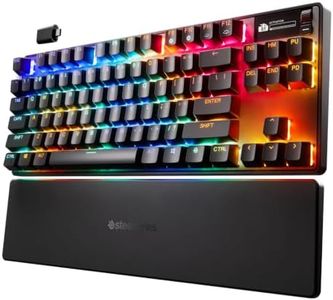
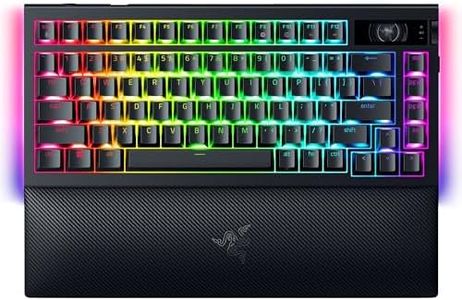
Razer BlackWidow V4 Pro 75% Wireless Gaming Keyboard: OLED Display - True 4K Hz Wireless - Bluetooth - Hot Swappable - Orange Tactile Switches - Command Dial - Snap Tap - Chroma RGB - Wrist Rest

Rating
10.0
Chosen by1,365
Key Switch Type
Ergonomics
Additional Features

Most important from
221 reviews

Key Switch Type
The keyboard has a great sound to the typing, and the RGB lighting synchs perfectly with other Razer devices.
Ergonomics
The wrist rest is comfortable, making it ideal for long gaming sessions.
Additional Features
The media keys are hard to see and use due to poor illumination and design.

The Razer BlackWidow V4 Pro is designed for gamers who seek a high-performance wireless keyboard packed with features. One of its standout qualities is the True 4K Hz wireless connectivity, which offers exceptional responsiveness, making it ideal for fast-paced gaming. Users can also connect to up to three Bluetooth devices, adding convenience for multitasking across different devices.

The hot-swappable design allows for customization of key switches, catering to those who prefer different tactile experiences, which is a significant advantage for gamers who might want to personalize their setup. The comforting wrist rest enhances ergonomics, supporting long gaming sessions without strain.

Another impressive feature is the OLED display with a command dial, which not only provides quick access to system metrics but also allows for creative control with customizable settings. The aesthetic aspects, such as per-key RGB lighting and a striking underglow, create an immersive gaming atmosphere, further enhancing the experience.

Rating
10.0
Chosen by1,365
Key Switch Type
Ergonomics
Additional Features

Most important from
221 reviews

Key Switch Type
The keyboard has a great sound to the typing, and the RGB lighting synchs perfectly with other Razer devices.
Ergonomics
The wrist rest is comfortable, making it ideal for long gaming sessions.
Additional Features
The media keys are hard to see and use due to poor illumination and design.
#2

Logitech G PRO X 60 Lightspeed Wireless Gaming Keyboard, Ultra Compact TKL 60% Mechanical Keyboard for Windows PC, LIGHTSYNC RGB, Dual-Shot PBT Keycaps, GX Optical Tactile Switches - White

Rating
8.8
Key Switch Type
Battery Life
Additional Features

Most important from
187 reviews

Key Switch Type
The tactile switches deliver a satisfying sound and feel, enhancing every keystroke with precision and responsiveness.
Battery Life
The keyboard’s lightweight design combined with a battery life that lasts forever makes it ideal for long gaming sessions and travel.
Additional Features
The included hard zippered carrying case adds a deluxe touch and ensures safe transport, perfect for tournaments or LAN parties.

The Logitech G PRO X 60 Lightspeed Wireless Keyboard is a compact and high-performing option designed mainly for gamers who want a fast and reliable wireless setup. Its 60% TKL layout saves desk space, giving more room for mouse movement, which is great for gamers needing speed and precision. It uses GX optical switches that respond quickly with a tactile feel, making gameplay smooth and accurate. The keyboard connects wirelessly via the Lightspeed adapter for a very low 1ms response time, plus you have the option to use Bluetooth or a wired USB connection, offering flexibility depending on your setup.

The battery life is decent for a wireless gaming keyboard and it comes with a carrying case, making it easy to transport for tournaments or LAN parties. Customization is a strong point here, thanks to the KEYCONTROL software that lets you remap keys and create layers, along with colorful RGB backlighting that you can personalize to your liking. However, its ultra-compact size means it lacks a number pad and some dedicated function keys, which might not suit users who do more than gaming or prefer a fuller keyboard layout.

Designed for esports performance, the keyboard might feel different from traditional mechanical keyboards to those new to GX optical switches. For users seeking a top-tier wireless mechanical keyboard focused on gaming performance with great portability, the G PRO X 60 meets those needs well, though it may not be ideal for those requiring a more standard or ergonomic design for everyday typing.

Rating
8.8
Key Switch Type
Battery Life
Additional Features

Most important from
187 reviews

Key Switch Type
The tactile switches deliver a satisfying sound and feel, enhancing every keystroke with precision and responsiveness.
Battery Life
The keyboard’s lightweight design combined with a battery life that lasts forever makes it ideal for long gaming sessions and travel.
Additional Features
The included hard zippered carrying case adds a deluxe touch and ensures safe transport, perfect for tournaments or LAN parties.
#3

Keychron K2 HE Rapid Trigger Wireless Custom Keyboard with Hall Effect Gateron Double-Rail Magnetic Switch, QMK 2.4 GHz Bluetooth 5.2 RGB Compatible with Mac Windows Linux (Aluminum + Wood)

Rating
8.2
Connectivity
Battery Life
Key Switch Type

Most important from
379 reviews

Connectivity
Its wireless connection is rock-solid across Bluetooth and 2.4 GHz modes, with a battery life so long you almost forget it needs charging.
Battery Life
Its wireless connection is rock-solid across Bluetooth and 2.4 GHz modes, with a battery life so long you almost forget it needs charging.
Key Switch Type
Typing on this keyboard is pure bliss, with each keystroke delivering a smooth, rich 'thock' that feels like tapping velvet pillows, boosting productivity without sacrificing quietness.
Ergonomics
The keyboard strikes the perfect balance in weight—solid and stable without sliding around or feeling overly heavy, making it a joy to use.
Layout and Size
The compact footprint rivals popular membrane keyboards, offering a space-saving design without compromising essential key accessibility.
Additional Features
The web-based software is powerful and user-friendly, enabling precise fine-tuning of the keyboard’s performance to individual preferences.

The Keychron K2 HE is a wireless mechanical keyboard designed with both gamers and professionals in mind. It offers versatile connectivity options including Bluetooth 5.2, 2.4 GHz wireless, and USB-C wired mode, letting you easily switch between up to three devices. This flexibility is great if you use multiple gadgets like a laptop, tablet, and phone. Its compact 75% layout with 84 keys strikes a nice balance between saving desk space and keeping essential keys accessible.

The keyboard features Gateron Double-Rail Magnetic switches that are hot-swappable, meaning you can customize or replace them without soldering. These switches also allow you to fine-tune the sensitivity from very light to firmer presses, catering to both fast gaming and comfortable typing. The rapid trigger feature responds instantly to key presses, an advantage for competitive gamers needing precision and quick reaction times. Built with durable double-shot PBT keycaps and a stylish mix of aluminum and rosewood, it offers both sturdy performance and a premium look.

Keychron K2 HE stands out with its excellent connectivity options, mechanical switch customization, and premium build quality, making it a strong candidate for anyone wanting a high-performance wireless mechanical keyboard that blends work and gaming needs.

Rating
8.2
Connectivity
Battery Life
Key Switch Type

Most important from
379 reviews

Connectivity
Its wireless connection is rock-solid across Bluetooth and 2.4 GHz modes, with a battery life so long you almost forget it needs charging.
Battery Life
Its wireless connection is rock-solid across Bluetooth and 2.4 GHz modes, with a battery life so long you almost forget it needs charging.
Key Switch Type
Typing on this keyboard is pure bliss, with each keystroke delivering a smooth, rich 'thock' that feels like tapping velvet pillows, boosting productivity without sacrificing quietness.
Ergonomics
The keyboard strikes the perfect balance in weight—solid and stable without sliding around or feeling overly heavy, making it a joy to use.
Layout and Size
The compact footprint rivals popular membrane keyboards, offering a space-saving design without compromising essential key accessibility.
Additional Features
The web-based software is powerful and user-friendly, enabling precise fine-tuning of the keyboard’s performance to individual preferences.

Buying Guide for the Best Wireless Keyboards

Choosing the right wireless keyboard can significantly enhance your typing experience, whether you're working, gaming, or just browsing the web. The key is to understand your specific needs and preferences, and then match those with the right features and specifications. Here are some key specs to consider when selecting a wireless keyboard, along with explanations to help you make an informed decision.
ConnectivityConnectivity refers to how the keyboard connects to your device. Wireless keyboards typically use Bluetooth or a USB receiver. Bluetooth is great for portability and can connect to multiple devices, while a USB receiver often provides a more stable connection with less latency. If you switch between devices frequently, Bluetooth might be the better option. If you need a reliable connection for gaming or intensive tasks, a USB receiver could be more suitable.
Battery LifeBattery life indicates how long the keyboard can operate before needing a recharge or battery replacement. This is important for convenience and uninterrupted use. Keyboards with rechargeable batteries are eco-friendly and can last from a few weeks to several months on a single charge. Those with replaceable batteries might last even longer but require you to keep spare batteries on hand. Consider how often you use the keyboard and whether you prefer the convenience of recharging or the longevity of replaceable batteries.
Key Switch TypeKey switch type affects the feel and sound of typing. There are membrane switches, which are quieter and softer, and mechanical switches, which are louder and provide tactile feedback. Membrane keyboards are generally more affordable and suitable for general use. Mechanical keyboards are preferred by gamers and heavy typists for their durability and responsiveness. Think about your typing habits and whether you prefer a quiet, soft touch or a more tactile, clicky experience.
ErgonomicsErgonomics refers to the design of the keyboard and how it supports your hands and wrists. Ergonomic keyboards are designed to reduce strain and improve comfort during long typing sessions. They may have features like split designs, wrist rests, and adjustable angles. If you spend a lot of time typing, an ergonomic keyboard can help prevent discomfort and repetitive strain injuries. Consider your typing posture and any existing discomfort when choosing an ergonomic design.
Layout and SizeLayout and size determine the keyboard's form factor and key arrangement. Full-sized keyboards include a number pad and are ideal for data entry and extensive typing. Tenkeyless (TKL) keyboards omit the number pad, saving space and making them more portable. Compact keyboards are even smaller and great for on-the-go use. Choose a layout that fits your workspace and typing needs. If you need a number pad for calculations, go for a full-sized keyboard. If you need something portable, consider a TKL or compact keyboard.
Additional FeaturesAdditional features can enhance your keyboard's functionality. These might include backlighting for typing in low light, programmable keys for custom shortcuts, and multimedia controls for easy access to volume and playback. Think about what extra features would make your typing experience more convenient and enjoyable. For example, backlighting is useful if you often work in dim environments, while programmable keys can boost productivity if you use specific shortcuts frequently.

FAQ

Most Popular Categories Right Now