10 Best Gaming Keyboards 2026 in the United States

Related Products
Up to 25% off

Recommended lists


Our technology thoroughly searches through the online shopping world, reviewing hundreds of sites. We then process and analyze this information, updating in real-time to bring you the latest top-rated products. This way, you always get the best and most current options available.

Our Top Picks
Winner
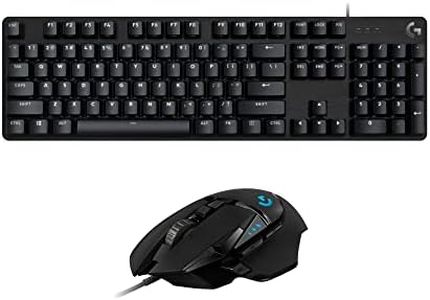
Logitech G413 SE Mechanical Gaming Keyboard and Logitech G502 HERO High Performance Gaming Mouse Bundle
Most important from
38 reviews
The Logitech G413 SE mechanical gaming keyboard delivers solid performance with its tactile mechanical switches, which offer satisfying feedback and responsiveness important for gaming. It has a sturdy build featuring a black-brushed aluminum top case that feels durable and premium. The keyboard includes white LED backlighting, which is customizable but more limited compared to full RGB options some gamers prefer for more flair and personalization.
The form factor is standard full-size, providing a familiar layout without saving desk space like compact keyboards. The wired USB connection ensures reliable and lag-free input, a must-have for serious gaming, though wireless options are absent. Ergonomically, the keyboard has a straightforward design but lacks wrist rest or other comfort enhancements, which might affect long sessions.
Paired with the Logitech G502 HERO mouse, this bundle shines: the mouse boasts a highly accurate HERO 25K optical sensor with no smoothing or filtering, ideal for precise aiming. Its adjustable weight system lets you tailor the feel to your preference, a feature appreciated by many gamers. Both devices offer programmable RGB lighting that can be synced, adding style to your setup. This combo suits gamers who want dependable mechanical keys and a top-tier mouse sensor without breaking the bank, but those seeking extensive keyboard customization or wireless freedom might want to explore other options.
Most important from
38 reviews
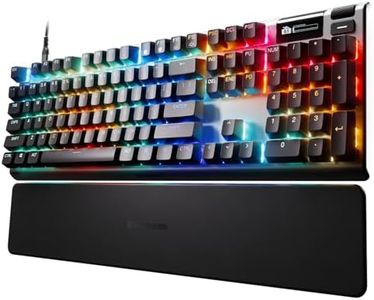
SteelSeries Apex Pro Gen 3 OmniPoint 3.0 HyperMagnetic Switches — Adjustable Actuation — Rapid Trigger — Game-Ready Presets — Protection Mode — Rapid Tap/SOCD — OLED — RGB — PBT Keycaps — USB-C
Most important from
199 reviews
The SteelSeries Apex Pro Gen 3 is designed with gamers in mind, featuring the innovative OmniPoint 3.0 HyperMagnetic switches that offer adjustable actuation sensitivity—a rare feature letting you customize how hard you need to press keys. This means you can make your keypresses faster or more deliberate, which can improve reaction time during gaming. The keyboard supports rapid trigger and rapid tap technology, reducing input delay for quicker responses, essential in competitive gaming. It also includes a unique Protection Mode to prevent accidental key presses by lowering sensitivity on nearby keys when one is pressed, helping avoid mistakes during intense gameplay.
With full RGB backlighting that is fully customizable and reactive to your keystrokes, the Apex Pro adds a visually engaging experience. The OLED smart display is a standout feature, allowing you to adjust settings without leaving your game, a handy addition for on-the-fly adjustments. The keys use durable PBT material, enhancing longevity and providing a satisfying typing feel. The keyboard has a standard full-size 104-key layout, which is good for gamers who also need a number pad. It connects via USB-C, ensuring a stable wired connection with minimal latency.
The keyboard is wired, so it lacks wireless convenience, and at 4.19 pounds with a robust alloy steel frame, it’s on the heavier side, which might not suit users wanting portability. This keyboard suits serious gamers seeking ultra-fast, customizable key responses and advanced features like an OLED display and adaptive actuation. Casual gamers or those preferring wireless models might find it less portable, but for those focused on performance and durability, the Apex Pro Gen 3 offers solid value.
Most important from
199 reviews
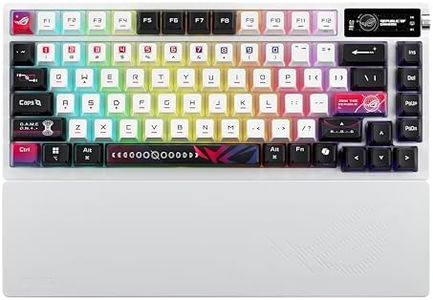
ASUS ROG Azoth X Wireless Mechanical Gaming Keyboard – 75% TKL, Tri-Mode Connectivity, Hot Swappable Pre-lubed ROG NX V2 Snow Linear Switches, South-Facing PCB, PBT Keycaps, PC/Mac Support - White
Most important from
41 reviews
The ASUS ROG Azoth X Wireless Mechanical Gaming Keyboard is a compact 75% TKL design, making it great for gamers who want a smaller footprint without losing essential keys. It features hot-swappable ROG NX V2 Snow linear switches known for smooth and quiet keystrokes, with an option for clicky switches if you prefer tactile feedback. The keyboard uses high-quality PBT keycaps which feel nice and resist wear over time. It offers tri-mode connectivity: fast and reliable 2.4 GHz wireless for gaming, Bluetooth for connecting multiple devices, and a wired USB option, so you can switch easily depending on your setup. The south-facing PCB helps with keycap compatibility, letting you customize keycaps without issues.
Its gasket mount and multi-layer dampening design reduce noise and vibration, enhancing comfort during long gaming sessions. The keyboard also includes a bright OLED screen for monitoring system stats and media, plus a control knob for quick volume or lighting adjustments, adding convenience. RGB lighting is customizable, with a cool stellar theme that looks good but isn’t overwhelming.
The 75% layout means no dedicated arrow cluster or numpad, which might not suit everyone. The weight and build quality suggest durability, though its premium features come at a higher price compared to simpler models. This keyboard suits gamers wanting a blend of performance, customization, and style in a compact wireless package, especially if you value smooth, quiet keys and advanced controls. However, if you need a full-size layout or the absolute lowest latency without compromise, you might want to compare it with other options.
Most important from
41 reviews
Buying Guide for the Best Gaming Keyboards
Choosing the right gaming keyboard can make a noticeable difference in your gaming experience, comfort, and performance. It's important to understand your needs, such as the types of games you play, how much space you have on your desk, and any extra features you might want for convenience or aesthetics. Take time to consider which features matter most to you, so that you can select a keyboard that feels great to use, supports your play style, and gives you the features you’ll actually benefit from.FAQ
Most Popular Categories Right Now


