We Use CookiesWe use cookies to enhance the security, performance, functionality and for analytical and promotional activities. By continuing to browse this site you are agreeing to our privacy policy

10 Best Compact Gaming Keyboards 2025 in the United States

How do we rank products for you?

Our technology thoroughly searches through the online shopping world, reviewing hundreds of sites. We then process and analyze this information, updating in real-time to bring you the latest top-rated products. This way, you always get the best and most current options available.

headphones-stars

Our Top Picks

#1

Winner

SteelSeries Apex Pro Mini Wireless Keyboard - 60% Design - OmniPoint 2.0 - Quantum 2.0 Wireless - Double Shot PBT Keycaps - Black

Rating
10.0
Chosen by1,194
Size and Layout
Switch Type
Backlighting

Most important from
784 reviews

Size and Layout
The keyboard layout fits well, reducing typos and offering pronounced keys.
Switch Type
The OmniPoint switches are incredibly smooth, eliminating the scratchiness common in other linear switches.
Backlighting
RGB lighting is fantastic, with bright and vibrant effects that spill over the board.
Build Quality
The keyboard's build quality is solid, with a premium aluminum top plate.
Additional Features
The small OLED screen is a fun, customizable feature with practical functionality.

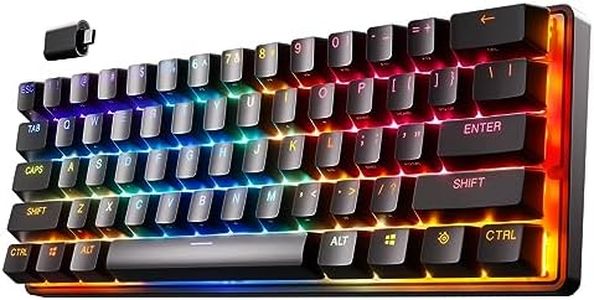
The SteelSeries Apex Pro Mini Wireless HyperMagnetic Gaming Keyboard is a compact 60% form factor keyboard designed for gamers who need a smaller, portable option without sacrificing performance. One of its standout features is the OmniPoint 2.0 Adjustable HyperMagnetic switches, which allow for customizable actuation points on each key, providing both rapid response and control. This means you can adjust the key sensitivity for different in-game actions, making it highly versatile for gaming scenarios.

Additionally, the keyboard offers 2-in-1 action keys, enabling you to program two different actions on a single key based on the depth of the press, which is a unique and useful feature for gamers needing quick transitions during gameplay. The keyboard also boasts RGB backlighting and PBT keycaps, enhancing both aesthetics and durability.

Its build quality is solid, featuring a premium aluminum top plate, and it supports multiple connectivity options including Bluetooth 5.0 and a 2.4GHz wireless connection, along with a detachable USB-C cable for wired use. Its compact size means it lacks a dedicated number pad, which could be a drawback for users who frequently use it. While it is on the higher end of the price spectrum, its advanced features and customization options justify the cost for serious gamers looking for top performance in a compact size. This keyboard is best suited for gamers who value portability without compromising on high-performance features.

Rating
10.0
Chosen by1,194
Size and Layout
Switch Type
Backlighting

Most important from
784 reviews

Size and Layout
The keyboard layout fits well, reducing typos and offering pronounced keys.
Switch Type
The OmniPoint switches are incredibly smooth, eliminating the scratchiness common in other linear switches.
Backlighting
RGB lighting is fantastic, with bright and vibrant effects that spill over the board.
Build Quality
The keyboard's build quality is solid, with a premium aluminum top plate.
Additional Features
The small OLED screen is a fun, customizable feature with practical functionality.
#2

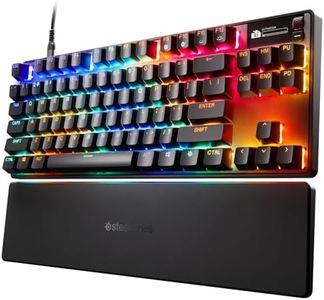
SteelSeries Apex Pro TKL Gen 3 OmniPoint 3.0 HyperMagnetic Switches — Adjustable Actuation — Rapid Trigger — Game-Ready Presets — Protection Mode — Rapid Tap/SOCD — OLED — RGB — PBT Keycaps — USB-C

Rating
9.1
Switch Type
Build Quality
Additional Features

Most important from
784 reviews

Switch Type
The OmniPoint 3.0 switches offer an incredibly precise and adjustable actuation range, allowing for tailored responsiveness to match any play style.
Build Quality
The keyboard's build quality is exceptional, with keycaps that feel smooth and premium, almost metallic rather than typical plastic.
Additional Features
Customization options are extensive, including RGB lighting synchronization, game-specific profiles, and the ability to assign multiple actions per key through actuation settings.
Backlighting
RGB lighting is vibrant and customizable, often regarded as superior to competing brands in terms of brightness and effects.
Connectivity
Wireless mode performs well with minimal latency and decent battery life, although charging convenience is improved with a dongle extension.

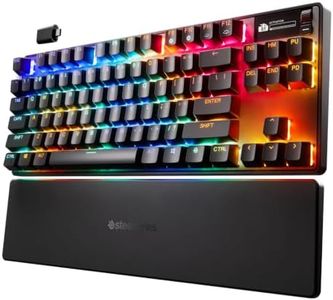
The SteelSeries Apex Pro TKL Gen 3 is a compact tenkeyless (TKL) keyboard designed specifically with gamers in mind. Its size is ideal for those who want a smaller footprint without sacrificing key functionality, making it great for tight desk spaces or on-the-go gaming setups. The standout feature is the OmniPoint 3.0 Hall Effect switches, which are incredibly fast and highly adjustable, allowing you to fine-tune how sensitive each key is. This means you can customize your keyboard response to your play style, whether you prefer light taps or deeper presses. The keyboard supports full anti-ghosting and key rollover, ensuring every keystroke registers accurately during fast and complex game moves. RGB backlighting adds a vibrant, customizable glow to enhance your gaming atmosphere. The build quality is strong and durable, featuring PBT keycaps that resist wear better than standard plastic keys.

Connectivity is straightforward and reliable with a USB-C wired connection, suitable for most PCs. Additional gamer-focused features like Protection Mode help prevent accidental keypresses, while the OLED smart display lets you adjust settings or check stats without leaving your game. The included game-ready presets make it easy to optimize performance for popular titles without manual tweaking. On the downside, being wired means less portability compared to wireless options. Also, the keyboard's price is on the higher side, reflecting its advanced tech and build quality, which might not fit every budget.

This keyboard targets esports and competitive players looking for speed and precision. Casual gamers who want a simple plug-and-play keyboard might find it more complex than needed. It excels when you want a fast, customizable, and sturdy compact gaming keyboard with thoughtful extras, but it may be excessive if you just need a basic gaming keyboard.

Rating
9.1
Switch Type
Build Quality
Additional Features

Most important from
784 reviews

Switch Type
The OmniPoint 3.0 switches offer an incredibly precise and adjustable actuation range, allowing for tailored responsiveness to match any play style.
Build Quality
The keyboard's build quality is exceptional, with keycaps that feel smooth and premium, almost metallic rather than typical plastic.
Additional Features
Customization options are extensive, including RGB lighting synchronization, game-specific profiles, and the ability to assign multiple actions per key through actuation settings.
Backlighting
RGB lighting is vibrant and customizable, often regarded as superior to competing brands in terms of brightness and effects.
Connectivity
Wireless mode performs well with minimal latency and decent battery life, although charging convenience is improved with a dongle extension.
#3

Razer Huntsman V3 Pro Mini 60% Esports Gaming Keyboard: Analog Optical Switches - Razer Snap Tap - Rapid Trigger - Adjustable Actuation - Dual-Purpose Mod Keys - Doubleshot PBT Keycaps - Black

Rating
8.8
Switch Type
Additional Features
Size and Layout

Most important from
775 reviews

Switch Type
The Gen-2 Analog Optical Switches provide incredibly smooth and satisfying feedback without being too loud.
Additional Features
Customization through the software is extensive, allowing full control over features like Snap Tap, Rapid Trigger, and RGB lighting effects.
Size and Layout
The compact 60% layout saves valuable desk space and supports larger mouse movements without feeling cramped.
Build Quality
Build quality feels solid and premium, with durable keycaps and a sleek, minimalist design.

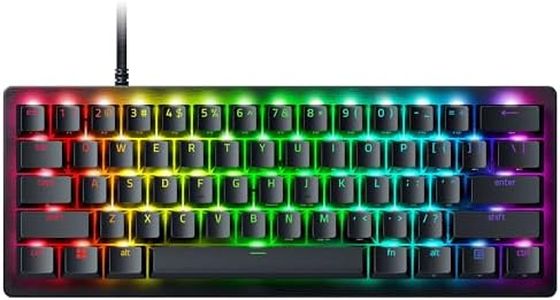
The Razer Huntsman V3 Pro Mini is a compact 60% keyboard designed with serious gamers in mind, especially those who play fast-paced FPS games. Its standout feature is the Gen-2 Analog Optical Switches that let you adjust the actuation point between 0.1 to 4.0 mm, offering precise control for quick and repeated key presses. This keyboard also includes innovations like Razer Snap Tap and Rapid Trigger, enhancing responsiveness by allowing near-instant input changes and rapid key resets, which can give players an edge in competitive gaming.

The build feels sturdy, with durable doubleshot PBT keycaps that resist wear and a classic black finish that looks sleek. RGB backlighting adds a customizable visual appeal, and the keyboard connects via USB-C for stable and fast wired connectivity. Its small size makes it ideal for gamers with limited desk space or those who prefer a minimalist setup. However, the 60% layout means it lacks dedicated arrow keys and a number pad, which could be a drawback if you need those for other tasks. Some features like Snap Tap require the latest firmware update, adding a small step before using them fully.

Excelling in gaming performance and customization, this keyboard is primarily suited for PC users and may not be the best fit for those wanting a keyboard for both gaming and heavy typing or multitasking.

Rating
8.8
Switch Type
Additional Features
Size and Layout

Most important from
775 reviews

Switch Type
The Gen-2 Analog Optical Switches provide incredibly smooth and satisfying feedback without being too loud.
Additional Features
Customization through the software is extensive, allowing full control over features like Snap Tap, Rapid Trigger, and RGB lighting effects.
Size and Layout
The compact 60% layout saves valuable desk space and supports larger mouse movements without feeling cramped.
Build Quality
Build quality feels solid and premium, with durable keycaps and a sleek, minimalist design.

Buying Guide for the Best Compact Gaming Keyboards

Choosing the right compact gaming keyboard can significantly enhance your gaming experience. Compact gaming keyboards are designed to save space while still providing the essential features needed for gaming. When selecting a compact gaming keyboard, it's important to consider several key specifications to ensure it meets your gaming needs and preferences. Here are the key specs to look out for and how to navigate them.
Size and LayoutThe size and layout of a compact gaming keyboard are crucial as they determine how much space it will take up on your desk and how comfortable it will be to use. Compact keyboards typically come in 60%, 65%, and 75% layouts. A 60% keyboard omits the function row, arrow keys, and numpad, making it the smallest and most portable. A 65% keyboard includes arrow keys and some navigation keys, offering a balance between size and functionality. A 75% keyboard includes a function row and more keys, providing a more familiar layout while still being compact. Choose a size that fits your desk space and your need for additional keys.
Switch TypeThe switch type refers to the mechanism beneath each key that registers a keypress. This is important because it affects the feel and responsiveness of the keyboard. Mechanical switches are popular among gamers for their tactile feedback and durability. They come in various types, such as linear (smooth and quiet), tactile (a noticeable bump), and clicky (a bump with an audible click). Choose linear switches for fast-paced gaming, tactile switches for a balance of typing and gaming, and clicky switches if you enjoy audible feedback.
Key Rollover and Anti-GhostingKey rollover and anti-ghosting are features that ensure all your keypresses are registered accurately, even when multiple keys are pressed simultaneously. This is important in gaming where multiple key combinations are often used. Key rollover can be 6-key or N-key, with N-key being the best as it allows unlimited simultaneous keypresses. Anti-ghosting prevents unregistered or 'ghost' keypresses. For gaming, N-key rollover and full anti-ghosting are ideal to ensure no keypresses are missed during intense gameplay.
BacklightingBacklighting enhances the visibility of keys in low-light conditions and adds a visual appeal to your gaming setup. RGB backlighting allows for customizable colors and effects, while single-color backlighting is simpler but still functional. If you enjoy customizing your gaming environment, RGB backlighting is a great choice. If you prefer a more straightforward setup, single-color backlighting will suffice.
Build QualityThe build quality of a keyboard affects its durability and feel. Keyboards can be made from plastic, aluminum, or a combination of materials. A sturdy build ensures the keyboard can withstand heavy use and provides a more premium feel. Look for keyboards with a solid frame and high-quality keycaps, such as PBT keycaps, which are more durable and resistant to wear compared to ABS keycaps. Choose a keyboard with a build quality that matches your usage intensity and preference for a premium feel.
ConnectivityConnectivity options include wired and wireless keyboards. Wired keyboards offer a stable connection with no input lag, which is crucial for competitive gaming. Wireless keyboards provide more flexibility and a cleaner setup but may introduce slight input lag and require battery management. If you prioritize performance and reliability, a wired keyboard is the best choice. If you value a clutter-free desk and are okay with occasional charging, a wireless keyboard can be a good option.
Additional FeaturesAdditional features such as programmable keys, macro support, and dedicated media controls can enhance your gaming experience. Programmable keys allow you to customize key functions, while macro support lets you execute complex commands with a single keypress. Dedicated media controls provide easy access to volume and playback controls. Consider what additional features are important to you based on your gaming style and preferences.

FAQ

Most Popular Categories Right Now