We Use CookiesWe use cookies to enhance the security, performance, functionality and for analytical and promotional activities. By continuing to browse this site you are agreeing to our privacy policy

10 Best Mini Gaming Keyboards 2026 in the United States
How do we rank products for you?

Our technology thoroughly searches through the online shopping world, reviewing hundreds of sites. We then process and analyze this information, updating in real-time to bring you the latest top-rated products. This way, you always get the best and most current options available.

headphones-stars

Our Top Picks

#1

Winner

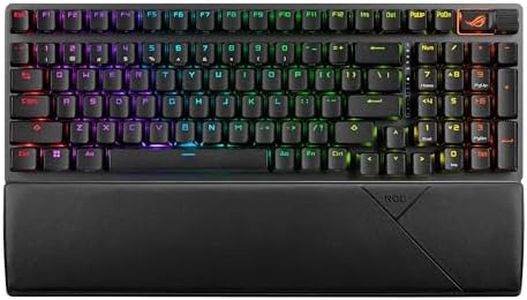
ASUS ROG Azoth Extreme Wireless Mechanical Gaming Keyboard – 75% TKL, ROG NX Snow Linear Switches, PBT Keycaps, Aluminum Chassis, Carbon Fiber, Gasket Mount, Color OLED Screen, PC/Mac Support - Black

Rating
10.0
Chosen by1,140
Size and Layout
Switch Type
Key Rollover and Anti-Ghosting

Most important from
101 reviews

Size and Layout
The compact 75% layout balances functionality and desk space perfectly, making it ideal for both gaming and productivity.
Switch Type
ROG NX Snow linear switches deliver smooth, consistent keystrokes with a controlled sound profile that’s quiet enough for extended use.
Key Rollover and Anti-Ghosting
High polling rate of 8000 Hz provides ultra-responsive key registration, appreciated by competitive gamers.
Backlighting
Customizable RGB lighting and the small OLED touchscreen add a premium touch and easy access to settings and battery monitoring.
Build Quality
The layered aluminum and carbon-fiber construction offers a refined, almost industrial look that feels more like a piece of art than a typical gaming keyboard.
Connectivity
Tri-mode connectivity with ultra-fast 2.4 GHz wireless, Bluetooth, and wired USB-C ensures versatile and reliable connections.

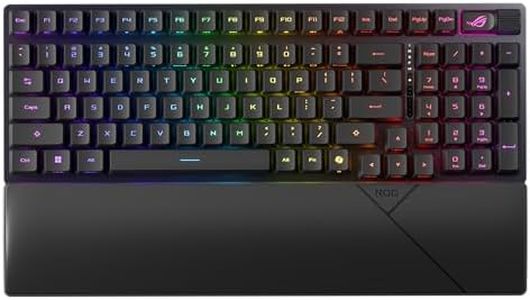
The ASUS ROG Azoth Extreme is a compact 75% mechanical gaming keyboard, making it a solid choice for gamers who want a smaller setup without losing essential keys. Its layout is space-saving yet functional, fitting well on most desks. It uses ROG NX Snow linear switches that offer smooth and quiet keystrokes, which work great for fast-paced gaming where responsive and consistent key presses matter. The keyboard supports hot-swappable switches, letting you easily change them if you want a different feel.

Connectivity is excellent with three options: ultra-fast 2.4 GHz wireless for minimal lag, Bluetooth for multi-device convenience, and a wired USB-C mode. The battery life can last up to 1600 hours when lighting is off, so it’s dependable for long sessions. The keyboard uses a high polling rate of 8000 Hz, which means it registers your key presses very quickly—a feature appreciated by competitive gamers. Built to last, the Azoth Extreme features a sturdy aluminum and carbon fiber chassis, giving it a premium feel and solid durability. Its three-layer dampening system also helps keep keystroke noise controlled and the typing experience smooth. RGB backlighting adds a nice touch of customization and visibility in dim environments, and the small OLED touchscreen lets you monitor battery life and tweak settings easily.

One minor downside is the weight (around 4.9 pounds), which is on the heavier side for a mini keyboard, making it less ideal if you need a truly portable option. Also, while it supports Mac and PC, some advanced features may be more Windows-focused. The price point is on the higher side, reflecting its premium build and features. The ASUS ROG Azoth Extreme is particularly well-suited for gamers seeking a high-performance, compact keyboard with excellent build quality and versatile connectivity. It balances functionality and durability, establishing itself as a strong contender in the mini-gaming keyboard category, though its heavier weight and higher price may not meet every user's preferences.

Rating
10.0
Chosen by1,140
Size and Layout
Switch Type
Key Rollover and Anti-Ghosting

Most important from
101 reviews

Size and Layout
The compact 75% layout balances functionality and desk space perfectly, making it ideal for both gaming and productivity.
Switch Type
ROG NX Snow linear switches deliver smooth, consistent keystrokes with a controlled sound profile that’s quiet enough for extended use.
Key Rollover and Anti-Ghosting
High polling rate of 8000 Hz provides ultra-responsive key registration, appreciated by competitive gamers.
Backlighting
Customizable RGB lighting and the small OLED touchscreen add a premium touch and easy access to settings and battery monitoring.
Build Quality
The layered aluminum and carbon-fiber construction offers a refined, almost industrial look that feels more like a piece of art than a typical gaming keyboard.
Connectivity
Tri-mode connectivity with ultra-fast 2.4 GHz wireless, Bluetooth, and wired USB-C ensures versatile and reliable connections.
#2

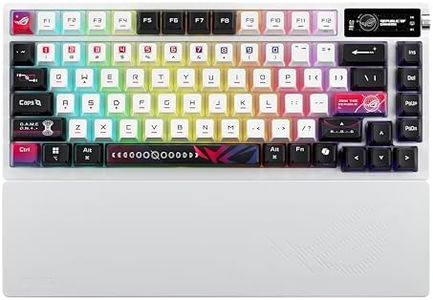
ASUS ROG Azoth X Wireless Mechanical Gaming Keyboard – 75% TKL, Tri-Mode Connectivity, Hot Swappable Pre-lubed ROG NX V2 Snow Linear Switches, South-Facing PCB, PBT Keycaps, PC/Mac Support - White

Rating
10.0
Connectivity
Switch Type
Backlighting

Most important from
73 reviews

Connectivity
This keyboard offers versatile connectivity with Bluetooth, ultra-low latency 2.4 GHz RF, and wired USB, making it ideal for both wireless convenience and competitive gaming.
Switch Type
The hot-swappable ROG NX V2 Snow linear switches provide a smooth, highly responsive feel that enhances FPS and arena battler performance.
Backlighting
The combination of durable PBT keycaps and a south-facing PCB allows for excellent keycap customization and vibrant, consistent RGB lighting effects.
Build Quality
Its solid aluminum frame and vibration-dampening layers produce a pleasant, low-pitched typing sound that avoids harsh noise.
Size and Layout
The keyboard's unique starry color scheme and stylish design make it visually striking and appealing on any desk setup.

The ASUS ROG Azoth X is a compact 75% TKL mechanical keyboard, making it a great choice for gamers who want something smaller than a full keyboard but still with essential keys. Its tri-mode connectivity—Bluetooth, ultra-low latency 2.4 GHz RF, and wired USB—offers flexible options whether you prioritize wireless convenience or lag-free gaming. The keyboard comes with hot-swappable ROG NX V2 Snow linear switches, praised for their smooth and satisfying feel, and you also get the option of clicky switches if preferred.

The build quality is solid, featuring an aluminum frame and vibration-dampening layers that produce a pleasant low-pitched typing sound without harsh noise. It also has durable PBT keycaps with a south-facing PCB, which supports more keycap customization and better lighting effects. Speaking of lighting, the RGB backlighting combined with a unique OLED display gives both aesthetic appeal and useful real-time info like system stats and media controls. The inclusion of a multi-function knob adds intuitive control for volume and lighting adjustments.

The keyboard offers a premium feel and advanced features but has a slightly higher weight for a mini keyboard and is officially limited to Windows compatibility, which might be a consideration if you use other operating systems. This keyboard suits gamers looking for a high-quality, versatile mini mechanical keyboard with excellent wireless options and a stylish design.

Rating
10.0
Connectivity
Switch Type
Backlighting

Most important from
73 reviews

Connectivity
This keyboard offers versatile connectivity with Bluetooth, ultra-low latency 2.4 GHz RF, and wired USB, making it ideal for both wireless convenience and competitive gaming.
Switch Type
The hot-swappable ROG NX V2 Snow linear switches provide a smooth, highly responsive feel that enhances FPS and arena battler performance.
Backlighting
The combination of durable PBT keycaps and a south-facing PCB allows for excellent keycap customization and vibrant, consistent RGB lighting effects.
Build Quality
Its solid aluminum frame and vibration-dampening layers produce a pleasant, low-pitched typing sound that avoids harsh noise.
Size and Layout
The keyboard's unique starry color scheme and stylish design make it visually striking and appealing on any desk setup.
#3

SteelSeries Apex Pro TKL Gen 3 OmniPoint 3.0 HyperMagnetic Switches — Adjustable Actuation — Rapid Trigger — Game-Ready Presets — Protection Mode — Rapid Tap/SOCD — OLED — RGB — PBT Keycaps — USB-C

Rating
9.1
Size and Layout
Switch Type
Backlighting

Most important from
457 reviews

Size and Layout
The compact tenkeyless design declutters the desk without sacrificing essential functionality, perfect for tight spaces.
Switch Type
The keys deliver a tactile yet quiet typing experience that brings genuine pleasure and reduces frustration.
Backlighting
Customizable per-key RGB lighting is rich and vibrant, seamlessly enhancing any gaming or work setup.
Build Quality
The build quality is premium and sturdy, with a solid chassis and durable keycaps that inspire confidence in long-term use.
Connectivity
USB-C connectivity ensures a reliable and modern wired connection with no input lag or interference.

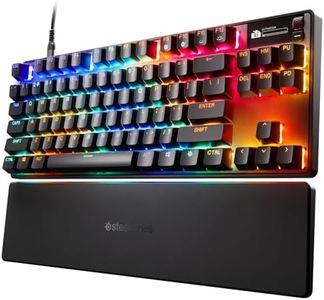
The SteelSeries Apex Pro TKL Gen 3 is a compact tenkeyless (TKL) keyboard, making it a great option if you want to save desk space but still need almost full-size functionality. It uses advanced OmniPoint 3.0 Hall Effect switches, which are known for their speed and reliability. These switches offer adjustable actuation sensitivity with up to 40 levels, letting you customize how quickly a key registers—a big plus for gamers who want precise control. The keyboard also has features like Rapid Trigger and Rapid Tap to reduce input delay, which can make your gaming experience smoother and more responsive.

The build quality feels solid, with durable PBT keycaps that resist wear and an overall layout designed for esports and competitive play. The RGB backlighting adds a nice customizable glow, letting you personalize your setup. An OLED smart display on the keyboard lets you adjust settings without leaving your game, which is a convenient touch. The keyboard connects via USB-C, ensuring a stable and fast wired connection.

One small note is that the TKL size means no dedicated number pad, which might not suit users who frequently work with numbers. Also, while the keyboard is wired, meaning no battery worries, it does weigh 3.5 pounds—some may find it a bit heavy for frequent transport. The SteelSeries Apex Pro TKL Gen 3 is an excellent choice in the mini gaming keyboard category, particularly for gamers who value speed, customization, and solid build quality. It suits competitive players seeking a fast, responsive keyboard in a smaller form factor without compromising on key features.

Rating
9.1
Size and Layout
Switch Type
Backlighting

Most important from
457 reviews

Size and Layout
The compact tenkeyless design declutters the desk without sacrificing essential functionality, perfect for tight spaces.
Switch Type
The keys deliver a tactile yet quiet typing experience that brings genuine pleasure and reduces frustration.
Backlighting
Customizable per-key RGB lighting is rich and vibrant, seamlessly enhancing any gaming or work setup.
Build Quality
The build quality is premium and sturdy, with a solid chassis and durable keycaps that inspire confidence in long-term use.
Connectivity
USB-C connectivity ensures a reliable and modern wired connection with no input lag or interference.

Buying Guide for the Best Mini Gaming Keyboards

When it comes to picking a mini-gaming keyboard, it's essential to consider your specific needs and preferences. Mini-gaming keyboards are compact and designed to save space while providing the essential keys for gaming. They are ideal for gamers who travel frequently or have limited desk space. To make an informed decision, you should focus on several key specifications that will impact your gaming experience. Understanding these specs will help you choose the best mini-gaming keyboard that fits your style and requirements.
Size and LayoutThe size and layout of a mini-gaming keyboard are crucial because they determine how compact the keyboard is and how the keys are arranged. Mini-gaming keyboards typically come in 60%, 65%, or 75% layouts. A 60% keyboard omits the function row, navigation cluster, and numpad, making it the most compact. A 65% keyboard includes arrow keys and a few navigation keys, while a 75% keyboard retains the function row. Choose a layout based on your need for additional keys versus the desire for a smaller footprint. If you need more keys for shortcuts or macros, a 65% or 75% layout might be better. If you prioritize portability and minimalism, a 60% layout is ideal.
Switch TypeSwitch type refers to the mechanism beneath each key that registers a keypress. This spec is important because it affects the feel and responsiveness of the keyboard. There are three main types of switches: mechanical, membrane, and optical. Mechanical switches are popular among gamers for their tactile feedback and durability. They come in various types, such as linear, tactile, and clicky, each offering a different feel. Membrane switches are quieter and less expensive but may not provide the same level of responsiveness. Optical switches use light to register keypresses and offer fast response times. Choose a switch type based on your preference for key feel and response. If you prefer a tactile and durable keyboard, go for mechanical switches. If you want a quieter and more affordable option, consider membrane switches.
Key Rollover and Anti-GhostingKey rollover and anti-ghosting are features that ensure all your keypresses are registered accurately, even when multiple keys are pressed simultaneously. This is important for gaming, where precise and simultaneous keypresses can make a difference. Key rollover refers to the number of keys that can be pressed at the same time without missing any inputs. Anti-ghosting prevents 'phantom' keypresses that can occur when multiple keys are pressed. Look for keyboards with at least 6-key rollover (6KRO) or N-key rollover (NKRO) for the best performance. If you play games that require complex key combinations, these features are essential to ensure every keypress is registered correctly.
BacklightingBacklighting refers to the illumination of the keys, which can be useful for gaming in low-light conditions and for adding a visual appeal to your setup. There are different types of backlighting, including single-color, multi-color, and RGB. Single-color backlighting provides a uniform color, while multi-color backlighting allows for different colors on different keys. RGB backlighting offers the most customization, allowing you to choose from millions of colors and create dynamic lighting effects. Choose backlighting based on your aesthetic preference and gaming environment. If you often game in the dark, backlighting can help you see the keys better. If you enjoy customizing your setup, RGB backlighting offers the most flexibility.
Build QualityBuild quality refers to the materials and construction of the keyboard, which affect its durability and feel. High-quality materials like aluminum or high-grade plastic can make the keyboard more robust and long-lasting. The build quality also impacts the weight and stability of the keyboard during intense gaming sessions. Look for keyboards with a solid build and good reviews on durability. If you plan to use the keyboard frequently or travel with it, a sturdy build is essential to ensure it withstands wear and tear.
ConnectivityConnectivity options include wired and wireless connections. This spec is important because it affects the keyboard's responsiveness and convenience. Wired keyboards offer a stable and lag-free connection, which is crucial for competitive gaming. Wireless keyboards provide more flexibility and a cleaner setup but may introduce slight latency and require battery management. Choose a connectivity option based on your gaming style and setup preferences. If you prioritize performance and reliability, a wired keyboard is the best choice. If you value a clutter-free desk and are okay with occasional charging, a wireless keyboard can be more convenient.

FAQ

Most Popular Categories Right Now