We Use CookiesWe use cookies to enhance the security, performance, functionality and for analytical and promotional activities. By continuing to browse this site you are agreeing to our privacy policy

10 Best Monitor Arms 2025 in the United States

How do we rank products for you?

Our technology thoroughly searches through the online shopping world, reviewing hundreds of sites. We then process and analyze this information, updating in real-time to bring you the latest top-rated products. This way, you always get the best and most current options available.

headphones-stars

Our Top Picks

#1

Winner

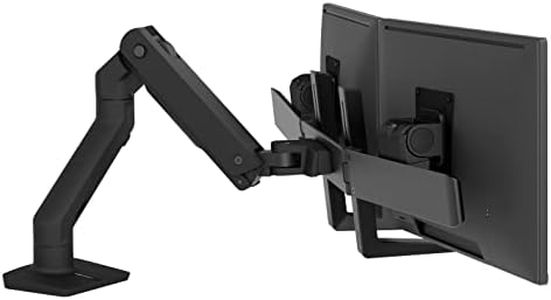
Ergotron – HX Dual Monitor Arm, VESA Desk Mount – for 2 Monitors Up to 32 Inches, 5 to 17.5 lbs Each – Matte Black

Rating
10.0
Chosen by1,362
Weight Capacity
Adjustability

Most important from
100 reviews

Weight Capacity
The mount is sturdy and well-built, holding heavy Apple Studio Displays securely.
Adjustability
Easy to assemble with sturdy metal arms and easy to adjust common screws.

The Ergotron HX Dual Monitor Arm is designed to accommodate two monitors of up to 32 inches, making it a great choice for anyone looking to enhance their workspace efficiency. Its broad VESA compatibility and diverse mounting options allow it to fit various desk setups, whether using a clamp or grommet mount. One standout feature is the impressive adjustability, offering 11.5 inches of lift and the ability to tilt and rotate monitors for optimal viewing angles. This is particularly beneficial for professionals who require dual displays for multitasking or collaborative work.

In terms of stability, the arm is made of sturdy aluminum and has been rigorously tested to ensure it securely holds the monitors in place. The 10-year warranty adds an assurance of quality and longevity. The weight capacity ranges from 5 to 17.5 lbs for each monitor, which means heavier monitors may not be compatible.

One potential drawback is that the assembly process might be a bit complex for those unfamiliar with monitor mounts, though the instructions are generally clear. Additionally, while the design is sleek and matte black, it might not blend with all home office aesthetics. For users with smaller desks, the space required for the arm and the monitors could be a consideration. Cable management is also included, which helps keep your workspace tidy, but some users might find it challenging to conceal all cables effectively depending on their setup. This monitor arm is best suited for professionals, gamers, or anyone who uses multiple screens regularly and values ergonomic comfort and flexibility. It excels in stability and versatility, but consider your monitor's weight and your desk space before purchasing.

Rating
10.0
Chosen by1,362
Weight Capacity
Adjustability

Most important from
100 reviews

Weight Capacity
The mount is sturdy and well-built, holding heavy Apple Studio Displays securely.
Adjustability
Easy to assemble with sturdy metal arms and easy to adjust common screws.
#2

Amazon Basics Gas Spring Single Computer Monitor Arm Mount, Adjustable, Holds up to 27" Monitors, Black

Rating
9.1
Weight Capacity
Adjustability
Cable Management

Most important from
2459 reviews

Weight Capacity
Sturdy construction holds a 27" monitor without any wobbling or sagging, proving its solid build quality.
Adjustability
Excellent adjustability allows for easy height, tilt, and rotation adjustments to find the perfect ergonomic position, reducing neck strain.
Cable Management
While cable management could be improved, clips are included to help with organization.

The Amazon Basics Gas Spring Single Computer Monitor Arm is designed for those seeking a space-efficient solution for a single monitor setup. It accommodates monitors ranging from 15 to 27 inches and supports weights between 4.4 to 15.4 pounds, making it flexible for various screen types. One standout feature is its extensive adjustability; it tilts from -90° to +85°, swivels ±90°, and rotates 360°, allowing users to find the perfect viewing angle easily.

Installation is straightforward, thanks to the included C-clamp and grommet base mounts that fit desks with a thickness of 0.39 to 4 inches. The built-in cable management system helps keep your workspace organized, a helpful touch for anyone looking to maintain a tidy desk area.

There are a few considerations to keep in mind. While the weight capacity is adequate for most small to medium monitors, heavier or larger displays may not be supported. Additionally, although the arm extends nicely for better reach, users with very deep desks might find the maximum extension a bit limited. The product is also relatively lightweight, which may raise concerns about its stability with heavier monitors. This monitor arm is a sensible choice for home office workers or anyone looking to optimize their workspace without investing heavily.

Rating
9.1
Weight Capacity
Adjustability
Cable Management

Most important from
2459 reviews

Weight Capacity
Sturdy construction holds a 27" monitor without any wobbling or sagging, proving its solid build quality.
Adjustability
Excellent adjustability allows for easy height, tilt, and rotation adjustments to find the perfect ergonomic position, reducing neck strain.
Cable Management
While cable management could be improved, clips are included to help with organization.
#3

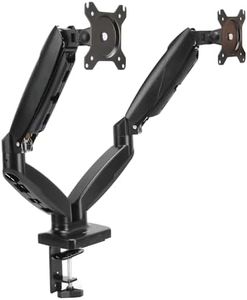
Amazon Basics Gas Spring Dual Computer Monitor Arm Mount, Adjustable, Holds up to 27" Monitors, Black

Rating
8.5
Weight Capacity
Adjustability
Mounting Options

Most important from
2459 reviews

Weight Capacity
The arm holds large monitors firmly without wobbling or sagging, demonstrating impressive sturdiness and reliability.
Adjustability
Adjustability shines through easy height, tilt, and rotation control, allowing users to find the perfect ergonomic position and reduce neck strain.
Mounting Options
Supports a variety of desk thicknesses with multiple mounting options, enhancing versatility depending on desk type.
Build Quality
Offers a great balance of quality and affordability, providing excellent value compared to pricier alternatives.
Cable Management
The cable management system is functional but could benefit from more robust clips for better cord organization.

The Amazon Basics Gas Spring Dual Monitor Arm is a practical choice if you want to free up desk space and manage two monitors between 15 and 27 inches. Its gas spring design allows smooth and nearly infinite adjustments, supporting monitors weighing from about 4.4 to 15.4 pounds. You can fine-tune the arm’s tension to balance different monitor weights, which is helpful but might require some trial and error. The arm offers good flexibility with tilt, swivel, and rotation, making it easy to position your screens comfortably.

It mounts securely to your desk via a C-clamp or grommet, fitting desks from just under half an inch to 4 inches thick, so it works with most standard desks. The VESA mounts supported (75x75mm and 100x100mm) cover the majority of monitors, which is convenient. The arm is made of aluminum, providing decent build quality while keeping the weight manageable at 7 pounds. Its cable management system helps keep cords tidy, reducing desk clutter.

If you have very heavy monitors above 15.4 pounds or very large screens beyond 27 inches, this arm may not be the best fit. Some users might find the initial adjustment process a bit fiddly. This mount is well suited for home or office users looking for an affordable and adjustable dual-monitor setup with reliable support and decent flexibility.

Rating
8.5
Weight Capacity
Adjustability
Mounting Options

Most important from
2459 reviews

Weight Capacity
The arm holds large monitors firmly without wobbling or sagging, demonstrating impressive sturdiness and reliability.
Adjustability
Adjustability shines through easy height, tilt, and rotation control, allowing users to find the perfect ergonomic position and reduce neck strain.
Mounting Options
Supports a variety of desk thicknesses with multiple mounting options, enhancing versatility depending on desk type.
Build Quality
Offers a great balance of quality and affordability, providing excellent value compared to pricier alternatives.
Cable Management
The cable management system is functional but could benefit from more robust clips for better cord organization.

Buying Guide for the Best Monitor Arms

Choosing the right monitor arm can significantly improve your workspace ergonomics and productivity. A monitor arm allows you to adjust the height, angle, and position of your monitor, helping to reduce neck and eye strain. When selecting a monitor arm, consider the key specifications that will ensure it meets your needs and fits your workspace setup.
Weight CapacityWeight capacity refers to the maximum weight the monitor arm can support. This is important because it ensures that your monitor is securely held without risk of falling or damaging the arm. Monitor arms typically have weight capacities ranging from 10 to 30 pounds. To pick the right one, check the weight of your monitor and choose an arm that can support at least that weight. If you plan to upgrade to a heavier monitor in the future, consider an arm with a higher weight capacity.
AdjustabilityAdjustability refers to the range of motion the monitor arm offers, including height adjustment, tilt, swivel, and rotation. This is crucial for achieving a comfortable viewing position and reducing strain on your neck and eyes. Monitor arms can vary from basic models with limited adjustability to advanced models with full range motion. If you need frequent adjustments or share your workspace, opt for a highly adjustable arm. For a fixed setup, a simpler model may suffice.
Mounting OptionsMounting options refer to how the monitor arm attaches to your desk or wall. Common options include clamp mounts, grommet mounts, and wall mounts. This is important for ensuring the arm is securely attached and fits your workspace. Clamp mounts are versatile and easy to install, suitable for most desks. Grommet mounts require a hole in the desk but offer a cleaner look. Wall mounts save desk space but require drilling into the wall. Choose based on your desk setup and installation preferences.
VESA CompatibilityVESA compatibility refers to the standard mounting hole pattern on the back of your monitor that matches the monitor arm. This is important to ensure your monitor can be securely attached to the arm. VESA patterns typically come in sizes like 75x75mm or 100x100mm. Check your monitor's VESA pattern and choose an arm that supports it. If you have a non-standard monitor, look for arms with adjustable brackets or adapters.
Build QualityBuild quality refers to the materials and construction of the monitor arm. This is important for durability and stability. Monitor arms can be made from plastic, aluminum, or steel. Higher quality materials like aluminum and steel offer better durability and stability, especially for heavier monitors. If you need a long-lasting and sturdy arm, opt for one with high-quality materials. For lighter monitors or temporary setups, plastic arms may be sufficient.
Cable ManagementCable management refers to the features that help organize and hide your monitor cables. This is important for maintaining a clean and clutter-free workspace. Monitor arms with built-in cable management channels or clips can keep cables tidy and out of sight. If you have multiple cables or prefer a neat setup, look for arms with good cable management solutions. For simpler setups, basic cable management may be adequate.

FAQ

Most Popular Categories Right Now