We Use CookiesWe use cookies to enhance the security, performance, functionality and for analytical and promotional activities. By continuing to browse this site you are agreeing to our privacy policy

10 Best Multifunction Laser Printers 2026 in the United States

How do we rank products for you?

Our technology thoroughly searches through the online shopping world, reviewing hundreds of sites. We then process and analyze this information, updating in real-time to bring you the latest top-rated products. This way, you always get the best and most current options available.

headphones-stars

Our Top Picks

#1

Winner

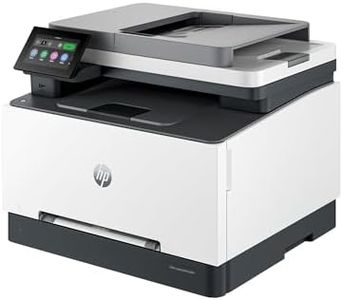
HP Color LaserJet Pro MFP 3301sdw Wireless All-in-One Color Laser Printer, Office Printer, Scanner, Copier, ADF, Duplex, Best-for-Office (499Q3F)

Rating
10.0
Chosen by1,160
Print Speed
Print Quality
Connectivity Options

Most important from
868 reviews

Print Speed
Print speed is impressive, and the printer handles detailed copies effortlessly.
Print Quality
Print and color quality is superb, and setup is easy.
Connectivity Options
Connecting to Wi-Fi was painless, and there have been zero paper jams thanks to the drawer feed.
Paper Handling
Connecting to Wi-Fi was painless, and there have been zero paper jams thanks to the drawer feed.
Operating Costs
The included toner cartridge lasts a long time, even with heavy daily use.

The HP Color LaserJet Pro MFP 3301sdw is designed for small offices or teams that require a reliable multifunction printer capable of printing, scanning, and copying with professional quality. A key strength is its print speed, reaching up to 26 pages per minute in both black and color, making it suitable for busy work environments. The TerraJet toner enhances productivity with vibrant colors, which is perfect for creating eye-catching documents and reports.

Another significant advantage is the user-friendly wireless connectivity, including dual-band Wi-Fi that helps maintain a stable connection, alongside the HP app that allows users to manage printing tasks directly from their smartphones. The printer also features auto-duplex printing, a 250-sheet input tray, and an auto document feeder, which contribute to its efficiency and convenience.

The built-in security features are a plus for businesses concerned about data protection, but they can add complexity for users who are less tech-savvy. Furthermore, while the sustainable design is commendable, the printer's initial price point may be higher than basic models without these features. The HP Color LaserJet Pro MFP 3301sdw is an excellent choice for small businesses looking for a robust and efficient multifunction printer that combines print quality with productivity, though considerations regarding weight, cost, and usability should be taken into account.

Rating
10.0
Chosen by1,160
Print Speed
Print Quality
Connectivity Options

Most important from
868 reviews

Print Speed
Print speed is impressive, and the printer handles detailed copies effortlessly.
Print Quality
Print and color quality is superb, and setup is easy.
Connectivity Options
Connecting to Wi-Fi was painless, and there have been zero paper jams thanks to the drawer feed.
Paper Handling
Connecting to Wi-Fi was painless, and there have been zero paper jams thanks to the drawer feed.
Operating Costs
The included toner cartridge lasts a long time, even with heavy daily use.
#2

HP Color Laserjet Pro MFP 4301fdw Wireless All-in-One Color Laser Printer, Scanner, Copier, Fax, Best-for-Office

Rating
9.7
Print Quality
Scanning Features
Operating Costs

Most important from
4516 reviews

Print Quality
The HP Color LaserJet Pro MFP 4301fdw has been working flawlessly for over ten months, delivering fast and perfect print quality.
Scanning Features
Fast full duplex scans on the ADF and excellent print quality make this printer a strong performer.
Operating Costs
Despite the high cost of toner, the print quality is worth it, especially for a small business.

The HP Color LaserJet Pro MFP 4301fdw is designed to meet the needs of small teams and office environments, accommodating up to 10 users. One of its standout features is its print speed, capable of producing up to 35 color pages per minute, making it a strong choice for high-volume printing. The print quality is also commendable with sharp details and vibrant colors, although the resolution of 600 x 600 dpi may not satisfy those requiring extremely high precision for graphic-heavy documents. The automatic 2-sided printing and document feeder enhance efficiency for scanning and copying tasks.

Connectivity options are plentiful, including USB, Ethernet, and wireless printing from mobile devices, ensuring flexibility and ease of use in various setups. Intelligent Wi-Fi helps maintain a stable connection, which is crucial for seamless operation. The printer also comes with HP Wolf Pro Security, offering customizable settings to safeguard sensitive information. Paper handling is versatile, with a maximum input capacity of 300 sheets and support for different media types and sizes. However, the output sheet capacity is limited to 150 sheets, which may require frequent emptying for large print jobs.

Scanning features are robust with a sheetfed scanner. Operating costs could be on the higher side due to the nature of color laser printing and the power consumption of 585 watts. While it excels in many areas, potential buyers should weigh these factors based on their specific needs and office space considerations.

Rating
9.7
Print Quality
Scanning Features
Operating Costs

Most important from
4516 reviews

Print Quality
The HP Color LaserJet Pro MFP 4301fdw has been working flawlessly for over ten months, delivering fast and perfect print quality.
Scanning Features
Fast full duplex scans on the ADF and excellent print quality make this printer a strong performer.
Operating Costs
Despite the high cost of toner, the print quality is worth it, especially for a small business.
#3

Canon imageCLASS MF753Cdw - Wireless Duplex Color Laser Printer, All-In-One with Scanner, Copier, Fax, Auto Document Feeder, Mobile Ready, 3 Year Limited Warranty, 35 PPM, White

Rating
9.1
Print Speed
Print Quality
Connectivity Options

Most important from
634 reviews

Print Speed
Print and scan speeds are excellent, handling double-sided tasks effortlessly.
Print Quality
For those dealing with documents, graphics, and photographs, the print quality is brilliant with great contrast and high resolution.
Connectivity Options
Seamless mobile printing, duplex scanning, and direct printing to email are standout features.
Paper Handling
It handles various paper types perfectly, from thick specialty papers to everyday documents.

The Canon Color imageCLASS MF753Cdw is a versatile multifunction laser printer designed to meet diverse office needs. It stands out with a fast print speed of 35 pages per minute, both in black-and-white and color, making it suitable for high-volume environments. The quick first print time of roughly 7 seconds adds to its efficiency. The print quality is solid with a maximum color print resolution of 1200 x 1200 dpi, ensuring crisp and clear documents. With a monthly duty cycle capable of handling heavy workloads, it suits busy offices well.

Connectivity options are robust, including Wi-Fi, USB, and Ethernet, providing flexibility for various setups. Mobile printing support through Canon PRINT Business, Apple AirPrint, and Mopria Print Service enhances convenience for users on the go. Paper handling features are noteworthy with a 250-sheet standard cassette, a 50-sheet multipurpose tray, and an optional expansion to 850 sheets, accommodating different paper types and sizes.

The 50-sheet automatic document feeder and one-pass 2-sided scanning streamline scanning and copying tasks, saving time and effort. Operating costs are managed with high-capacity toner options, reducing the frequency of replacements. However, the printer's weight (48.5 pounds) and size (18.2 x 16.8 x 17 inches) might be cumbersome for smaller office spaces. The 3-year limited warranty offers peace of mind in terms of reliability and support. Users who need a reliable, fast, and high-quality multifunction laser printer for a medium to large office environment will find the Canon Color imageCLASS MF753Cdw to be a fitting choice.

Rating
9.1
Print Speed
Print Quality
Connectivity Options

Most important from
634 reviews

Print Speed
Print and scan speeds are excellent, handling double-sided tasks effortlessly.
Print Quality
For those dealing with documents, graphics, and photographs, the print quality is brilliant with great contrast and high resolution.
Connectivity Options
Seamless mobile printing, duplex scanning, and direct printing to email are standout features.
Paper Handling
It handles various paper types perfectly, from thick specialty papers to everyday documents.

Buying Guide for the Best Multifunction Laser Printers

When choosing a multifunction laser printer, it's important to consider your specific needs and how the printer's features align with them. Multifunction laser printers are versatile devices that combine printing, scanning, copying, and sometimes faxing capabilities into one machine. This can save space and streamline your workflow. To make an informed decision, you should understand the key specifications and how they impact the printer's performance and suitability for your tasks.
Print SpeedPrint speed is measured in pages per minute (PPM) and indicates how quickly the printer can produce documents. This is important if you need to print large volumes of documents regularly. Printers with speeds of 20-30 PPM are suitable for home or small office use, while speeds of 30-50 PPM are better for medium-sized offices. For high-volume environments, look for printers with speeds above 50 PPM. Consider your typical print volume to determine the right speed for you.
Print QualityPrint quality is measured in dots per inch (DPI) and affects the clarity and detail of printed documents. Higher DPI values result in sharper and more detailed prints. For general office documents, 600 x 600 DPI is usually sufficient. If you need to print high-quality graphics or detailed images, look for printers with 1200 x 1200 DPI or higher. Assess the type of documents you print most often to choose the appropriate print quality.
Monthly Duty CycleThe monthly duty cycle is the maximum number of pages a printer can handle in a month without experiencing wear and tear. This is crucial for ensuring the printer's longevity and reliability. For home or small office use, a duty cycle of up to 10,000 pages is typically adequate. Medium-sized offices might need a duty cycle of 10,000 to 50,000 pages, while large offices should look for printers with a duty cycle exceeding 50,000 pages. Estimate your monthly print volume to select a printer with a suitable duty cycle.
Connectivity OptionsConnectivity options determine how you can connect the printer to your devices. Common options include USB, Ethernet, and Wi-Fi. USB is suitable for direct connections to a single computer, while Ethernet is ideal for wired network connections in an office. Wi-Fi allows for wireless printing from multiple devices, including smartphones and tablets. Consider your office setup and how you prefer to connect your devices to choose the right connectivity options.
Paper HandlingPaper handling refers to the printer's ability to manage different paper sizes and types, as well as its input and output capacity. This is important for ensuring smooth operation and reducing the need for frequent paper refills. Look for printers with multiple paper trays if you need to print on various paper types or sizes. For high-volume printing, choose a printer with a large input and output capacity. Think about the types of documents you print and the volume to determine the right paper handling features.
Scanning FeaturesScanning features include the resolution, speed, and capabilities of the scanner. Higher resolution (measured in DPI) results in clearer and more detailed scans. Scanning speed is important if you need to digitize large volumes of documents quickly. Additional features like automatic document feeders (ADF) and duplex scanning (scanning both sides of a page) can enhance productivity. Consider how often you scan documents and the level of detail you need to choose the right scanning features.
Operating CostsOperating costs include the cost of toner cartridges, drum units, and other consumables, as well as energy consumption. This is important for budgeting and long-term affordability. Look for printers with high-yield toner cartridges to reduce the frequency of replacements. Energy-efficient models can also help lower electricity bills. Consider the total cost of ownership, including consumables and energy use, to choose a printer that fits your budget and usage patterns.

FAQ

Most Popular Categories Right Now