We Use CookiesWe use cookies to enhance the security, performance, functionality and for analytical and promotional activities. By continuing to browse this site you are agreeing to our privacy policy

10 Best Nintendo Switch Docking Stations 2026 in the United States
How do we rank products for you?

Our technology thoroughly searches through the online shopping world, reviewing hundreds of sites. We then process and analyze this information, updating in real-time to bring you the latest top-rated products. This way, you always get the best and most current options available.

headphones-stars

Our Top Picks

#1

Winner

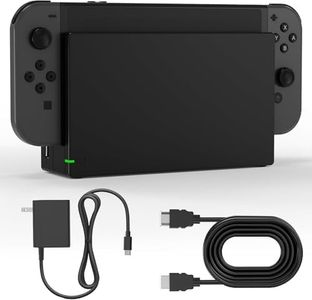
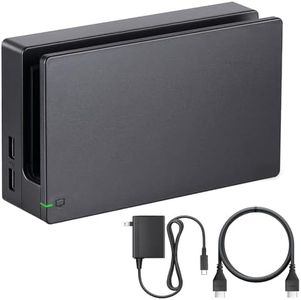
TV Dock Station for Switch - 3 in 1 Replacement TV Base Docking Station Set with Upgraded IC Module, Charger, HDMI Cable Accessories for Switch Console - Not for Switch 2

Rating
10.0
Chosen by1,148
Compatibility
Charging Capability
Build Quality

Most important from
345 reviews

Compatibility
Provides a simple and cost-effective way to play on multiple TVs without constantly unplugging cables.
Charging Capability
Works great and delivers exactly as expected, making charging and docking effortless.
Build Quality
The dock’s performance closely matches the original Nintendo Switch dock, making it a worthy alternative.
Size and Portability
Compact and lightweight design enhances portability and easy placement around the home.
Additional Features
Comes complete with everything needed to start gaming right away, including a charger and high-speed HDMI cable.

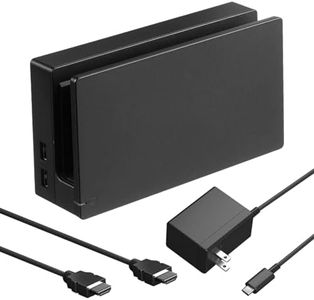
This MOSAHOLL 3-in-1 TV Dock Station is a practical replacement for the original Nintendo Switch dock, designed specifically for the original Switch model (not compatible with the newer Switch 2). It lets you set up multiple docks around your home, making it easy to switch the console from one TV to another without unplugging and moving cables.

The dock includes one HDMI port and two USB ports, which is standard for a Switch dock and sufficient for connecting to your TV and accessories. It comes with a charger and a high-speed HDMI cable, so you have everything needed to get started right away. The build is compact and lightweight, which helps with portability and ease of placement. However, since it is a third-party product, the build quality might not feel as premium as the official Nintendo dock, and there could be slight differences in durability over time.

The upgraded IC module suggests improved stability in charging and video output compared to some cheaper alternatives. This dock provides a budget-friendly option for players who want extra docking stations for convenience rather than the very latest features or highest-end materials.

Rating
10.0
Chosen by1,148
Compatibility
Charging Capability
Build Quality

Most important from
345 reviews

Compatibility
Provides a simple and cost-effective way to play on multiple TVs without constantly unplugging cables.
Charging Capability
Works great and delivers exactly as expected, making charging and docking effortless.
Build Quality
The dock’s performance closely matches the original Nintendo Switch dock, making it a worthy alternative.
Size and Portability
Compact and lightweight design enhances portability and easy placement around the home.
Additional Features
Comes complete with everything needed to start gaming right away, including a charger and high-speed HDMI cable.
#2

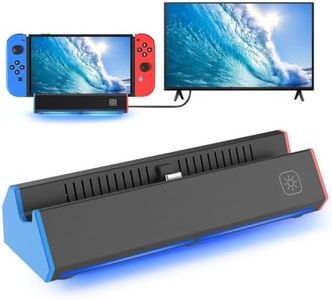
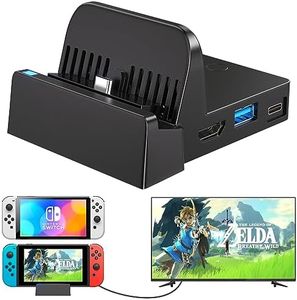
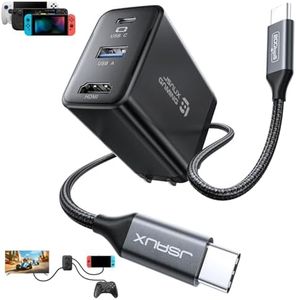
JSAUX 65W Switch Dock with 4K@120Hz HDMI, 65W PD Fast Charging, USB A Port, USB C TV Docking Station Compatible with Switch/Steam Deck/ROG Ally/Samsung/iPad/MacBook and More - OmniCentro Charger Dock

Rating
10.0
Compatibility
Charging Capability
Size and Portability

Most important from
51 reviews

Compatibility
Delivers smooth 4K 60Hz output for the Switch 2, making it an excellent travel dock with sharp visuals.
Charging Capability
Combines a powerful 65W charger with the dock itself, eliminating the need for a separate power supply and enhancing portability.
Size and Portability
Compact and lightweight design fits easily into travel kits, offering great convenience for gaming on the go.
Build Quality
Build quality feels premium with tight tolerances and high-quality cables, avoiding the cheap feel common in third-party docks.
Additional Features
Plug-and-play simplicity ensures zero setup issues across multiple devices, including MacBook Pro and various gaming handhelds.
Port Availability
Does not include an HDMI cable in the package, so users need to supply their own for TV connection.

The JSAUX 65W Switch Dock is a versatile and compact docking station that works well for Nintendo Switch owners as well as users of other handheld gaming devices like the Steam Deck or ROG Ally, and even some tablets and laptops. It offers 4K HDMI output at up to 120Hz, although with the Switch, the video output maxes out at 4K 60Hz due to the console’s own limits. This means you get smooth, sharp visuals when connected to a TV, enhancing your gaming experience.

One of its strong points is the 65W USB-C Power Delivery charging, which keeps your Switch or other devices charged quickly while you play, avoiding battery drain during extended sessions. The USB-A 2.0 port lets you connect accessories like keyboards or USB drives, but it has limited speed (480 Mbps) and power output, so it’s better suited for simple peripherals rather than high-demand devices. Also, third-party controllers might not work well with the Switch through this dock.

The dock is smaller and lighter than the official Switch dock, making it very portable and easy to carry around for travel or visits to friends. It supports multiple devices beyond just the Switch, adding to its usefulness if you own several gadgets. One minor downside is that to get the most from the dock’s charging and turbo modes, you need to connect things in a specific order and use the correct USB-C port, which might be a bit confusing for some users. Build quality is decent but doesn’t match the sturdiness of the original dock. This dock is an excellent choice for Switch gamers who want a lightweight, multi-device docking solution with fast charging and good video output, provided some minor quirks and the USB-A port’s limited capabilities are acceptable.

Rating
10.0
Compatibility
Charging Capability
Size and Portability

Most important from
51 reviews

Compatibility
Delivers smooth 4K 60Hz output for the Switch 2, making it an excellent travel dock with sharp visuals.
Charging Capability
Combines a powerful 65W charger with the dock itself, eliminating the need for a separate power supply and enhancing portability.
Size and Portability
Compact and lightweight design fits easily into travel kits, offering great convenience for gaming on the go.
Build Quality
Build quality feels premium with tight tolerances and high-quality cables, avoiding the cheap feel common in third-party docks.
Additional Features
Plug-and-play simplicity ensures zero setup issues across multiple devices, including MacBook Pro and various gaming handhelds.
Port Availability
Does not include an HDMI cable in the package, so users need to supply their own for TV connection.
#3

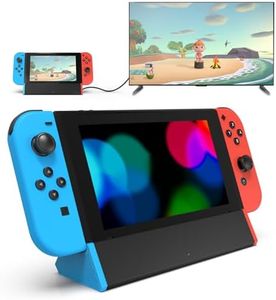
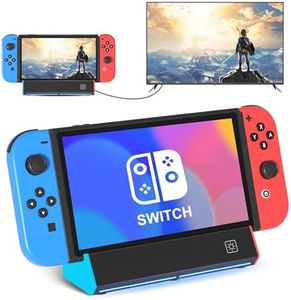
Dock Station for Nintendo Switch/Switch OLED, Replacement 3-in-1 TV Dock Set with Original IC Module, AC Charger & High-Speed HDMI Cable for 1080P HD Output(Not Compatible with Sw 2)

Rating
9.1
Compatibility
Build Quality
Size and Portability

Most important from
167 reviews

Compatibility
Delivers a clear, stable picture and connects quickly to the TV for seamless gameplay on the big screen.
Build Quality
Offers solid build quality with a secure fit, giving confidence in its durability and reliability.
Size and Portability
Compact, lightweight design makes it an ideal choice for travel or as a convenient backup dock.

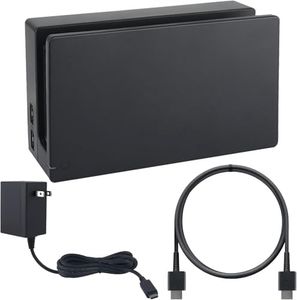
This docking station is designed specifically for the Nintendo Switch and Switch OLED models but is not compatible with the newer Switch 2. It offers smooth connection to TVs with a high-quality HDMI cable supporting 1080p resolution at 60Hz, which means you get good HD visuals during gameplay. Charging is a strong point here, with up to 39W power delivery that safely charges your console quickly thanks to built-in protections against overheating and electrical issues.

The dock includes a useful range of ports: one HDMI, one USB 3.0, and two USB 2.0 ports, making it easy to connect accessories like controllers or external storage. The dock also features thoughtful design touches like cable management and a non-slip base, which help keep your setup tidy and stable whether at home or on the go. It's compact and lightweight enough to fit into travel bags, making it a portable solution if you want to use your Switch with TVs outside of your house.

On the downside, it lacks compatibility with the latest Switch model, and while the build quality appears solid with an original-grade chipset, it’s not a smart home device and offers a basic port selection compared to some premium docks. This dock serves as a reliable and convenient choice for Switch and Switch OLED owners who want a dependable, portable docking station without extra bells and whistles.

Rating
9.1
Compatibility
Build Quality
Size and Portability

Most important from
167 reviews

Compatibility
Delivers a clear, stable picture and connects quickly to the TV for seamless gameplay on the big screen.
Build Quality
Offers solid build quality with a secure fit, giving confidence in its durability and reliability.
Size and Portability
Compact, lightweight design makes it an ideal choice for travel or as a convenient backup dock.

Buying Guide for the Best Nintendo Switch Docking Stations

Choosing the right Nintendo Switch docking station can significantly enhance your gaming experience. A docking station allows you to connect your Nintendo Switch to a TV or monitor, charge the console, and connect additional peripherals. When selecting a docking station, it's important to consider several key specifications to ensure it meets your needs and preferences.
CompatibilityCompatibility refers to whether the docking station works with your specific model of Nintendo Switch. This is crucial because not all docking stations are designed to work with every version of the console. Some are only compatible with the original Nintendo Switch, while others may also support the Switch Lite or Switch OLED models. To ensure you pick the right one, check the product description for compatibility information and make sure it matches your console model.
Port AvailabilityPort availability refers to the number and types of ports available on the docking station. This is important because it determines what devices and accessories you can connect. Common ports include HDMI for video output, USB ports for controllers or other peripherals, and an AC adapter port for power. If you plan to connect multiple devices, look for a docking station with several USB ports. For a basic setup, a docking station with an HDMI port and a couple of USB ports should suffice.
Charging CapabilityCharging capability indicates whether the docking station can charge your Nintendo Switch while it is docked. This is essential for uninterrupted gaming sessions. Some docking stations offer fast charging, which can be beneficial if you need to quickly recharge your console. If you often play for extended periods, choose a docking station with reliable charging capabilities to ensure your console stays powered up.
Build QualityBuild quality refers to the materials and construction of the docking station. A well-built docking station is more durable and can withstand regular use. Look for docking stations made from high-quality materials like sturdy plastic or metal. Additionally, consider the design and stability of the docking station to ensure it securely holds your console without the risk of tipping over.
Size and PortabilitySize and portability are important if you plan to travel with your docking station or have limited space. Smaller, more compact docking stations are easier to carry and store, making them ideal for gamers on the go. However, they may have fewer ports and features compared to larger models. If you need a docking station for home use, a larger model with more features might be a better fit.
Additional FeaturesAdditional features can enhance your gaming experience and provide extra convenience. Some docking stations come with built-in cooling fans to prevent overheating, LED indicators to show charging status, or even extra storage for game cards. Consider what additional features might be useful for you and choose a docking station that offers those benefits.

FAQ

Most Popular Categories Right Now