We Use CookiesWe use cookies to enhance the security, performance, functionality and for analytical and promotional activities. By continuing to browse this site you are agreeing to our privacy policy

10 Best Dymo Label Makers 2025 in the United States

How do we rank products for you?

Our technology thoroughly searches through the online shopping world, reviewing hundreds of sites. We then process and analyze this information, updating in real-time to bring you the latest top-rated products. This way, you always get the best and most current options available.

headphones-stars

Our Top Picks

#1

Winner

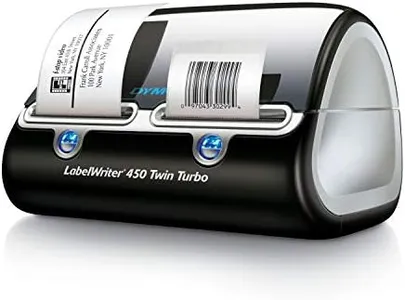
DYMO Label Printer | Label Writer 450 Twin Turbo Direct Thermal Printer Fast Printing Great for Labeling Filing Shipping Mailing Barcodes and More Home & Office Organization

Rating
10.0
Chosen by1,113
Print Resolution
Label Width Compatibility
Connectivity Options

Most important from
1806 reviews

Print Resolution
Print quality remains excellent even with off-brand labels, and small fonts are still legible.
Label Width Compatibility
Changing label types takes only seconds, making it incredibly efficient for printing various sizes.
Connectivity Options
Setup is straightforward; just insert blank labels, connect to a laptop, and it works perfectly.
Label Design Features
The included software is simple to use, though it requires manual line breaks when entering text.

The DYMO LabelWriter 450 Twin Turbo stands out for its efficiency and convenience, especially for home and office use. One of its major strengths is the ability to switch between two different rolls of labels without needing to swap them manually, making it ideal for those who need to print various types of labels frequently. This feature significantly enhances productivity and reduces downtime. Additionally, the direct thermal printing technology means you won't need to buy ink or toner, saving on recurring costs and maintenance hassle.

The printer's resolution of 300 x 300 dpi ensures that your labels are clear and professional-looking, suitable for a wide range of uses including labeling, filing, shipping, and barcoding. Connectivity is straightforward with a USB connection, making it easy to set up with your PC. The device also allows for easy customization and printing directly from software like Microsoft Word, Excel, and Google Contacts, which is a big plus.

However, the printer does have some limitations. It's monochrome, so it won't print in color, which might be a drawback if you need color labels. Also, while it does come with one USB port, it lacks wireless connectivity options, which could be inconvenient for some users who prefer a more flexible setup. Another point to consider is that it works best with authentic DYMO labels, so you might be limited in terms of label variety and costs. The printer is relatively lightweight and compact, making it easy to fit into most workspaces.

Rating
10.0
Chosen by1,113
Print Resolution
Label Width Compatibility
Connectivity Options

Most important from
1806 reviews

Print Resolution
Print quality remains excellent even with off-brand labels, and small fonts are still legible.
Label Width Compatibility
Changing label types takes only seconds, making it incredibly efficient for printing various sizes.
Connectivity Options
Setup is straightforward; just insert blank labels, connect to a laptop, and it works perfectly.
Label Design Features
The included software is simple to use, though it requires manual line breaks when entering text.
#2

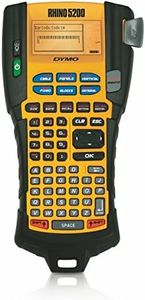
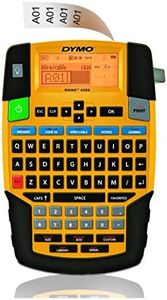
DYMO Industrial Label Maker & Carry-Case RhinoPRO 5200 Label Maker, for Job Sites and Heavy-Duty Labeling Jobs, Prints Fast, Includes 2 Rolls of DYMO Industrial Vinyl Labels

Rating
9.4
Keyboard Type
Power Source

Most important from
1761 reviews

Keyboard Type
The non-qwerty keyboard takes some getting used to, but becomes less cumbersome over time.
Power Source
Rechargeable battery issues exist but can improve with continued use and charging.

The DYMO Industrial Label Maker RhinoPRO 5200 is tailored for job sites and heavy-duty labeling tasks, making it particularly useful for asset management and industry-compliant labeling.

With a print resolution of 300 dpi, it ensures clear and readable labels.

It supports label widths of up to 3/4.

Rating
9.4
Keyboard Type
Power Source

Most important from
1761 reviews

Keyboard Type
The non-qwerty keyboard takes some getting used to, but becomes less cumbersome over time.
Power Source
Rechargeable battery issues exist but can improve with continued use and charging.
#3

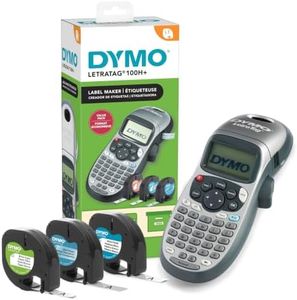
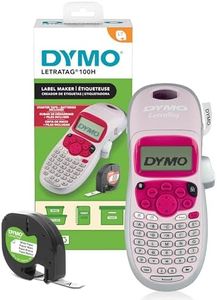
DYMO Label Maker Machine with Tape - 100H LetraTag Handheld, Comes with 3 LT label tapes. Great for Home & Office Organization

Rating
8.5
Label Design Features
Power Source

Most important from
44312 reviews

Label Design Features
Label designs offer great versatility with multiple font sizes, symbols, and styles to personalize your labels.
Power Source
It delivers excellent quality and durability, with batteries and tape lasting a long time even under frequent use.

The DYMO LetraTag 100H is a handheld label maker that fits well for home and office organization tasks thanks to its portability and ease of use. It prints labels using thermal technology at a resolution good enough for clear, readable text, though not very high in detail since it maxes out at 101 dpi for black and white. It works with 1/2-inch wide LT tapes, which come in paper and plastic options, including black on white and black on clear, giving you flexibility in label style.

One of the standout features is its keyboard, which allows quick label creation on the go. The graphical display lets you preview your labels before printing, reducing errors and wasted tape. There are five font sizes, seven print styles, and eight box styles, so you have decent customization to make labels look neat and personalized.

Connectivity is simple — the label maker runs on 4 AA batteries and doesn’t require cables or Bluetooth, making it very portable but limiting it to manual operation without app or computer integration. This could be a drawback if you want to design labels on a computer or connect to other devices. The device is compact and lightweight, making it easy to handle and carry around. It also features an auto-off function that helps save battery life when not in use, which is convenient since battery replacement is needed over time. Included in the package are three tape cartridges, so you can start labeling right away without purchasing extra supplies. While it’s not the fastest label maker and has limited resolution compared to more advanced models, it offers good value for everyday labeling needs. This label maker is best suited for users who want a straightforward, portable device with decent design features and a simple setup. It’s ideal for organizing items around the house or office but may fall short for those needing more connectivity or higher resolution printing.

Rating
8.5
Label Design Features
Power Source

Most important from
44312 reviews

Label Design Features
Label designs offer great versatility with multiple font sizes, symbols, and styles to personalize your labels.
Power Source
It delivers excellent quality and durability, with batteries and tape lasting a long time even under frequent use.

Buying Guide for the Best Dymo Label Makers

Choosing the right Dymo label maker can make your labeling tasks much easier and more efficient. Whether you need it for home organization, office use, or industrial purposes, understanding the key specifications will help you select the best model for your needs. Here are the main features to consider when picking a Dymo label maker.
Print ResolutionPrint resolution refers to the clarity and sharpness of the labels produced by the label maker. It is measured in dots per inch (DPI). Higher DPI values mean clearer and more detailed labels. For basic home use, a lower DPI (around 180-200) is usually sufficient. For professional or industrial use, where readability and detail are crucial, look for a higher DPI (300 or more). Consider what you will be labeling and how important the clarity of the text and images is to you.
Label Width CompatibilityLabel width compatibility indicates the range of label tape widths that the label maker can handle. This is important because different tasks may require different label sizes. For general home or office use, a label maker that supports widths from 1/4 inch to 1 inch should be adequate. For more specialized tasks, such as industrial labeling, you might need a model that supports wider tapes. Think about the types of items you will be labeling and choose a model that can accommodate the necessary tape widths.
Connectivity OptionsConnectivity options refer to how the label maker connects to other devices, such as computers or smartphones. Some label makers are standalone devices, while others can connect via USB, Bluetooth, or Wi-Fi. Standalone models are simple and easy to use, ideal for quick labeling tasks. Models with USB connectivity are great for desktop use, allowing you to design labels on your computer. Bluetooth and Wi-Fi models offer the most flexibility, enabling you to print from multiple devices, including smartphones and tablets. Consider how you plan to use the label maker and choose the connectivity option that best fits your workflow.
Keyboard TypeThe keyboard type on a label maker can affect ease of use and speed. There are two main types: QWERTY keyboards, which are similar to computer keyboards, and ABC keyboards, which list letters in alphabetical order. QWERTY keyboards are generally faster and more intuitive for those who are used to typing on a computer. ABC keyboards might be easier for beginners or those who do not type frequently. Think about your typing habits and choose a keyboard type that will be most comfortable for you.
Power SourceThe power source of a label maker can be either batteries, a rechargeable battery pack, or an AC adapter. Battery-powered models offer portability and are great for on-the-go use, but you will need to replace or recharge the batteries regularly. Models with a rechargeable battery pack are convenient and cost-effective in the long run. AC-powered models are ideal for stationary use, such as in an office, where you have access to a power outlet. Consider where and how often you will be using the label maker to determine the best power source for your needs.
Label Design FeaturesLabel design features include the ability to add symbols, barcodes, frames, and different font styles to your labels. These features can enhance the functionality and appearance of your labels. For basic labeling needs, simple text options may be sufficient. For more complex tasks, such as creating barcodes or adding logos, look for a model with advanced design features. Think about the types of labels you need to create and choose a label maker that offers the necessary design capabilities.

FAQ

Most Popular Categories Right Now