We Use CookiesWe use cookies to enhance the security, performance, functionality and for analytical and promotional activities. By continuing to browse this site you are agreeing to our privacy policy

10 Best Portable Photo Printers 2026 in the United States
How do we rank products for you?

Our technology thoroughly searches through the online shopping world, reviewing hundreds of sites. We then process and analyze this information, updating in real-time to bring you the latest top-rated products. This way, you always get the best and most current options available.

headphones-stars

Our Top Picks

#1

Winner

HP Sprocket Select 2.3x3.4 Instant Photo Printer, Print Pictures on Zink Sticky-Backed Paper from Your iOS & Android Device, Portable Printer for Home Use and Travel, Eclipse

Rating
10.0
Chosen by1,284
Portability
Print Quality
Print Speed

Most important from
28294 reviews

Portability
The printer is small enough to slip into a pocket, making it perfect for easy transport and on-the-go printing.
Print Quality
Prints come out with vivid, true-to-life colors that enhance casual snapshots and creative projects.
Print Speed
Though print speed is slow, it suits users who want quick, small batches rather than large volume printing.
Paper and Ink Compatibility
While the paper is a bit pricey, its quality and the sticky-backed feature make it worth the cost.

The HP Sprocket Select is a compact, stylish portable photo printer designed for quick, on-the-go printing directly from your smartphone via Bluetooth. It prints photos that are 2.3 x 3.4 inches—about 30% larger than its earlier models—using Zink technology, which means it doesn’t require ink cartridges and produces smudge-, water-, and tear-resistant sticky-backed photos, making it great for scrapbooking or sharing as stickers. The print quality is decent with a resolution of 313 x 400 dpi, suitable for casual snapshots but not professional-grade prints.

This printer is very portable, weighing only 180 grams and slim enough to carry around easily. It includes a rechargeable lithium polymer battery, though the print speed is quite slow at 1 page per minute, making it best for printing a few photos at a time rather than large batches. Connectivity is straightforward with Bluetooth and the dedicated HP Sprocket app, which offers fun personalization options such as filters, frames, and augmented reality features. The app can even pull photos from social media using hashtags, adding a modern twist to printing.

The printer only supports specific Zink photo paper, which may be more costly over time. Its small photo size makes it ideal for casual users who want instant prints and creative fun rather than high-resolution or larger prints. For those seeking a lightweight, easy-to-use printer to capture moments for journaling, gifts, or parties, the HP Sprocket Select provides a good fit, although some patience with its slower print speed is necessary.

Rating
10.0
Chosen by1,284
Portability
Print Quality
Print Speed

Most important from
28294 reviews

Portability
The printer is small enough to slip into a pocket, making it perfect for easy transport and on-the-go printing.
Print Quality
Prints come out with vivid, true-to-life colors that enhance casual snapshots and creative projects.
Print Speed
Though print speed is slow, it suits users who want quick, small batches rather than large volume printing.
Paper and Ink Compatibility
While the paper is a bit pricey, its quality and the sticky-backed feature make it worth the cost.
#2

HP Sprocket Portable 2x3 Instant Photo Printer (Luna Pearl) Starter Bundle

Rating
10.0
Print Quality
Connectivity
Battery Life

Most important from
28294 reviews

Print Quality
Colors come out true to life with terrific quality, enhancing scrapbooks, journals, and creative projects.
Connectivity
Print speed is surprisingly fast when connected, allowing for quick snapshots to be printed during casual use.
Battery Life
Battery life requires attention—it's short enough that keeping the printer charged or near an outlet is necessary for extended use.
Paper and Ink Compatibility
ZINK technology delivers mess-free, sticker-backed photos that are fun and versatile for personalizing notebooks, journals, and keepsakes.
Portability
The printer is compact enough to slip into a pocket, making it incredibly easy to carry and perfect for on-the-go printing.

The HP Sprocket Portable 2x3 Instant Photo Printer is a compact and lightweight device designed for quick, on-the-go photo printing directly from smartphones via Bluetooth. Its standout feature is the ZINK technology, which uses special glossy sticky-back photo paper that requires no ink cartridges, making it easy and mess-free to use. The printer produces 2x3 inch color photos, which are small and perfect for scrapbooks, albums, or fun keepsakes. Users can personalize photos with filters, frames, and stickers through the HP app, enhancing the creative experience.

In terms of print quality, the photos are vibrant and resistant to water, smudges, and tears, but the small print size limits detailed image reproduction compared to larger printers. The print speed is slow (about one photo per minute), which is common for portable photo printers, so it suits casual use rather than bulk printing. Battery life is sufficient for several prints before needing a recharge, supporting its portability.

Connectivity is reliable with Bluetooth 5.0, compatible with most iOS and Android devices, making it easy to print directly from social media or your photo gallery. However, it only prints on HP’s specialized ZINK paper, which adds an ongoing cost and limits paper choices. The included starter bundle with extra accessories like a carrying case, markers, and stickers is a nice bonus for creative users. This printer is perfect for anyone seeking a fun, highly portable photo printer to capture and instantly print moments during parties, travel, or casual gatherings. It is less suited for users needing larger prints, fast output, or professional photo quality. The HP Sprocket balances convenience and creativity in a small, user-friendly package.

Rating
10.0
Print Quality
Connectivity
Battery Life

Most important from
28294 reviews

Print Quality
Colors come out true to life with terrific quality, enhancing scrapbooks, journals, and creative projects.
Connectivity
Print speed is surprisingly fast when connected, allowing for quick snapshots to be printed during casual use.
Battery Life
Battery life requires attention—it's short enough that keeping the printer charged or near an outlet is necessary for extended use.
Paper and Ink Compatibility
ZINK technology delivers mess-free, sticker-backed photos that are fun and versatile for personalizing notebooks, journals, and keepsakes.
Portability
The printer is compact enough to slip into a pocket, making it incredibly easy to carry and perfect for on-the-go printing.
#3

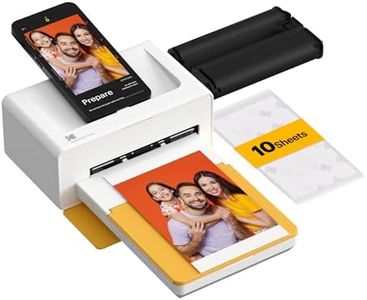
KODAK Dock Plus 4PASS Instant Photo Printer, 4x6” Portable Picture Printer, Bluetooth & Dock 2-in-1 Home and Gift Printer for iPhone & Android, 50 Sheets Bundle

Rating
8.8
Print Quality
Connectivity
Paper and Ink Compatibility

Most important from
19295 reviews

Print Quality
High-quality, vibrant prints straight from your phone.
Connectivity
The app makes printing a breeze, enhancing usability.
Paper and Ink Compatibility
Love the perforated lines on paper, no need for scissors to cut perfect lines.
Portability
Super easy to assemble and use; great size and easy to store.

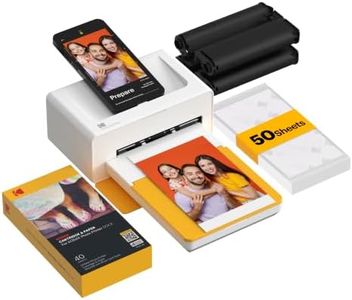
The Kodak Dock Plus 4PASS Instant Photo Printer stands out as a solid choice for anyone looking to print photos on the go. Its ability to print 4x6 inch photos while charging your smartphone adds convenience, making it ideal for events or family gatherings. A significant advantage is its affordability; the cost per photo is notably low, especially when purchased in a bundle. This makes it one of the more budget-friendly options in the portable photo printer category.

Print quality is another highlight. Utilizing 4PASS technology, photos are vibrant and durable, being both fingerprint-proof and water-resistant. This longevity ensures your memories can last over a century, which is impressive. The option to print border or borderless photos gives users flexibility in presentation. Additionally, the accompanying Kodak app enhances usability with features like filters and augmented reality, allowing for creative and personalized prints.

There are a few limitations to consider. The print speed is relatively slow at just 1 page per minute, which might not suit those looking for quick prints, especially in high-demand situations. The weight of 2 kilograms makes it somewhat portable, but it may not be as lightweight as other models on the market. While it supports both Bluetooth and USB connections, some may find the lack of direct integration with social media platforms limiting.

The Kodak Dock Plus is well-suited for casual users and families who want an affordable, high-quality portable printer. If quick printing is a priority or you're looking for comprehensive connectivity options, you might want to explore other models.

Rating
8.8
Print Quality
Connectivity
Paper and Ink Compatibility

Most important from
19295 reviews

Print Quality
High-quality, vibrant prints straight from your phone.
Connectivity
The app makes printing a breeze, enhancing usability.
Paper and Ink Compatibility
Love the perforated lines on paper, no need for scissors to cut perfect lines.
Portability
Super easy to assemble and use; great size and easy to store.

Buying Guide for the Best Portable Photo Printers

Choosing the right portable photo printer can be a bit overwhelming, but with the right approach, you can find a model that perfectly suits your needs. Portable photo printers are great for printing photos on the go, whether you're at a party, traveling, or just want to quickly print a memory. To make the best choice, consider the following key specifications and how they align with your personal requirements.
Print QualityPrint quality is measured in DPI (dots per inch), which indicates how many dots of ink the printer can place on a square inch of paper. Higher DPI means better resolution and more detailed prints. If you want professional-quality photos, look for printers with at least 300 DPI. For casual use, a lower DPI might be sufficient. Consider what you will be using the prints for – if they are for scrapbooking or framing, higher quality is essential.
Print SizePrint size refers to the dimensions of the photos the printer can produce. Common sizes include 2x3 inches, 4x6 inches, and sometimes larger. Smaller sizes are more portable and convenient for quick prints, while larger sizes are better for more detailed photos and display purposes. Think about where and how you plan to use your prints – if you want to carry them in your wallet, smaller sizes are ideal, but for photo albums or wall displays, larger prints are preferable.
ConnectivityConnectivity options determine how you can send photos to the printer. Common methods include Bluetooth, Wi-Fi, and USB. Bluetooth is great for quick, wireless printing from your smartphone, while Wi-Fi allows for more flexibility and the ability to print from multiple devices. USB connections are reliable and often faster but require a physical connection. Consider your typical usage scenario – if you often print from your phone, Bluetooth or Wi-Fi might be more convenient.
Battery LifeBattery life is crucial for portable photo printers, as it determines how long you can print without needing to recharge. Some printers offer a few dozen prints per charge, while others can handle more. If you plan to use the printer frequently while traveling or at events, look for a model with a longer battery life. For occasional use, a shorter battery life might be acceptable. Think about how often and where you will be using the printer to decide what battery life suits your needs.
Print SpeedPrint speed indicates how quickly the printer can produce a photo. This is usually measured in seconds per print. Faster print speeds are convenient if you need to print multiple photos quickly, such as at a party or event. However, faster speeds can sometimes compromise print quality. If you value speed over quality, look for printers with faster print times. If quality is more important, you might be willing to wait a bit longer for each print.
Paper and Ink CompatibilityDifferent printers use different types of paper and ink, which can affect the cost and availability of supplies. Some printers use all-in-one cartridges, while others use separate ink and paper. Consider the ongoing cost and convenience of replacing these supplies. If you want to keep costs down, look for printers with affordable and readily available paper and ink. If you prefer convenience, all-in-one cartridges might be a better choice.
PortabilityPortability refers to the size and weight of the printer, which affects how easy it is to carry around. Smaller, lighter printers are easier to take with you, but they might have fewer features or lower print quality. Larger printers might offer better quality and more features but can be cumbersome to transport. Think about how often you will be carrying the printer and how important portability is to you. If you need a printer that fits in your bag, prioritize smaller models.

FAQ

Most Popular Categories Right Now